
Live wallpapers on Android have always had a catch. The ones that look the most impressive drain the battery fast enough that most people set them up, enjoy them for a day, and then switch back to a static photo when they notice the 4 p.m. battery warning.
Wonderland is Samsung's attempt to make a live wallpaper that doesn't drain your battery.
It's part of Samsung's Good Lock suite, and it takes a different approach to live wallpaper than most third-party alternatives: Instead of running a separate animated scene, it applies motion effects to whatever image you've already chosen as your wallpaper. The result is a home screen that feels alive rather than static, built on an image that's personal to you rather than a stock animation someone else made.
What is Wonderland?
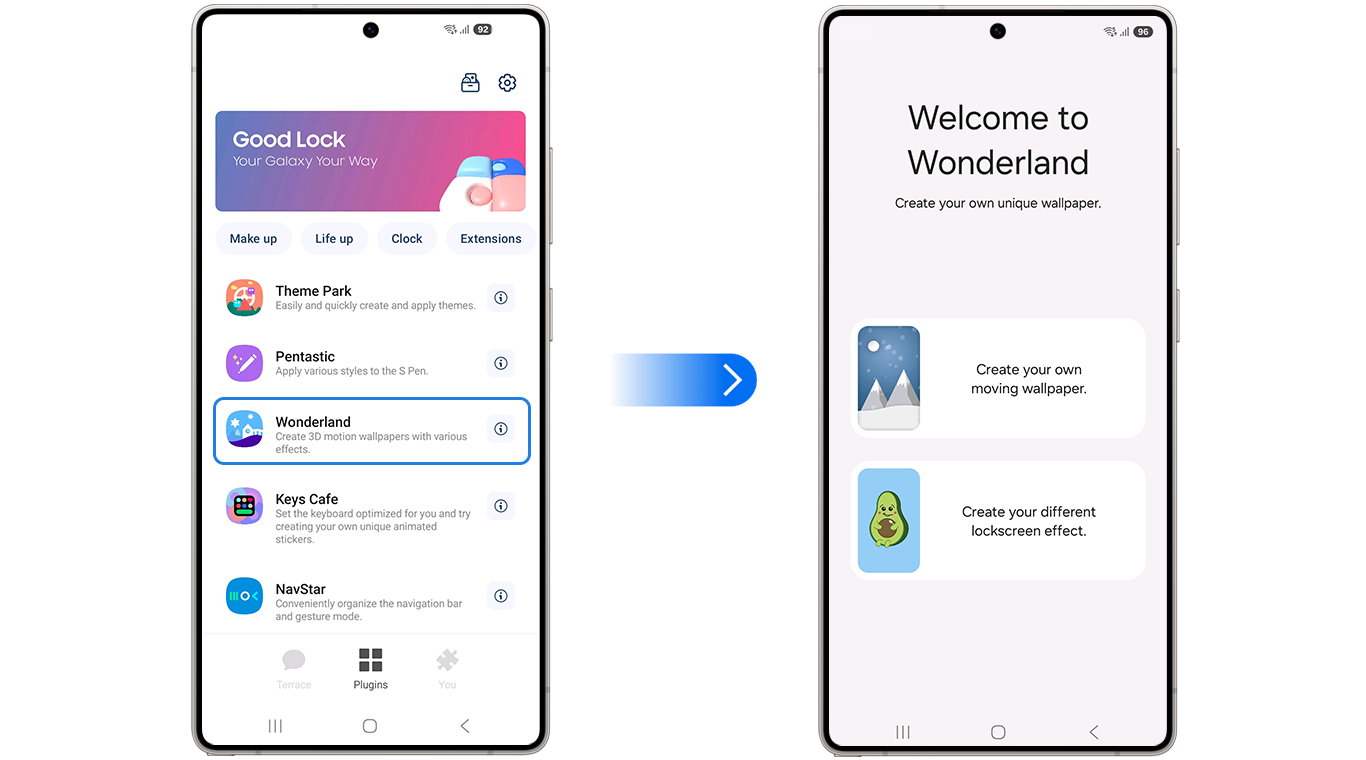
Image: WhistleOut
Wonderland is a free Good Lock module that adds motion and depth effects to static wallpapers—including parallax tilt movement, layered particle animations, 3D depth effects for portrait photos, and gradient background generation—with battery throttling built in so effects scale back when power is low.
What Wonderland can actually do
Motion parallax shifts the background subtly as you tilt the phone, creating a sense of depth and spatial dimension. It's the same effect used in high-end phone wallpaper apps and works best with landscape or architectural photos where the sense of distance is readable.
Particle effects layer floating animated elements over your wallpaper—snow, leaves, bokeh circles, sparks, and similar organic elements that drift across the screen continuously. The particle type and density are adjustable. A winter photo with a light snow overlay, or a forest image with floating leaves, looks considerably more dynamic than the static version without being distractingly busy.
Gradient backgrounds aren't photo-based—instead of animating an image, this mode generates a color gradient that shifts and moves as the wallpaper itself. If you prefer a clean, minimal look without a photograph, gradient mode delivers motion without visual complexity.
3D depth effects: The feature portrait photographers will use most
Portrait mode photos taken on Galaxy cameras capture depth map data alongside the image—information about which parts of the scene are close and which are far. Wonderland uses that depth data to create a parallax effect where the subject appears to float in front of the background as you tilt the phone.
This is the effect that looks most impressive in a short demo. A portrait of a person, a pet, or any subject shot in portrait mode becomes a genuinely dimensional home screen that responds to how you're holding the phone. It's also the effect that benefits most from being built by Samsung rather than a third party—because it integrates directly with the depth data format that Galaxy cameras generate, it works reliably rather than requiring post-processing workarounds.
Does Wonderland drain your battery?
Wonderland saves on battery by adjusting the effects when you need. Most live wallpaper apps are indifferent to battery state. They run at full effect continuously, which is why they drain power fast enough to be impractical for daily use.
Wonderland is built into the Good Lock ecosystem and designed specifically for One UI's power management system. Effects throttle back automatically when the battery is low or the device is under thermal stress—reducing animation intensity or pausing effects entirely until conditions improve. This is the practical difference between a live wallpaper you use once and one you keep on your phone permanently.
The interactive element—where the wallpaper responds to touch and tilt gestures—follows the same pattern. When the phone is idle on a desk, effects run at a lower power state. When you pick it up and the sensors are active, the full effect is restored. It's smart power management applied to a feature that has historically been ignored.
How to get Wonderland
- Cost: Free
- Available on: Samsung Galaxy devices via Galaxy Store and Google Play
- Requires: Good Lock main app installed first
- 3D depth effects: Require portrait mode photos taken on a Galaxy camera with depth data
Wonderland only works on Galaxy phones. Here are the best phones to run it on.
Wonderland only works on Samsung Galaxy devices, so if you're not already in the ecosystem, here are the most popular Galaxy phones worth considering:
Moto G 5G (2025) 128GB
- 6.7 inch display
- Rear Cameras: 50MP, 2MP
- Front Camera: 16MP

Moto G 5G (2026) 128GB
- 6.7 inch display
- Rear Cameras: 50MP, 2MP
- Front Camera: 32MP

Galaxy A26 5G
- 6.7 inch display
- Rear Cameras: 50MP, 8MP, 2MP
- Front Camera: 13MP

Moto G Power (2025) 128GB
- 6.8 inch display
- Rear Cameras: 50MP, 8MP
- Front Camera: 16MP
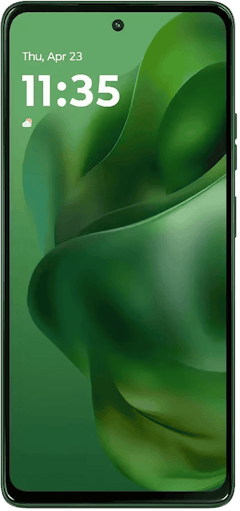
Edge (2025) 256GB
- 6.7 inch display
- Rear Cameras: 50MP, 50MP, 10MP
- Front Camera: 50MP

Wonderland: FAQ
Does Wonderland work with any photo or only Galaxy camera photos?
Motion parallax and particle effects work with any image. The 3D depth effect requires portrait mode photos that contain depth map data, which are typically taken with the Galaxy camera's portrait mode.
Will Wonderland drain my battery faster than a static wallpaper?
Wonderland uses more power than a static wallpaper, but significantly less than most third-party live wallpaper apps—the built-in battery throttling reduces effect intensity when power is low, making it practical for daily use in a way many live wallpapers aren't.
Can I use Wonderland effects on both the home screen and lock screen?
Wonderland effects apply to the wallpaper, which can be set to display on the home screen, lock screen, or both—the same effect configuration applies wherever the wallpaper appears.
Does the parallax effect work in landscape mode?
The tilt-based parallax responds to the phone's orientation sensors regardless of screen orientation, though the visual effect is most intentional in portrait mode, where the phone is held and tilted naturally.
Is Wonderland compatible with Theme Park?
Wonderland and Theme Park work on different layers of the interface and can both be active simultaneously—Wonderland applies effects to your wallpaper image, while Theme Park handles color theming across the system UI.
Scott Houghton
Jr. Staff Writer

Find a better phone plan
Thousands of cell phone plans unpacked. All the facts. No surprises.


.png?w=280&h=280&usm=20&usmrad=0.8&fit=crop "Cheap Unlimited Data Plans from $25/Month")


.png?w=280&h=280&usm=20&usmrad=0.8&fit=crop "Best Cell Phone Deals for June 2026: Get the New iPhone 17 for Free")

