
Image: Google.
Android is the operating system of choice for some of the biggest device brands on the market including Samsung, Google, and Motorola. That said, how each phone uses Android can look different, making it difficult to keep track of what version your device is currently running.
The latest Android OS version is Android 17, officially released for Google Pixels on June 16, 2026. Other brands are now catching up. Samsung began rolling out its Android 17-based One UI 9 update to the Galaxy S26 series in September, and Motorola has started updating select phones as well. Until Android 17 is available for your device, the most recent Android version for most phones is Android 16.
We’ve got all the details on Android 17, its top features, and how you can update your phone’s OS. Read on for our full Android guide.
What is Android?
Android is an operating system for smartphones designed by Google. The first version was released in September of 2008 and it has grown to become the most-used smartphone OS on the planet.
Despite being made by Google, Android isn’t limited to Google’s smartphones. Instead, Google allows other companies to use its OS as the bedrock system for their devices. While each company can tweak features and adjust how the phone looks, Android is still the operating system running the show.
Android devices come from some of the largest smartphone manufacturers in the world including:
What is the latest Android version?
The latest Android version is Android 17. It's out now for Google Pixel phones and is rolling out to Samsung Galaxy, Motorola, and other Android devices.
If your device can’t update to Android 17 yet, the most recent version you can use is Android 16.
Samsung’s version of Android 17 is called One UI 9. It debuted on the Galaxy Z Fold8, Z Fold8 Ultra, and Z Flip8, and it also shipped on the Galaxy S26 FE. The update started rolling out to the Galaxy S26, S26+, and S26 Ultra on September 16, 2026, and it has begun reaching some Galaxy S25, Z Fold7, and Z Flip7 owners. Samsung expects to bring it to more Galaxy phones through the end of the year, and you can check our Samsung Galaxy release dates guide for the latest.
Motorola has also started rolling out its Android 17-based Hello UI update, beginning with the Motorola Edge (2025) and Motorola Signature. The company has confirmed that more than 50 Razr, Edge, and Moto G phones will get the update. Timelines for other brands vary, so check your manufacturer’s update page for the latest.
Are Android updates important?
Yes, Android updates are incredibly important. They keep your data safe and make sure your phone is working properly. It’s always beneficial to update your phone when you have the chance.
Each version of Android also comes with periodic updates. Some might introduce new features while others offer quality-of-life fixes, like pushing a change that makes your Android’s internet work faster. Android security updates are also important because they patch flaws and keep your personal data secure.
Google also releases quarterly platform updates for each Android version. Android 17 QPR1, for example, began rolling out to Pixel phones with the September 2026 Pixel Drop. It’s still Android 17, not a new version.
Full history of Android OS versions and release dates
Here are Android’s version names and release dates as of Android 17:
Android version and release dates
| Android version | Release date |
|---|---|
| Android 1.0 | September 23, 2008 |
| Android Cupcake | April 27, 2009 |
| Android Donut | September 15, 2009 |
| Android Eclair | October 27, 2009 |
| Android Froyo | May 20, 2010 |
| Android Gingerbread | December 6, 2010 |
| Android Honeycomb | February 22, 2011 |
| Android Ice Cream Sandwich | October 18, 2011 |
| Android Jelly Bean | July 9, 2012 |
| Android KitKat | October 31, 2013 |
| Android Lollipop | November 12, 2014 |
| Android Marshmallow | October 2, 2015 |
| Android Nougat | August 22, 2016 |
| Android Oreo | August 21, 2017 |
| Android Pie | August 6, 2018 |
| Android 10.0 | September 3, 2019 |
| Android 11.0 | September 8, 2020 |
| Android 12.0 | October 4, 2021 |
| Android 13.0 | August 15, 2022 |
| Android 14.0 | October 4, 2023 |
| Android 15.0 | October 15, 2024 |
| Android 16.0 | June 10, 2025 |
| Android 17.0 | June 16, 2026 |
Why does Android have a dessert nickname?
During development, Google typically assigns each Android version a dessert or sweet treat codename to keep projects under wraps. For the first several Android releases, Google used this codename instead of a numbering system when naming the new OS.
In 2019, Google announced it would switch to numbers and phase out dessert names for Android naming. This was designed to make the system more accessible worldwide since some previous names were difficult for non-English speakers to pronounce. Google still uses dessert codenames for future Android releases in internal communications. Android 17’s codename was Cinnamon Bun.
How to check your Android version
Updating your device to the most recent Android version is the best way to keep it running well and access new features.
If you don’t know what your current Android version is, you can find it in the settings of your device. It’s typically found in the “About phone” section near your device model information and IMEI number.
On a Samsung Galaxy phone, open your Settings app, scroll to the bottom, and tap About phone. This is where you’ll find your model name, phone number, and IMEI.
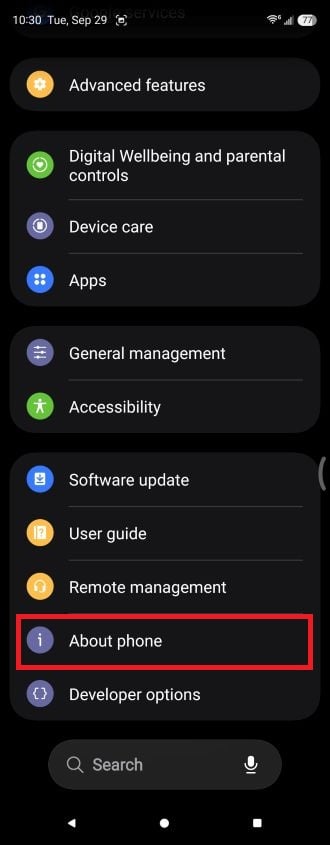
Image: Scott Houghton.
From there, tap Software information. Your Android version is listed on this screen, along with your One UI version. Samsung phones running its Android 17 update will show One UI 9.
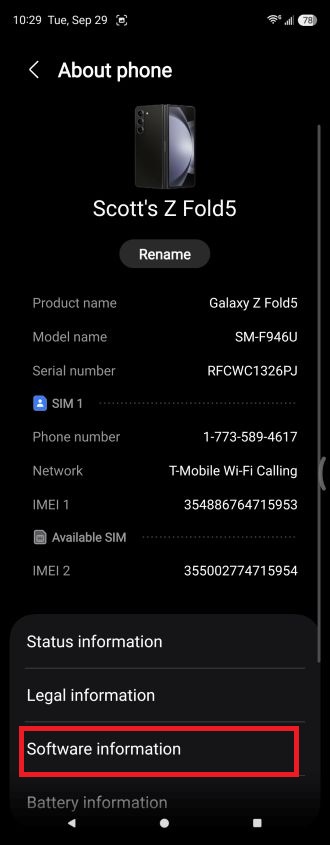
Image: Scott Houghton.
Every manufacturer will have different steps on their device. That said, there is an easy way to check on most Android devices. If your settings app has a search bar, simply search for “Android” and the version number should pop up.
How to update your Android version
If you discover you’re running an older version of Android, you can download Android 17 from your Settings app once it’s available for your device. Once again, the steps will vary depending on manufacturers and even device models.
For Samsung Galaxy phones, open your Settings app, scroll down, and tap Software update. Then tap Download and install. If Android 17 (One UI 9) is available for your phone, follow the on-screen prompts to download and install it.
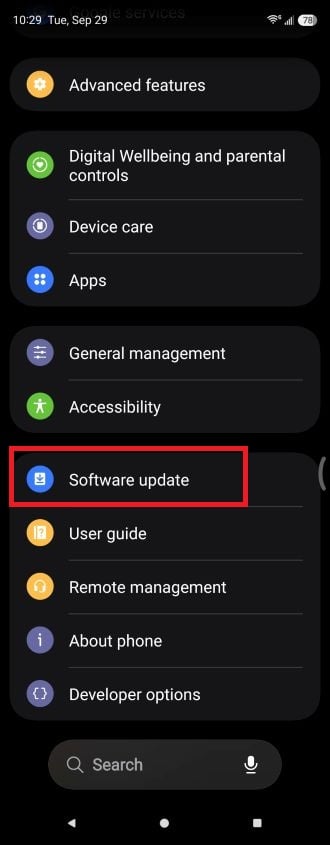
Image: Scott Houghton.
Samsung is rolling out its Android 17-based One UI 9 update in stages, so your phone might not show the update yet even if it’s eligible. Our One UI 9 guide has the current rollout status for each Galaxy.
For Google Pixels, open your Settings app, tap System, then tap Software updates (on some phones this is labeled System update). Your device will show whether an update is available. If Android 17 is waiting for you, follow the on-screen prompts to download and install it.
For Motorola phones, go to Settings > System > System updates.
Android-compatible devices
Android 17 is compatible with the most recent Android devices, including Google’s new Pixel 11 series. It’s available on supported Google Pixel phones stretching back to the Pixel 6 series. The Pixel 6 and Pixel 6 Pro are getting Android 17 as their final major update, and Google’s support for both phones ends in October 2026.
Google Pixel 11 256GB

| Description | |
|---|---|
| Screen Size | 6.3" |
| Available On | 141 Plans from 11 carriers |
| Available From |


|
| Priced From | $899 upfront |
| View Full Details |
 Google's new 2026 model featuring a larger main camera sensor and Google AI powered by Tensor G6, with Gemini, 48MP + 10.8MP + 13MP triple rear camera system, upgraded wireless charging, 6.3" OLED display with 120Hz and Android 17
Samsung phones get Android 17 through One UI 9. The Galaxy Z Fold8 series and Z Flip8 launched with it, and the Galaxy S26 FE did too. The Galaxy S26, S26+, and S26 Ultra are receiving it now, and the Galaxy S25 series, Z Fold7, and Z Flip7 are beginning to get it in select regions. Older eligible phones, like the Galaxy S24 and S23 series, are expected to follow between October and December 2026. The Galaxy S22 series, Z Fold4, and Z Flip4 aren’t getting the update. See our One UI 9 guide for the full list of eligible Galaxy devices.
Motorola has confirmed more than 50 phones across its Razr, Edge, and Moto G lines for Android 17. Newer Razr and Edge models are first in line, and Moto G phones are expected to come later.
Top Android 17 features
Each new version of Android comes with new features for your phone. Most of Android 17's biggest changes focus on multitasking, creator tools, and security.
Bubbles
Bubbles is Android 17's headline multitasking feature. Long-press any app icon to turn it into a compact, floating window that sits on top of whatever else you're doing. That makes it easy to keep notes, a map, or a video tutorial in view while you work in another app.
On tablets and foldables, bubbles dock in a dedicated bubble bar at the bottom of the screen. From there, you can switch between apps with one tap, and resize a bubble or expand it to full screen.
Screen Reactions and a new screen recorder
Android 17 updates screen recording and annotation with a new toolbar and a smoother flow. It also adds Screen Reactions, which records your phone screen and your selfie camera at the same time. You can react over websites, apps, and videos without a green screen or switching between apps.
Foldable gaming mode
Foldable gaming mode splits the screen 50/50, with your game on top and a dynamic gamepad on the bottom. Google said at launch that the mode would become available in the coming months, so it might not be live on your foldable yet. Android 17 also adds native controller remapping for external controllers, and Google says it reduced frame drops and stutters by making memory cleanup more efficient for high-definition games.
Theft protection and security
Android 17 adds several tools designed to protect your phone if it's lost or stolen, and to block scams and malicious apps:
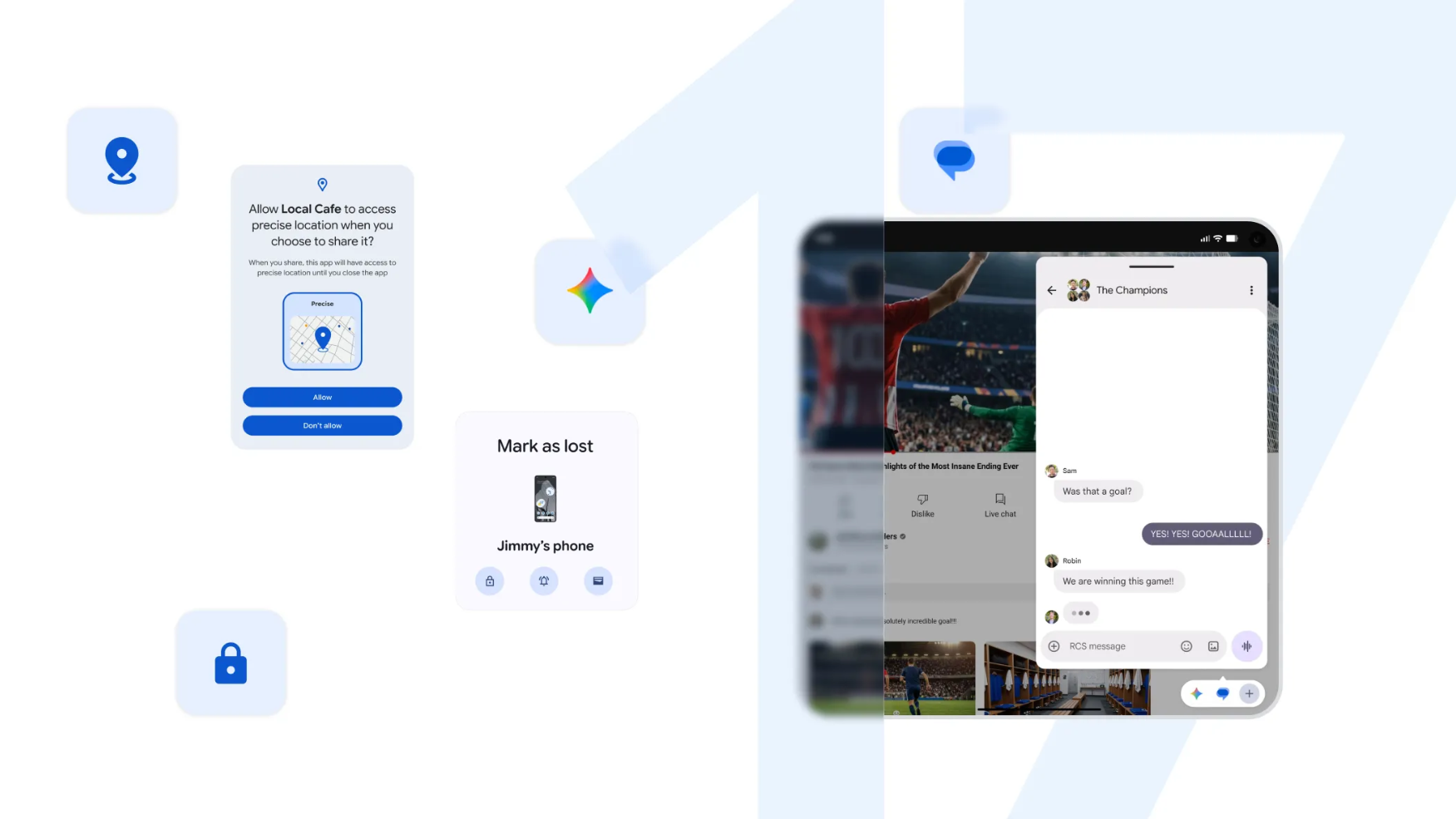
- Biometric "Mark as lost": Find Hub's Mark as lost feature can now lock a missing phone with your biometrics, so even a thief who knows your passcode can't access your data or turn off tracking.
- Tougher PIN protection: Android 17 reduces the number of PIN guesses allowed and adds longer wait times between failed attempts.
- Live Threat Detection: Improvements help block more suspicious apps and scams.
- Advanced Protection mode: An enhanced version helps protect you from more sophisticated threats.
Privacy controls
Android 17 gives you more control over what apps can see. You can now grant an app temporary access to your precise location instead of leaving it on, and you can share only specific contacts with an app instead of your entire address book.
Android 17 also adds support for Encrypted Client Hello (ECH). Paired with private DNS, it hides the domain names of the sites you visit from network snoops when the site supports it.
Customization and everyday controls
Android 17 also includes a handful of smaller changes that make your phone easier to tailor to your habits:
- Hide app names: A new setting lets you remove app names from your home screen for a cleaner look.
- Expanded dark theme controls: You get more control over the expanded dark theme, which darkens apps that don't have a dark mode of their own.
- Separate assistant volume: Your assistant now has its own dedicated volume control.
- Parental Controls: Google is expanding Parental Controls to all Android devices.
App memory limits
Under the hood, Android 17 introduces app memory limits that stop apps from using too much RAM. Google says this helps improve your device's overall performance and battery life.
Gemini Intelligence
Gemini Intelligence, Google's system-level AI layer for Android, is rolling out alongside Android 17, but it's limited to select high-end phones. It isn't included on every phone that gets the update. On Samsung Galaxy phones, it's currently only available on the Galaxy Z Fold8, Z Fold8 Ultra, and Z Flip8. Our One UI 9 guide breaks down which Gemini Intelligence features each Galaxy phone gets.
Scott Houghton
Jr. Staff Writer

Find a better phone plan
Thousands of cell phone plans unpacked. All the facts. No surprises.


.png?w=280&h=280&usm=20&usmrad=0.8&fit=crop "Best Cell Phone Deals for October 2026: Get the New iPhone 18 Pro for Free")


