
 Prefer WhistleOut in Google
Over 50,000 new apps are released every month, creating an onslaught of options for users looking to enhance their phone's capabilities. Good news: we're here to help.
Every month, we root through the app stores, searching for the best new apps for your phone. We're not just regurgitating the Android and iOS charts: we're recommending the tools we've added to our own phones—ones that we know, from our own experiences, have improved our day-to-day lives.
Since 2008, we've watched the evolution of smartphones and apps, and we've learned the differences between essential ones and their fly-by-night counterparts. This collection of the best new iPhone and Android apps for October will help you get more out of the phone in your pocket.
Plus, we've already found the best mobile games to fill your spare time. Just check out our guide to the best mobile games for iPhone and Android.
How we picked the best apps for October
Our testers search for Android and iPhone apps that are easy to use and affordable. We evaluate the best apps of the month through hands-on use and rate them on a five-star scale based on the following criteria:
- User experience
- Price and value
- Efficacy
- Practicality
- Privacy & security
Best Apps for
iPhone and Android
Gartic Phone
Broken telephone meets Pictionary, and your terrible drawings are half the fun.
- Free on the Apple App Store and Google Play Store. Also playable on desktop.
- Ad-supported, with a short ad before your first game.
Remember playing telephone as a kid, whispering a sentence down the line until it came out the other end as complete nonsense? Gartic Phone is a free party game that turns the classic telephone game into a chain of alternating sentences and drawings. One player writes a prompt, the next player draws it, the next player describes that drawing in a sentence, and on it goes until the original idea is hilariously lost.
“Drawing on a very small screen is complicated, which just makes the whole broken telephone much more fun.”
Getting a game going is quick. Everyone downloads the app, one person starts a game, and the rest of the group joins with an invite code. Friends can join a Gartic Phone game in seconds by scanning a QR code straight off the host's phone. As the starting player, you write the first sentence, and you can either pick a category to give everyone a little direction or keep it open so anything goes.
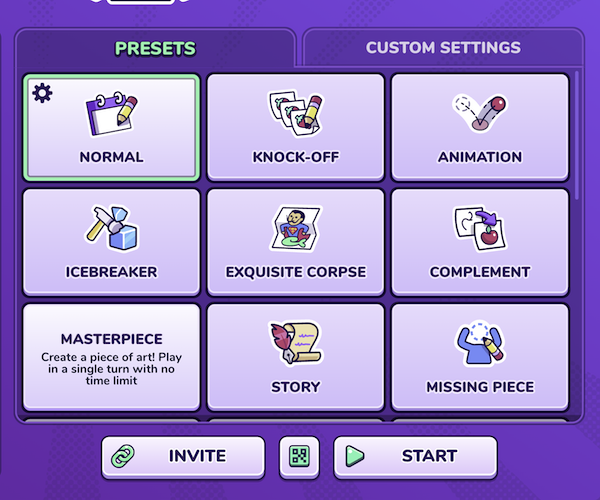
Image: Jessica Santero | WhistleOut
Here's where it gets interesting: drawing on a phone screen is tricky, and in Gartic Phone that's exactly what makes the game so funny. Your carefully planned cat turns into a lumpy potato, the next player confidently describes it as a potato, and suddenly the whole chain has gone off the rails. You don't need any artistic talent to play. If anything, it helps if you don't have any.
Top affordable unlimited data plans
Online multiplayer games like Gartic Phone run on your data connection, whether you're gathered around a pub table or playing from separate couches. Make sure your plan can keep up with a look at some of the best unlimited data options right now:
|
#1
|
Mint Mobile

Unlimited Data Plan
$10.00/mo
$60 for 6 months of service
|
|
#2
|
Lyca Mobile

Unlimited Plus Plan
$12.50/mo
Pay $12.50/month for the first 9 months<br>Regular rate is $49/month
|
|
#3
|
Cricket

3-Month Unlimited Plan
$15.00/mo
$45 advance payment for 3 months (equals to $15/month)<br>regular rate for 3 months is $120 (equals to $40/month)
+ $9.99 Upfront
|
You don't have to be in the same room to play, either. Gartic Phone also runs on desktop, so a long-distance group can play together over a Zoom call. Just send the invite link to everyone, hop on a video call, and you'll still have a blast.
Here's the catch: Gartic Phone isn't completely ad-free. I had to sit through a 30-second ad before my first Gartic Phone game, but the rest of the session was ad-free. For a free game this much fun, that's an easy trade.
Gartic Phone is an easy party game to recommend because it's free, it works for all ages, and nobody needs to be good at drawing to play. I can see it being a hit at a pub or any informal get-together, and it's definitely one I'm keeping on my phone for the next game night.
"Honestly, Gartic Phone is a top-notch game. It's entertaining, it's fun, and it's good for all ages—it's definitely my type of game."
Jessica Santero, Staff Writer
Best of October 2026
Recommended by Jessica Santero

Stuff
A straightforward to-do list app that feels right at home next to Notes.
- Free on the Apple App Store. iPhone only, requires iOS 26 or later.
- Extra Stuff costs $2.99/month, $29.99/year, or $119.99 for lifetime access.
If you've been keeping your to-do lists in the Notes app, Stuff may be worth a look. Stuff is a free iPhone to-do list app built to feel as familiar as the Notes app. When you first open it, a short walkthrough panel covers the basics: creating tasks, marking them complete with a checkbox, editing existing tasks, building separate lists, and adding tags.
“The interface mirrors Notes closely enough that anyone who already keeps lists there will feel at home right away.”
The app's standout features are its listen and scan modes. Stuff's listen mode lets you add tasks by dictating them through Siri instead of typing them out. It's a quick way to log something before you forget it.

Image: Max McCaskill | WhistleOut
Scan mode uses your camera to pull task details from a physical document, like a doctor's appointment card or a DMV slip. Stuff's scan mode can capture a task straight from a paper document, so you don't have to retype any of it.
Most popular flagship phones on the market
Stuff requires iOS 26 or later, so older iPhones are left out. If your phone can't run the latest apps, it might be time for an upgrade. Here's what's leading the pack right now:
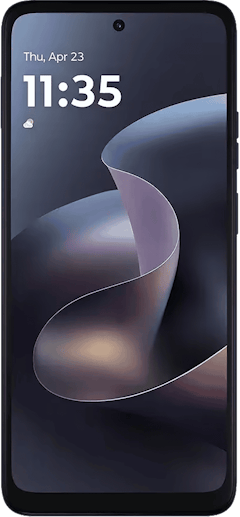
Moto G 5G (2026) 128GB
- 6.7 inch display
- Rear Cameras: 50MP, 2MP
- Front Camera: 32MP
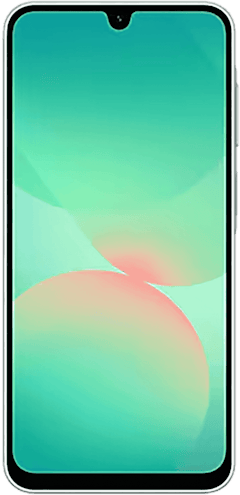
Galaxy A26 5G
- 6.7 inch display
- Rear Cameras: 50MP, 8MP, 2MP
- Front Camera: 13MP
Galaxy A27 5G 128GB
- 6.7 inch display
- Rear Cameras: 50MP, 5MP, 2MP
- Front Camera: 12MP

That said, Stuff is a simple to-do list at heart. If you want your tasks organized inside a daily or weekly calendar, an app like Routine offers more control, and Todoist still has the edge for advanced list features. Stuff doesn't match calendar-based planners like Routine or feature-heavy apps like Todoist, but it isn't trying to.
Stuff is free to download, and the Extra Stuff upgrade costs $2.99/month, $29.99/year, or $119.99 for lifetime access. Most users will probably find the free version of Stuff is enough for managing everyday to-do lists.
Overall, Stuff is a solid option for anyone who wants something more organized than Notes without learning a complicated new system. If you already keep your to-do lists in the Notes app, Stuff is an easy upgrade that won't take long to learn. Lists also sync across devices and can be shared with other people.

"Stuff is an easy switch for anyone who's been using Notes as a to-do list. It won't replace a full planner, but listen mode and scan mode make adding tasks a lot faster."
Max McCaskill, Senior Staff Writer
Best of October 2026
Recommended by Max McCaskill
ættlíf
The chore app that gave our busy household an actual system.
- Free on the Apple App Store and Google Play Store.
- Includes some ads. An account is required to get started.
With three kids and two full-time jobs, chores in our house had a way of quietly slipping into the background. Laundry piled up, dishes waited, and nobody could remember whose turn it was to do what. We didn't have a good system for household chores, and our house was starting to show it.
“This app has absolutely changed my household. I honestly don't know how we lived without it.”
So I downloaded ættlíf to build a better housework routine. After using it every single day this month, ættlíf got our entire household back on track with a system we can actually keep up with.
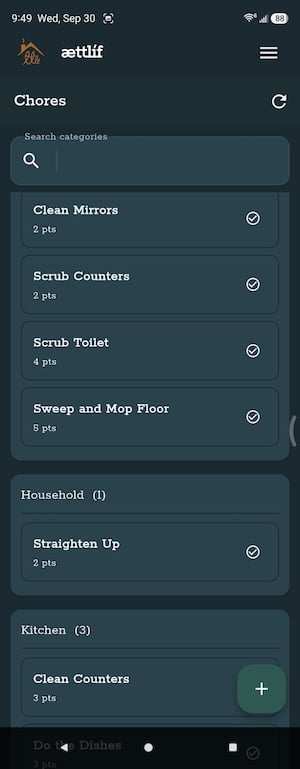
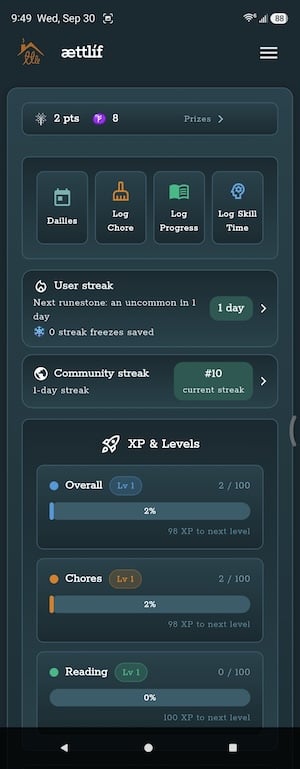
Image: Scott Houghton | WhistleOut
Getting started is easy. You'll need to create an account before you can do anything, but the process is quick, and I had everything set up in less than 30 minutes. ættlíf's design and flow are thoughtfully put together, so setting up your household's routines never feels confusing.
Best MVNOs for busy families
Running a household is expensive enough without overpaying for phone service. Here are some of the best affordable MVNOs running on the same networks as the Big Three carriers:
|
#1
|
Mint Mobile
Unlimited Data Plan
$10.00/mo
$60 for 6 months of service
|
|
#2
|
Visible

$25 Visible Plan
$25.00/mo
Taxes & Fees included
|
|
#3
|
Spectrum Mobile®

Unlimited Plus
$40.00/mo
+ $20 Upfront
|
The real magic, though, is how it handles the chores themselves. ættlíf gamifies household chores, which makes them feel like something to complete instead of something to put off. That small shift made a big difference for our family. Chores stopped getting forgotten, and keeping up with everything started to feel manageable again.
Here's the catch: ættlíf does include ads. The ads in ættlíf are there, but they're never over-the-top, and they didn't get in the way of my daily use. The app also keeps permissions light, asking only for notifications. The only personal data it collects is your email address, and from what I can tell, it handles that well.
If your household is struggling to keep up with chores, ættlíf is one of the easiest ways to put a real system in place. It's free, it's simple to set up, and I'm still using it every day.

"This app was awesome, and it got our household routines back on track. I used it every single day this month, and I'll keep using it."
Scott Houghton, Staff Writer
Best of October 2026
Recommended by Scott Houghton
How WhistleOut reviews apps
Our mobile experts scour the app stores every month, looking for the best new apps for Android and iPhone. Before recommending an app, we use the app for at least one full week, testing its basic functionality and evaluating whether or not it delivers on its promises. From there, we weigh the app's pros and cons, and then determine whether or not it's a worthwhile download for the wider population of cell phone users.
- Easy to use
Great apps simplify your phone. We selected the tools that don't require a complicated instructional manual. - Affordability
The internet is filled with expensive price tags, but we're not buying what they're selling. We lean into inexpensive, quality apps. Extra points if they're free! - Hands-on testing
We played around with these before recommending them, ensuring they're worth your download.
From there, we weigh the app's pros and cons and then determine whether or not it's a worthwhile download for the wider population of cell phone users.
All the latest cell phone news and deals, delivered every Thursday.
Jessica Santero
Staff Writer

Thousands of cell phone plans unpacked. All the facts. No surprises.


