
A cellular signal that works perfectly outdoors often fails indoors because building materials like concrete, brick, and metal block cell signals, resulting in dropped calls, poor audio quality, or a lost signal the moment a person walks through the front door.
Wi-Fi calling solves this problem by routing phone calls through a home broadband connection instead of a cell tower, and compatible smartphones make this switch automatically without any action from the user.
What is Wi-Fi calling?
Wi-Fi calling (also known as VoWiFi, or Voice over Wi-Fi) is a smartphone feature that allows you to make and receive phone calls and text messages over a Wi-Fi network instead of a traditional cellular signal. Your phone uses Wi-Fi calling automatically when your cellular signal is weak or unavailable but a Wi-Fi network is within reach. Your calls and texts stay connected with Wi-Fi calling even when you're in a building with thick walls, a basement, or a rural area where your carrier's signal is weak or non-existent.
In short: Wi-Fi calling is just like making regular calls, but your connection is established via Wi-Fi instead of cellular towers.
How is Wi-Fi calling different from regular calling?
Wi-Fi calling uses your home internet connection instead of a traditional cell tower to transmit your voice. Regular cellular calls depend on tower signals, which can be weak indoors. Wi-Fi calling routes your voice as data through your broadband provider to your carrier's network, resulting in clearer audio, fewer dropped calls, and reliable coverage where cell signals can't reach, all using your regular phone number.
The tech behind Wi-Fi calling varies by provider. With Spectrum Internet, for example, that home path is powered by a fiber network and delivered through a hardwired broadband line, which gives indoor calls a steadier route before they reach Wi-Fi.
Advantages of Wi-Fi calling
- Improves indoor call quality where cellular signals cannot reach.
- Reduces dropped calls by switching from cellular to Wi-Fi automatically.
- Works with your regular phone number and dialer, so no extra apps are needed.
- Free to use and can help avoid international roaming charges.
Disadvantages of Wi-Fi calling
- Requires a reliable home internet connection to work well.
- May not provide accurate location data to 911 during an emergency.
Is Wi-Fi calling like WhatsApp?
Wi-Fi calling is different from alternative calling apps like WhatsApp or Zoom because it doesn’t require a separate account and app. Wi-Fi calling is integrated directly into your phone's dialer. Wi-Fi calling works like a regular phone call and can reach any number, including landlines, businesses, and anyone who doesn't use smartphones.
Here’s what makes Wi-Fi calling different from alternative messaging apps:
- Your number: You use your regular phone number.
- Native experience: You dial and answer calls exactly the same way you always do.
- Seamless handoff: Most modern networks can hand off a call between Wi-Fi and 5G or 4G LTE cellular without dropping your call as you move in and out of range.
How does Wi-Fi calling work?
Wi-Fi calling converts your voice into data packets and sends them over your internet connection instead of a cell tower, all in milliseconds.
Here's the step-by-step path a Wi-Fi call takes:
- You place a call from your phone.
- Your voice is converted into encrypted data packets.
- Those packets travel over your Wi-Fi network to the internet.
- Your carrier routes them to the recipient.
- The call is decoded and connects through your regular phone number.
For the best Wi-Fi calling experience, you need a stable internet connection. A congested or slow network produces choppy audio the same way a weak cell signal would. Having a strong home internet connection at home ensures that your Wi-Fi calls are crystal clear, no matter how far away you are from the nearest cell tower.
Spectrum Internet, for example, is a strong option to support clear Wi-Fi calling. Spectrum Internet plans offer download speeds from 500Mbps up to 2Gbps many areas, so households have room for calls, video meetings, streaming, and everyday connected devices at the same time.
When should you use Wi-Fi calling?
Wi-Fi calling is preferred wherever your cellular connection is limited or when you’re traveling abroad and want to avoid expensive roaming fees.
These are the top situations where Wi-Fi calling makes the biggest difference:
| Situation | Why Wi-Fi calling helps |
|---|---|
| Weak indoor signal | The Wi-Fi signal bypasses walls, floors, and materials that block cellular signals. |
| Basement or lower floors | Wi-Fi calling uses home broadband internet instead of connecting to a tower signal that can't reach underground. |
| Rural or remote areas | Since Wi-Fi calling works anywhere you have home internet, it works even where towers are sparse. |
| Apartment buildings | Wi-Fi calling works better than traditional calls because it reduces congestion on busy networks from many neighbors sharing the same nearby tower. |
| Traveling abroad | Wi-Fi calling allows you to dial and receive calls from U.S. numbers over Wi-Fi at domestic rates to avoid roaming charges. |
| Work-from-home employees and students | Wi-Fi calling means fewer dropped calls on important meetings since your home Wi-Fi is stronger than your cell signal. |
How to enable Wi-Fi calling on your phone
To turn on Wi-Fi calling on your iPhone, follow these steps:
- Open your iPhone’s Settings.
- Tap Cellular (or Mobile Service).
- Select Wi-Fi Calling.
- Toggle on Wi-Fi Calling on This iPhone.
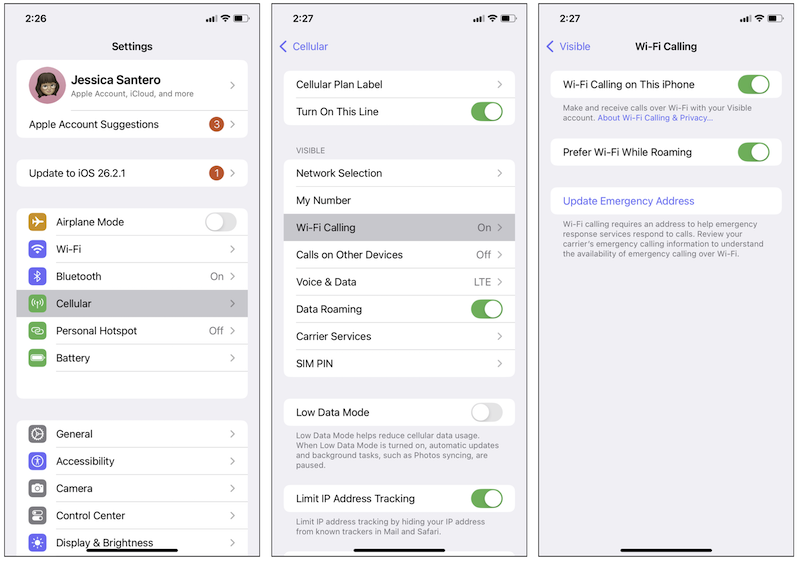
Image: Jessica Santero | WhistleOut
To turn on Wi-Fi calling on your Android device, follow these steps:
- Open your phone’s Settings.
- Tap Connections (or Network & Internet).
- Toggle on Wi-Fi Calling.
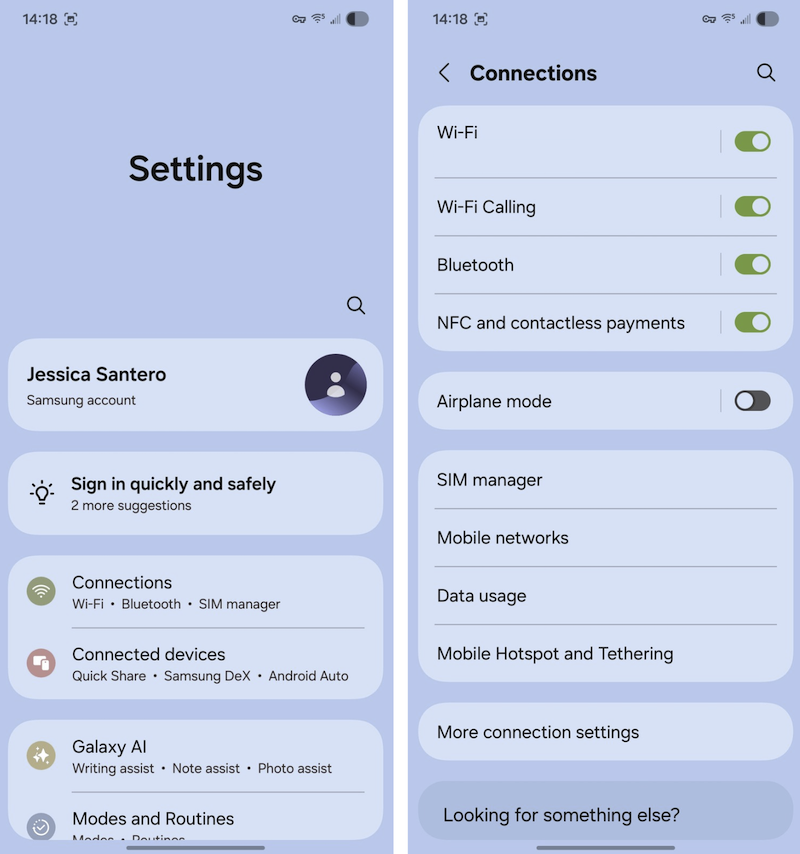
Image: Jessica Santero | WhistleOut
How to enable Spectrum Mobile Wi-Fi calling
To turn on your Spectrum Mobile Wi-Fi calling, make sure to follow these steps:
- Open your phone’s Settings.
- Find and tap your Wi-Fi settings.
- Select the Spectrum Free Trial network.
- When prompted, tap Agree & Continue to turn on Wi-Fi calling.
When you first turn on Wi-Fi calling on your phone, you might be asked to enter a physical address. This is a one-time requirement used only to route 911 emergency calls over Wi-Fi. To confirm Wi-Fi calling is active, look for "Wi-Fi" or "Wi-Fi Calling" next to your carrier name in your phone's status bar.
Wi-Fi calling with Spectrum Mobile
Spectrum Mobile includes Wi-Fi calling on every single plan, plus access to over 48 million outdoor Spectrum Wi-Fi access points nationwide. Spectrum Mobile is available to Spectrum Internet customers, which keeps mobile calling and the home connection that supports indoor Wi-Fi calling under the same provider relationship.
Virtually all modern smartphones, including iPhones and Android devices released after 2018, are Wi-Fi calling compatible. Your phone can automatically switch between cellular and Wi-Fi networks mid-call, so you do not have to change settings as you move in and out of range.
|
Spectrum Mobile

Unlimited
$30.00/mo
+ $20 Upfront
|
|
Spectrum Mobile
Unlimited Plus
$40.00/mo
+ $20 Upfront
|
|
Spectrum Mobile
Unlimited Plus Premium
$50.00/mo
+ $20 Upfront
|
Your home internet is just as important for your calls as your cell service
The quality of that Wi-Fi call depends entirely on the quality of the home internet connection. A weak or unstable Wi-Fi signal produces patchy audio and dropped calls, while an overloaded home network with multiple devices streaming or downloading causes delays, echoes, and awkward pauses during conversations. A fast, stable, and well-distributed home Wi-Fi network delivers clear calls that are better than a standard cellular connection.
Your home internet service is just as important as your cellular plan when calling indoors. Spectrum Advanced Wi-Fi can help manage the home network from one app, and Spectrum Wi-Fi Pods can extend coverage in larger or harder-to-reach spaces where calls tend to break up. Improving the home Wi-Fi network by moving the router to a central location, upgrading to a mesh system for larger homes, or selecting a higher-speed internet plan can also eliminate poor call quality without changing a single thing about the cellular plan itself.
|
Spectrum

Spectrum Internet® 100
$30/mo
for 1 year
+ $20 Upfront
|
|
Spectrum
Spectrum Internet® 500
$40/mo
for 1 year
+ $20 Upfront
|
|
Spectrum
Spectrum Internet® 1 Gig
$60/mo
for 1 year
+ $20 Upfront
|
Wi-Fi calling: FAQ
Is Wi-Fi calling free?
Yes, most carriers include Wi-Fi calling as part of your standard voice plan. When you use it with a U.S. number, it should not cost anything extra. Spectrum Mobile includes Wi-Fi calling for free with every cell phone plan.
Does Wi-Fi calling use my cellular data?
No, Wi-Fi calling does not use your cellular data. Since the call routes over Wi-Fi, your mobile data plan remains untouched.
Should I keep Wi-Fi calling on all the time?
Yes, you should keep it on all the time. Your phone automatically chooses the best network for calls, so you’ll get the best possible connection. Having Wi-Fi calling on is especially helpful if you often find yourself in areas with weak cellular coverage.
Can I make 911 calls via Wi-Fi?
Yes, you can make 911 calls via Wi-Fi, but traditional calls are best. Remember, Wi-Fi calling uses Wi-Fi, so if you’re away from home or one of Spectrum’s Access Points, you’ll need to make a traditional call to 911.
Does Wi-Fi calling work abroad?
Yes, Wi-Fi calling works abroad and is the best way to avoid carrier roaming charges while outside the country. However, making calls to international numbers will incur charges unless your phone plan includes international calling.
This page is sponsored by Spectrum in paid partnership with WhistleOut.
Jessica Santero
Staff Writer

Find a better phone plan
Thousands of cell phone plans unpacked. All the facts. No surprises.


.png?w=280&h=280&usm=20&usmrad=0.8&fit=crop "Best Cell Phone Deals for September 2026: Get the New iPhone 18 Pro for Free")


