


In an age where seamless connectivity is a necessity, your mobile hotspot is your lifeline to the internet. It turns the powerful cellular network access you already pay for into a portable Wi-Fi signal for all your devices. Whether you're working remotely, traveling the country, or simply experiencing a home internet outage, your hotspot is the backup plan you need to keep you connected.
Plus, the right hotspot plan could let you finally ditch that monthly home Wi-Fi bill. If that sounds appealing, our guide to replacing your home internet with a hotspot can help you decide what’s best for you.
Read on to learn how to turn on your mobile hotspot, calculate your data needs, and choose the right plan for reliable Wi-Fi anywhere a cell signal can reach.
You need a mobile hotspot if you:
If you are a remote worker (or student) you need a mobile hotspot for a stable, high-speed connection away from Wi-Fi that can handle video calls and online classes.
We recommend:

If you need serious data, T-Mobile's Experience Beyond delivers with 250GB of hotspot data on the best 5G network.
You need a hotspot if you travel the U.S. frequently. That includes van life and vacation time, too. Use your hotspot for navigation, entertainment, and communication without relying on questionable public Wi-Fi networks in hotels or cafes.
We recommend:

You get 50GB of high-speed hotspot and can connect to the AT&T, T-Mobile, and Verizon networks.
A hotspot can come in handy if you live in an area with limited or unstable broadband. That way, if there's an outage, you can use your hotspot as a backup solution to stay connected.
We recommend:

It includes unlimited hotspot data (albeit capped at 5Mbps). Plus, you get access to the best 4G LTE network in the nation.
What is a mobile hotspot?
A mobile hotspot (also called "tethering" or "Wi-Fi sharing") creates a personal, portable Wi-Fi network using a cellular (4G/5G) connection. It acts as a pocket-sized router that pulls internet access from the nearest cell tower and converts that cellular signal into a private Wi-Fi frequency. Your other devices—such as laptops, tablets, and smartwatches—can then connect to this signal just like they would to a standard home router. This setup helps you work remotely, travel, or stay connected during home internet outages.
Pro tip: If you plan to use your phone as a hotspot, it can quickly drain your phone’s battery. Always keep a power bank on hand or connect your phone to a charger while tethering for longer stretches of time.
3 types of mobile hotspots
You have three primary options for creating a mobile hotspot. The best choice depends on your specific data usage and how you plan to connect your devices.
1. Smartphone hotspot
- Best for: The average Joe who has Wi-Fi at home but needs to work or study during a weekend getaway. 20GB of high-speed hotspot data is generally more than enough for checking emails and streaming standard videos.
Your smartphone is the most convenient tool you have. Enable the hotspot feature to pull data directly from your mobile phone plan. This method is perfect for occasional use or as an emergency backup. However, keep in mind that most mobile plans limit how much data you can share.
2. Dedicated hotspot device (also known as a puck)
- Best for: Remote workers who handle large files and video calls daily—20GB of high-speed is not enough. You can easily burn through 1GB of data daily, or 20GB in one week. A dedicated device with plan options for 100GB+ of data keeps you connected without worry.
3. Home internet router with hotspot failover
- Best for: Users who need the highest level of reliability and backup at home. This type of router isn’t portable, but it includes a mobile hotspot in case your Wi-Fi fails.
A third option is a specialized home internet router that has a mobile data failover built in. It runs primarily on your standard home internet connection, but it automatically switches to its internal SIM card and cellular network during an outage.
How mobile hotspots work
The magic of a mobile hotspot is that your phone converts cellular data into an internet access point. Your cell phone gets internet connectivity from its wireless signal, and then it broadcasts that connection as a Wi-Fi signal for other devices. For that reason, hotspots don’t work if you don’t have cell service.
Understanding cellular networks
Your mobile hotspot depends entirely on the wireless networks (3G, 4G, 5G) that your device can connect to. Each network uses different radio frequencies to transfer data. Higher generations like 5G use faster frequency bands (like C-band or mmWave), which can transfer data much faster than older ones, like 4G LTE.
Check coverage near you
Just because your phone supports 5G doesn't mean it's available everywhere. In fact, the absolute fastest speeds (on Verizon's 5G Ultra Wideband network) are very limited in availability. That’s exactly why checking carrier coverage maps helps you keep the fastest connections:
Mobile hotspot speeds
5G and 4G LTE hotspot connections deliver the Wi-Fi speeds you're likely used to from your home internet, while 3G hotspot data speeds feel like dropping back to a dial-up connection. That said, 3G may suffice if you just need to send an email or view something basic.
To give you a better idea of the speed gap between 5G, 4G, and 3G, we've listed the top and average speeds between the two below. As the table makes clear, 3G doesn't come close to touching the top speeds offered by 5G or even 4G LTE.
5G, 4G, and 3G speeds compared
| Generation | Top speed | Average speed |
|---|---|---|
| 3G | 42Mbps | 8Mbps |
| 4G LTE | 1Gbps | 10–30Mbps |
| 5G | 2.5Gbps | 100–300Mbps |
Hotspot features to understand
Knowing the terminology behind mobile plans can save you money and prevent frustrating speed issues.
Mobile hotspot features glossary
| Feature | Why it matters |
|---|---|
| Data allowance | The amount of guaranteed high-speed data before your speeds are slowed down (throttled). |
| Throttling vs. deprioritization | Throttling is a permanent speed reduction for the month. Deprioritization is a temporary slowdown during congestion on a mobile network. |
| Speed caps | The fixed, low speed you max out at after hitting your high-speed limit (e.g., 600 Kbps). |
| Wi-Fi band options | 2.4 GHz (better range) vs. 5 GHz (faster speed, shorter range). |
| Battery life | The runtime of a dedicated device, typically 8–12 hours. A long battery life for your hotspot device is essential for long travel days. |
| Antenna ports (TS9, SMA) | Physical ports on a dedicated device allow you to connect a high-gain external antenna for better signal capture. |
| Supported network bands | Specific network frequencies your device can connect to, like T-Mobile's 5G or Verizon's C-Band frequencies. |
How carriers manage hotspot data
You should know your hotspot might be limited by your carrier—but not all slowdowns are the same. Carriers use two main methods to control your hotspot: data caps and deprioritization.
- A data cap is a fixed amount of high-speed data. Once you use it up (like your plan's 20GB), your hotspot slows to a basic 3G speed for the rest of your billing cycle. It's a permanent change until your plan resets.
- Deprioritization is a temporary slowdown. If the network gets busy, your speed might dip so other users can get online. Your speed bounces back as soon as the traffic clears! This setup is common on unlimited data plans to avoid networks dropping to unusable speeds for everyone.
Knowing the difference here helps you pick the right plan and avoid surprises or unexpected slowdowns.
What is latency?
Latency is the delay, or lag, it takes for data to travel to a server and back to your device. For the best experience, you want high frequency for fast downloads and low latency for a lag-free connection.
Hotspot security basics
When you set up a mobile hotspot, you create a private connection. Encryption scrambles your data, so only your device and the intended server can read it, shielding your information from unauthorized access.
To protect your connection and prevent others from using your data, always set a strong password and choose the most secure protocol available, like WPA2 or WPA3.
- WPA2 uses a single shared password for all connected devices. While functional, it can be vulnerable to advanced attacks, so using a strong, unique password is essential.
- WPA3 is the most secure protocol available. It provides stronger protection by creating individual encryption keys for each device on your network, making it much harder for others to access your data. When using your hotspot, you should use WPA3 for added protection out in public.
Choosing the right hotspot
Not all mobile hotspots are created equal, and the right one for you depends on how you plan to use it. The first decision you need to make is whether to rely on your phone's built-in hotspot feature or invest in a dedicated standalone mobile hotspot device. Before you decide, ask yourself these key questions:
- How many devices will you connect? Most smartphones allow 5–10 connected devices through their hotspot feature, while dedicated mobile hotspot devices typically support 10–30+ devices simultaneously. If you're just connecting a laptop occasionally, your phone's hotspot will do. But if you need to support multiple devices for a family or work team, you'll need a dedicated hotspot with a higher capacity.
- How much data do you need? Streaming video, video calls, and large file uploads eat through data quickly. Light browsing and sending emails require far less. For the average user occasionally working away from home, 10–20GB per month is usually enough. However, you'll need 50GB or more if you're streaming HD video regularly, attending daily video conferences, or sharing the connection with multiple people.
Calculate how much hotspot data you actually need below.
I have been on Visible’s cheapest plan for over a year, and I’m very happy with my unlimited hotspot data at 5Mbps. It’s 3G, but honestly, it’s fast enough for me. I head down to the beach frequently to work on my laptop and have never had any issues working in Google’s app suite or staying connected to my team with Slack.
Jessica Santero, WhistleOut staff writer
- Do you need 5G speeds? If you're using your hotspot for remote work (like daily video conferences, large file uploads, or real-time collaboration), then yes, you need 5G speeds for a smooth experience. If you're just checking email, browsing the web, or doing light work without constant video calls, 4G LTE is sufficient and more affordable.
- How will you use it? Your usage pattern will determine whether your phone's hotspot is enough or if you need a dedicated device. If you need an occasional travel backup, your phone’s hotspot should be enough in a pinch. But if you plan on working daily from home or in a remote location, a dedicated hotspot device is your best bet.
Should you use your phone’s hotspot or get a dedicated hotspot?
Use your phone's hotspot if you:
- Only need occasional internet access on the go
- Connect one or two devices at most
- Have a generous hotspot allowance on your current phone plan (20GB+)
- Are a casual internet user with light data needs
Use a hotspot device if you:
- Work remotely and require reliable, consistent internet
- Need to connect multiple devices simultaneously (5+ devices)
- Burn through your phone's hotspot data regularly
- Travel frequently or live in an RV and want a dedicated internet source
How much hotspot data do you need?
Not sure how much data to get? Here's what common activities actually use so you can estimate your monthly needs:
Light activities:- Sending emails: About 1MB per message
- Browsing websites: 60–150MB per hour
- Streaming music: 40–150MB per hour
- Video calls: 1–1.5GB per hour
- Streaming video in standard definition: 1GB per hour
- Streaming video in HD: 3GB per hour
- Streaming video in 4K: 7–10GB per hour
What does 50GB actually get you?
To put it in perspective, 50GB of data is enough for:
- 800 hours of web browsing; or
- 300 hours of music streaming; or
- 50 hours of HD video streaming; or
- 35–40 hours of video calls
Mobile hotspot devices
We go over the good, the bad, and the ugly when it comes to hotspot devices. Watch our tutorial to find out more:
Not sure which hotspot device to get? Check out the top devices on the market:
Best 5G hotspot: Netgear Nighthawk M7 Pro
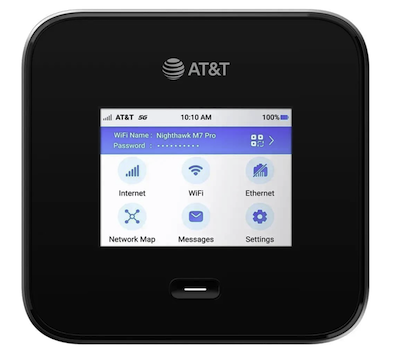
- 5G speeds (where available) plus 4G LTE backup
- Connects up to 64 devices simultaneously
- Touchscreen display for easy control
- All-day battery life (10–24 hours)
Best for: Serious users who demand the highest performance. You can connect many devices at once, and it can handle it all for seamless streaming or competitive gaming.
See at AmazonBest budget hotspot: Travel Wifi Sapphire 3
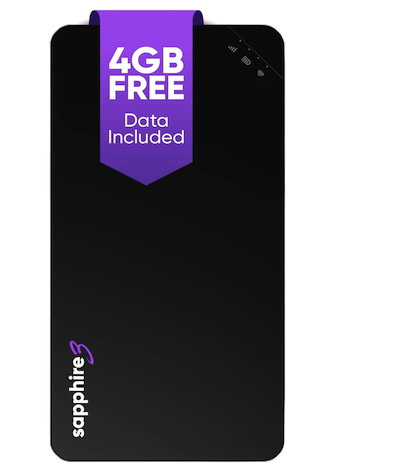
- Reliable 4G LTE speeds
- Connects up to 10 devices
- Compact and easy to carry
- 8–10 hour battery life
- Reliable 4G LTE speeds
Best for: Travelers looking for a no-fuss, user-friendly experience who want immediate connectivity without dealing with contracts or physical SIM cards.
See at AmazonBest international hotspot: Simo Solis 5G
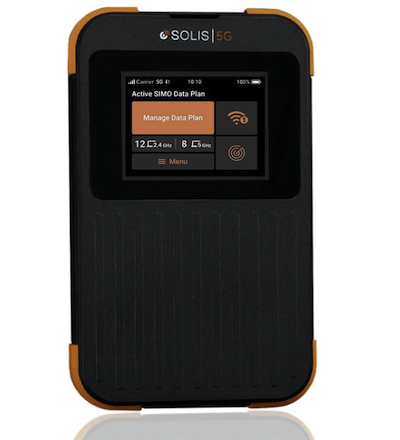
- Coverage in 100+ countries
- Works with international cell networks
- Dual SIM or eSIM support
- Connects 1–15 devices
- Data can be pricey
Best for: Digital nomads and frequent travelers who need a complete mobile connectivity solution that is durable enough to withstand outdoor elements while traveling globally.
See at AmazonBest for rural use: TravelFi Journey 1
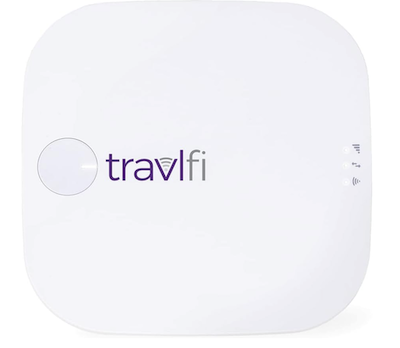
- Tough, durable build
- Long battery life or plug-in power option
- 4G LTE with signal-boosting technology
- Ports for external antennas
- Limited to travel in the U.S. only.
Best for: Road trippers and those who travel across the U.S. often, specifically in rural areas where standard signals tend to drop.
See at AmazonBest mobile hotspot plans
We’ve found the top three phone plans with serious hotspot data included, so you don’t have to.
Compare mobile hotspot plans from $25/month
| Plan | Price | Data limit | |
|---|---|---|---|
|
T-Mobile Experience More |
$85/mo. | 60GB | View at T-Mobile |
|
US Mobile Unlimited Premium |
$44/mo. | 50GB | View at US Mobile |
|
Visible Visible $25 plan |
$25/mo. | Unlimited (capped at 5Mbps) | View at Visible |
Is an unlimited hotspot truly unlimited?
No, unlimited hotspot data is almost never unlimited. Most phone plans give you a set amount of high-speed hotspot data (anywhere between 10GB and 200GB) before throttling your speeds to unusable slowness for the rest of the billing cycle.
If you need a lot of hotspot data, check out our guide to the best unlimited hotspot plans to find options with the most generous allowances.

T-Mobile | Experience More | $85/month—Best 5G network hotspot
T-Mobile's Experience More plan sports a whopping 60GB mobile hotspot data allowance. Additionally, you get truly unlimited high-speed data with no deprioritization threshold. The Un-carrier even throws in a free Apple TV+ and Netflix subscription for streaming Bridgerton or Stranger Things. At $85/month for a single line, Experience More is pretty pricey—you get generous hotspot data and extra perks for around the same price as Verizon and AT&T.
Nevertheless, T-Mobile's exceptional 5G network, which blankets significantly more of the country than its competitors, makes it worth the cost. You'll enjoy more 5G mobile hotspot connectivity in more places, with blazing-fast mobile data speeds. For some decent savings, consider T-Mobile's $60/month Essentials tier, which delivers 50GB of premium mobile data and unlimited 3G hotspot allowance. But Experience More gives you the most mobile hotspot on America's best 5G network.
- Pros: 60GB mobile hotspot allowance, truly unlimited high-speed priority data, free Netflix and Apple TV+ subscription, best-in-class 5G network
- Cons: Expensive single-line price

US Mobile | Unlimited Premium | $44/month—Best value mobile hotspot plan
US Mobile is one of our favorite MVNOs. Running on either Verizon, AT&T, or T-Mobile's network, depending on which carrier you select, you'll enjoy fantastic coverage. Its Unlimited Premium plan starts at just $39/month for a single line of service, netting you unlimited premium high-speed data and a whopping 50GB mobile hotspot data.
Even though US Mobile's hotspot is capped at 50GB per month, competitive family plan perks starting with three lines and international data make US Mobile an outstanding MVNO that beats out much of the competition.
- Pros: Unlimited high-speed premium data, 50GB mobile hotspot data, choice of three networks
- Cons: Perks not available until three-line premium bundle

Visible Wireless | Visible | $25/month—Cheapest unlimited hotspot plan
Visible's Visible plan sets you back just $25/month for unlimited talk, text, and data powered by Verizon. For a wallet-friendly price, you even get unlimited mobile hotspot at 5Mbps download speeds. Notably, your hotspot usage may be slowed down even further after you exceed 50GB in a month, but you're never cut off.
Although 5Mbps is a bit slow, it's fine for all but the most hardcore gamers and cinephiles (for reference, 5Mbps is great for a single high-definition video stream from Netflix, but not 4K streaming). If you’re willing to pay a bit more paper month, stepping up to Visible’s still affordable $30/month Visible+ and $35/month Visible+ Pro plans give you access to its fastest-possible 5G data speeds. In all, Visible provides the best unlimited hotspot plan at half the cost of its parent carrier Verizon.
- Pros: Unlimited mobile hotspot usage, reliable Verizon-powered coverage, extremely affordable
- Cons: Mobile hotspot limited to 5Mbps download speeds, lacks 5G Ultra Wideband
Not convinced? Read our raving review of Visible to learn why it’s a great option.
How to set up a mobile hotspot
You can enable your hotspot on your Android device or iPhone in a few simple taps. Choose your phone and follow our step-by-step instructions:
To turn on your iPhone's hotspot, follow these steps:
- Open Settings.
- Tap Cellular.
- Find Personal Hotspot.
- Toggle on Allow Others to Join.
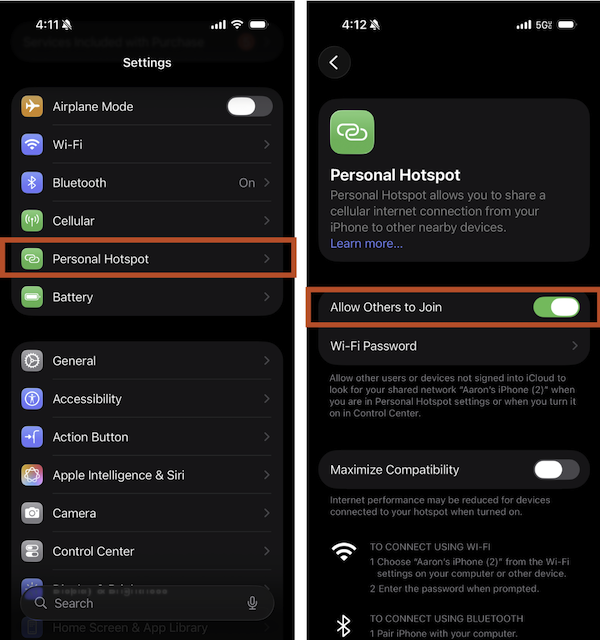
Image: Aaron Gates | WhistleOut
Make sure you add a password to add hotspot protection, too.
To turn on your Android's hotspot, follow these steps:
- Open Settings.
- Tap Connections.
- Find Mobile Hotspot and Tethering.
- Toggle on Mobile Hotspot.
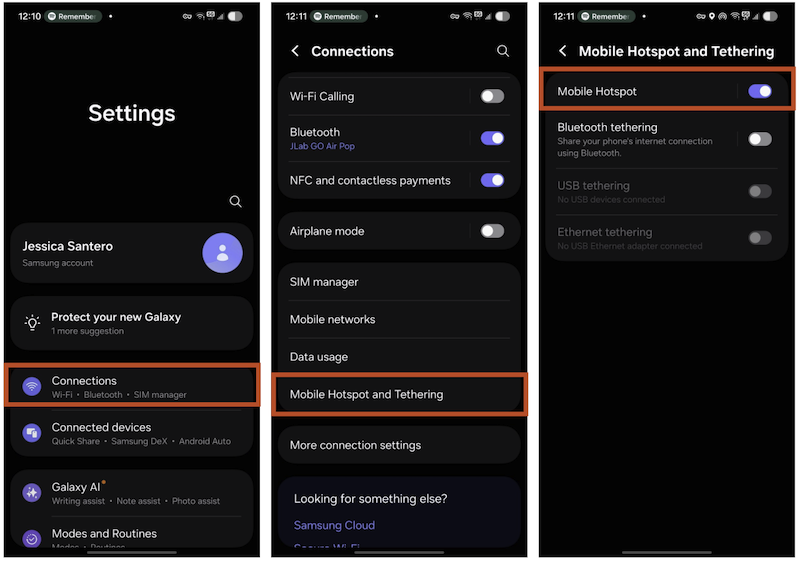
Image: Jessica Santero | WhistleOut
Hotspot troubleshooting
Running into problems with your mobile hotspot? Here are the most common issues and how to fix them.
My speeds are really slow.
If your hotspot feels sluggish, start by checking how many devices are connected. Too many devices sharing the connection will slow everything down. Disconnect anything you're not using. Next, check your signal strength—if you only have one or two bars, try moving closer to a window or going outside. Also, check if you've used up your high-speed data for the month. If you have, your carrier is probably throttling your speeds until your next billing cycle.
I don’t have a signal.
No bars at all? First, make sure you're in an area with coverage from your carrier. Check its coverage map online. If you should have coverage, try restarting your hotspot—turn it off, wait 30 seconds, and turn it back on. Move to higher ground or near a window. If you're in a rural area, you might need an external antenna to boost your signal.
My device can’t connect.
If your laptop or phone can't connect to your hotspot, make sure you're entering the password correctly. If that doesn’t work, restart both your hotspot and the device trying to connect. Check if your hotspot has reached its maximum number of connected devices (most allow 10–15). If so, disconnect something else first. You can also try forgetting the network on your device and reconnecting from scratch.
I’m out of data.
If you keep hitting your data cap and getting throttled, you have a few options. First, figure out what's eating your data. Streaming video in HD uses the most; Drop it to standard definition to save data. Turn off automatic app updates and cloud backups while using your hotspot. If you regularly run out, it's time to upgrade to a plan with more high-speed data or switch to an unlimited plan.
My hotspot is overheating.
Hotspots can get warm, especially in direct sunlight or when heavily used. If yours is overheating, move it out of the sun and away from other heat sources. But make sure it's not covered or sitting on fabric that traps heat! Turn it off for 15–20 minutes to cool down.
There’s a network outage.
Sometimes the problem isn't your hotspot, but your carrier's network. Check your carrier's website or social media for outage reports in your area. If there's a known outage, you'll just have to wait it out. If it's just you, restart your hotspot and run through the other potential problems above.
Mobile hotspot FAQs
Can a hotspot replace home internet?
Yes, a hotspot can replace home internet, especially for light users or in more remote areas. However, it often falls short for heavy usage because of potential data caps, inconsistent speeds, and higher latency.
How long does hotspot data last?
Hotspot data lasts as long as your data plan allows (like 10GB), but it also depends on your digital activity. Want to find out how much hotspot data you need? Check out our calculations above.
Will a hotspot drain my battery?
Yes, using your phone as a mobile hotspot will seriously drain your battery because it's constantly working to maintain both a cellular connection and a Wi-Fi signal to share.
Does unlimited mean truly unlimited?
No, unlimited hotspot data isn't truly unlimited. Most phone plans offer a set amount of high-speed data (such as 30GB) and then drastically slow your speeds for the rest of the month.
Jessica Santero
Staff Writer

Find a better phone plan
Thousands of cell phone plans unpacked. All the facts. No surprises.


.png?w=160&h=160&usm=20&usmrad=0.8&fit=crop "The Best Family Cell Phone Plans for 2026")


.png?w=280&h=280&usm=20&usmrad=0.8&fit=crop "Best Cell Phone Deals for July 2026: Get the New iPhone 17 for Free")



