
Messenger Kids is Meta's attempt to give children under 13 a supervised version of the messaging experience their parents already use. It is free, ad-free, and built around a contact approval system that keeps strangers out. If you are already a Facebook user with an established, verified account, it is a reasonable option. If you are not, you are going to have a frustrating afternoon.
I discovered Messenger Kids, along with the top messaging apps for kids, in our full guide.

- Free, no ads, no in-app purchases
- Available for iOS and Android
- Requires an active, verified Facebook account
Kids messaging over cellular data?
Make sure you are on a plan with no overage surprises. Here are the most popular T-Mobile MVNO plans right now for the best 5G coverage for less:
|
Mint Mobile

Unlimited Data Plan
$10.00/mo
$60 for 6 months of service
|
|
US Mobile

Unlimited Premium Plan
$20.00/mo
|
|
Straight Talk

Platinum Unlimited Data Plan
$60.00/mo
+ $4.88 Upfront
|
The setup problem
Messenger Kids will not activate without an established, verified Facebook account. When I created a new Facebook profile specifically to test the app, Facebook declined access to Messenger Kids on any device. The reason was that my account was too new and therefore not trusted. If you have never had a Facebook account, or if yours has been dormant for years, expect the setup process to stall before it begins.
It is a major barrier for parents who quit Facebook years ago or who never joined. The workaround is to reactivate or rebuild your Facebook presence before you try to set up Messenger Kids, which is a huge ask for a lot of people. Reddit users confirm this experience regularly, with some reporting that it took multiple attempts over several days before Facebook trusted their account enough to allow Messenger Kids activation.
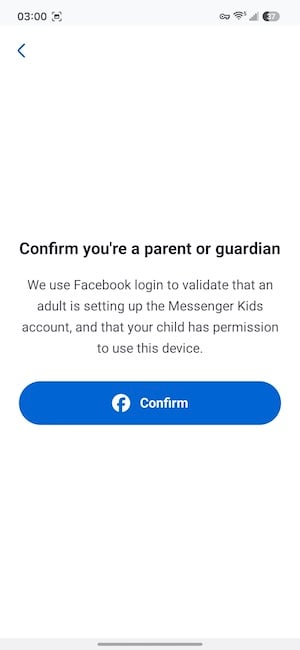
Image: Jessica Santero | WhistleOut
Not sure how to update your apps?
Keeping your apps up to date ensures you're always getting the latest features, bug fixes, and security improvements. Learn how to update the apps on your iPhone and your Android. It takes less time than you think.
What Messenger Kids offers
Once setup is complete, Messenger Kids works exactly like regular Messenger, but simpler and without any of the extra social dynamics. Kids can send text messages, make video calls, share photos, use animated face filters, send GIFs and stickers, and draw in messages. The interface uses the same Messenger icon and familiar layout, so children who have seen Messenger on a parent's phone will recognize it immediately.
Every interaction is strictly between a child and their pre-approved contact list. The app does not attempt to monetize children's data or attention, unlike any other app from Meta.
That said, Meta was found liable in a landmark 2026 social media addiction trial. That verdict applies to Facebook and Instagram (not to Messenger Kids), but it speaks to the company that handles your child's safety.
What Reddit says about Messenger Kids
Setup frustrations come up consistently in parent communities. Beyond that, the most common feedback is about the dynamic between kids on the platform. One parent in r/daddit noted that blocking and unblocking among kids required several conversations and bordered on bullying. The parental controls handle content well, but the app doesn't do anything to manage friendship conflicts once kids are inside it.
Parental controls
The parent dashboard gives you full control over your child's contact list. You add and remove contacts, approve or reject requests, and review activity at any time. Bedtime controls let you disable the app on a schedule, which is very practical in any kids' messaging app and something I didn't find in every competitor I tested.
However, Messenger Kids does not flag sensitive words, summarize conversations, or send alerts when something concerning appears. You can check the activity log manually, but the app does not surface problems for you. If you need proactive monitoring, Messenger Kids is not the right tool. Apps like Sage Haven offer AI-moderated recap features that Messenger Kids simply does not match.
Is Messenger Kids worth it?
For families who are already active on Facebook and want a free, no-frills messaging option for a child under 13, Messenger Kids is a no-brainer. The bedtime scheduling is useful, the ad-free design is appreciated, and the contact approval system is reliable. For families without an established Facebook presence, the setup barrier makes it a non-starter. And for parents who want AI moderation and proactive alerts rather than manual monitoring, Sage Haven or Kinzoo are more suitable options.
How I tested Messenger Kids

- Attempted setup using a newly created Facebook account and documented the access denial
- Tested the contact approval and removal flow from the parent dashboard
- Evaluated the kid-facing messaging interface including filters, stickers, GIFs, and video calling
- Confirmed the absence of ads, in-app purchases, and social feed elements
- Tested the bedtime control feature and confirmed it disables the app as scheduled
- Reviewed the activity log and confirmed no AI moderation or keyword-alert features
Why you can trust WhistleOut
.svg)
15+
years of mobile industry experience

900+
published wireless guides

35+
firsthand carrier reviews
We've been around since the birth of the iPhone. Along the way, we've learned how to spot the best deals for your wallet (and your sanity). We spend our days researching informative guides and writing insightful reviews on every kind of wireless plan, distinguishing what matters from what doesn't. We played around with these plans before recommending them, ensuring they're worth your hard-earned money.
Want to know more? Check out how we review every cell phone plan we rank.
Messenger Kids: FAQ
Do I need a Facebook account to use Messenger Kids?
Yes, Messenger Kids requires an active, verified Facebook account to set up. Newly created accounts are often flagged and denied access, so an established account is necessary.
Is Messenger Kids completely free?
Yes, Messenger Kids is free with no ads and no in-app purchases of any kind.
Can kids use Messenger Kids without parental supervision?
The app is designed so that every contact requires parental approval, but it does not proactively alert parents to concerning messages the way AI-moderated apps like Sage Haven do.
Does Messenger Kids have screen time controls?
Yes, parents can set bedtime controls that automatically disable the app during specific hours, directly from the parent dashboard.
Jessica Santero
Staff Writer

Thousands of cell phone plans unpacked. All the facts. No surprises.





.png?w=280&h=280&usm=20&usmrad=0.8&fit=crop "The Best Cheap Phone Plans for 2026: We Tested Them All to Help You Save")


