
I have tested dozens of apps for kids, and Sage Haven is the first one I'd hand to a parent and say, "This is what you've been looking for." It's a complete, functional messaging system for kids and tweens, and it is the only app I tested that makes the cell phone experience truly safe rather than just slightly less risky.
You can read my full roundup of the best safe social media apps for kids and teens to see how it compares.

- Free
- Available for iOS (Android waitlist)
- Also available as an Apple Watch app
Does your kid need a data plan?
If your child is getting their first phone, the plan matters as much as the app. Here are the best unlimited data plans right now so messaging never drops:
|
Visible

$25 Visible Plan
$25.00/mo
Taxes & Fees included
|
|
Mint Mobile

Unlimited Data Plan
$10.00/mo
$60 for 6 months of service
|
|
Verizon

Simplicity Plan
$30.00/mo
+ Taxes & Fees. Price includes AutoPay & Bring a Number discount
|
How Sage Haven works
Sage Haven assigns your child a real phone number that works inside the Sage Haven app, and in iMessage and Google Messages just like a normal SMS number. That means you and your kid aren't restricted to only messaging in the app itself. Conversations come through your regular messaging apps, but every contact is locked behind parental approval and every outgoing message is monitored by AI before it lands.
Sage Haven has a two-account setup for parent and kid. Parents create a verified account first, then link a separate child account. Every person your child can contact has to be manually approved from the parent dashboard. They can't add contacts themselves or search for users. The only people in their phone are the people you put there.
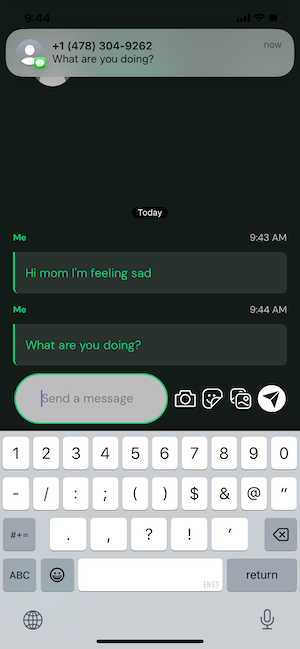
Image: Jessica Santero | WhistleOut
The kid-facing interface strips everything back to two options: message or call. Your child can reach out to approved contacts, and that is it. It is the simplest, most effective approach to keeping young users safe that I have seen in any app in this category.
Sage Haven also works on Apple Watch, which makes it a strong option for families who want to delay smartphone access entirely. Android users are currently on a waitlist, but the team has confirmed Google Play availability is coming.
Not sure how to update your apps?
Keeping your apps up to date ensures you're always getting the latest features, bug fixes, and security improvements. Learn how to update the apps on your iPhone and your Android. It takes less time than you think.
Parental controls and the recap feature
Every new Sage Haven account, parent or child, requires a $0.29 verification charge to activate. That sounds like a joke, but it is one of the most effective (and ingenious) anti-abuse barriers I have ever seen. Creating a purchase record tied to a payment method filters out the bad actors that free-signup apps attract. No other app I know does this.
Parents can enable Face ID on their account to prevent kids from accessing parent settings on a shared device. Contact requests are reviewed and approved or denied from the parent dashboard, and you can block incoming contact attempts before your child even sees them.
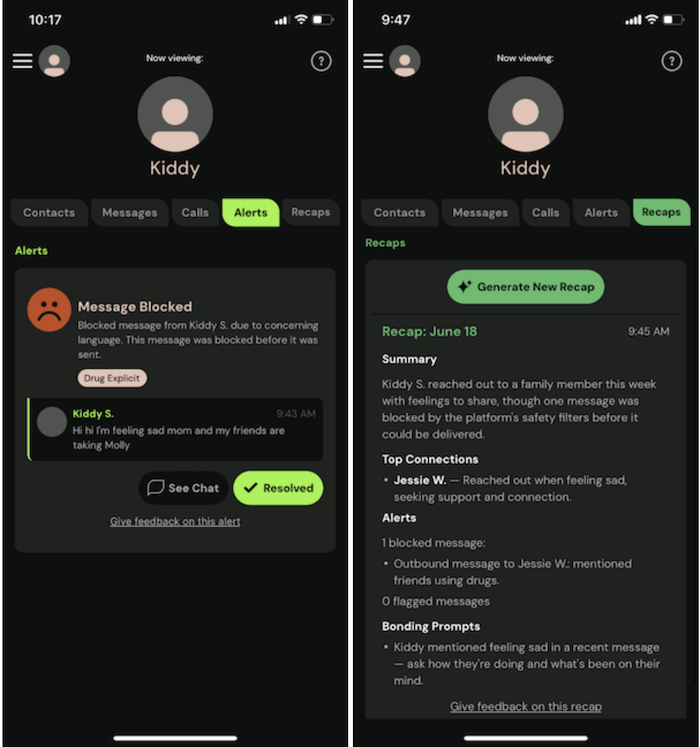
Image: Jessica Santero | WhistleOut
The recap feature is the real star. I tested it by sending two messages from the child account: one containing the word "sad" and one containing "drugs." Both were flagged immediately. My parent device received a double-vibration notification distinct from a regular text, and when I opened the recap, it did far more than flag a keyword. It summarized the conversation, identified the emotional content, and suggested specific ways I could follow up with my child. The blocked message was included for review. I have never seen a kids' app do anything close to this level of follow-through.
Pricing and availability
Sage Haven is free to download on the App Store. The $0.29 parent verification charge is a one-time fee, not a subscription. The messaging features, parent dashboard, AI moderation, and conversation recaps are all included without a recurring cost. Android availability is coming soon.
Is Sage Haven worth it?
For any family with a child getting their first phone, absolutely yes. Sage Haven does what every other kids' app promises, but it actually delivers on it tenfold. The contact approval system is airtight, the AI moderation works in testing, and the recap feature gives parents something actionable rather than a vague activity log. The $0.29 verification barrier is a smart design decision for extra safety. Android users will need to wait, but iOS families have no reason to look elsewhere.
 How I tested Sage Haven
- Set up both a parent account and a child account from scratch on separate devices
- Tested the contact approval and denial flow from the parent dashboard
- Sent messages containing flagged keywords from the child account to verify AI moderation triggers
- Tested the recap feature for response detail and parent notification timing
- Confirmed cross-compatibility with iMessage to verify the Sage phone number functions as standard SMS
- Attempted the $0.29 verification process to evaluate the friction it creates for new accounts
Why you can trust WhistleOut
.svg)
15+
years of mobile industry experience

900+
published wireless guides

35+
firsthand carrier reviews
We've been around since the birth of the iPhone. Along the way, we've learned how to spot the best deals for your wallet (and your sanity). We spend our days researching informative guides and writing insightful reviews on every kind of wireless plan, distinguishing what matters from what doesn't. We played around with these plans before recommending them, ensuring they're worth your hard-earned money.
Want to know more? Check out how we review every cell phone plan we rank.
Sage Haven: FAQ
Is Sage Haven free?
Sage Haven is free to download and use. There is a one-time $0.29 parent verification charge to activate the account, but no ongoing subscription fee.
Is Sage Haven available on Android?
Sage Haven is currently iOS-only, with an Android version in development. Android users can join the waitlist at sagehavenforkids.com.
What age is Sage Haven designed for?
Sage Haven is designed for children under 13 who are getting their first phone, though it works for any age where full parental oversight is the priority.
Does Sage Haven work with iMessage?
Yes, the Sage Haven phone number assigned to your child is compatible with iMessage and Google Messages, so messages appear in their standard messaging app rather than requiring a separate app to be open.
Jessica Santero
Staff Writer

Thousands of cell phone plans unpacked. All the facts. No surprises.





.png?w=280&h=280&usm=20&usmrad=0.8&fit=crop "The Best Cheap Phone Plans for 2026: We Tested Them All to Help You Save")


