
Most screen time apps block you on your phone and stop there. The problem is that distractions don't. The moment Instagram is blocked on your phone, you're opening it in Safari on your laptop without thinking twice.
Freedom is the only app in WhistleOut's best screen time apps guide that blocks both simultaneously, syncing restrictions across every device on your account the moment a session starts.

Freedom
- Price: Free. Premium from $3.33/month.
- Platforms: iOS, Android, Mac, Windows
Already on Verizon? You might be paying more than you need to.
Verizon MVNOs use the same towers and offer comparable coverage at a noticeably lower monthly cost. If your plan hasn't changed in the past year, it's worth a quick comparison.
|
Visible

$25 Visible Plan
$25.00/mo
Taxes & Fees included
|
|
XFINITY Mobile

Mobile Select Plan
$0.00/mo
(for the first year of service) <br>Regular rate of $30/mo. thereafter
|
|
US Mobile

Unlimited Premium Plan
$39.00/mo
|
What is Freedom?
Freedom is a cross-platform screen time and website blocker for iOS, Android, Mac, and Windows that enforces your blocklist across all connected devices at the same time. Build a custom list of apps and websites, set a schedule or start a session manually, and Freedom locks everything out on your phone and computer simultaneously. It's the most practical option for anyone whose distraction habits don't stay on one device.
Not sure how to update your apps?
Keeping your apps up to date ensures you're always getting the latest features, bug fixes, and security improvements. Learn how to update the apps on your iPhone and your Android. It takes less time than you think.
The cross-device sync is what separates Freedom from everything else
Most competitors handle phone blocking reasonably well. What they don't do is follow you to your browser the moment you try to work around them. When a Freedom session starts, the same blocklist applies to your phone and your laptop instantly, with no separate setup required for each device.
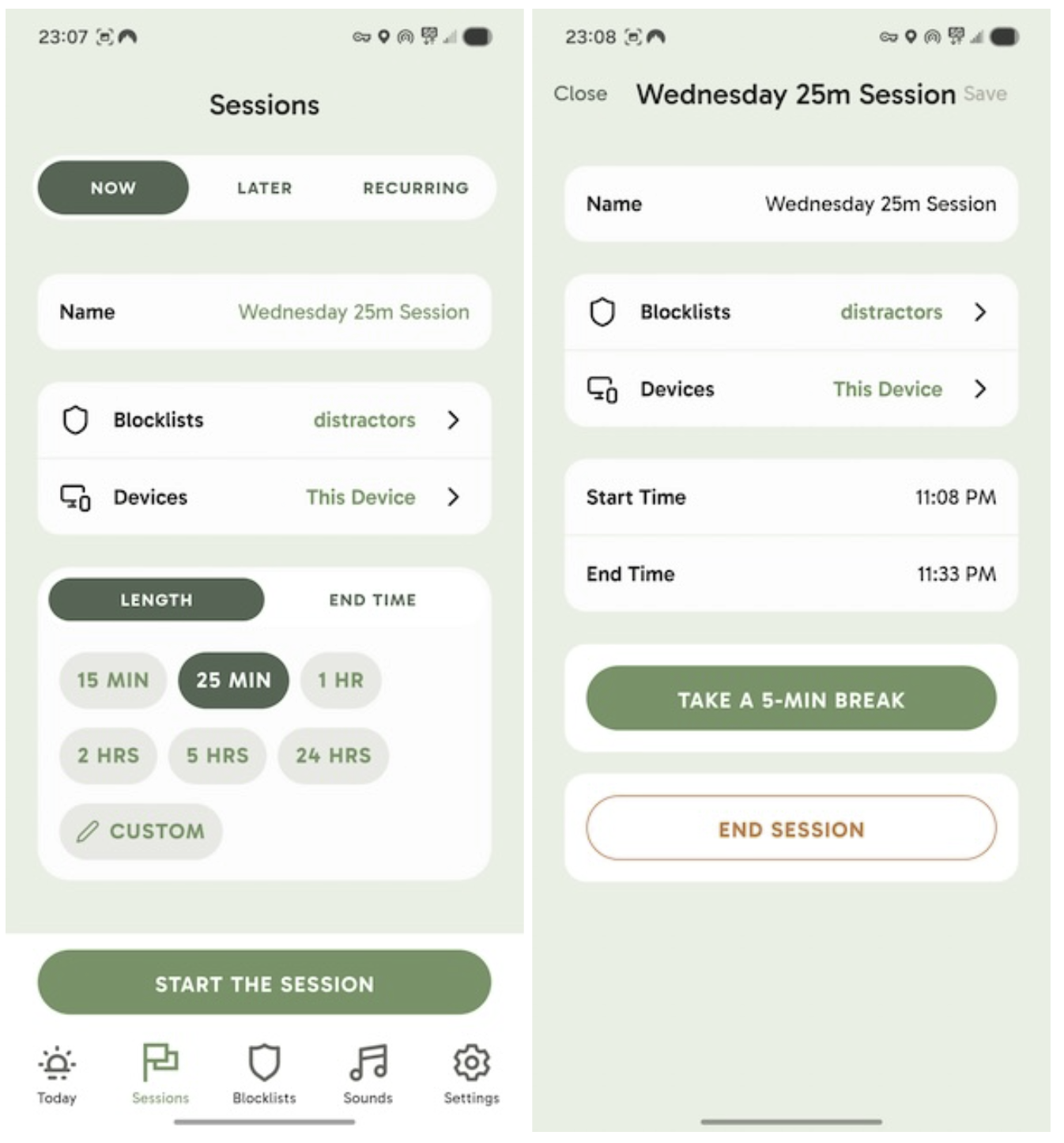
Image: Jessica Santero | WhistleOut
Freedom also gives you one five-minute break per day, which is just enough to scratch the itch without encouraging you to delete the app entirely. It's a realistic concession that keeps the limits from feeling punitive enough to abandon.
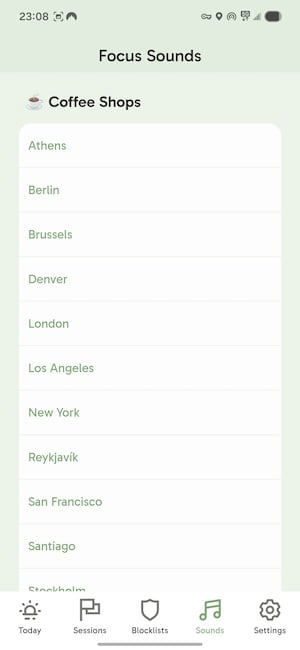
Image: Jessica Santero | WhistleOut
The built-in ambient sounds feature is a small but smart addition. Rather than opening YouTube Music for background noise and getting pulled into recommendations, Freedom gives you focus audio directly in the app.
Free vs. Premium: What the upgrade adds
The free tier includes app and website blocking with basic scheduling, and the desktop blocker works on both Mac and Windows. Premium unlocks recurring sessions, advanced scheduling, and locked mode, which prevents you from ending a session early even from your phone. At $3.33/month on an annual plan, it's one of the cheaper paid options in this category, and locked mode alone is worth it for anyone who knows they'll try to quit early.
Freedom isn't the most aggressive screen time tool available. Shift and Brick both offer harder lockouts. But it's the most realistic long-term option for people who work across multiple devices and need something that fits into a real routine.
Best unlimited data plans right now
If you work across multiple devices throughout the day, an unlimited data plan ensures you're never throttled mid-session.
Here are the most popular unlimited plans currently available.
|
Visible
$25 Visible Plan
$25.00/mo
Taxes & Fees included
|
|
Mint Mobile

Unlimited Data Plan
$25.00/mo
$75.00 upfront payment for 3 months (equals to $25.00/month). Intro pricing for new customers only.
|
|
XFINITY Mobile
Mobile Select Plan
$0.00/mo
(for the first year of service) <br>Regular rate of $30/mo. thereafter
|
How I tested Freedom
- Set up Freedom on iPhone, Android, and a MacBook simultaneously to test cross-device sync
- Created recurring block schedules for work hours and tested them over three consecutive weeks
- Attempted to access blocked sites on desktop during an active phone session and vice versa
- Evaluated locked mode to determine how difficult it actually is to end a session early
- Used the ambient sound feature during focus sessions to assess its value as a Spotify replacement
Why you can trust WhistleOut
.svg)
15+
years of mobile industry experience

900+
published wireless guides

35+
firsthand carrier reviews
We've been around since the birth of the iPhone. Along the way, we've learned how to spot the best deals for your wallet (and your sanity). We spend our days researching informative guides and writing insightful reviews on every kind of wireless plan, distinguishing what matters from what doesn't. We played around with these plans before recommending them, ensuring they're worth your hard-earned money.
Want to know more? Check out how we review every cell phone plan we rank.
Freedom app: FAQ
Does Freedom work on Mac and Windows?
Yes, Freedom has a desktop app for both Mac and Windows that syncs blocks with the iOS and Android mobile apps simultaneously when a session is active.
Can you end a Freedom session early?
On the free tier, yes. With premium locked mode enabled, you cannot end a session before the timer expires.
Is Freedom free?
Freedom has a free tier that includes basic app and website blocking with scheduling. Premium plans with recurring sessions, locked mode, and advanced features start at $3.33/month on an annual plan.
What is the difference between Freedom and ScreenZen?
ScreenZen interrupts individual app opens with a pause, while Freedom completely blocks apps and websites across all your devices on a schedule. Freedom is better for structured work hours; ScreenZen is better for breaking specific automatic habits throughout the day.
Jessica Santero
Staff Writer

Find a better phone plan
Thousands of cell phone plans unpacked. All the facts. No surprises.


