
- Why Google is asking for your age
- What happens if you ignore Google's prompt
- How to verify your age on Google Play
- Is Google's age verification safe?
- How to spot a fake Google age verification email
- Does this replace Family Link and parental controls?
- Setting up a kid's phone with age checks in mind
- Google Play age verification: FAQ
Google has started checking the ages of their users, and the Play Store is where most parents run into it first. Some accounts now hit a verification wall before the download button, and getting past it means handing over a driver's license, a selfie, a credit card, or your email address.
This comes down to new state laws, with Texas enforcing age checks today and three more states starting in 2027. If you already trust Google with your personal data, verifying with a credit card takes the least effort, and it means no third-party company ever sees your face or your email address.
If you want the full picture, here's exactly what Google is checking, which verification method gives away the least personal data, and how age verification changes your child's account.
Why Google is asking for your age
Google is asking because of new state laws in Texas, Utah, Louisiana, and Alabama that require app stores to know how old their users are. Of the four, only Texas is enforcing its law today. The other three start in 2027, but Google has already switched the checks on across the country.
Google Play Store age verification laws by state
| State | Status | Effective date |
|---|---|---|
| Texas | In effect now | January 1, 2026 |
| Alabama | Not yet in effect | January 1, 2027 |
| Utah | Not yet in effect | May 6, 2027 |
| Louisiana | Not yet in effect | July 1, 2027 |
But even if you don't live in one of those states, you'll still run into this. Google has been running an age estimation model on US accounts since August 2025, and it works on its own regardless of what any state requires. It reads signals already sitting in your account, like what you search for, the kinds of YouTube videos you watch, and how long the account has existed, then decides whether you're likely over or under 18.
The frustrating part is the model's guess can override the birthday on the account, so you can enter your real birthday and still get flagged. So even if you are over 18, depending on your activity, you could be flagged as a minor, and Google will prompt you to verify your age.
What happens if you ignore the prompt
Ignoring the age verification prompt starts a 14-day clock. If Google decides an account holder may be too young to manage their own account, that person has 14 days to act before the account is disabled, and the account information gets deleted 30 days after that.
There are only two ways to stop the clock.
- A parent sets up supervision on the account.
- The account holder verifies they're old enough to manage it alone.
A disabled account also hides any content the person has published, so a teenager's YouTube uploads disappear until the account comes back, and Google warns restored content can take several days to reappear.
How to verify your age on Google Play
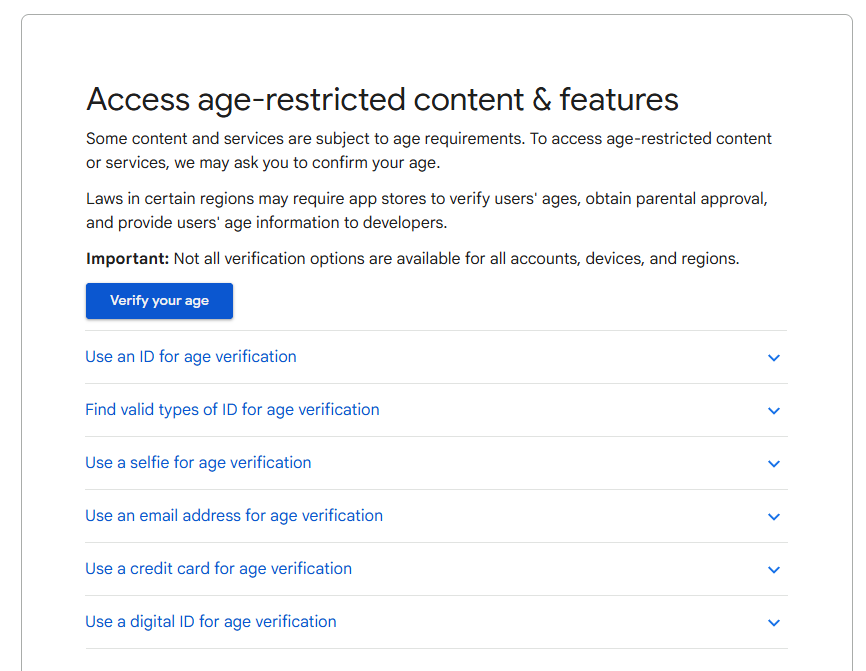
Image: Scott Houghton | WhistleOut
Age verification takes about two minutes, and every method starts in the Play Store or on your Google Account page. Google offers five options, though not all of them show up for every account or region.
You also don't have to wait to be asked. Google's account page has a verification link that runs the same flow whenever you want, so you can check anytime instead of waiting until you're mid-download.
Verify your age by method
| Method | Steps |
|---|---|
| Government ID | Tap Verify > Use your ID > Agree to ID verification > Photograph and upload your ID > Confirm your date of birth > Submit ID |
| Selfie | Tap Verify > Take a selfie > Review Private ID's terms > Continue |
| Credit card | Tap Verify > Use your credit card > Enter your card number, expiry, and billing address |
| Tap Verify > Select the email option > Confirm the address on your account | |
| Digital ID | Tap Use your digital ID > Select an ID from your wallet > Follow the wallet prompts > Continue |
Google is picky about ID photos. When uploading your ID photo, make sure to show all four corners, shoot in color without glare, and upload a .jpg or .png, because .pdf files get rejected.
Before you use your credit card
You'll see a pending authorization on your statement afterward. That's Google confirming the card is real, not billing you, and it disappears on its own within 1 to 14 business days. If it's still there after that, call your bank.
Is Google's age verification safe?
Google's age verification is safe in the sense that every method is documented and handled by Google or a named partner. The methods aren't equally private, though, and the differences are worth considering.
Here's what each one actually hands over, based on Google's own documentation:
- Selfie: The partner, Private ID, gets a random identifier for your account and nothing else, and Google says it deletes the photo once it estimates your age.
- Email estimation: Sends your address to a partner called VerifyMy, which passes it to database providers that check where else you've used it. VerifyMy doesn't keep the address, but it does circulate.
- Government ID: Google securely stores your ID photo and deletes it after confirming your birth date. That date then gets saved to your payments profile, and some IDs go to manual review.
- Credit card: The only method where Google says outright that it retains what you entered to meet legal and regulatory requirements.
The selfie and email routes mean accepting a privacy policy from a company you didn't choose, since those partners write their own terms. Google also publishes no accuracy rate for the selfie estimate, and its own instructions assume some people will fail and need another method.
But if you don't want an image of your Government ID floating around the cloud, and you are already planning to buy apps on Google Play, adding a credit card is the easiest option.
How to spot a fake Google age verification email
Google states it plainly that they will never ask you to provide this type of information in an email. Every legitimate verification method starts inside the Play Store, in a prompt on your device, or on your Google Account page.
If you are worried about scams, we recommend skipping the link entirely and going to myaccount.google.com yourself, and preemptively verifying your age.
Does age verification replace Family Link and parental controls?
Age verification doesn't replace Family Link, and it was never meant to. Family Link still handles download approvals, screen time, and content filters, while age verification runs underneath as a separate layer telling apps roughly how old your child is.
Instead of knowing your child's exact age, apps get an age range instead. The age ranges are 0 to 12, 13 to 15, 16 to 17, and 18 and over, and are only shared with apps if you turn the feature on.
- Turn it on: Open Family Link > Select your child > Google Play > Age sharing > Share age range with all apps
- Turn it off: Open Family Link > Select your child > Google Play > Age sharing > Do not share age range with apps
To learn more about Google Family Link, check out our guide covering every feature it has to offer. And if you're looking for an additional level of supervision, check out our guide to the best parental control apps.
Setting up a kid's phone with age checks in mind
The account matters more than the phone, since verification and Family Link both live on the Google Account. A hand-me-down works fine as long as the software cooperates.
Our guide to the best cell phones for kids breaks things down by age group. Here are some of our favorites right now:
- 6.7 inch display
- Rear Cameras: 50MP, 8MP, 2MP
- Front Camera: 13MP

- 6.7 inch display
- Rear Cameras: 50MP, 5MP, 2MP
- Front Camera: 12MP

- 6.7 inch display
- Rear Cameras: 50MP, 8MP, 5MP
- Front Camera: 12MP

- 6.7 inch display
- Rear Cameras: 50MP, 12MP, 5MP
- Front Camera: 12MP

- 6.3 inch display
- Rear Cameras: 48MP, 13MP
- Front Camera: 13MP


Google Play age verification: FAQ
Do I have to verify my age on Google Play?
Google Play's age verification is only required once Google asks, and that depends on your region and what its estimation model concluded about your account. People in Texas are most likely to be prompted, since it's the only state with an active app store law. You can also verify voluntarily through your Google Account and get it over with.
What happens if I ignore the age verification prompt?
Ignoring the age verification prompt on an account Google thinks belongs to a minor starts a 14-day countdown to account disablement, with deletion 30 days later. Adults who ignore a standard Play Store prompt lose access to certain app downloads but keep the account.
Does Google save the age-verification selfie?
No, Google says it deletes the selfie once it estimates your age. The photo goes to a partner called Private ID, which receives only a random identifier for your account and reports back whether you're old enough. Private ID's own privacy policy governs that step.
Does verifying my age cost anything?
No, all five methods are free, including the credit card option. The pending authorization on your statement is a validity check that clears within 1 to 14 business days.
Can my child verify their own age?
No, children under 18 can't verify themselves into adult access, which is the whole point of the system. A minor's account gets resolved by linking it to a parent and setting up supervision through Family Link.
Does Google share my child's birthday with app developers?
No, instead of your child's birthdate, developers get an age band, using ranges of 0 to 12, 13 to 15, 16 to 17, and 18 and over. Age sharing is also off by default, so nothing reaches any app until a parent turns it on.
Scott Houghton
Jr. Staff Writer

Thousands of cell phone plans unpacked. All the facts. No surprises.
Related Articles


.jpg?w=160&h=160&usm=20&usmrad=0.8&fit=crop "Google Pixel 7a: Pricing, and Release Date")
Related Topics
GooglePopular Topics
Featured App Reviews iOS News Coverage Device Reviews Device Explainers Carrier Explainers App Roundups T-Mobile


.png?w=280&h=280&usm=20&usmrad=0.8&fit=crop "Best Cell Phone Deals for November 2026: Get the New iPhone 18 Pro for Free")




.png?w=280&h=280&usm=20&usmrad=0.8&fit=crop "Cell Coverage Near You: Who Has the Best 5G Network?")

