Image: Max McCaskill
A text says your package couldn't be delivered, and all you need to do is tap a link to reschedule or pay a small redelivery fee. If you aren't expecting anything, it's easy to ignore. But during the holidays, when you might have a dozen orders on their way at once, it's a lot more convincing. That's exactly what scammers are counting on.
If a text about a USPS, UPS, or FedEx delivery asks you to tap a link, pay a fee, or confirm personal information, you should always treat it as a scam. Don't tap anything or respond directly to the text message. Instead, if you're expecting something, check your tracking number directly in the carrier's app or on its official website.
TL;DR: How to identify a fake delivery text
A delivery text is probably a scam if it:
- Arrives when you never signed up for text alerts on that package.
- References a retailer you haven't shopped from, like Amazon, Best Buy, or Walmart
- Includes a link that doesn't go to a legitimate retailer or shipping website.
- Asks you to pay a fee, update your address, or enter card details.
- Pressures you to act fast or your package will be returned or destroyed.
- Comes from a regular 10-digit phone number or an email address.
- Gives complicated instructions, like replying to the text or copying a link into your browser.
- Has typos, odd grammar, or no real tracking number.
How package delivery text scams work
Package delivery scams are a type of smishing or phishing by text message.
- Phishing is when a scammer pretends to be a company or organization you trust to trick you into handing over personal information, like passwords or credit card numbers.
- Smishing is a mix of SMS (the technical name for standard text messages) and phishing, so it simply means phishing through a text.
In a package delivery scam, a scammer texts you pretending to be a carrier like USPS, UPS, or FedEx and claims there's a problem with your delivery. They'll often include a link to a fake website where you're asked to enter your address, credit card number, or account login details.
In other cases, you may be asked to pay an "unexpected fee" that's come up in the shipping process. The fee is usually tiny, so paying it feels harmless. However, the real goal is obtaining your card number and personal information, which can then be used for much bigger charges or sold to other scammers.
These texts work because nearly everyone is expecting a package at some point. Scammers don't need to know what you ordered or even where you got it from. They just need to send enough texts to reach someone who is expecting a delivery but doesn't recognize that the message is fake.
Warning signs of a fake USPS, UPS, or FedEx text
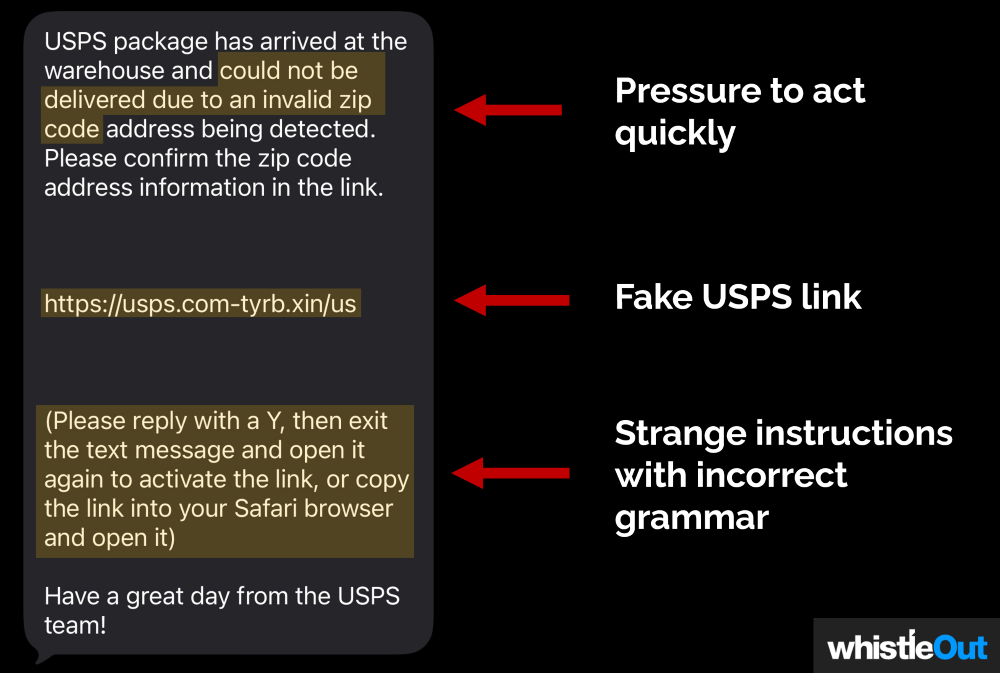
Image: Max McCaskill
The easiest way to identify a fake text message is to ask whether you signed up for it. USPS, UPS, and FedEx don't text you out of the blue. If you never opted in to text alerts for a specific package, a delivery text from any of them should make you suspicious right away.
There are several other indicators found within messages themselves that are red flags for fakes.
A link you don't recognize
Scam texts often include web addresses designed to look close to a real shipping company's website, like a slightly misspelled carrier name, adding extra words, or using a strange domain ending. Examples for FedEx would be altered addresses like fedx.com, fed-ex.com, or even fedex.xyz.
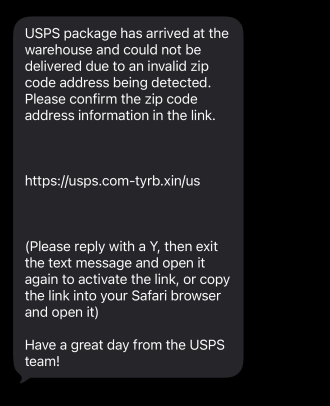
In the USPS scam text I received above, the scammer uses a link made to look like it belongs to USPS, but it's actually fake. Even if a link looks legitimate, don't tap it or copy it. Instead, open the carrier's official app or website in your browser and check your tracking number there.
A request for money or personal information
A classic text scam claims your package is on hold because of an incomplete address and asks for a small fee to release it. Others might say your shipment can't be delivered until you confirm your address details. None of the major carriers—including UPS, FedEx, and USPS—will send text messages asking for money or personal information.
To be clear, some packages do carry legitimate charges, like duties on international shipments or collect-on-delivery fees. If you think you might owe something, check your tracking number on the carrier's official website. Never pay through a link in a text.
Urgent deadlines, threats, or shipping problems
Scam texts often say your package will be returned, held, or destroyed unless you act quickly. The USPS scam text in the image above claims a package can't be delivered because the address has an invalid ZIP code. Scammers use problems like this to create urgency so you'll tap a link or send money before you think.
A random phone number or email address
Many parcel text scams come from a regular 10-digit phone number or an email address to bypass your phone's spam filters. Real shipping updates will typically arrive from short codes.
Sloppy writing, complicated instructions, and missing details
Typos, strange capitalization, missing punctuation, and generic greetings like "Dear customer" are all red flags. So is a text that doesn't include a tracking number you can check, or one that uses information that doesn't match any of your orders.
Watch out for complicated instructions too. A real carrier will never ask you to jump through hoops just to track a package. The scam text above asks you to reply to the text to access the link, or copy the inactive link and paste it into Safari. Those extra steps are designed to get around your iPhone's built-in spam protections, which disable links in texts from unknown senders. Replying also tells the scammer your number is active, so they'll send even more scam texts afterward.
What real carrier texts look like
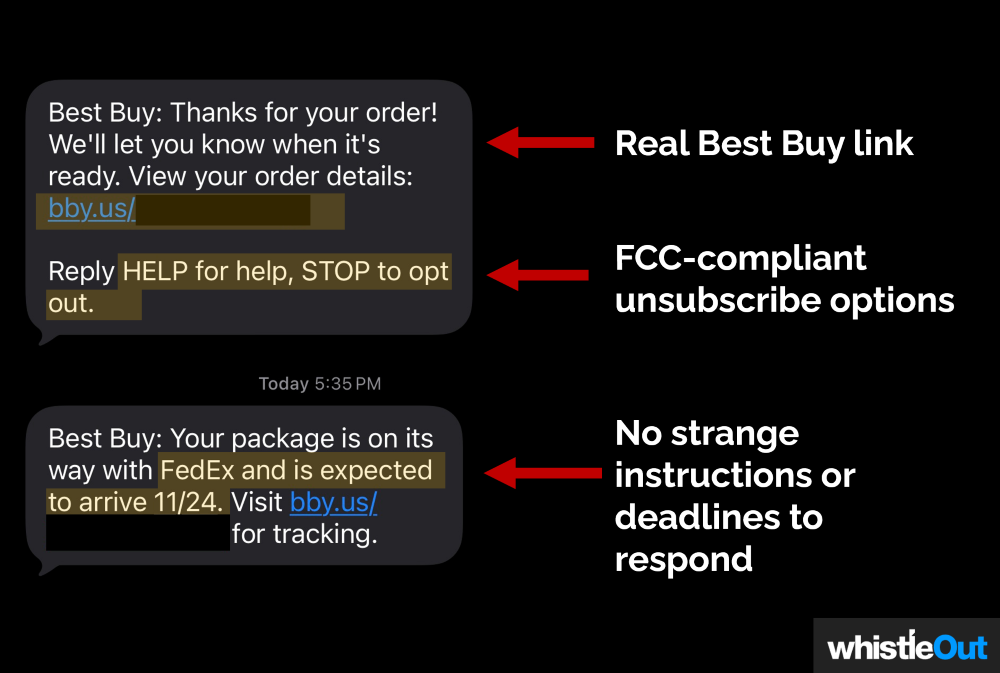
Image: Max McCaskill
Real carrier texts appear after you sign up for them, and they never ask you to pay a fee or enter card details. They give you a status update on a package you're already expecting, and that's pretty much it.
The texts above are real Best Buy shipping notifications. They include a link that goes to Best Buy's actual website, say the order is shipping with FedEx, and give an expected arrival date. There are no confusing instructions, no fees, and no pressure to act. It's simply an update.
Like many real shipping texts, there are also opt-out instructions. Retailers and carriers include that line because FCC rules require text alert programs to give you a way to unsubscribe. If a message comes in with no opt-out instructions, it's a good chance it's a fake. That said, don't treat opt-out instructions as complete proof a text is real, since scammers can add that same line into a fake message.
USPS texts
USPS only texts you if you request Text Tracking by texting your tracking number to 28777. USPS does not include links in any of the texts it sends. According to the U.S. Postal Inspection Service, USPS won't text or email you about a package unless you've requested it with a tracking number, and those messages will never contain a link.
UPS texts
UPS sends text alerts when you have opted into its service and have a delivery scheduled. You can opt in when placing an order or through a UPS My Choice account. If UPS contacts you about a package, it will always give you a tracking number to verify on ups.com. You never have to answer through the text itself.
FedEx texts
FedEx only sends delivery update texts if you've signed up to receive them, either from the retailer or FedEx itself. FedEx doesn't send unsolicited texts asking for account credentials, payment, or personal information.
How to block and report scam texts
When you receive a scam text, report it first, then block the sender.
- Reporting helps your carrier and Apple or Google filter similar spam text messages for everyone.
- Blocking keeps that particular number from texting you again.
Never reply to a scam text, even to send STOP, since replying confirms your number is active.
Unfortunately, blocking one number rarely ends the problem. Scammers cycle through new numbers constantly, so enabling your phone's built-in spam filters is also a good idea. Our guide to blocking spam callers covers more ways to cut down on spam calls and texts.
How to report and block scam texts on iPhone
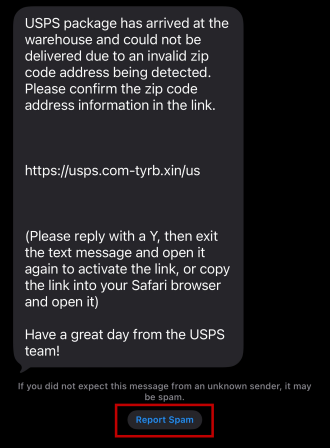
Image: Max McCaskill
To report a spam text on iPhone:
- Open the scam text in the Messages app.
- Tap Report Spam under the message.
Reporting doesn't block the number. To block the sender on iPhone:
- Open the conversation in the Messages app.
- Tap the number or name at the top of the conversation.
- Tap Info.
- Select Block Caller.
How to report and block scam texts on Android
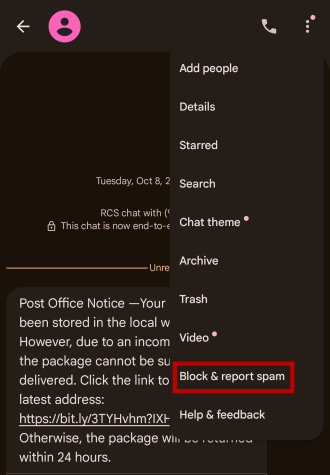
Image: Max McCaskill
To report and block a scam text in the Messages app on Android:
- Open the Messages app.
- Open the scam text thread.
- Tap the three-dot menu
- Choose Block & report spam.
Steps can vary slightly depending on your specific Android phone and messaging app. Our guide to blocking a number on Android covers Samsung phones and other blocking methods.
Where to report delivery scam texts
You can also forward a scam text to your wireless carrier and the company being impersonated. This helps carriers, government agencies, and the shipping companies themselves stay aware of the most up-to-date scamming methods being used to target consumers.
- Your carrier: Forward the text to 7726 (SPAM). This works on most major U.S. carriers.
- USPS: Email a screenshot of the text to [email protected], along with your name and the date you received it.
- UPS: Follow the steps on the UPS fraud page.
- FedEx: Email the sender's phone number, a screenshot, and any visible link to [email protected].
- The FTC: File a report at ReportFraud.ftc.gov.
Want more protection? Try a spam-blocking app
If built-in filters aren't catching enough, a third-party app can add another layer. Textkiller is built specifically for blocking spam texts on iPhone, while its sister app, Robokiller, handles SMS protection on Android. See our roundup of the best spam-blocking apps for more options.
FAQ: Package delivery text scams
Do parcel services text you?
Yes, parcel services can text you, but only if you sign up for text alerts. USPS will only text if you request Text Tracking for a specific package, and UPS and FedEx will only send messages for deliveries you've opted to track. None of them will text you asking for payment or personal information.
What happens if I click a fake delivery link?
Clicking a fake delivery link usually takes you to a scam website designed to steal your personal data or payment information, and some can install malware on your phone. If you clicked but didn't enter anything, close the page, delete the text, and make sure your phone's software is up to date. If you entered card details, contact your bank or card issuer right away. If you entered a password, change it on all accounts that use it.
How do I report a scam text?
Report a scam text by tapping Report Spam (iPhone) or Report spam (Android) in your messaging app, then forward the text to 7726. For delivery scams, you can also email USPS at [email protected], FedEx at [email protected], or file a report with the FTC at ReportFraud.ftc.gov.
Is USPS Informed Delivery legit?
Yes, Informed Delivery is a free, legitimate USPS service that emails you previews of incoming mail and updates on your packages. You can only sign up through usps.com, and you must create an account. Scammers sometimes use the Informed Delivery branding for messages, so ignore any text claiming to be from Informed Delivery that asks you to tap a link or pay a fee.
Max McCaskill
Sr. Staff Writer

Thousands of cell phone plans unpacked. All the facts. No surprises.

Related Articles


Related Topics
Operating Systems ExplainersPopular Topics
Featured App Reviews iOS News Coverage Device Reviews Device Explainers T-Mobile App Roundups Carrier Explainers