
Recording a phone call sounds simple. Tap a button, save the audio, and done. On Android, it's anything but.
Your options depend on which phone you own, which version of Android it runs, and even which state you live in. A Pixel owner in Utah and a Galaxy owner in California are sitting in two completely different situations.
The good news is that recording calls on Android is easier now than it's been in years. Google added a native recorder to Pixel phones, Samsung finally enabled it for US Galaxy owners, and third-party apps can fill the gap for everyone else.
How to record a call on Android
There are several ways to save calls on an Android phone:
- Google Pixel's built-in call recorder and Call Notes
- Samsung's built-in Call Transcripts feature
- Third-party call recording apps
- Google Voice
- Speakerphone plus an external recording device
If your phone has a built-in recorder in its dialer, use it. Native recording delivers the cleanest audio, stays on your device, and doesn't require handing call access to a random app developer. Everything else on this list is a workaround for phones that don't have that option.
A note on Android call recording
Android call recording used to be like the wild west without direction or tools. Then Google spent several years fencing it in. Android 9 started restricting access to call audio, and in 2022, Google changed its Play Store policies to block apps from using the Accessibility API for recording. That killed most third-party call recorders overnight.
Today, the reliable options are the recorders phone makers build directly into their dialer apps, and those vary by phone, region, and Android version. Every native recorder also plays an announcement telling everyone on the line that the call is being recorded. That's not a bug. It's how these features stay legal across all 50 states.
Google Pixel call recording
Pixel phones have the best call-recording experience on Android right now. Google offers two versions of the feature depending on which Pixel you own: an AI-powered option called Call Notes and a simpler recorder for older models.
Call Notes on the Pixel 9 and newer
Call Notes is Google's Gemini-powered recording feature, and it does more than just capture audio. It records the call, transcribes it, and generates a summary of what was discussed, all processed on your device rather than in the cloud. It's available on the Pixel 9 series and newer, though Google's budget A-series models miss out.
To use Call Notes:
- Open the Phone app, tap More (the three-dot menu), then Settings.
- Tap Call Notes and toggle the feature on. You may need to download some additional components the first time.
- During a call, tap the Call Notes button in the in-call screen. Your Pixel announces to everyone on the line that the call is being recorded.
- After the call ends, find the recording, transcript, and summary in the Phone app.
You can also set Call Notes to trigger automatically for specific contacts or for calls from numbers not in your contact list. One catch: For now, only English-language calls will be transcribed and summarized.
Automatically record calls
Depending on your state's laws, there's an option to automatically record calls from numbers not in your contacts. It's genuinely useful for documenting scam calls. Though if you'd rather those calls never reach you in the first place, here's how to block spam callers and other callers you don't want entirely.
Samsung Galaxy call recording
Samsung Galaxy phones can record calls right from the stock Phone app. In the US, the feature is called Call Transcripts, and it arrived with One UI 7. It works on any Galaxy running One UI 7 or later, including the S24 series onward and recent foldables.
To record a call on a Samsung Galaxy in the US:
- Make or answer a call in the Phone app.
- Tap the Record Call button on the call screen.
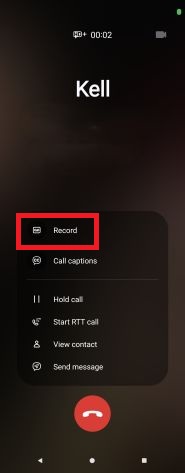
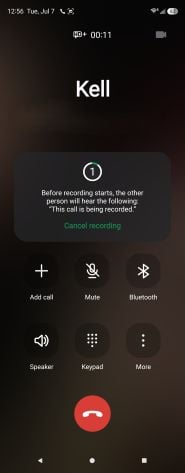
- Your phone will warn you it's about to alert the other person and give you five seconds to cancel. After that, it plays a "This call is being recorded" message for everyone on the line.
- When the call ends, you will receive a notification that your call was recorded and you'll have the option to save it onto your phone's internal storage.
You get both the audio file and an AI-generated transcript, which currently supports about 20 languages. The transcript is linked to the contact, so past recorded conversations are easy to find later. The stock Phone app is just the start of what Samsung lets you tweak. For the deep-end customization tools, check out Samsung Good Lock explained.
Recording calls on Android phones without a native option
Plenty of Android phones still ship without a recorder in the dialer, and older models miss out on the features above entirely. If that's your situation, these workarounds get the job done. Just know they trade convenience for compatibility.
Record calls on Android with a third-party app
Third-party call recorders used to be everywhere on the Play Store. Then Google changed its policies in 2022 and banned the Accessibility API workaround most of them relied on, which cleared out nearly the entire category. The apps that still work fall into two camps.
Cube ACR

- Free (in-app purchases)
The first is Cube ACR, which is the most capable recorder left standing. You can grab it directly from the Play Store, and it supports automatic recording for regular calls plus VoIP apps like WhatsApp and Google Meet.
Recording quality varies a lot by phone, though. On some devices, it captures both sides of the call cleanly. On others, you'll only hear yourself unless you change the recording source in the app's settings or flip on speakerphone. The app is free with ads, but the useful features sit behind a subscription.
TapeACall

The second camp is conference-call recorders like TapeACall. These sidestep Android's restrictions entirely by merging your call with a third line that captures the audio on the app's servers. It looks like a three-way call, but the third participant is a recording service.
The upside is that it works on basically any phone. The downside is a subscription fee and your conversations passing through someone else's servers.
Using Google Voice for Android call recording
Google Voice remains the sneaky free option, but keep in mind, it only records incoming calls.
- Install the Google Voice app and sign in or register for a free Google Voice number.
- Head to Settings > Calls > Incoming call options and turn the feature on.
- When you answer a call to your Google Voice number, press 4 on the keypad. A robotic voice announces that the recording has started.
- Press 4 again to stop recording.
- Find completed recordings in your Google Voice voicemail list or your email.
If you need to record a call you're placing, Google Voice can't help you. But for documenting incoming calls, it's hard to beat free.
Is it legal to record Android calls?
In most cases, it's legal to record phone calls on your Android phone. Many states don't even require you to tell other members of the call that you are recording. That said, there are some states where you must get permission from everyone on the call before recording, or you'll risk breaking the law.
In any case, it's always a nice gesture to inform everyone you're going to record the call, even in states where you aren't legally required to do so. The native recorders from Google and Samsung handle this for you with that automatic announcement, which is exactly why they include it.
States fall into one of two categories for recording phone calls. Most states fall into the One-Party Consent category. For these states, only one person on the call needs to know that the call is being recorded. That means in most cases you don't have to inform the other person that you are recording the call if you don't want to. Here are the 36 One-Party Consent states and districts:
- Alabama
- Alaska
- Arizona
- Arkansas
- Colorado
- Washington, D.C. (District of Columbia)
- Georgia
- Hawaii
- Idaho
- Indiana
- Iowa
- Kansas
- Kentucky
- Louisiana
- Maine
- Minnesota
- Mississippi
- Missouri
- Nebraska
- New Jersey
- New Mexico
- New York
- North Carolina
- North Dakota
- Ohio
- Oklahoma
- Rhode Island
- South Carolina
- South Dakota
- Tennessee
- Texas
- Utah
- Virginia
- West Virginia
- Wisconsin
- Wyoming
All other states fall into the All-Party Consent category. In these states, you must legally inform everyone on the phone call that you are recording it. Failure to do so could result in criminal or civil charges. Here is the list of All-Party Consent states:
- California
- Connecticut
- Delaware
- Florida
- Illinois
- Maryland
- Massachusetts
- Michigan
- Montana
- Nevada
- New Hampshire
- Oregon
- Pennsylvania
- Vermont
- Washington
While these lists are a good basic guide, make sure to check your state's actual regulations. State laws can be complicated, and some consent requirements only apply to phone calls made in private places. Additionally, violating these laws in some states is a felony, while in others it may be only a misdemeanor.
Best Android phones
Need an Android phone with call recording baked in? Your best bets are the Google Pixel 10 or Samsung Galaxy S26, since both have a recording feature directly in the dialer.
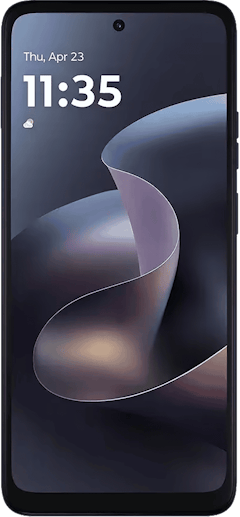
Moto G 5G (2026) 128GB
- 6.7 inch display
- Rear Cameras: 50MP, 2MP
- Front Camera: 32MP
Galaxy A26 5G
- 6.7 inch display
- Rear Cameras: 50MP, 8MP, 2MP
- Front Camera: 13MP

Galaxy A27 5G 128GB
- 6.7 inch display
- Rear Cameras: 50MP, 5MP, 2MP
- Front Camera: 12MP

Galaxy A37 5G 128GB
- 6.7 inch display
- Rear Cameras: 50MP, 8MP, 5MP
- Front Camera: 12MP

Edge (2026) 128GB
- 6.3 inch display
- Rear Cameras: 50MP, 50MP, 10MP
- Front Camera: 50MP

Moto G Stylus 5G (2026) 128GB
- 6.7 inch display
- Rear Cameras: 50MP, 13MP
- Front Camera: 32MP
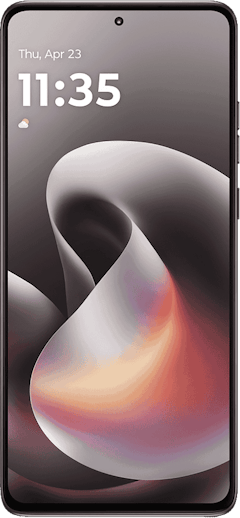
Galaxy A57 5G 128GB
- 6.7 inch display
- Rear Cameras: 50MP, 12MP, 5MP
- Front Camera: 12MP

Pixel 10a 128GB
- 6.3 inch display
- Rear Cameras: 48MP, 13MP
- Front Camera: 13MP

Pixel 10 128GB
- 6.3 inch display
- Rear Cameras: 48MP, 10.8MP, 13MP
- Front Camera: 10.5MP

Pixel 11 256GB
- 6.3 inch display
- Rear Cameras: 48MP, 13MP, 10.8MP
- Front Camera: 10.5MP


Android call recording: FAQ
Can I record phone calls on an Android phone?
You can record calls on most Android phones, but the method depends on your device. Recent Google Pixel and Samsung Galaxy phones include a recorder in the Phone app, while other Android phones need a third-party app, Google Voice, or an external recording device. Availability also varies by region because of local recording laws.
Can I record Android calls automatically?
Automatic call recording is available on some Android phones but not others. Google Pixel phones can automatically record or take Call Notes for calls from non-contacts or specific numbers. Samsung's U.S. Call Transcripts feature is manual only, so you'll need to start each recording yourself, though Galaxy phones in some other regions do support auto-recording.
Is recording calls on Android free?
Recording calls on Android is free if your phone has a native recorder. The built-in features on Pixel and Samsung phones cost nothing, and Google Voice is a free option for incoming calls on any Android device. Third-party apps like TapeACall typically require a subscription, and some features, such as advanced transcription, require payment.
Why doesn't my Android phone have a call recording option?
Your phone may be missing call recording because of its manufacturer, region, or software version. Google restricted call audio access starting with Android 9 and tightened Play Store policies for recorder apps in 2022. Recording now depends largely on what your phone maker builds into the dialer. Older phones, phones sold in restrictive regions, and phones with Wi-Fi Calling enabled may not show the option at all.
Does the other person know when I record a call on Android?
Most of the time, yes, native recording features from Google and Samsung play an audible announcement to everyone on the call before recording starts, and there's no way to turn it off. This keeps the features compliant with all-party consent laws in states like California and Florida.
Scott Houghton
Jr. Staff Writer

Thousands of cell phone plans unpacked. All the facts. No surprises.


