This year, I wanted to read over 150 books...but I fell short and basically fizzled out by October. If you're like most people, your own resolution list looks great on January 1 and a little dusty by spring.
A habit tracker app gives your resolution a daily check-in, a streak to protect, and a clear picture of how your week went. The best apps for self-improvement won't do the work for you, but they make it a lot harder to quietly forget about a goal. Most habit tracking apps also send reminders, put your progress on your home screen with widgets, and let you plan days off (so one missed workout doesn't end the whole resolution).
I tested five habit tracker apps on my Samsung Galaxy S24 FE and iPhone 11, from a pixel-art role-playing game to simple daily checklists. Many of the habit tracker rankings you'll find online are written by companies that make their own habit tracker. WhistleOut doesn't make one, so no app on this list gets a head start.
Quick look at the best habit tracker apps
| App | Best for | Price |
|---|---|---|
| HelloHabit | Tracking habits with a built-in journal | Free, premium subscription available |
| Habitica | Turning habits into a video game | Free, premium subscription available |
| Habit Radar | A simple daily habit checklist | Free, premium subscription available |
| Everyday | A colorful, minimalist habit tracker | Free, premium subscription available |
| HabitNow | Quitting bad habits | Free, one-time premium upgrade available |
What should you look for in a habit tracker app?
You should look for a habit tracker app that fits your schedule, handles a missed day gracefully, and works on the phone you already use. Most of these apps look alike in the App Store, so these are the details that separate a tracker you'll keep from one you'll delete in February.
- Flexible schedules. Not every habit happens daily, so look for apps that let you pick specific weekdays or a number of times per week.
- A plan for missed days. Some apps reset your streak to zero, while others let you skip a day or pause everything for a vacation.
- Widgets and watch support. Home screen widgets and smartwatch apps let you check off a habit in a second without opening the app.
- Health app connections. A few apps complete fitness habits on their own when Apple Health or Google's health apps record your steps or workouts.
- Free plan limits. Many free versions cap how many habits you can track, which is plenty for one or two resolutions.
The best habit tracker apps
HelloHabit: The most complete habit tracker, with a journal for every habit
5 out of 5 overall
- People who want a habit tracker, calendar, and journal in one app.
HelloHabit is the most complete habit tracker I tested.
HelloHabit is my top pick because it puts your habits, a calendar, a timer, and a journal for every habit in one app.
HelloHabit is a habit tracker and daily planner that combines your habits, a calendar, a timer, and a journal in one app. You can track habits you want to build, like reading or drinking water, and habits you want to quit, with a quit tracker that counts the time since you stopped. Fitness habits can sync automatically from Apple Health, and each habit gets its own reminder. The free version covers up to five active habits, one reminder per habit, and three journal notes per day.
I really like the way it includes a journal section for taking notes. You've got your calendar and your habits, which you can sort by day in a list style, or you can pull up a habit report to see how many days of the month you completed your habit. You can even look back at the full year, and the tabs at the bottom of the screen are really clear.
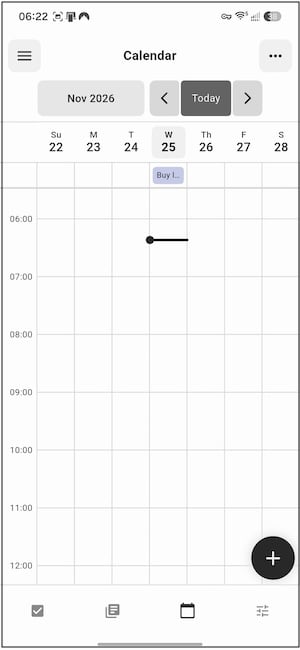
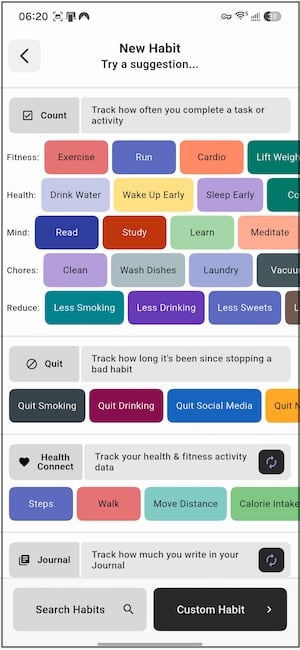
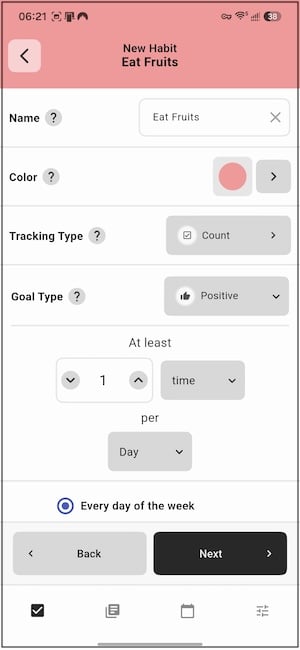
Image: Jessica Santero | WhistleOut
There's also a timer if you'd like to use a stopwatch or a counter. In the journal section, you can take notes directly on your habits. My habit was to eat three pieces of fruit a day, so if I skipped a piece of fruit because of an event or something else I had going on, I could easily take note of that.
HelloHabit is free for iPhone and Android. A premium subscription is available that unlocks unlimited habits, reminders, and journal notes.
Habitica: A cute pixel-art game that rewards you for every habit
5 out of 5 overall
- Gamers who want points, gold, and items for sticking to their habits.
My second favorite is Habitica, because it's so cute and fun.
Habitica turns habit tracking into a cute, easy-to-use video game, with dailies that anchor you to your goals every day.
Habitica is a free, open-source app that turns your habits and to-do list into a retro role-playing game. You create a pixel-art character and sort your goals into three types: habits you want to build or break, dailies you need to complete each day, and one-off to-dos. Finishing them earns experience points and gold that you can spend on gear and rewards, while skipping dailies costs your character health. You can also join a party with friends to fight bosses on quests, and Habitica works on iPhone, Android, and the web.
The little pixel characters are adorable. It's really easy to use and includes basically all of the main features you'd want in a habit tracking app. You can add, edit, and delete habits, and you can also set up bad habits you'd like to quit. You have a little life bar and experience points, just like a video game, and you earn gold, points, and different items.
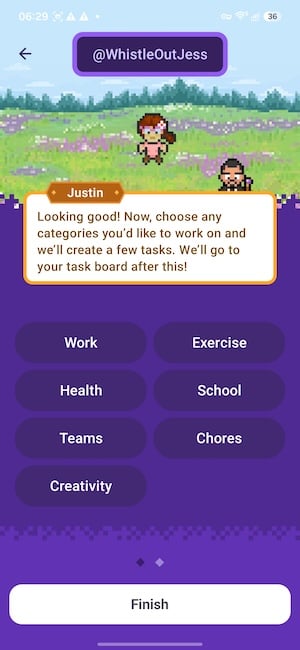
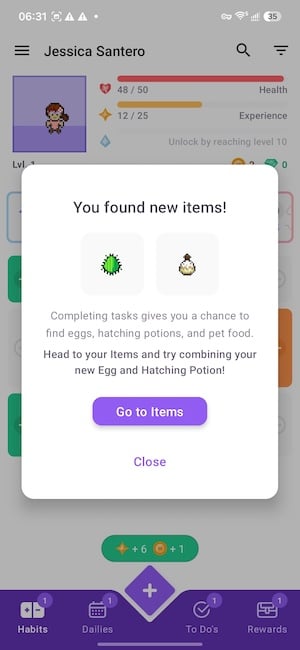
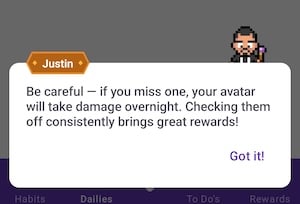
Image: Jessica Santero | WhistleOut
There are dailies you have to do, which are objectives you set for each day. I think that's a better way to anchor yourself if you're really trying to break a habit or create a new one. Habitica also includes a to-do list, and you get more points for those tasks too. Then you can head over to your bag to see all your rewards and the cute little pixel items, and it looks like there are holiday items you can snag as well.
Habitica is free for iPhone and Android, with ads on Android. A premium subscription is available that adds cosmetic extras and perks, but you don't need one to use every habit tracking feature.
Habit Radar: A simple tick-it-off habit checklist with a streak counter
4.5 out of 5 overall
- People who want to tick off each habit as soon as they finish it.
My next favorite is Habit Radar, and it's one I could see myself using.
Habit Radar's simple tick-it-off style gives your habits a home, so you don't have to write them on sticky notes or to-do lists.
Habit Radar is a streaks habit tracker app built around one quick tick for each habit you finish. Your habits sit in a simple daily list, and a streak counter tracks how many days in a row you've kept each one going. Your progress also shows up as colorful grids, all the way up to a full-year view. You can add a home screen widget to keep your habits in sight, and Habit Radar is available on iPhone and Android.
I really like how simple it is. I like to have a journal, I have a physical agenda, and I like using Google Calendar. But when it comes to habits, I always feel bad writing them on sticky notes or to-do lists.
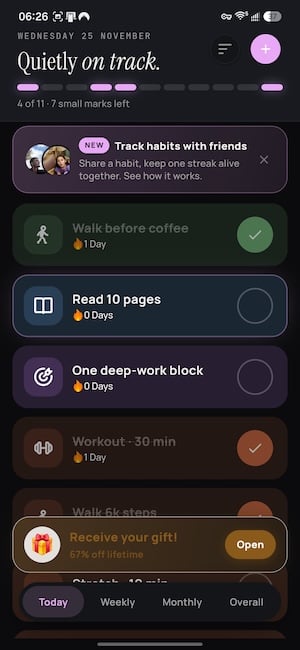
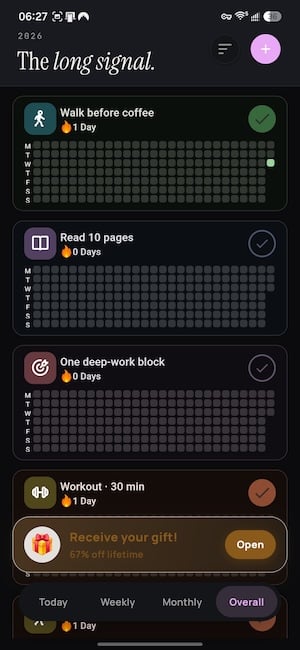
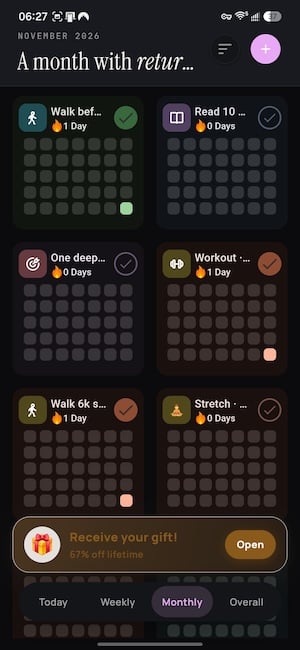
Image: Jessica Santero | WhistleOut
So I really love the simple style of this app, where you tick off a habit as soon as you do it during the day. You can see your progress by day, week, month, or even overall.
Habit Radar is free for iPhone and Android, and a premium subscription is available.
Everyday: A colorful daily habit tracker with a clean white design
4.5 out of 5 overall
- People who want a simple, colorful daily habit tracker.
Everyday is a similar style to Habit Radar, but it's a bit simpler.
Everyday gives you the same daily tick as Habit Radar in a simpler, more colorful package.
Everyday is a daily habit tracker app that fills in a colored square each day you complete a habit. The more days you check off, the more color fills your screen. You choose a color for each habit, and a daily counter shows how many habits you've completed that day, along with total counts and completion rates for each habit. Everyday also sends reminders and syncs your habits across iPhone, iPad, Mac, Apple Watch, Android, and the web.
You get the same daily tick, or daily completion, you're looking for. It has a white interface and you pick your colors, so it's a bit more rainbow.
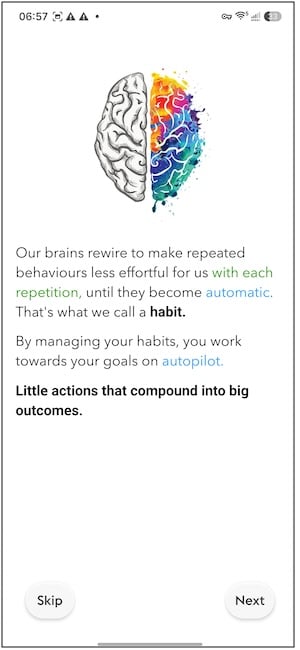
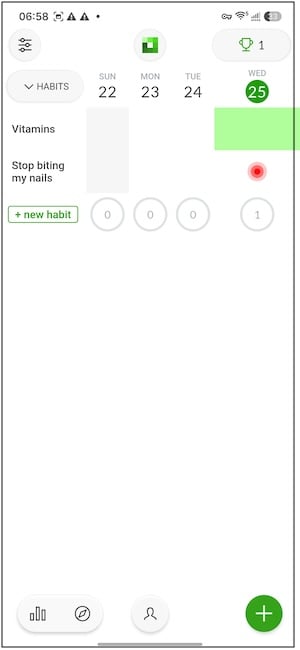
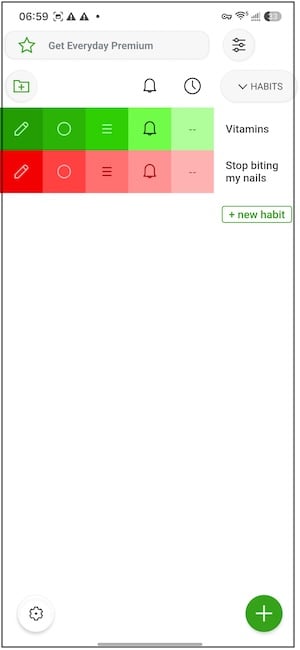
Image: Jessica Santero | WhistleOut
The trade-off is that the interface isn't quite as sophisticated as Habit Radar's.
Everyday is free for iPhone and Android, and a premium subscription is available.
HabitNow: The easiest habit tracker for quitting bad habits
4.5 out of 5 overall
- People who want to quit a bad habit.
HabitNow is still a solid pick, especially if you want to quit a bad habit.
HabitNow packs your habits, tasks, and a timer into one app, and it's the best pick on this list for quitting a bad habit.
HabitNow combines a habit tracker, a to-do list, a calendar, and a timer in one app. You can sort habits into categories, schedule them for specific days, add one-off tasks next to your daily habits, and set reminders. Your progress shows up in stats and charts, and the free version lets you track up to seven habits.
You have your habits, your categories, your tasks, and a timer.
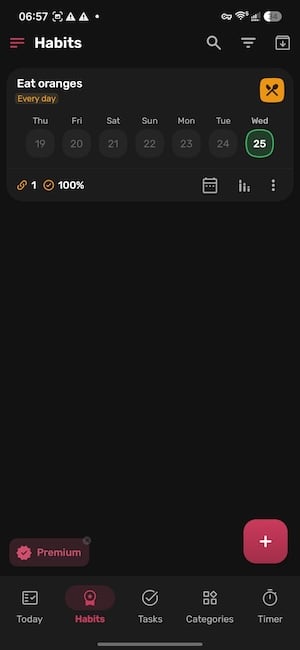
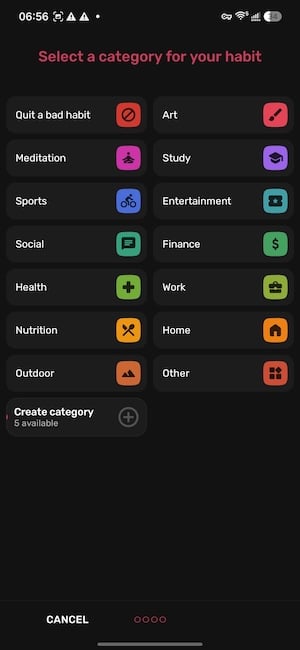
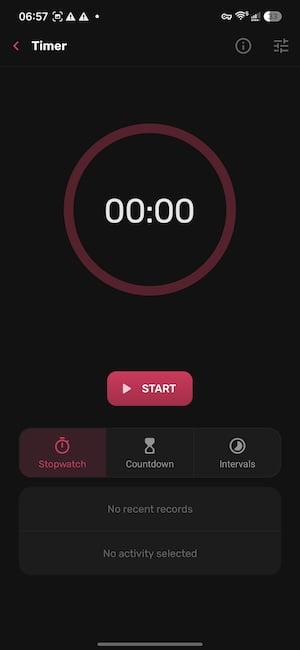
Image: Jessica Santero | WhistleOut
I'd say HabitNow is more focused on quitting bad habits, since it's a lot easier to add a bad habit you want to quit in HabitNow than in the other apps.
HabitNow is free for iPhone and Android. A one-time premium upgrade is available, with no subscription.
What happens when you miss a day?
What happens when you miss a day depends on the app, and it's the moment that decides whether a lot of resolutions survive January. Before you commit to a habit tracker, check how it treats an off day.
Habitica is the strictest app I tested, since your character loses health when you skip your dailies. If you know a rough week is coming, turn on Pause Damage in Settings so your character doesn't pay the price. HelloHabit takes a gentler approach, letting you write a journal note about why you missed a habit so the gap on your calendar has context.
How do you set up a New Year's resolution in a habit tracker app?
You set up a New Year's resolution in a habit tracker app by turning one big goal into a small action you can check off. A resolution like "read more" is hard to track, but "read 20 pages a day" fits in a single tap.
- Pick one resolution to start, and add a second one only after the first feels automatic.
- Schedule fewer days than feels ambitious, like three workouts a week instead of seven.
- Set a reminder for a time of day you're usually free.
- Decide how you'll handle a missed day before it happens, whether that's a skip, a planned rest day, or a vacation pause.
- Add the app's widget to your home screen so your progress is the first thing you see.
If your resolution is about your mood or stress levels, your iPhone can help too. Here's how to set State of Mind reminders on iPhone so the Health app nudges you to log how you feel. For more support, check out our picks for the best mental health apps, or read my Finch review if you want a gentler, self-care approach to building habits.
How I tested the best habit tracker apps
[CONFIRM: edit these bullets to match what you did during testing.]
I tested five habit tracker apps on my Samsung Galaxy S24 FE and iPhone 11. The features and scenarios I tested included the following:
- I set up real habits, like eating three pieces of fruit a day.
- I added, edited, and deleted habits in each app.
- I checked off habits during the day and reviewed my progress by day, week, and month.
- I tried extra tools like timers, journals, and to-do lists.
- I checked what the free version includes before any paywall.
Why you can trust WhistleOut

15+
years of mobile industry experience

900+
published wireless guides

35+
firsthand carrier reviews
We've been around since the birth of the iPhone. Along the way, we've learned how to spot the best deals for your wallet (and your sanity). We spend our days researching informative guides and writing insightful reviews on every kind of wireless plan, distinguishing what matters from what doesn't. We played around with these plans before recommending them, ensuring they're worth your hard-earned money.
Want to know more? Check out how we review every cell phone plan we rank.
Habit tracker apps: FAQ
Is there a free habit tracker app?
Yes, there are several free habit tracker apps. Habitica is free on iPhone, Android, and the web, and you don't need a subscription to use its habit tracking features. HelloHabit lets you track five habits for free, and HabitNow lets you track up to seven habits for free.
Can a habit tracker app help me keep my New Year's resolutions?
Yes, a habit tracker app can help you keep your New Year's resolutions by breaking a big goal into small daily check-ins. Reminders keep the goal on your radar, and streaks and charts show your progress over time. Pick an app that fits how you handle a missed day so one slip doesn't end your resolution.
Can I track habits with friends?
Yes, you can track habits with friends in Habitica. You can join a party with friends to fight bosses on quests, and when one person skips their dailies, the whole party takes damage.
What are the best apps for self-improvement?
The best apps for self-improvement depend on your goal. Habit trackers like HelloHabit and Habit Radar help you build daily routines, while Finch turns self-care into a daily habit with a virtual pet. For stress and emotional health, check out the best mental health apps. If you want to learn something new, Kinnu is my favorite free learning app.
Jessica Santero
Staff Writer

Thousands of cell phone plans unpacked. All the facts. No surprises.

Related Articles


Related Topics
App Roundups FeaturedPopular Topics
Featured App Reviews iOS News Coverage Device Reviews Device Explainers App Roundups T-Mobile Carrier Explainers