APN (Access Point Name) settings allow your phone to connect to your carrier’s network for internet access, messaging, and mobile data. In more technical terms, APN settings are the network configuration parameters for your device to communicate with your provider’s cellular data network.
While most modern smartphones automatically configure APN details when you insert a SIM card or activate an eSIM, you might need to manually adjust them if you’re having connectivity problems or recently switched to Metro by T-Mobile and brought your own device. Without the correct APN settings, your phone won’t be able to access mobile data or browse the internet.
Below, you’ll find device-specific steps to check or update your Metro by T-Mobile APN settings.
LIMITED TIME: Get any Mint Mobile plan for just $15 per month

Mint's Holiday Promo is here, and for a limited time, new customers and switchers can get any Mint plan for just $15 per month, including Unlimited. The deal applies to 3-month, 6-month, and 12-month plans, and Mint's Unlimited plan includes unlimited talk, text, and data with no hard caps. Paying $15 per month for the 12-month Unlimited plan works out to 50% off its normal price.
In our firsthand testing, we found Mint's unlimited plan to be one of the best options on the market, and two of our WhistleOut staffers switched to Mint permanently.
As a bonus, use the code 15NOW to get another $15 off any 3-month plan. Combining both offers brings the 3-month Unlimited plan down to just $30 total ($10/month).
How to view and edit Metro by T-Mobile's APN settings on Android
Note: These instructions are based on a Pixel 6 running Android 15 or later. Steps may vary for your particular device or if you’re using an older version of the Android operating system.
Follow these steps to view or modify your APN settings on an Android device:
- Open Settings on your phone and tap Network and Internet or Connections.
- Select Mobile Networks or SIMs.
- If your phone shows SIMs, tap and select your SIM two times. Otherwise, skip down to the next step.
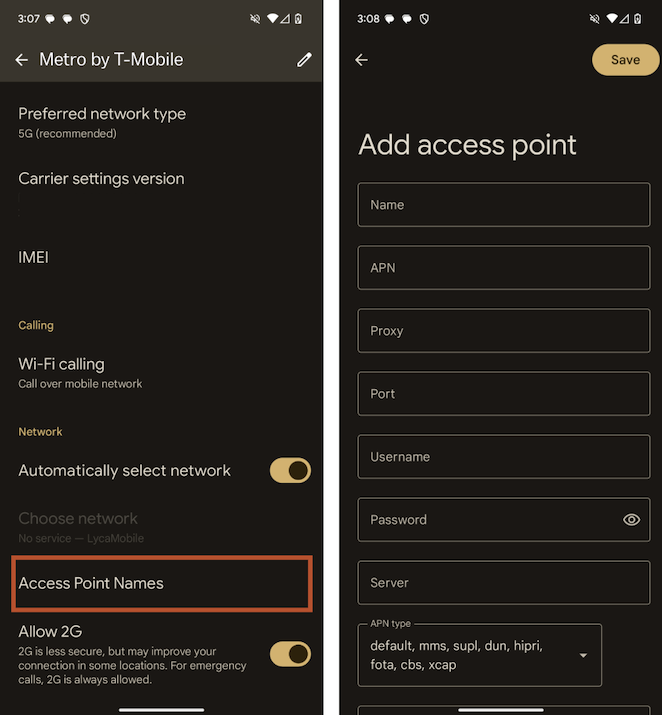
- Tap Access Point Names to view your current Metro by T-Mobile APN settings:
- To modify your APN settings, tap each field and enter Metro by T-Mobile's APN details:
- Restart your phone.
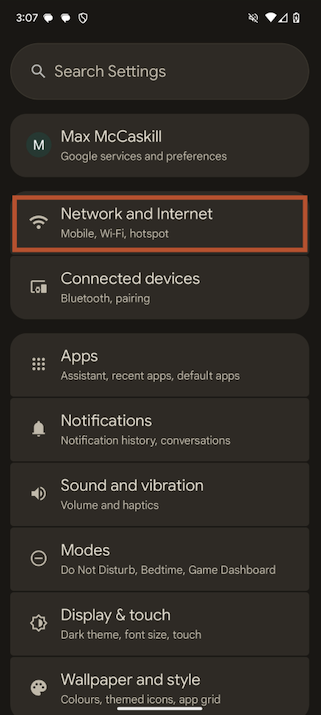
Image: Max McCaskill | WhistleOut
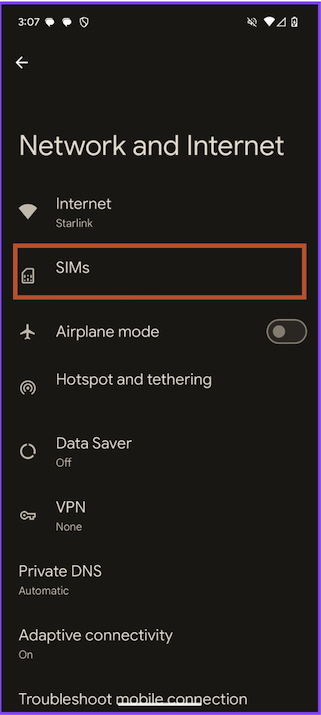
Image: Max McCaskill | WhistleOut
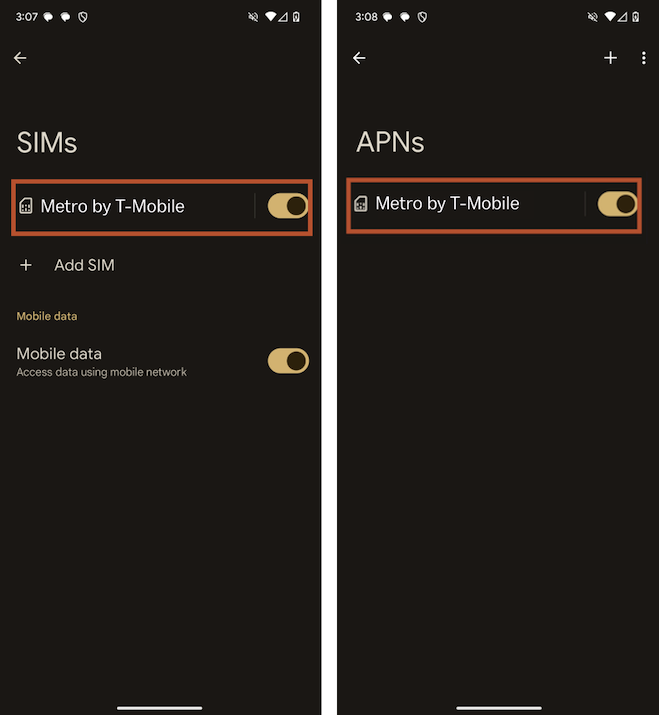
Images: Max McCaskill | WhistleOut
Images: Max McCaskill | WhistleOut
Metro by T-Mobile APN settings
| APN name | Metro |
| APN | fast.metropcs.com |
| MMSC (MMS Center) | http://metropcs.mmsmvno.com/mms/wapenc |
| MCC (Mobile Country Code) | 310 |
| MNC (Mobile Network Code) | 260 |
| APN protocol | IPv4/IPv6 |
| APN roaming protocol | IPv4/IPv6 |
| Proxy | Leave blank |
| Port | Leave blank |
| Username | Leave blank |
| Password | Leave blank |
| Server | Leave blank |
| MMS proxy | Leave blank |
| MMS Port | 8080 |
| Authentication type | Leave blank |
| APN type | default,mms,supl,fota,xcap |
| MVNO type | Leave blank |
If your SIM setup is successful, you’ll see Metro’s name at the top of your screen. However, if these steps don’t work for manual changes to your phone’s APN settings, reach out to Metro’s customer service for further help.
Save with T-Mobile’s 5G Home Internet
Bundle your Metro phone plan (also called a voice line) with any T-Mobile 5G home internet plan and get a $15/month discount. That means you can get T-Mobile’s home internet for as little as $35/month.
With the largest 5G network nationwide, T-Mobile provides extensive coverage via its reliable cell network and blazing-fast internet connectivity. Choose from T-Mobile’s multiple plans for speedy wireless internet at home:- Rely Internet is $35/month* and provides unlimited internet at speeds ranging from 133-415Mbps, a little slower than you may be used to but fast enough for an average user.
- Amplified Internet offers faster speeds for only $45/month*, ranging from 170-498Mbps.
- All-In Internet provides the same speeds as Amplified but includes more perks. At $55/month*, you also get a Paramount+ and Hulu subscription to boot.
Check out our guide to good internet speed if you’re unsure what speed your household should get. Keep in mind that the more users and devices at home, the faster internet speed you’ll need.






*Pricing reflects discount for bundling.
How to view and edit Metro by T-Mobile's APN settings on iPhone
Note: These instructions are based on the iPhone 13 running iOS version 18 and above. Steps may vary for your particular device, iOS version, or carrier restrictions.
Follow these steps to view or modify your APN settings on an iPhone:
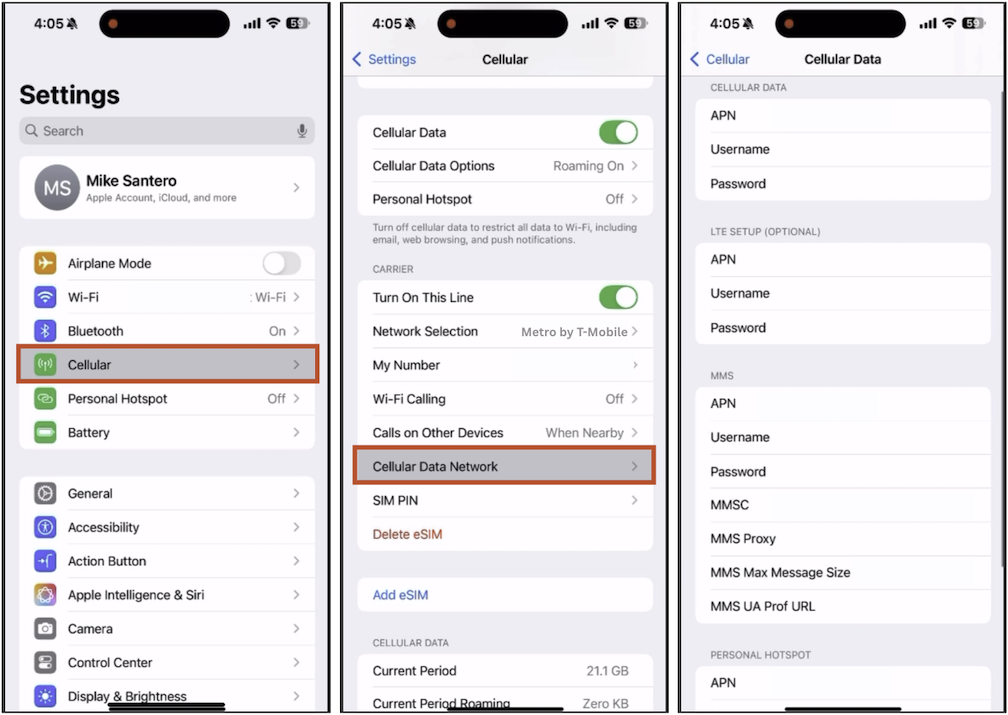
- In your phone’s Settings, tap Cellular or Mobile Service.
- Depending on your iPhone, tap Cellular Data, Cellular Data Network, or Mobile Data Network to view your APN settings.
- If your APN settings aren’t already preinstalled, enter Metro by T-Mobile’s APN settings:
- Restart your phone.
Images: Michael Santero | WhistleOut
Metro by T-Mobile APN settings
| APN name | Metro |
| APN | fast.metrobyt-mobile.com |
| MMSC (MMS Center) | http://metropcs.mmsmvno.com/mms/wapenc |
| MCC (Mobile Country Code) | 310 |
| MNC (Mobile Network Code) | 260 |
| APN protocol | IPv4/IPv6 |
| APN roaming protocol | IPv4/IPv6 |
| Proxy | Leave blank |
| Port | Leave blank |
| Username | Leave blank |
| Password | Leave blank |
| Server | Leave blank |
| MMS proxy | Leave blank |
| MMS Port | 8080 |
| Authentication type | Leave blank |
| APN type | default,mms,supl,fota,xcap |
| MVNO type | Leave blank |
If your SIM setup is successful, you’ll see Metro’s name at the top of your device’s home screen. However, if these steps don’t work for manual changes to your phone’s APN settings, contact Metro’s customer support for further help.
Save on data with Metro by T-Mobile
Metro by T-Mobile offers affordable phone plans on the largest 5G network in the nation. You can choose from different data plan options to better suit your data needs. Downgrade to a smaller data allowance, like 10GB to save on your monthly bill, or upgrade for unlimited data if you find you frequently run out before the end of the month.
Check out Metro by T-Mobile’s best phone plans and its range of data amounts.
When should you update your APN settings?
You should update your APN settings if you’re having trouble accessing the internet on your phone or have recently switched carriers and brought your unlocked phone with you. If you can’t access your mobile data after correctly activating your Metro by T-Mobile plan, you may need to change your APN settings.
While most smartphones set up APNs automatically, you may need to enter them manually if your data isn’t working despite having an active plan. However, before you start adjusting your phone’s technical settings, check out our data connection troubleshooting guide to make sure your mobile data is properly configured.
Many carriers, including Metro, require specific APN settings for their network to work correctly. Misconfigured APN settings can cause mobile data issues or extremely slow speeds. Always use the exact APN details provided by Metro, and restart your device after applying changes.
More offers from Metro by T-Mobile:
- Metro by T-Mobile cell phone deals
- Metro by T-Mobile cell phone plans
- Metro by T-Mobile phones
- Metro by T-Mobile review
- Best cell phone deals
Check out Metro by T-Mobile's cell phone plans:
Angelo Ilumba
Senior Writer

Thousands of cell phone plans unpacked. All the facts. No surprises.

Related Articles


Related Topics
Carrier Explainers Metro by T-MobilePopular Topics
Featured App Reviews iOS News Coverage Device Reviews Device Explainers Carrier Explainers App Roundups T-Mobile