Storm Radar is The Weather Channel's free radar app, and it brings a simple storm map, spoken directions, and route alerts to your CarPlay screen. It earned a spot in our roundup of the best weather apps for CarPlay as the easiest one to pick up and use.
Some drivers want a dozen map layers, and some just want to know if it's raining at the next exit. I tested Storm Radar on my iPhone 11, and WhistleOut senior staff writer Max McCaskill drove with it on CarPlay in his Ford Bronco. It was the only app of the three that we could use on the dashboard without a learning curve.
Live alerts need live data
Storm Radar refreshes its alerts and reroutes you over your cellular connection for the entire drive. An unlimited plan means a long stretch of highway won't push you past a data cap halfway to your destination.
Compare the best unlimited data plans available right now:



- Free to download, with an optional Premium upgrade
- Premium adds high-resolution radar and more map layers
- Requires the latest version of iOS to run on CarPlay
What is Storm Radar?
Storm Radar is a weather radar app from The Weather Channel that added CarPlay support at the end of summer 2026. On your dashboard, it previews the weather along your route, reads out turn-by-turn directions with automatic rerouting, and sends weather alerts that refresh as you drive.
Not sure how to update your apps?
Keeping your apps up to date ensures you're always getting the latest features, bug fixes, and security improvements. Learn how to update the apps on your iPhone and your Android. It takes less time than you think.
Three filters are plenty if you use one at a time
You only get three weather filters on the CarPlay screen, and there are no menus to dig through. If you just want to see where the rain is, Storm Radar is a reliable, no-fuss storm mapper.
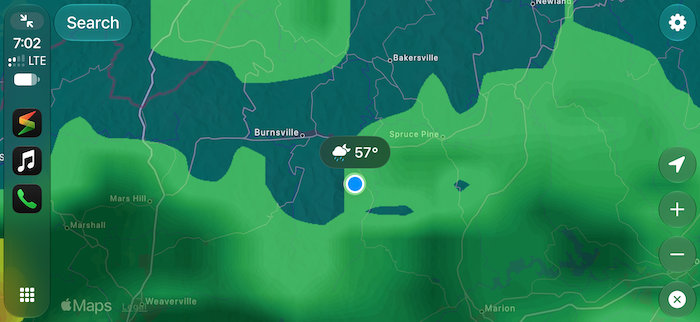
Image: Max McCaskill | WhistleOut
The map gets crowded fast when you stack layers. When Max turned on all three filters at once, the map became very hard to read, while a single filter stayed clear at a glance.
Spoken directions keep your eyes up
Storm Radar reads your turns out loud and reroutes automatically, so you can follow the drive without staring at the map. The alerts update as conditions change ahead, which keeps you from relying on a radar snapshot you checked before leaving.
Update your iPhone before you connect
Storm Radar requires the latest version of iOS to run on CarPlay. An older iPhone that can't install the newest update won't show the app on your dashboard at all, so check your software before a big trip.
Is Storm Radar worth downloading?
Storm Radar is the right pick for commuters who want to see the rain, hear their turns, and get on with the drive. The free version covers all of that without a learning curve. Drivers who want hurricane tracking and a long list of layers should try MyRadar, which adds road conditions to every turn through its RouteCast feature. Current Premium pricing is listed on the App Store page.
 How I tested Storm Radar
- Drove with it on CarPlay in Max McCaskill's Ford Bronco, while I tested the phone app on my iPhone 11.
- Checked map readability by turning on each filter separately and then all three together.
- Tested the route features including route previews, spoken directions, and weather alerts during a drive.
Storm Radar: FAQ
Is Storm Radar free?
Yes, Storm Radar is free to download and use on CarPlay. Premium adds high-resolution radar and more map layers.
Does Storm Radar work with CarPlay?
Yes, Storm Radar works with CarPlay. Your iPhone needs the latest version of iOS to run it on your dashboard.
Who makes Storm Radar?
Storm Radar is made by The Weather Channel.
Does Storm Radar give directions on CarPlay?
Yes, Storm Radar gives spoken turn-by-turn directions on CarPlay and reroutes you automatically. It also sends weather alerts along your route as you drive.
Why you can trust WhistleOut

15+
years of mobile industry experience

900+
published wireless guides

35+
firsthand carrier reviews
We've been around since the birth of the iPhone. Along the way, we've learned how to spot the best deals for your wallet (and your sanity). We spend our days researching informative guides and writing insightful reviews on every kind of wireless plan, distinguishing what matters from what doesn't. We played around with these plans before recommending them, ensuring they're worth your hard-earned money.
Want to know more? Check out how we review every cell phone plan we rank.
Jessica Santero
Staff Writer

Thousands of cell phone plans unpacked. All the facts. No surprises.

Related Articles


Related Topics
App Reviews FeaturedPopular Topics
Featured App Reviews iOS News Coverage Device Reviews Device Explainers Carrier Explainers App Roundups T-Mobile