
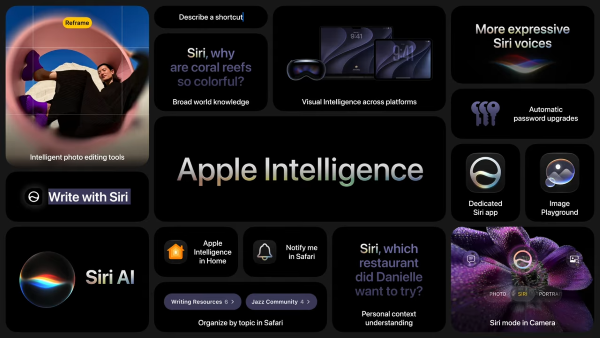
Image: Apple WWDC 2026
Apple officially announced at WWDC 2026 that iOS 27 is coming this fall. After the sweeping redesign that came with iOS 26, this year's update is more focused.
iOS 27 finally delivers the AI-enabled Siri that Apple promised back in 2024 with iOS 18, brings new parental control tools, and continues to push Apple Intelligence deeper into the apps you use every day. There are also some much-needed customization options and refinements to the Liquid Glass interface design.
After digging through the details from Apple's latest announcements, here are the new iOS 27 features we're most excited about. Plus, we'll cover when iOS 27 is expected to be released, which iPhones will be compatible, and how to update to the latest iOS when the time comes.
Best new iOS 27 features
Every year, Apple releases a new iOS update for iPhones. Some—like last year's iOS 26—are massive updates designed to completely change how you use your iPhone. This year's iOS 27 is a smaller, quality-of-life update designed to improve the overall system and to make your device easier to use.
Despite being a smaller update, here are the five newest iOS 27 features that excited our team and will likely have the biggest impact on your device.
1. Siri AI: Apple Intelligence is finally coming to Siri
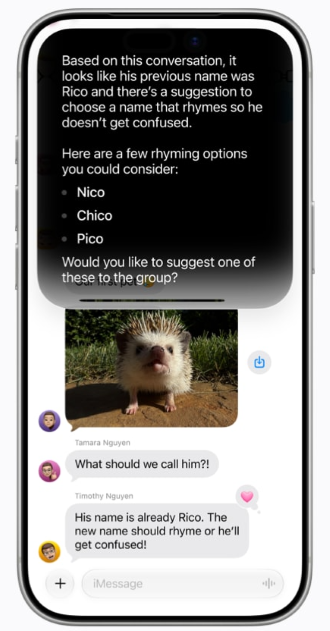
Image: Apple
Apple first teased an AI-enabled Siri in 2024 with iOS 18, but it never actually released the feature. iOS 27 is finally delivering on that promise.
Siri AI is a completely rebuilt digital assistant, powered by the next generation of Apple Intelligence. The major improvements are personal context understanding, broad world knowledge, and onscreen awareness.
This means Siri can now do things like pull a restaurant recommendation from a text message, surface a hotel confirmation number buried in your email, or answer questions about whatever is on your screen at the moment. It does this in a typed or spoken back-and-forth conversation.
There's also a brand-new dedicated Siri app that syncs your conversation history across all your Apple devices via iCloud, so you can pick up a conversation on iPhone that you started on your Mac.
2. Parental Controls: New digital child safety tools for families
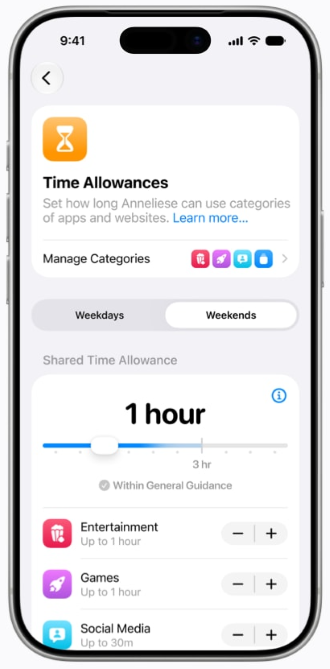
Image: Apple
Apple is updating its child safety features with iOS 27. Placing their kids on an Apple Child Account, parents get a layered set of tools organized around four key areas:
- What kids can see: Parents choose exactly which apps are available on a child's device. There are also new features requiring children to get parental approval before accessing any new website in Safari or downloading new apps.
- Who they can talk to: Parents manage which contacts children can reach over Messages, FaceTime, and Phone, and can require approval before kids add anyone new. Communication Safety, which already blurred nudity by default for users under 18, now also blocks violent or graphic content in shared images and videos.
- When they can access apps: Time Allowances let parents set limits by app category—Entertainment, Games, and Social Media—with guidance based on a child's age. Parents can also create daily schedules to restrict access during times like school hours.
- How parents stay informed: Screen Time has been redesigned with a dashboard showing daily average usage and the most-used apps. Parents can pause device access with a single tap or extend access when a child needs a few extra minutes to finish something.
Note that you'll also have to set up an Apple Family Sharing account to access these tools, so both you and your child will need iPhones to use them.
Not ready to update just yet? Check out the best safe apps for kids and teens in the meantime.
3. Apple Intelligence photo editing: Reframe photos and generate new backgrounds
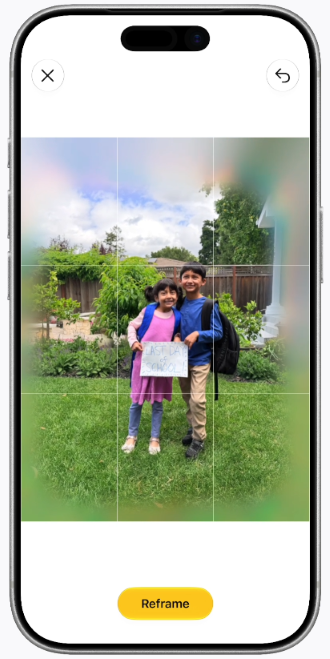
Image: Apple
iOS 27 brings three meaningful upgrades to the editing features of the Photos app:
- Clean Up: The existing Clean Up tool received a major upgrade. Removing unwanted objects from photos now produces better-quality results.
- Extend: A new Extend tool lets users expand the edges of an image to give subjects more breathing room, and Apple Intelligence fills in whatever's missing using image generation.
- Reframe: Spatial Reframing lets users adjust the composition of a photo by touching and dragging to shift the perspective in real time. It's designed to feel like a photographer physically repositioning the camera when taking the shot. New content is only generated where the perspective changed, keeping the rest of the image intact.
4. Other Apple Intelligence updates: AI improvements for Safari, Shortcuts, Passwords, and More
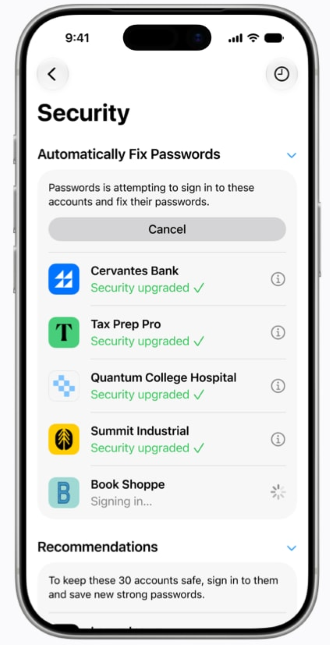
Image: Apple
Beyond Photos, iOS 27 pushes Apple Intelligence into several other corners of Apple's native apps. Many of these are agentic AI tools, meaning they can build systems that allow Apple Intelligence to run independently without additional user input. Here's a quick rundown of the most popular new features:
- Safari: Tabs can now be automatically organized into topics based on what you're browsing. A new Notify Me feature lets you ask Safari to monitor a webpage for changes and send a notification when it detects one. You can also create custom Safari extensions just by describing what you want.
- Shortcuts: A new Describe a Shortcut feature lets users build automatic tasks by describing what they want in plain language. Apple Intelligence assembles the required steps, and users can refine the result just by describing what to change.
- Image Playground: Apple's generative AI tool now supports photo-realistic image generation. Users can also modify images using natural language or by tapping and circling objects directly.
- Passwords: Apple Intelligence can now automatically fix weak or compromised passwords with a single tap, navigating through websites on your behalf to update your credentials.
- Home app: Certain smart home notifications are now classified as a single activity, reducing alert noise. HomeKit Secure Video cameras also gained generated video descriptions and searchable clip history, so you can find specific footage without scrubbing through hours of recordings.
- Call Context: When you call a business, the Phone app will automatically surface relevant information—like a confirmation number or reservation code—from other apps, without listening to your call.
5. Liquid Glass refinements: Interface customization and visual bug repair
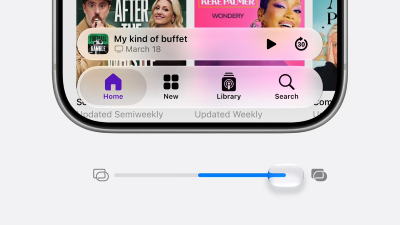
Image: Apple WWDC 2026
Liquid Glass was the defining visual change of iOS 26, but the reaction has been mixed. The translucent design was a unique new look, but some users struggled to read text with the clear backgrounds, and the system caused several visual bugs.
iOS 27 is finally addressing those complaints. Apple is introducing additional controls that let users dial back the intensity of the Liquid Glass effect, and is fixing the visual bugs that have accumulated since the initial iOS 26 launch.
What is iOS 27?
iOS 27 is Apple's next operating system for iPhones.
A smartphone's operating system (OS) is the software that runs the device. Apple iPhones use iOS, and most other smartphones run on Android. Each year, Apple releases a new iOS version to power its latest iPhone and deliver updates to past models.
The current version is iOS 26, which launched in 2025 with the iPhone 17 series. Following the new naming system it established last year, Apple is again naming its entire OS family after the coming year, when most of its features will be in effect. In addition to iOS 27, the new software lineup will also include:
- watchOS 27
- tvOS 27
- macOS 27
- visionOS 27
- iPadOS 27
When is the iOS 27 release date?
iOS 27 will be released in the fall of 2026. While Apple hasn't officially confirmed the date, we expect it to be released around September 15 based on previous release patterns.
Like most tech companies, Apple has an internal calendar for when it likes to release new devices and OS updates. Apple typically announces the newest iOS version at the World Wide Developers Conference (WWDC) in June. This year's WWDC keynote event and iOS 27 announcement were on June 8, so Apple has followed its typical calendar so far.
Apple likes to announce its new iPhones in early September, followed by a 10-day preorder period. The new iOS usually arrives roughly a week after the preorder period begins, just before the new devices are officially shipped. If Apple continues following its normal schedule, we expect the iPhone 18 Pro models and the highly anticipated iPhone Fold to be announced on September 8, putting the iOS 27 release date the following week, around September 15.
You can see the release dates of recent iOS versions below:
Recent iOS release dates
| iOS release dates | |
|---|---|
| iOS 27* | September 15, 2026* |
| iOS 26 | September 15, 2025 |
| iOS 18 | September 16, 2024 |
| iOS 17 | September 18, 2023 |
| iOS 16 | September 12, 2022 |
| iOS 15 | September 20, 2021 |
| iOS 14 | September 16, 2020 |
| iOS 13 | September 19, 2019 |
| iOS 12 | September 17, 2018 |
| iOS 11 | September 19, 2017 |
| iOS 10 | September 13, 2016 |
*Expected release date.
What iPhones will get iOS 27?
Apple announced that iOS 27 will cover the same devices as iOS 26. That includes the upcoming iPhone 18 lineup and all current models going back to the iPhone 11. That's a pleasant surprise, as iOS updates usually drop the oldest models from the previous generation.
Here's the full list of expected iOS 27-compatible iPhones:
Expected iOS 27-compatible iPhones
| iPhone 18, 18 Plus, 18 Pro, 18 Pro Max, iPhone Fold* |
| iPhone 17, 17e, 17 Plus, 17 Pro, 17 Pro Max, iPhone Air |
| iPhone 16, 16e, 16 Plus, 16 Pro, 16 Pro Max |
| iPhone 15, 15 Plus, 15 Pro, 15 Pro Max |
| iPhone 14, 14 Plus, 14 Pro, 14 Pro Max |
| iPhone 13, 13 mini, 13 Pro, 13 Pro Max |
| iPhone 12, 12 mini, 12 Pro, 12 Pro Max |
| iPhone 11, 11 Pro, 11 Pro Max |
| iPhone SE 2nd and 3rd gen |
*Expected 2026 models.
How to update to iOS 27?
iOS 27 isn't out yet, but when it is released, you can easily update to it by following the steps below. If you haven't updated your device in a while, these same instructions can help you update to iOS 26.
No matter what the current iOS version is, the best practice is to always keep your iOS updated to protect your data and keep your iPhone running smoothly.
Here's how to update to the latest version of iOS:
- Head to Settings > General > Software Update
- Choose Download and Install to obtain the most recent software release for your iOS device.
These upgrades are typically large, so we suggest downloading over Wi-Fi so you don't use up your mobile data.
You can also enable automatic iOS updates to ensure you're always running the latest software by:
- Navigating to Settings > General > Software Update
- Tapping Automatic Updates
- Toggling on Download iOS Updates and Install iOS Updates.
Max McCaskill
Sr. Staff Writer

Thousands of cell phone plans unpacked. All the facts. No surprises.

Related Articles


Related Topics
iOS FeaturedPopular Topics
Featured App Reviews iOS News Coverage Device Reviews Device Explainers Carrier Explainers App Roundups T-Mobile


Free iPhone 18 Pro, up to $1,200 off, with a trade-in in any condition or a line switch on Experience Beyond


.png?w=280&h=280&usm=20&usmrad=0.8&fit=crop "Best Cell Phone Deals for October 2026: Get the New iPhone 18 Pro for Free")



