
Video editing apps on a regular phone usually mean squinting at a tiny timeline while your thumb covers half the preview. CapCut Pad was built specifically for large-screen devices like Galaxy tablets and the Z Fold line, rather than being a stretched version of a phone app.
You can see how it stacks up in the best free apps for foldable phones.
- Free (premium subscriptions available)
- Available for iOS and Android
High-definition editing needs a plan that can keep up
Exporting and uploading edited video eats through data allowances fast, especially if you post directly from your phone. AT&T MVNO carriers offer the same network coverage for a fraction of the cost, so check out the most popular plans below:


What is CapCut Pad?
CapCut Pad is a dedicated version of the CapCut video editor redesigned specifically for large-screen devices, including the Z Fold line and Galaxy tablets. Instead of stretching the same interface used on a regular phone, the layout gives your timeline, media bin, and editing controls their own dedicated space on screen at the same time.
What you get in the free version
The free tier includes multi-layer and multi-track editing, keyframe animation, transitions, filters, automatic captions, and background removal. None of these tools require a subscription to unlock, which is unusual for an editing app this capable. I tested each feature directly on an unfolded screen and found the timeline easy to scrub through without the usual pinch-and-zoom gymnastics a regular phone requires.
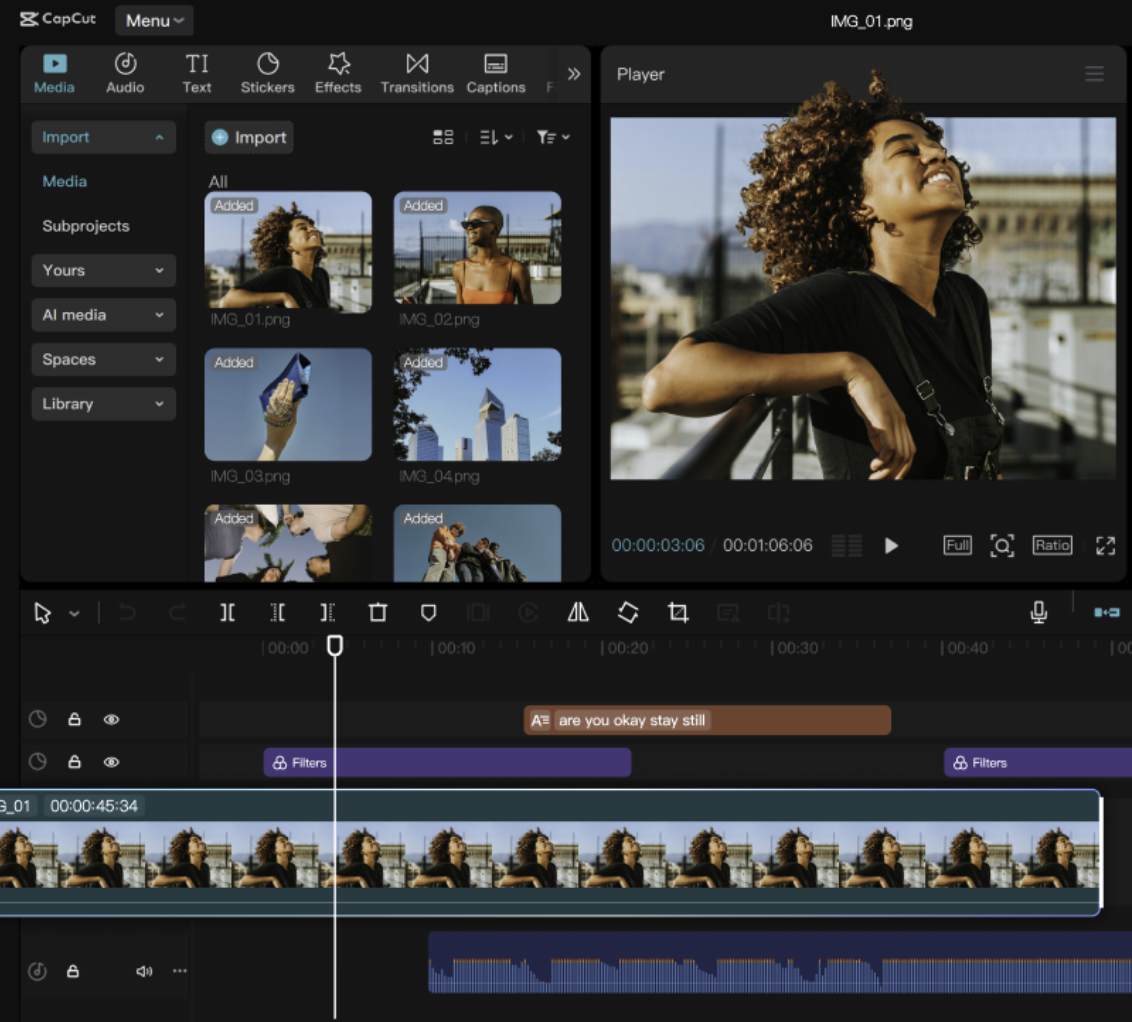
Image: Google Play Store
Not sure how to update your apps?
Keeping your apps up to date ensures you're always getting the latest features, bug fixes, and security improvements. Learn how to update the apps on your iPhone and your Android. It takes less time than you think.
The catch worth knowing about
I am not confident this free model will last, and that concern comes from experience. I used the original CapCut app regularly until its best features moved behind a paywall, and I eventually switched editors because of it. CapCut Pad may follow the same path eventually, so treat the current free access as a good deal while it lasts rather than a permanent guarantee.
Is CapCut Pad worth downloading?
Right now, yes, and it is one of the most capable free video editors available for a foldable phone. The layout genuinely takes advantage of the extra screen space instead of just filling it, and the included editing tools cover far more than a casual editor typically needs. Keep in mind the free tier could shrink in the future, so it is worth downloading and using while every feature remains unlocked.
 How I tested CapCut Pad
- Edited a short clip on an unfolded foldable screen
- Tested keyframe animation, transitions, and filters for responsiveness
- Checked automatic caption accuracy against spoken audio
- Used the background removal tool on multiple clips to evaluate consistency
- Compared the free feature set against the original CapCut app for reference
Why you can trust WhistleOut
.svg)
15+
years of mobile industry experience

900+
published wireless guides

35+
firsthand carrier reviews
We've been around since the birth of the iPhone. Along the way, we've learned how to spot the best deals for your wallet (and your sanity). We spend our days researching informative guides and writing insightful reviews on every kind of wireless plan, distinguishing what matters from what doesn't. We played around with these plans before recommending them, ensuring they're worth your hard-earned money.
Want to know more? Check out how we review every cell phone plan we rank.
CapCut Pad: FAQ
Is CapCut Pad free?
Yes, CapCut Pad is free to download and includes editing, keyframe animation, filters, captions, and background removal without a subscription. Premium subscriptions are available but not required for core editing.
Is CapCut Pad the same as regular CapCut?
No, CapCut Pad is a separate version built specifically for large screen devices like foldables and tablets, with a layout designed around the extra screen space rather than a stretched phone interface.
Does CapCut Pad work on a regular phone?
CapCut Pad is designed for phones with bigger screens, so it works best on foldables and tablets where its timeline and media bin layout have enough room to display properly.
Will CapCut Pad stay free?
There is no guarantee. The original CapCut app moved several of its best features behind a paywall over time, so CapCut Pad's current free access could change in the future.
Jessica Santero
Staff Writer

Thousands of cell phone plans unpacked. All the facts. No surprises.

Related Articles


Related Topics
App Reviews FeaturedPopular Topics
Featured App Reviews iOS News Coverage Device Reviews Device Explainers Carrier Explainers App Roundups T-Mobile


