
Data centers are all over the news right now, from towns fighting new construction over power bills and water use to AI companies spending billions to build bigger ones. It's easy to think of that as a problem for power companies and tech giants, but data centers also play a big role in how your phone works every day. They store your photos, run most of your apps, and handle a lot of the AI features phone makers love to advertise.
Your phone splits its work between its own processor and servers in data centers, and that split affects everything from which AI features work offline to how much of your personal data leaves your device. Once you know what runs where, the data center headlines are much easier to follow, and this guide covers what data centers actually do, how cloud and edge computing fit in, and what it all costs in energy and dollars.
What do data centers do?
A data center is a building filled with thousands of servers, storage drives, and networking equipment that run the software behind apps, websites, and other online services. For example, when you open Instagram or ask ChatGPT a question, your phone sends a request over Wi-Fi or cellular data to a server in a data center, and that server sends back your feed or your answer in a fraction of a second.
Data centers handle jobs that are too big for a phone to manage on its own, like syncing messages across all your devices, processing payments, and running large AI models. All of that hardware produces a lot of heat, so data centers use huge amounts of electricity to power both the servers and the cooling systems that keep them from overheating.
Do phones use data centers?
Phones use data centers all the time, and nearly every app on your home screen relies on one. Carriers like T-Mobile, Verizon, and AT&T also run the core of their networks from data centers, which route your calls, texts, and mobile data. Aside from a few offline tools like the calculator and flashlight, almost everything on your smartphone connects to a data center at some point, including the camera once it starts backing up photos.
Cloud vs. data center: What's the difference?
The cloud is a service, and a data center is the physical building where that service runs. When an app says your files are "in the cloud," those files are stored on servers in a data center that the app company either owns or rents from a cloud provider like Amazon Web Services (AWS), Microsoft Azure, or Google Cloud.
My friends who work in big tech like to joke that the cloud is just someone else's computer, and they're not wrong. Most app makers rent server space from a big cloud provider instead of building their own data centers, because renting is cheaper and faster than building from scratch. Renting also lets apps add more servers when traffic spikes, like when a new game launches or everyone opens a streaming app on a Sunday night, and then scale back down when things calm down.
As a result, many of the apps on your phone run in buildings owned by the same few companies. That's convenient for developers, and it's also why one bad day at a single cloud provider can take down a long list of apps at once.
What runs on your phone vs. in a data center
Your phone splits its work between its own processor and remote data centers, based on how much computing power a task needs, how quickly the result has to come back, and how private the data is. Quick, personal tasks like unlocking with your face, autocorrecting a text, or processing a photo right after you take it usually happen on the phone. Bigger jobs like syncing your photo library, streaming video, or answering a complex AI question usually happen in a data center.
Where common phone tasks run
| Task | Where it usually runs |
|---|---|
| Face unlock and fingerprint unlock | On your phone |
| Keyboard autocorrect and word predictions | On your phone |
| Camera processing (HDR, portrait mode) | On your phone |
| Galaxy AI text and call translation | On your phone |
| Photo backup (Google Photos, iCloud) | Data center |
| Music and video streaming | Data center |
| AI chatbots like ChatGPT and the Gemini app | Data center |
| Generative photo edits like Galaxy AI's Generative Edit | Data center |
| Navigation and live traffic | Both |
Each approach has trade-offs. Tasks that run on your phone are faster, keep your data on the device, and still work with no signal, but they're limited by what a phone chip and battery can handle. Tasks that run in a data center can use far more computing power, but they need a connection and send your data off your phone to get the job done.
Navigation is a great example of how the two work together: Google Maps can save offline maps on your phone, while live traffic updates come from data centers in real time. The divide between the two keeps changing as phone chips get more powerful, and AI is shifting fastest.
How AI features on your phone use data centers
AI features on your phone run either on the phone itself or in a data center, depending on how much computing power they need. Phone makers put smaller AI models directly on the phone for quick, private tasks and send larger requests to more powerful models on their servers, usually without telling you which one is handling a request. Google, Samsung, and Apple all work this way, but each one draws the line between the phone and the data center in a slightly different place.
Google and Android phones
Google built a compact AI model called Gemini Nano that runs directly on Android phones, so some AI features never need to send your data to Google's servers.
- On your phone: Features powered by Gemini Nano, like scam detection in Google Messages on Pixel phones, run on the device.
- In a data center: Bigger requests, like conversations in the Gemini app, go to Google's data centers.
Samsung Galaxy phones
Samsung gives Galaxy owners the most control over where their AI requests go, using a setting called Process data only on device under Settings > Galaxy AI.
- On your phone: With the setting turned on, on-device features like translation keep working.
- In a data center: Cloud-based features like Generative Edit and page summaries in Samsung Internet stop working when the setting is on.
The setting only applies to Samsung's own AI features, so apps like ChatGPT and Gemini still send your prompts to a data center.
Apple iPhones
Apple splits Apple Intelligence between the iPhone and its own servers, using a system called Private Cloud Compute for heavier requests.
- On your phone: Simple Apple Intelligence requests run directly on the iPhone.
- In a data center: Heavier requests go to Private Cloud Compute, which Apple says encrypts your data and doesn't keep it once the request is finished.
Apple's rebuilt Siri also uses a custom Google Gemini model for its hardest requests, so even Apple's privacy-focused AI still relies on large data centers.
How to tell if a feature runs on your phone or in a data center
The easiest way to check where any AI feature runs is to turn off Wi-Fi and cellular data and try it. If the feature still works, it's running on your phone, and if it fails, it needs a data center.
What is edge computing?
Edge computing means processing data closer to where it's created or used, instead of sending it to a large central data center that could be several states away. The "edge" is the outer boundary of a network, and your phone sits right on that boundary, so on-device AI features count as edge computing.
Carriers use edge computing with their networks. Verizon, for example, works with Amazon to put servers right inside its 5G network, so some apps don't have to send your data across the country and back. The shorter trip cuts down on lag, which is the delay between tapping something and seeing it happen. Less lag makes the biggest difference in things like cloud gaming and video streaming, where even a small delay is easy to notice.
Carrier edge computing is still limited since it helps only apps that are built for it and only in cities where carriers have set it up. For most people, the edge computing you'll notice is AI features that run on your phone, respond quickly, and still work without a signal.
Why apps stop working when AWS goes down
Apps stop working during an AWS outage because the servers those apps depend on are inside AWS data centers, so the app on your phone has nothing to connect to. Your phone and cellular connection usually keep working during a cloud outage, even though the affected app looks just as broken as it would in a dead zone.
The October 2025 AWS outage is the biggest recent example. A glitch in one of Amazon's data centers in Northern Virginia caused problems that spread across AWS, and apps like Snapchat, Venmo, Reddit, Robinhood, Ring, Fortnite, Signal, and Zoom stopped working for millions.
The cause was a behind-the-scenes error that kept AWS services from finding each other, a bit like a phone book losing a listing. According to Amazon, the disruption lasted more than 14 hours.
What apps use AWS?
Thousands of popular apps use AWS for at least part of their back end, including Netflix, Snapchat, Reddit, Venmo, Robinhood, Lyft, Fortnite, and Amazon's own apps like Alexa, Ring, and Prime Video. Other apps run on Microsoft Azure, Google Cloud, or networks like Cloudflare, so an outage at any of those companies can take down a different set of apps.
How to tell an app outage from a phone problem
An app outage usually means one or two apps stop working while the rest of your phone runs normally. If your browser loads websites and other apps work, the problem is almost certainly on the app's side, and the only fix is to wait.
Outage trackers like Downdetector can show whether other people are reporting the same issue. If nothing loads, including websites, the problem is more likely your connection, and our guide to fixing cellular data that's not working walks through how to get back online.
How much energy do data centers use?
Data centers used about 485 terawatt-hours of electricity worldwide in 2025, which is about 1.5% of all the electricity used on the planet, according to the International Energy Agency (IEA).
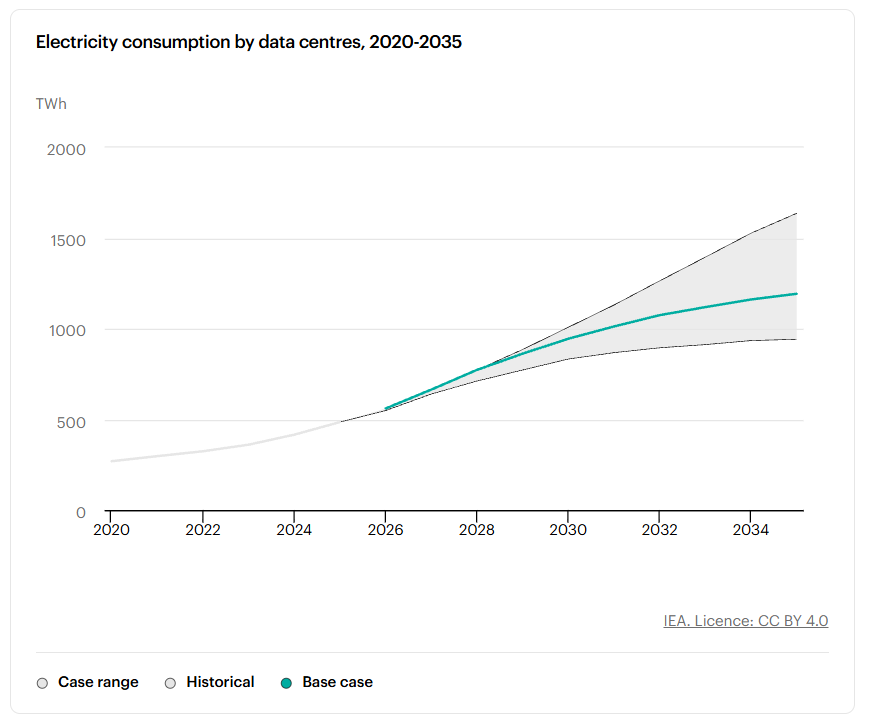
Data center electricity use grew 17% in 2025, and data centers built specifically for AI grew even faster, using 50% more power than the year before. The IEA expects total data center electricity use to roughly double to 950 terawatt-hours by 2030, about 3% of global electricity demand, with AI-focused data centers tripling their use over that time.
How data centers affect what you pay for your phone
AI data centers are pushing phone prices up mainly because chipmakers are prioritizing memory for AI servers, leaving less supply for phones, tablets, and laptops.
Tech writers have nicknamed the memory shortage "RAMageddon," and our breakdown of how RAMageddon is coming for your phone plan explains how T-Mobile moved from 24-month to 36-month device installment plans and cut its early upgrade perks. A longer installment plan makes an expensive phone look cheaper each month, but it also keeps you paying for the same device for an extra year.
Apple is passing on those costs too. Apple raised the price of every iPhone still on sale by $100 on the same day it announced the iPhone 18 Pro lineup, bringing the iPhone 17 to $899 and the iPhone 17e to $699. Apple hasn't officially explained the price increase, but rising memory costs from AI demand are the most likely reason.
Higher prices don't have to mean paying full price. Last year's models are often the best value right now, and if your current phone still works well, hanging onto it a little longer is an easy way to wait out the price hikes.
If you're ready to upgrade, carrier deals are your best bet, because trade-in credits and promos can easily cover the price increase. Here's where to find the best carrier deals on popular phones right now:
Data centers and your phone: FAQ
What do data centers have to do with my phone?
Data centers store the data and run the software behind almost every app, cloud backup, and AI feature on your phone. Your phone sends requests over Wi-Fi or cellular data to servers in data centers, and those servers send back your messages, videos, search results, and AI responses. AI demand at data centers is also raising the cost of memory chips, which is pushing phone prices higher.
Does AI on my phone run in a data center?
AI on your phone runs in a data center for larger requests and on the phone's own processor for smaller ones. Features like live translation and autocorrect usually run on the phone, while chatbots like ChatGPT and the Gemini app, generative photo edits, and complex Siri requests usually run in a data center. To check a specific feature, turn off Wi-Fi and cellular data and try it, since anything that still works is running on your phone.
Why do apps stop working when AWS goes down?
Apps stop working when AWS goes down because the servers they rely on run inside Amazon's data centers. During an AWS outage, like the one in October 2025, affected apps can't reach their servers, so they fail to load even though your phone and cellular connection are working. The only fix is to wait for AWS and the app to restore service.
How much energy does one AI prompt use?
One AI text prompt uses about 0.24 to 0.34 watt-hours of electricity, based on Google's figure for Gemini and OpenAI's figure for ChatGPT. A 0.24 watt-hour prompt uses about as much energy as watching TV for under nine seconds, or roughly 1.5% of a full charge on a flagship phone battery. Generating images and video uses much more, and neither estimate includes the energy used to train the AI models.
Scott Houghton
Jr. Staff Writer

Thousands of cell phone plans unpacked. All the facts. No surprises.

Related Articles


Related Topics
General Mobile ExplainersPopular Topics
Featured App Reviews iOS News Coverage Device Reviews Device Explainers Carrier Explainers App Roundups T-Mobile


