
I defended Google Calendar for years before Fantastical finally got me to stop. Fantastical autofills your events instead of forcing you to tap through separate fields for a title, date, and time, and it merges iCloud, Google, and Outlook accounts into a single view.
You can compare it to the rest of my picks in the best iPhone-exclusive apps.
- Free tier available; Premium subscription available
- Available for iPhone, iPad, Mac, and Apple Watch only
Keep your calendar updated while traveling internationally
Fantastical pulls in real-time updates from iCloud, Google, and Outlook, and that only works if your phone has data wherever you are. If international trips are part of your schedule, check out the most popular carrier plans that include international data:
|
T-Mobile

Experience Beyond 2.0
$100.00/mo
with Auto-Pay + Taxes and fees
|
|
Verizon

Unlimited Plus
$80.00/mo
+ Taxes & Fees. Price includes AutoPay & Paperless discount.
+ $40 Upfront
|
|
AT&T

Premium 2.0℠
$90.00/mo
+ $35 Upfront
|
Fantastical builds your event from one typed sentence
Fantastical reads what you type the way you'd say it out loud and schedules it correctly on its own. Type an event title followed by a time range, and Fantastical places it on your calendar without asking you to fill out separate date and time fields first.
I hate accidentally tapping a random spot on Google Calendar and creating an event I never meant to make. Fantastical never did that to me during testing. I needed to block off time for app testing sessions, so I typed the event title followed by the time range, and it landed on my calendar at the correct time with no extra steps.
Multiple calendars live behind one account key
Fantastical pulls in iCloud, Google, and Outlook accounts behind a single account key that Flexibits assigns when you set up the app. That extra layer keeps anyone else from tampering with your schedule, even if they gain access to one of your individual calendar accounts.
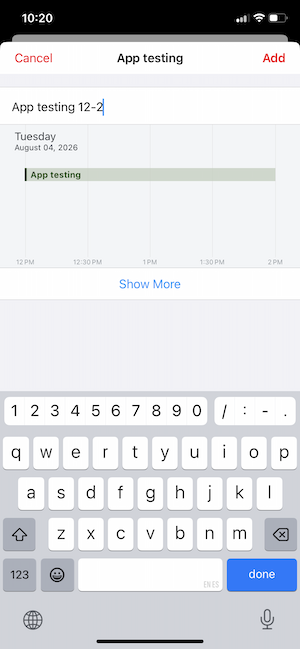
Image: Jessica Santero | WhistleOut
Flipping between day, week, month, and year views felt just as smooth as the event creation itself. I found myself using the year view far more than I expected to when planning further out than a single week.
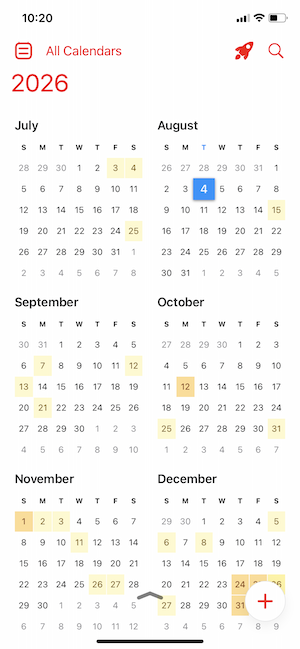
Image: Jessica Santero | WhistleOut
Not sure how to update your apps?
Keeping your apps up to date ensures you're always getting the latest features, bug fixes, and security improvements. Learn how to update the apps on your iPhone and your Android. It takes less time than you think.
Watch out for Android apps borrowing the name
There are calendar apps using the Fantastical name on the Play Store, but none of them are made by Flexibits. Fantastical stays inside Apple's ecosystem on purpose, and that decision is part of what makes the natural language parsing and account-key security feel so tightly built compared to a cross-platform app trying to support every operating system at once.
Is Fantastical worth the subscription?
If Google Calendar has ever created an event you didn't mean to make, or made you dig through menus just to see your whole month, Fantastical fixes both problems in one download. The free tier covers natural language event creation and multiple calendar accounts. The Premium upgrade adds weather integration and additional customization, and it is the one expense on this list that will give budget-conscious users the most pause.
Fantastical is the app that finally got me to stop defending Google Calendar. The account-key security is what pushed it past a four-star rating for me, even with the Premium price tag.
Jessica Santero, WhistleOut Staff Writer
 How I tested Fantastical
- Scheduled real app testing sessions using typed natural language event creation
- Connected iCloud, Google, and Outlook calendar accounts behind a single account key
- Compared accidental event creation on Google Calendar against Fantastical's tap behavior
- Tested switching between day, week, month, and year calendar views
- Verified that Android apps using the Fantastical name are unrelated to the Flexibits app
Why you can trust WhistleOut
.svg)
15+
years of mobile industry experience

900+
published wireless guides

35+
firsthand carrier reviews
We've been around since the birth of the iPhone. Along the way, we've learned how to spot the best deals for your wallet (and your sanity). We spend our days researching informative guides and writing insightful reviews on every kind of wireless plan, distinguishing what matters from what doesn't. We played around with these plans before recommending them, ensuring they're worth your hard-earned money.
Want to know more? Check out how we review every cell phone plan we rank.
Fantastical: FAQ
Is Fantastical free to use?
Fantastical offers a free tier with natural language event creation and multiple calendar accounts. The Premium tier adds weather integration and additional customization for a monthly subscription fee.
Is Fantastical available on Android?
No, the real Fantastical app stays exclusive to Apple devices. Any calendar app using the Fantastical name on the Play Store is unrelated to Flexibits, the company behind the actual app.
Can Fantastical connect to Google Calendar?
Yes, Fantastical connects to iCloud, Google, and Outlook calendar accounts and merges them into a single view behind one account key.
Does Fantastical work on Apple Watch?
Yes, Fantastical is available on iPhone, iPad, Mac, and Apple Watch, though it is not available on Android or other non-Apple devices.
Jessica Santero
Staff Writer

Find a better phone plan
Thousands of cell phone plans unpacked. All the facts. No surprises.





