MyRadar is a free weather radar app that puts a live storm map and road-condition directions on your CarPlay screen. It took the top spot in our roundup of the best weather apps for CarPlay, and it's the one I'd install first before driving into bad weather.
I tested MyRadar on my iPhone 11, and WhistleOut senior staff writer Max McCaskill put it through real drives on CarPlay in his Ford Bronco. No other app we tested let us stack as many weather layers on the dashboard without paying a cent.
Your radar runs on data, so stop overpaying for it
MyRadar loads every radar map and storm layer over your cellular connection, and that adds up over a long drive. AT&T MVNOs run on AT&T's network and often cost a fraction of AT&T's own plans, although your data may be deprioritized during busy times.
Compare the most popular AT&T MVNO plans and see how much you could save:


- Free to download, with an optional Premium upgrade
- Premium adds pro radar and hurricane tracking and removes ads
- Available on iPhone with full CarPlay support
What is MyRadar?
MyRadar shows a live weather map on your CarPlay screen and adds turn-by-turn directions with road conditions through a feature called RouteCast. It had the most weather filters of the three apps Max tested, and the developer keeps adding more. The October update brought a Hurricane Tracker layer to CarPlay, and the update before that added Storm Centers.
Not sure how to update your apps?
Keeping your apps up to date ensures you're always getting the latest features, bug fixes, and security improvements. Learn how to update the apps on your iPhone and your Android. It takes less time than you think.
RouteCast shows what's ahead, not just what's overhead
Plenty of weather apps only tell you what's happening where you're parked, but RouteCast pairs your directions with road conditions along the way. You'll know about the slushy stretch before you reach it.
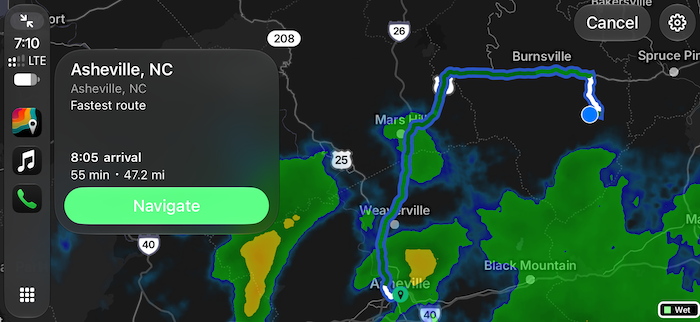
Image: Max McCaskill | WhistleOut
MyRadar takes driver safety more seriously than its rivals
MyRadar was the only app that warned Max several times not to use it on CarPlay while driving. It also freezes the radar image while your car is moving, so a looping storm animation can't pull your eyes off the road. That limit stays in place even if you pay for Premium.
Hidden controls are the one real annoyance
None of the settings or map controls appear when you open the app. You have to tap the screen to bring them up, and they vanish again if you wait more than a second. "Feels like an extra, unnecessary step that makes the app not a great choice for a quick look at the radar while driving," Max notes.
Is MyRadar worth downloading?
MyRadar is the best CarPlay weather app for drivers who want control over their map. Max agrees the hidden controls aren't a dealbreaker, and nothing else we tested stacks this many storm layers on your dashboard for free. If you'd rather glance at the rain without tapping anything, Storm Radar keeps its CarPlay screen to three filters. Current Premium pricing is listed on the App Store page.
 How I tested MyRadar
- Drove with it on CarPlay in Max McCaskill's Ford Bronco, while I tested the phone app on my iPhone 11.
- Counted the weather layers available on the CarPlay screen and checked how readable the map stayed with them turned on.
- Tracked controls and safety warnings by counting the taps it took to reach map settings and noting each warning against use while driving.
MyRadar: FAQ
Is MyRadar free on CarPlay?
Yes, MyRadar is free to download and works on CarPlay without a subscription. Premium removes ads and adds pro radar and hurricane tracking.
Does MyRadar show animated radar on CarPlay?
No, MyRadar freezes the radar image on CarPlay while your car is moving. The developer keeps animation off for safety, even on the paid tier.
How do I add MyRadar to CarPlay?
Download MyRadar on your iPhone, then go to Settings > General > CarPlay and choose your car. Add MyRadar to your CarPlay screen from that list.
Is MyRadar better than Storm Radar for CarPlay?
MyRadar is better if you want more weather layers and road-condition directions. Storm Radar is better if you want a simpler map with only three filters.
Why you can trust WhistleOut

15+
years of mobile industry experience

900+
published wireless guides

35+
firsthand carrier reviews
We've been around since the birth of the iPhone. Along the way, we've learned how to spot the best deals for your wallet (and your sanity). We spend our days researching informative guides and writing insightful reviews on every kind of wireless plan, distinguishing what matters from what doesn't. We played around with these plans before recommending them, ensuring they're worth your hard-earned money.
Want to know more? Check out how we review every cell phone plan we rank.
Jessica Santero
Staff Writer

Thousands of cell phone plans unpacked. All the facts. No surprises.

Related Articles


Related Topics
App Reviews FeaturedPopular Topics
Featured App Reviews iOS News Coverage Device Reviews Device Explainers Carrier Explainers App Roundups T-Mobile