
Find My has saved me more than once, and each time reminded me why it should be turned on from day one. Find My is Apple's device and item tracker, and it locates your iPhone, iPad, Mac, Apple Watch, or an AirTag using a crowdsourced network built from every other Apple device nearby.
You can compare it to the rest of my picks in the best iPhone-exclusive apps.
- Free, already built into iOS
- Works with iPhone, iPad, Mac, Apple Watch, and AirTags
A lost phone needs a location ping, which needs a signal
Find My can only send you a location update if the lost device, or a nearby Apple device relaying its signal, has some kind of connection available. Verizon's network covers a wide range of the country, and MVNOs riding that same network often charge less for the same coverage.
Check out the most popular Verizon MVNO plans below:
|
Visible

$19 Visible Plan
$19.00/mo
Taxes & Fees included
|
|
US Mobile

Unlimited Premium Plan
$39.00/mo
|
|
Spectrum Mobile®

Unlimited
$30.00/mo
+ $20 Upfront
|
Find My tracks your devices through a crowdsourced network
Find My locates your iPhone, iPad, Mac, Apple Watch, or an AirTag using a crowdsourced network built from every other Apple device nearby, even when the lost item has no signal of its own. That last part is what separates it from a basic GPS tracker: A lost AirTag can still be found through the Bluetooth signal it sends to a stranger's iPhone passing by, without that stranger ever knowing it happened.
My phone has fallen out of my backpack while hiking, gotten wedged between my driver's seat and center console, and gone missing off a motor scooter. In every case, having Find My already turned on meant I was not starting from zero when I needed it most.
The app found my AirTag before I even started looking
I left an AirTag at a friend's house across town once, marked it as lost in the app, and had a location notification within minutes. None of that required my friend to do anything on their end. Their iPhone picked up the AirTag's signal automatically and relayed its location back to me through the same crowdsourced network that powers device tracking.
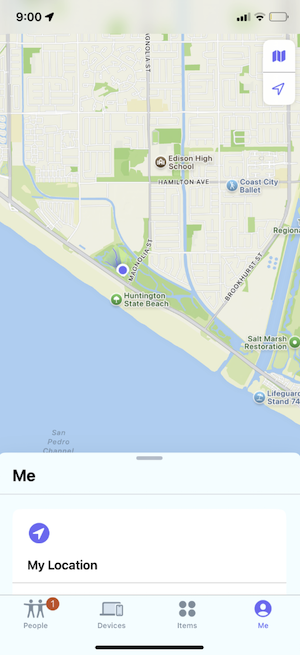
Image: Jessica Santero | WhistleOut
Not sure how to update your apps?
Keeping your apps up to date ensures you're always getting the latest features, bug fixes, and security improvements. Learn how to update the apps on your iPhone and your Android. It takes less time than you think.
Apple Family Sharing only works with consent
Using the Apple Family Sharing feature, you can add family members or friends to see their location in the Find My app, but only after they agree to share it with you. Neither person can see the other's location without that mutual agreement in place, which keeps the feature from becoming a way to track someone without their knowledge.
Is Find My worth turning on?
This one is for everyone with an iPhone, honestly. Find My is completely free and already built into iOS, so there is no download required and no subscription standing between you and using it. If you have ever lost a phone, a set of keys, or even a pet, turning this on before you need it is the entire point.
Find My has saved me more than once, and each time reminded me why it should be turned on from day one. It is free, it is already on your phone, and there is no reason not to have it active.
Jessica Santero, WhistleOut Staff Writer
 How I tested Find My
- Tracked a personal iPhone across real situations, including a hiking trip and a car incident
- Marked an AirTag left at a friend's house as lost to test the crowdsourced device network
- Set up family sharing to confirm that location access requires mutual consent
- Tested device tracking for iPhone, Mac, and Apple Watch within the same account
- Verified that Find My requires no download or subscription beyond what iOS already includes
Why you can trust WhistleOut
.svg)
15+
years of mobile industry experience

900+
published wireless guides

35+
firsthand carrier reviews
We've been around since the birth of the iPhone. Along the way, we've learned how to spot the best deals for your wallet (and your sanity). We spend our days researching informative guides and writing insightful reviews on every kind of wireless plan, distinguishing what matters from what doesn't. We played around with these plans before recommending them, ensuring they're worth your hard-earned money.
Want to know more? Check out how we review every cell phone plan we rank.
Find My: FAQ
Is Find My free to use?
Yes, Find My is completely free and already built into iOS, with no download or subscription required to use it.
Do I need an AirTag to use Find My?
No, Find My works with your iPhone, iPad, Mac, and Apple Watch on its own, and AirTags are an optional add-on if you want to track items like keys, bags, or pets.
Can someone track my location without my permission using Find My?
No, family and friend location sharing in Find My requires mutual consent, and no one can see your location unless you have agreed to share it with them.
Does Find My work if a lost device has no signal?
Yes, Find My can locate a lost device or AirTag through a crowdsourced network of nearby Apple devices, even when the lost item itself has no signal of its own.
Jessica Santero
Staff Writer

Find a better phone plan
Thousands of cell phone plans unpacked. All the facts. No surprises.





