I love the idea of a game night, but I don't do it as often as I'd like. Getting everyone available for a stretch of time is hard enough, and then you still have to teach the group a new game or agree on what to play.
Guess skips all of that, and it earned a perfect 5 out of 5 on my list of the best trivia and game night apps.

5 out of 5 overall
- Free
- Available for iOS and Android
Same Verizon coverage, half the price
Verizon MVNOs run on the same Verizon network for a lot less each month. Compare the most popular Verizon MVNO plans below:
|
Visible

$19 Visible Plan
$19.00/mo
Taxes & Fees included
|
|
Spectrum Mobile®

Unlimited
$30.00/mo
+ $20 Upfront
|
|
US Mobile

Unlimited Premium Plan
$39.00/mo
|
Guess is Heads Up on your phone
Guess is a phone-based version of Heads Up. You open the app, tap a category, and hold your phone up to your forehead. A word appears on your screen that you can't see, and the rest of the group gives you clues until you guess it.
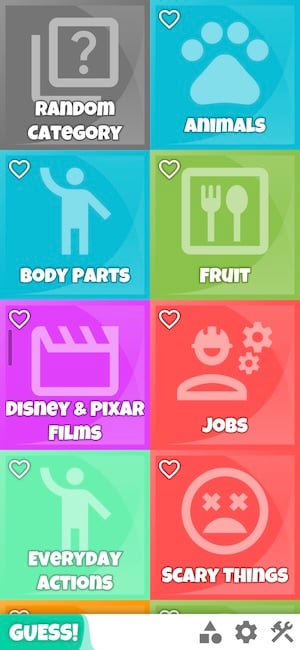
Image: Jessica Santero | WhistleOut
Let's say I choose a category that's original Pokémon and I start playing. A random Pokémon would appear on my phone (like Pikachu) that I can't see. I'd hold my phone up to my forehead, and the other players need to give me hints (such as Ash's BFF) so that I say whatever Pokémon is on my screen. That's where the app's title comes from: Guess.
“WOW. That's all I can say about this app. Guess makes it so easy and you don't need to think about anything.”
Jessica Santero, WhistleOut Writer
What I really like about this app is that the interface is extremely easy to use. You open the app and there's already a grid of premade categories to pick from, plus a random tile if you really don't want to search through the hundreds of categories.
Not sure how to update your apps?
Keeping your apps up to date ensures you're always getting the latest features, bug fixes, and security improvements. Learn how to update the apps on your iPhone and your Android. It takes less time than you think.
Build your own categories for a family reunion
You can adjust the rules by team, by time, by number of guesses, or by number of mistakes, and you can build your own categories from scratch.
If you've got a family reunion coming up, you could put together a category of family nicknames or every pet the family has ever owned.
Is Guess worth downloading?
This is definitely one to keep on hand. I have to admit, after testing apps, I usually uninstall them all...but I decided to keep Guess. It doesn't take any setup, almost everyone already knows how to play, and you can do it anywhere. Guess is free and available for iOS and Android.
 How I evaluated Guess
I judged each app on whether it actually gets a group playing in the same room, not just whether it looks good in a store listing. Here's what I looked for:
- Setup time: Can everyone jump in within a minute, or does someone have to walk the group through the rules first?
- Group-friendliness: Is this actually built for a room full of people, or does it work better solo or against strangers online?
- Ads and monetization: Does the free version interrupt the game, or does it stay out of the way?
- Content quality: Are the categories and packs actually appropriate for a mixed group, including public or user-submitted content?
Guess FAQ
Is Guess free?
Yes, guess is free and available for iOS and Android.
What are good games to play with family on your phone?
Guess is an easy pick for mixed-age family groups since you can build custom categories, like family nicknames or every pet the family has ever owned.
Can you make your own categories in Guess?
Yes, you can build your own categories from scratch and adjust the rules by team, by time, by number of guesses, or by number of mistakes.
Jessica Santero
Staff Writer

Find a better phone plan
Thousands of cell phone plans unpacked. All the facts. No surprises.