Zinnia is a digital journal and planner app for iPhone, iPad, and Android, built for bullet journaling, planning, and scrapbooking. It's our pick for planners and journaling in the roundup of the best note-taking apps for iPad, and I tested its templates, stickers, and washi tape on my iPad.
I'm still a paper spiral planner girly because I check my planner several times a day and journal on the road. Zinnia is the first app that made me seriously consider going digital, without carrying a laptop or squinting at a tiny phone screen.
- Free, or $34.99/year for Zinnia Premium
- Templates, stickers, washi tape, photo uploads, and PDF imports
- Available for iPhone, iPad, and Android
What is Zinnia?
Zinnia comes with colorful templates, stickers, washi tape, and photo uploads, and Zinnia Premium unlocks the full library. An iPad screen shows a full weekly spread at once, which a phone screen can't match.
Journaling abroad? Bring data that works there too
Uploading travel photos to your journal uses data fast, and roaming fees turn a scrapbook into an expensive souvenir. Several major carrier plans include international data, so you can sync your pages from anywhere without hunting for Wi-Fi.
Check out the most popular carrier plans with international data:



The best templates I've seen in any app
Zinnia's templates are cute, colorful, and extremely detailed, and they beat every other app I tested by a mile. The planners are packed with detail, and seasonal templates let you refresh your pages throughout the year. If you find a niche planner online, you can also import your own PDF template and use it inside Zinnia.
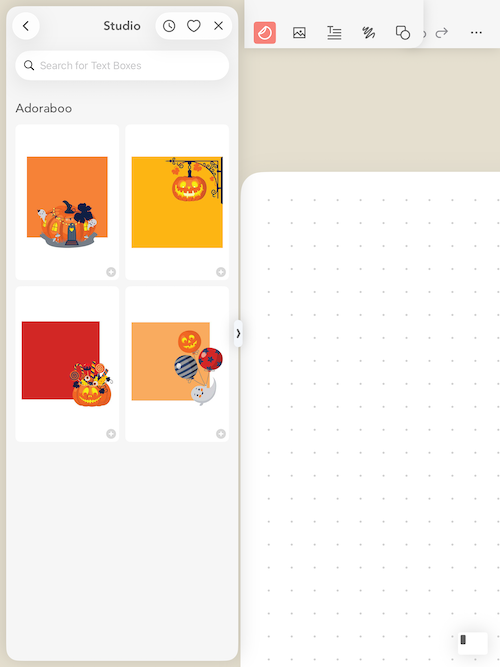
Image: Jessica Santero | WhistleOut
Bullet journalists usually spend hours drawing layouts by hand, and ready-made spreads skip straight to the fun part of filling them in.
Washi tape and photos turn your journal into a scrapbook
The washi tape collection was my favorite part of the app, and it makes bullet journal spreads look hand decorated. You can also insert pictures to build an online scrapbook, which keeps your favorite photos in one place if you're running out of wall space or tired of printing them. Stickers and photos sit alongside your handwriting, so a weekly spread can double as a record of what you actually did, and checklist fans can build to-do lists right into their daily pages.
Not sure how to update your apps?
Keeping your apps up to date ensures you're always getting the latest features, bug fixes, and security improvements. Learn how to update the apps on your iPhone and your Android. It takes less time than you think.
Is Zinnia Premium worth it?
If you already know you love bullet journaling and want to go digital, Premium is easy to justify. If you're only curious, browse the templates in the free version and decide whether they're worth the yearly price.
The free version barely lets you start
Almost everything in Zinnia is limited without Premium, and the free version gave me little more than a blank dot grid page. I was clicking like mad through templates, stickers, and seasonal additions trying to get something going, and nearly all of them asked me to upgrade first. That makes it hard to judge whether Zinnia fits your planning style before you pay. Premium is sold as a yearly subscription, and I'd happily add Zinnia to my list of premium apps I pay for if it offered a one-time purchase.
How Zinnia compares to Goodnotes
Goodnotes also handles planners, but Zinnia leans harder into decoration and journaling than into class notes. Its Android app also gives Android tablet owners a planner option that many iPad-only competitors don't.
 How I tested Zinnia
- Browsed the templates, stickers, and washi tape on my iPad as a longtime paper planner user.
- Tested how far the free version goes before the app asks you to upgrade to Premium.
- Added photos to a blank page to see how Zinnia works as a digital scrapbook.
Zinnia: FAQ
What is the best digital planner app for iPad?
Zinnia is the best app I tested for planners and journaling because its templates are colorful and extremely detailed.
Is Zinnia free?
Zinnia has a free version with very limited content, and Zinnia Premium unlocks everything with a yearly subscription. Current pricing is listed on the App Store and Google Play pages.
Can you import PDF planners into Zinnia?
Yes, you can upload your own PDF planner templates and use them in Zinnia.
Is Zinnia good for bullet journaling?
Yes, Zinnia is built for bullet journaling, with templates, stickers, washi tape, and photo uploads.
Does Zinnia work on Android?
Yes, Zinnia is available on Android as well as iPhone and iPad.
Why you can trust WhistleOut

15+
years of mobile industry experience

900+
published wireless guides

35+
firsthand carrier reviews
We've been around since the birth of the iPhone. Along the way, we've learned how to spot the best deals for your wallet (and your sanity). We spend our days researching informative guides and writing insightful reviews on every kind of wireless plan, distinguishing what matters from what doesn't. We played around with these plans before recommending them, ensuring they're worth your hard-earned money.
Want to know more? Check out how we review every cell phone plan we rank.
Jessica Santero
Staff Writer

Thousands of cell phone plans unpacked. All the facts. No surprises.

Related Articles


Related Topics
App Reviews FeaturedPopular Topics
Featured App Reviews iOS News Coverage Device Reviews Device Explainers Carrier Explainers App Roundups T-Mobile