
Infuse fixed a problem I had been dealing with for years without knowing there was a better option out there. Infuse is a video player built to handle file formats that trip up other apps, and you never have to convert anything before it plays.
You can compare it to the rest of my picks in the best iPhone-exclusive apps.

- Free tier available; Infuse Pro available
- Available for iPhone, iPad, Apple TV, Mac, and Vision Pro only
Streaming video files eats through data fast
Uploading and streaming large video files through Infuse away from Wi-Fi can burn through a data allowance quickly. T-Mobile's network reaches most major cities, and MVNOs on that same network often cost less for it. Check out the most popular T-Mobile MVNO plans below:
|
Mint Mobile

Unlimited Data Plan
$15.00/mo
$45 for 3 months of service
|
|
US Mobile

Unlimited Premium Plan
$39.00/mo
|
|
Tello

Unlimited Text, Talk, and Data Plan
$25.00/mo
|
Infuse plays formats other iPhone video apps reject
Infuse handles file formats that stop other video players before you even hit play. It streams from local storage, a NAS, or cloud services like Dropbox and Google Drive without missing a beat, and it does all of that without asking you to convert the file first.
I ran into format problems constantly back when I taught English and edited video lessons for my students. Files that played fine on my computer would refuse to open on a phone or tablet, so I would reach for something like CapCut just to add subtitles before reloading everything into Google Classroom.
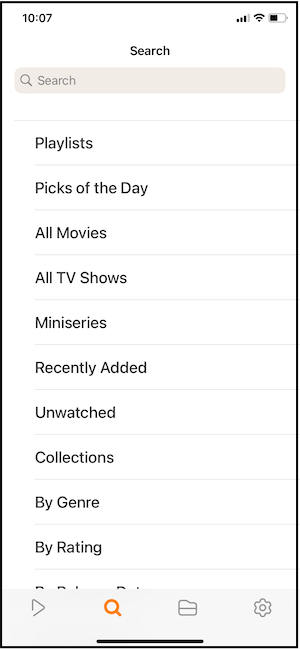
Image: Jessica Santero | WhistleOut
Files upload over Wi-Fi with no cables or conversions
Connecting your iPhone to the same Wi-Fi network as your computer and opening a browser lets you upload files directly into Infuse. That method works well for files that do not send cleanly through AirDrop or for anyone using a computer that is not a Mac.
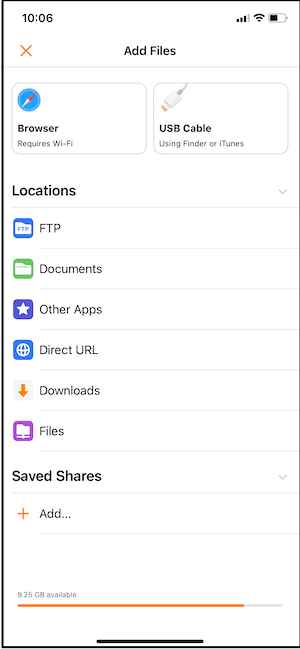
Image: Jessica Santero | WhistleOut
With Infuse, I connect my iPhone to the same network as my computer, open a browser, and upload files directly with no cables and no conversions involved.
Not sure how to update your apps?
Keeping your apps up to date ensures you're always getting the latest features, bug fixes, and security improvements. Learn how to update the apps on your iPhone and your Android. It takes less time than you think.
Subtitles and casting happen automatically
Subtitles show up automatically on files that include them, and casting whatever you are watching to a smart TV takes one tap. Neither of those steps required any extra setup on my end during testing, which stood in sharp contrast to the multi-step process I used to go through with dedicated subtitle and casting tools.
Is Infuse worth downloading?
Yes, and it makes the most sense for anyone managing a personal video library or streaming from a home server. The free tier plays most file types without restriction. Infuse Pro adds broader format support and additional streaming sources, and it is worth the upgrade specifically for anyone dealing with a file that refuses to play right no matter what app they try.
Infuse fixed a problem I had been dealing with for years without knowing there was a better option out there. No cables, no conversions, and subtitles that just show up every time.
Jessica Santero, WhistleOut Staff Writer
 How I tested Infuse
- Loaded personal video files with varying formats directly into Infuse on an iPhone
- Uploaded files over a shared Wi-Fi network without using AirDrop or cables
- Tested automatic subtitle detection against files that previously required manual subtitle editing
- Cast video files to a smart TV to test the casting feature
- Compared the free tier's format support against the Infuse Pro upgrade
Why you can trust WhistleOut
.svg)
15+
years of mobile industry experience

900+
published wireless guides

35+
firsthand carrier reviews
We've been around since the birth of the iPhone. Along the way, we've learned how to spot the best deals for your wallet (and your sanity). We spend our days researching informative guides and writing insightful reviews on every kind of wireless plan, distinguishing what matters from what doesn't. We played around with these plans before recommending them, ensuring they're worth your hard-earned money.
Want to know more? Check out how we review every cell phone plan we rank.
Infuse: FAQ
Is Infuse free to use?
Infuse offers a free tier that plays most file types without restriction. Infuse Pro adds broader format support and additional streaming sources for a monthly subscription fee.
Is Infuse available on Android?
No, Infuse is built exclusively for iPhone, iPad, Apple TV, Mac, and Vision Pro, with no official Android release available.
Do I need to convert video files before playing them in Infuse?
No, Infuse plays most file formats directly without requiring any conversion beforehand, which is the main problem it solves compared to other video players.
Can Infuse stream from cloud storage?
Yes, Infuse streams from cloud services like Dropbox and Google Drive, along with local storage and NAS devices.
Jessica Santero
Staff Writer

Find a better phone plan
Thousands of cell phone plans unpacked. All the facts. No surprises.





