
A bigger foldable screen usually means more room for app icons, and more room tends to mean more clutter. Niagara Launcher replaces the standard Android home screen with a single top widget and a scrollable alphabetical list, and it turned out to be one of my favorite downloads of all time.
You can compare it to other picks in the best free apps for foldable phones.
- Free (optional paid tier for wallpapers and extra customization)
- Available for Android only
Declutter your home screen, then declutter your bill
If simplifying your phone has you thinking about simplifying your monthly costs too, Verizon MVNO carriers offer the same network at a lower price. Check out the most popular plans below:


What is Niagara Launcher?
Niagara Launcher is a free Android home screen replacement built around minimalism. Instead of swiping through panels of app icons, you get one top widget slot and a short list of your most used apps front and center. I set mine to Libby, since I am nearly always in the middle of an audiobook, and everything else lives in a clean alphabetical list.
How the scroll bar replaces your app drawer
A single scroll bar along the edge of the screen replaces panel after panel of icons. Sliding your finger along it jumps you straight to any letter of the alphabet, which is faster than hunting through a grid once you get used to it. I installed it on my Samsung S24 FE, and finding any app now takes one motion instead of several swipes and a search.
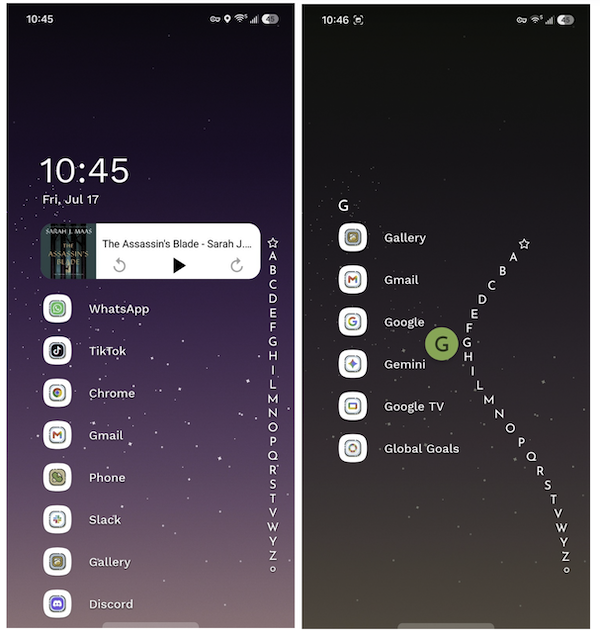
Image: Jessica Santero | WhistleOut
There is a hidden benefit beyond a cleaner look. Because only favorited apps sit on the home screen, opening something you have not favorited requires a deliberate scroll and tap instead of an instinctive one. That extra step cut down on my own mindless app switching more effectively than any screen time blocker I have tried.
Not sure how to update your apps?
Keeping your apps up to date ensures you're always getting the latest features, bug fixes, and security improvements. Learn how to update the apps on your iPhone and your Android. It takes less time than you think.
What to know before installing it on a foldable
Niagara can only run one instance at a time, which means your outer cover screen and your main unfolded screen will share the same layout. Some Fold owners see this as a limitation, since they would prefer separate setups for each screen. On a Fold7, the app also pushes down the multitasking bar at the bottom of the display, which is a minor tradeoff worth knowing about before you fully commit to it.
If the app does not activate right away after installing it, a quick fix usually solves it:
- Go to Settings, then Accessibility, then Installed Apps, select Niagara Launcher, and toggle it on.
- If that does not work, go to Settings, then Apps, force stop Niagara, and reopen it.
Is Niagara Launcher worth downloading?
Absolutely, and it works well on any Android phone, not just a foldable. The free version includes the full scroll bar navigation, top widget slot, and favorites list without any functionality locked behind a paywall. The optional paid tier only adds wallpapers and extra customization, so you are not missing anything essential by skipping it.
Niagara just elevates the whole Android experience. I do not even have that many apps, but it makes finding them seamless. It has also worked better than any screen time blocker at reducing my scrolling.
Jessica Santero, WhistleOut Staff Writer
 How I tested Niagara Launcher
- Set Niagara Launcher as the default home screen on a Samsung Galaxy S24 FE for daily use
- Tested the alphabetical scroll bar navigation against a standard app grid for speed
- Timed how long it took to locate and open non-favorited apps before and after switching launchers
- Tested cover screen and unfolded screen behavior for layout consistency
- Worked through the troubleshooting steps needed to get the launcher to activate properly
Why you can trust WhistleOut
.svg)
15+
years of mobile industry experience

900+
published wireless guides

35+
firsthand carrier reviews
We've been around since the birth of the iPhone. Along the way, we've learned how to spot the best deals for your wallet (and your sanity). We spend our days researching informative guides and writing insightful reviews on every kind of wireless plan, distinguishing what matters from what doesn't. We played around with these plans before recommending them, ensuring they're worth your hard-earned money.
Want to know more? Check out how we review every cell phone plan we rank.
Niagara Launcher: FAQ
Is Niagara Launcher free?
Yes, Niagara Launcher is free to download and use, including its scroll bar navigation and top widget slot. An optional paid tier adds wallpapers and extra customization, but it is not required for the core experience.
Is Niagara Launcher available on iPhone?
No, Niagara Launcher is an Android-only app, since iOS does not currently allow third-party home screen replacements at this level.
Does Niagara Launcher work well on foldable phones?
Yes, though the cover screen and unfolded screen share the same layout since the app can only run one instance at a time. Some Fold owners see this as a minor limitation compared to their preference for separate setups on each screen.
Why is Niagara Launcher not opening after I install it?
This problem is usually fixed by going to Settings, then Accessibility, then Installed Apps, selecting Niagara Launcher, and toggling it on. If that does not work, force-stopping the app from Settings and reopening it typically resolves the issue.
Jessica Santero
Staff Writer

Thousands of cell phone plans unpacked. All the facts. No surprises.

Related Articles


Related Topics
App Reviews FeaturedPopular Topics
Featured App Reviews iOS News Coverage Device Reviews Device Explainers Carrier Explainers App Roundups T-Mobile


