
A foldable phone makes Notion incredible, with an app that finally uses every inch of a bigger screen. Notion combines notes, tasks, calendars, and AI search into one workspace, and a foldable phone is the first place I have used it where the layout actually feels intentional. I tested it on both a regular phone and a foldable to see how much the extra width really changes, and the difference surprised me.
Curious how it held up against the best apps around? Check out our guide to the best free apps for foldable phones.
- Free (premium subscriptions available)
- Available for iOS and Android
Give your foldable the data plan it deserves
A workspace app like Notion syncs constantly in the background, so a slow or capped connection turns every tap into a wait. Here are the best unlimited data plans available right now:



What is Notion?
Notion is basically your organizational hub, like an all-in-one workspace. It combines notes, task lists, calendars, and a built-in AI search function into one customizable system.
Everything is built from modular blocks of text, tables, and images that you arrange yourself, so the app never forces you into a rigid template. That flexibility is what makes the screen size problem so noticeable on a standard phone. It adapts, instead of stretching and warping to fit the screen.
Where Notion struggles on a regular phone
On a standard phone held vertically, Notion only shows you one column at a time, and turning the phone horizontally makes it nearly unusable. I tested this on my Samsung S24 FE, and flipping to landscape left barely enough visible interface to work with. Every meeting note, calendar check, or AI question required a fresh scroll, which broke my concentration constantly.
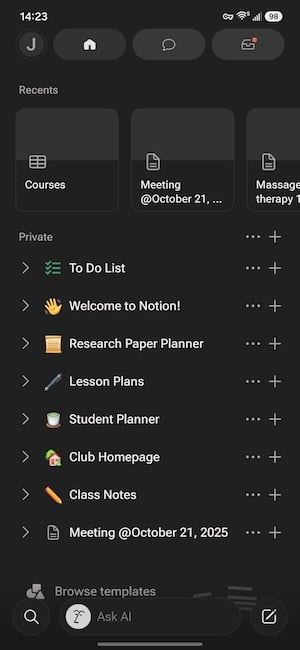
Image: Jessica Santero | WhistleOut
However, on a foldable phone like the Galaxy Flip5, Notion is so much easier to see and use. The extra space means you can see multiple elements at once and eliminates the need to constantly scroll up and down. Now that I've tried Notion on a foldable phone, I wouldn't even bother using Notion on a regular phone because it's just clunky and bothersome.
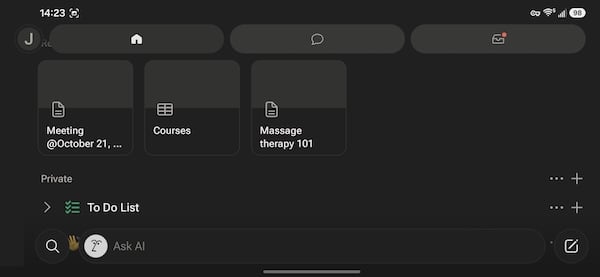
Image: Jessica Santero | WhistleOut
Not sure how to update your apps?
Keeping your apps up to date ensures you're always getting the latest features, bug fixes, and security improvements. Learn how to update the apps on your iPhone and your Android. It takes less time than you think.
How the wider screen changes everything
I used Notion daily to plan content scripts, track publishing schedules, and keep a running journal, and the extra width from an unfolded screen makes every one of those tasks faster. You can see your notes, your calendar, and the AI search bar on the same screen instead of jumping between them.
The AI search function benefits the most from this change, since it can display a full answer alongside your original notes rather than covering them entirely. That side-by-side view is the single biggest reason why Notion on a foldable is superior instead of a regular phone.
Is Notion worth downloading on a foldable?
Yes, and it is one of the clearest examples of an app that was not built for foldables but benefits from one anyway. The free tier includes notes, tasks, calendars, and AI search without a paywall blocking core functionality. If you already rely on Notion for planning or journaling, a foldable phone removes the biggest friction point you were probably tolerating without realizing it.
Notion works really well on a foldable phone because you can see more on a single screen instead of having to scroll multiple times to reach your meeting notes, find your calendar, or ask AI your questions. It makes taking notes much easier, and you can see much more.
Jessica Santero, WhistleOut Staff Writer
 How I tested Notion
- Used Notion daily for content planning, journaling, and calendar tracking on both a regular phone and a foldable phone
- Compared vertical and horizontal layouts on a Samsung Galaxy S24 FE against the unfolded view on a Galaxy Z Fold5
- Tested the built in AI search function on both screen sizes to compare readability
- Checked how templates and databases rendered at each screen width
Notion: FAQ
Is Notion free?
Notion is free to download and use, including notes, tasks, calendars, and AI search. Paid subscription tiers add extra storage and collaboration features, but they are not required for core functionality.
Does Notion work better on a foldable phone?
Yes, because Notion is difficult to use on a standard phone held horizontally and cramped even when held vertically. An unfolded foldable screen gives its modular layout enough width to display notes, calendars, and search results together, giving you a better app experience.
Is Notion available on Android and iPhone?
Yes, Notion is available on both iOS and Android, and the app works the same way on either platform once installed.
What is Notion best used for?
Notion is best for planning, journaling, and note-taking tasks that benefit from a flexible, block-based layout, especially when paired with its built-in AI search feature.
Jessica Santero
Staff Writer

Thousands of cell phone plans unpacked. All the facts. No surprises.

Related Articles


Related Topics
App Reviews FeaturedPopular Topics
Featured App Reviews iOS News Coverage Device Reviews Device Explainers Carrier Explainers App Roundups T-Mobile


