
Every brush stroke on a regular phone screen is a small act of risk, since one shaky tap can turn a fine line into a wide streak of color. Sketchbook is a free drawing app that solves this the moment you unfold a foldable phone, turning a cramped canvas into something closer to a real sketchpad.
You can see how it compares to other picks in the best free apps for foldable phones.
- Free (optional pro features)
- Available for iOS and Android
Sketching on the go needs a plan that keeps up
Downloading brushes, syncing files, and saving high-resolution drawings all eat into your data allowance fast. If you are on T-Mobile, check out the most popular MVNO plans that offer the same coverage for less:


What is Sketchbook?
Sketchbook is a free digital drawing app built by Autodesk with an impressive set of brushes, pencils, and markers. It supports pressure sensitivity for stylus use, which means the thickness and opacity of your line change based on how hard you press, just like real art tools. I tested it on a Samsung Galaxy S24 FE and compared the experience to a Galaxy Z Fold5 to see how much the extra canvas actually matters.
The brush library and stylus support
The free version includes every basic tool you would expect, along with a surprising number of specialized textured brushes. A simple paintbrush, a fine-tip pen, and flat markers cover the basics, while the textured brush set adds enough variety for detailed illustration work. As someone who has studied watercolor for several years, I found the digital transition easier than expected.
One feature I really liked is the automatic complementary color suggestion tool, which analyzes your current palette and recommends colors that pair well with it. This takes the guesswork out of color theory even when you are not consciously thinking about it, and it is a feature I have not seen handled this well in other free drawing apps.
Not sure how to update your apps?
Keeping your apps up to date ensures you're always getting the latest features, bug fixes, and security improvements. Learn how to update the apps on your iPhone and your Android. It takes less time than you think.
Why a foldable screen changes the experience
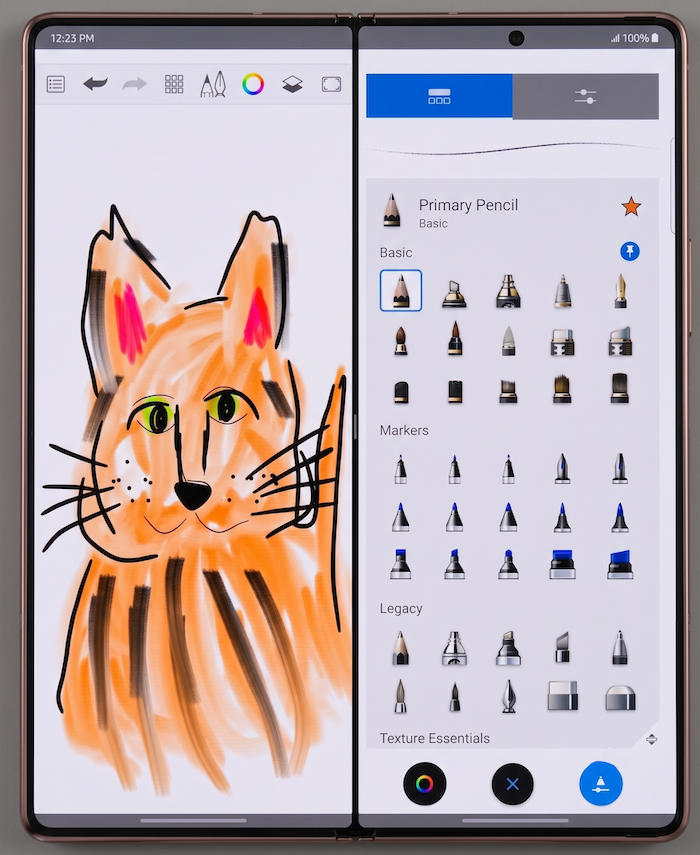
Image: Jessica Santero | WhistleOut
On a regular phone, Sketchbook works, but you are constantly fighting the limited space for fine detail work. Unfolding a foldable screen gives you room to work with a stylus the way you would on a tablet, instead of squeezing every stroke into a palm-sized display. With a large enough foldable, you also avoid carrying separate art supplies or a tablet just to sketch when inspiration hits.
Is Sketchbook worth downloading?
Yes, especially if you own a foldable phone and have any interest in digital art. The free tier includes a complete brush library, stylus support, and color theory tools without a subscription requirement. Optional pro features are available as a one-time purchase, but I never felt limited enough by the free version to consider paying for them.
 How I tested Sketchbook
- Drew the same reference image on a Samsung Galaxy S24 FE and on an unfolded Galaxy Z Fold5
- Tested every included brush type, including the textured brush set
- Used a stylus to evaluate pressure sensitivity accuracy
- Compared the automatic color suggestion tool against manual color theory choices
Why you can trust WhistleOut
.svg)
15+
years of mobile industry experience

900+
published wireless guides

35+
firsthand carrier reviews
We've been around since the birth of the iPhone. Along the way, we've learned how to spot the best deals for your wallet (and your sanity). We spend our days researching informative guides and writing insightful reviews on every kind of wireless plan, distinguishing what matters from what doesn't. We played around with these plans before recommending them, ensuring they're worth your hard-earned money.
Want to know more? Check out how we review every cell phone plan we rank.
Sketchbook: FAQ
Is Sketchbook completely free?
Sketchbook is free to download and includes a full brush library, stylus support, and color tools. An optional one-time purchase unlocks additional pro features, but it is not required for full use of the app.
Does Sketchbook support a stylus?
Yes, Sketchbook supports pressure-sensitive stylus input, so line thickness and opacity respond to how hard you press, similar to a physical pencil or brush.
Is Sketchbook better on a foldable phone?
Sketchbook is noticeably better on a foldable phone because the unfolded screen gives you room for fine detail work that a standard phone screen can't support.
Is Sketchbook available on Android and iPhone?
Yes, Sketchbook is available on both iOS and Android, and the core brush library and stylus support work the same on either platform.
Jessica Santero
Staff Writer

Thousands of cell phone plans unpacked. All the facts. No surprises.

Related Articles


Related Topics
App Reviews FeaturedPopular Topics
Featured App Reviews iOS News Coverage Device Reviews Device Explainers Carrier Explainers App Roundups T-Mobile


