
After 16 years of using iPhones, Widgetsmith is the first app that made me rethink what my Home Screen could actually look like. Instead of picking from Apple's short list of default widget styles, Widgetsmith lets you design your own by choosing the size, the data it displays, the font, and the color.
You can compare it to the rest of my picks in the best iPhone-exclusive apps.
- Free with ads; Premium costs $1.99/month
- Available for iPhone and iPad only
A redesigned Home Screen deserves a data plan that keeps up
Weather, activity, and calendar widgets only refresh when your phone has a signal to pull new data from. AT&T's network covers most of the country, and MVNOs riding that same network often charge less for it.
Check out the most popular AT&T MVNO plans below:
|
US Mobile

Unlimited Premium Plan
$39.00/mo
|
|
Cricket

Supreme Unlimited Plan
$55.00/mo
with AutoPay; $60 for the first month.
+ $9.99 Upfront
|
|
PureTalk

Unlimited Data w/ 10GB Hotspot Plan
$44.99/mo
|
Widgetsmith replaces Apple's default widgets with ones you design
Widgetsmith is a widget-building app that covers everything from clocks and calendars to activity rings. Instead of settling for whatever style Apple ships with, you build the widget from scratch by choosing its size, the specific data it shows, the font, and the color before dropping it directly onto your Home or Lock Screen.
I built a bigger clock widget the same day I downloaded the app and immediately wondered why I had waited so long to try it. The size options alone solved a problem Apple's default widgets never addressed for me.
Wallpapers and widgets match without extra effort
Widgetsmith includes a library of wallpapers you can pair directly with your widgets for a cohesive look. I couldn't resist adding a strawberry milk boba wallpaper to both my Lock and Home Screen the moment I saw it in the library, and from there I went back and color-matched my widgets to it.
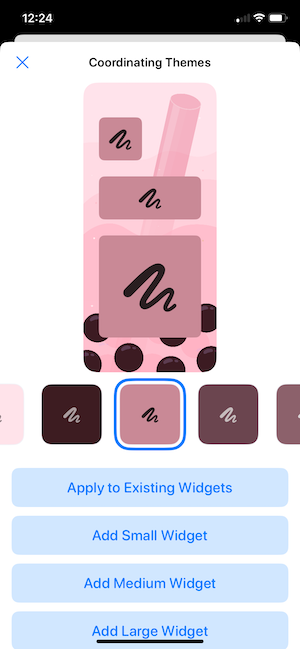
Image: Jessica Santero | WhistleOut
Not sure how to update your apps?
Keeping your apps up to date ensures you're always getting the latest features, bug fixes, and security improvements. Learn how to update the apps on your iPhone and your Android. It takes less time than you think.
Live widgets only update with a live connection
Weather, activity rings, and calendar widgets only refresh when your phone actually has a connection to pull new data from. If you are building out a Widgetsmith setup packed with real-time information, a dependable signal keeps every widget accurate instead of stuck showing yesterday's numbers on your Home Screen.
Is Widgetsmith worth downloading?
Yes, and it is best for anyone who wants their Home Screen to look and feel like theirs instead of the setup every other iPhone ships with out of the box. The free tier includes ads and covers every main widget type. Premium removes the ads and unlocks additional customization options for the widgets you have already built.
If you have ever felt like Apple's default widgets were too limited in size or style, Widgetsmith is the app that hands you control over both.
My iPhone has never before been more aesthetic than it is right now. Sixteen years of using default widgets, and it took one afternoon in Widgetsmith to make my Home Screen feel like mine.
Jessica Santero, WhistleOut Staff Writer
 How I tested Widgetsmith
- Built custom widgets for weather, clocks, and activity rings on an iPhone
- Compared widget size and customization options against Apple's built-in default widgets
- Paired widgets with wallpapers from the app's built-in library
- Tracked how quickly live widgets updated on Wi-Fi versus cellular data
- Used both the free, ad-supported tier and the Premium tier to compare feature access
Why you can trust WhistleOut
.svg)
15+
years of mobile industry experience

900+
published wireless guides

35+
firsthand carrier reviews
We've been around since the birth of the iPhone. Along the way, we've learned how to spot the best deals for your wallet (and your sanity). We spend our days researching informative guides and writing insightful reviews on every kind of wireless plan, distinguishing what matters from what doesn't. We played around with these plans before recommending them, ensuring they're worth your hard-earned money.
Want to know more? Check out how we review every cell phone plan we rank.
Widgetsmith: FAQ
Is Widgetsmith free to use?
Yes, Widgetsmith is free to download and includes ads. A Premium subscription removes the ads and unlocks additional customization for your widgets.
Is Widgetsmith the same as the calendar app with a similar name on Android?
No, Widgetsmith is made exclusively for iPhone and iPad, and similar-sounding widget apps on Android are unrelated products from different developers.
Do Widgetsmith widgets update automatically?
Yes, live widgets like weather and activity rings update automatically whenever your phone has a Wi-Fi or cellular connection to pull new data from.
Can I match Widgetsmith widgets to my wallpaper?
Yes, Widgetsmith includes a built-in wallpaper library, and you can color-match your custom widgets to whatever wallpaper you choose.
Jessica Santero
Staff Writer

Find a better phone plan
Thousands of cell phone plans unpacked. All the facts. No surprises.





