
The Apple Store claims that to finance a new iPhone using Apple Card installments or the Upgrade program, you’re required to have a postpaid plan from AT&T, Verizon, or T-Mobile. However, that’s actually not true, and you can easily score a financed iPhone from the Apple Store while on a prepaid carrier.
By choosing T-Mobile’s service at checkout, you can select to pay with Apple Card Monthly Installments or join the Apple Upgrade program without signing into a T-Mobile account. Your phone is then shipped unlocked, so you can activate it with any carrier you want.
I’ve personally used this method to get an iPhone 18 Pro on Apple Card installments with a prepaid US Mobile plan, and it worked with no problems. The catch is that it only works on Apple's premium iPhones, and Apple or T-Mobile could end this loophole at any time.
How to finance an iPhone from the Apple Store without a postpaid plan
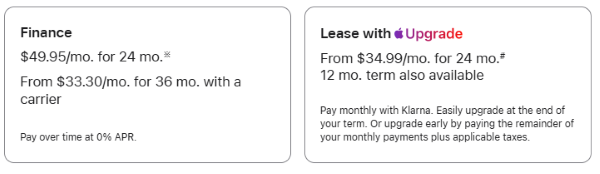
Image: Apple Store
If you’ve ever attempted to finance an iPhone through the online Apple Store, you may have noticed the site requires you to purchase the phone connected to a postpaid plan from a major carrier like AT&T, T-Mobile, or Verizon. However, that requirement is not enforced, and you can still purchase an unlocked iPhone by simply selecting the T-Mobile option and not entering any account information.
I successfully used this method to get a new iPhone 18 Pro on a 24-month Apple Card Monthly Installment plan. Though I picked T-Mobile at checkout, I activated the phone with my prepaid US Mobile plan as soon as I received it. I can confirm that it works, and I’ve had no issues with my phone after activation.

Image: Max McCaskill
To finance your new iPhone with a prepaid plan, simply follow these steps:
- Pick an iPhone Pro, Duo, or Air model. This loophole currently only works on Apple's premium iPhones. Base and budget models like the iPhone 17 or 17e require carrier account verification at checkout.
- Select customization options and add any trade-in information. Apple requires you to pick the color and storage size of your device before giving you a final price. You may also qualify for trade-in credits if you want to send in your old iPhone.
- Under payment options, choose Finance (Apple Card Monthly Installments) or Lease with Apple Upgrade. Apple Card spreads the cost over 24 interest-free payments. Apple Upgrade is a 12–24 month lease that typically includes a lower monthly payment, but you won’t own the phone once the plan is over.
- Under Connectivity, choose T-Mobile as your carrier. AT&T and Verizon require immediate account verification, but T-Mobile does not. By selecting T-Mobile, you won't be asked for a phone number, account number, or plan details.
- Finish the checkout process. Despite selecting T-Mobile as your carrier, your iPhone will ship unlocked, allowing you to connect with any carrier.
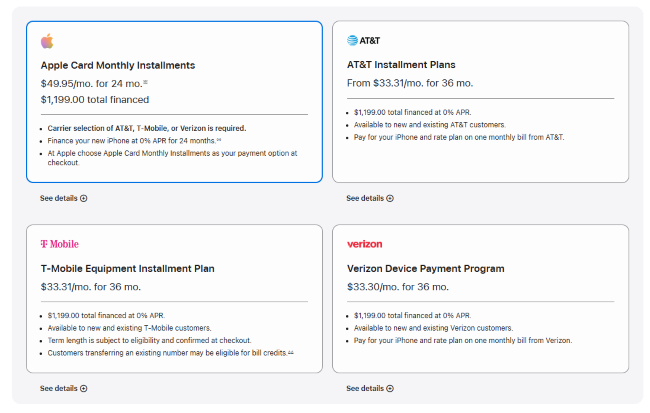
Image: Max McCaskill
Note: Make sure you’re selecting T-Mobile as your carrier, not as a financing option. If you opt to finance instead of lease, you’ll see terms from Apple Card, AT&T, T-Mobile, and Verizon. You must pick Apple Card Monthly Installments. If you’re being asked for T-Mobile account information at any point in the checkout process, you’ve likely accidentally selected T-Mobile as your financing option instead of connectivity source.
How to set up your new iPhone after it arrives
When you turn on your new iPhone, it will try to begin the T-Mobile activation process. This is a quick setup feature Apple added to help actual T-Mobile customers, and it’s easy to skip. Your phone is still unlocked despite this initial prompt.
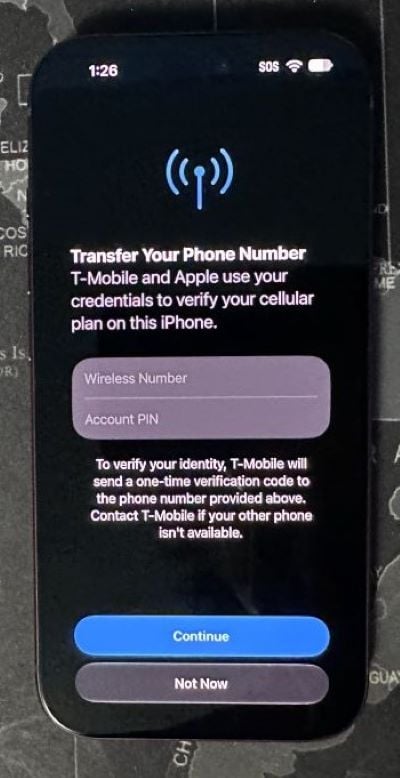
Image: Max McCaskill
Here’s how to set up your new iPhone and skip the T-Mobile activation prompt:
- Turn your iPhone on and follow the initial welcome prompts.
- When you get to Transfer Your iPhone Number, don’t add any information and simply press Continue three times.
- A new button saying Not Now will pop up. Press it and complete the setup process.
- Once you get into your new phone, contact your current carrier and begin the process of setting up service or transferring your current number.
If you’re transferring data from your current iPhone to your new one, you can also complete the Quick Start process with no issues during setup. Just note that your new iPhone won’t pull over your current eSIM or phone plan. You’ll still need to contact your carrier or download their app to transfer your old number to your new phone.
Why Apple makes you pick a carrier (and why it doesn't really matter)
Apple has close partnerships with AT&T, Verizon, and T-Mobile. As part of their agreements, Apple limits the sale of financed iPhones through the Apple Store to the major carriers. Since the major carriers sell the vast majority of iPhones, Apple is willing to box out prepaid carriers from its store to keep them happy.
Despite these agreements, Apple does not have access to a list of all the major carriers’ customers. The process relies on the carriers themselves to verify a customer’s eligibility. While AT&T and Verizon require specific account information, T-Mobile’s verification process is very basic, allowing users to simply say they are a customer without actually proving it.
From there, the iPhones are shipped unlocked, but Apple does include that pesky T-Mobile activation step during the device’s setup. While it may seem like this screen is connected to T-Mobile, it’s actually just designed to help speed the activation process along. The device is still unlocked, and by simply skipping that prompt, you'll never see it again.
Is getting an iPhone this way against the rules?
No. As a customer, you are not doing anything wrong. The carrier requirement is a deal between T-Mobile and Apple, not something you agree to. Getting Apple Card financing or Upgrade leasing without entering carrier plan details isn't illegal. T-Mobile simply doesn’t ask for confirmation details from any of its customers at checkout, and Apple purposely ships the phone unlocked.
Remember, your financing agreement is between you and the lender, not Apple or T-Mobile. For the Apple Card, that's currently Goldman Sachs, and for Apple Upgrade, it's Klarna. These agreements are solely about paying for your device on the schedule you selected. They have nothing to do with the carrier you use.
Apple Card financing vs. Apple Upgrade: Which should you use?
If you’re considering this method, you will have to select a financing option. Each method is best for different types of customers.
Apple Card Monthly Installments split the cost of your iPhone into 24 interest-free payments. You'll need an Apple Card credit card, which means applying and getting approved if you don’t already have one. You also have the ability to pay more than your monthly statement to finish your plan faster. At the end of the installment plan period, you’ll fully own the device.
Apple Upgrade is Apple's new leasing program with 12–24 month plans. The monthly payments are lower than Apple Card financing, but that's because you aren't paying off the whole phone. Financing is covered through Klarna, which owns the iPhone, and you must return it when the lease ends. If you decide you want to keep the phone, you must immediately pay off the remaining full cost. Like the Apple Card, Apple Upgrade also requires a credit check.
Apple Card Monthly Installments vs. Apple Upgrade
| Apple Card Monthly Installments | Apple Upgrade | |
|---|---|---|
| Lender | Apple Card (Goldman Sachs) | Klarna |
| Type | 0% APR financing plan | Lease |
| Term length | 24 months | 12 or 24 months |
| Who owns the phone | You | Klarna, unless you buy it out |
| Unlocked iPhone | Yes | Yes |
If you plan to keep your iPhone for a few years, we recommend going with Apple Card Monthly Installments. You'll own it outright once it's paid off, and you can sell it or keep using it as long as you like.
We only recommend Apple Upgrade if you already buy a new iPhone every year. For everyone else, the lower monthly payments seem nice at first, but we found it can cost more over time, and you never own the phone.
What iPhones does this purchasing loophole work on?
Unfortunately, Apple and the major carriers have clamped down on this loophole for some iPhones. We’ve found it currently works on premium models, but not the base iPhone or budget models.
What iPhones work:
- iPhone 18 Pro and iPhone 18 Pro Max (I tested this with the iPhone 18 Pro)
- iPhone Air
- iPhone Duo
What iPhones don’t work:
- iPhone 17
- iPhone 17e
- iPhone 16
On the base and budget models, Apple checks for an account no matter what carrier you select, and there’s no way to get around it. We also have no idea how long Apple and T-Mobile will allow this loophole to continue for premium models, so don’t be surprised if it’s eventually closed.
Other ways to get a new iPhone on a prepaid plan
If Apple financing isn't an option or you want an iPhone that doesn’t qualify, you still have a few routes:
- Check your prepaid carrier's deals. Some prepaid carriers do run device deals or partner with third-party financing services. Like Apple, these usually require a 12–24 month repayment plan. Just know that a carrier-financed phone may be locked to that carrier until it's paid off, so switching later gets harder.
- Buy an older or refurbished iPhone. A previous-generation model can cost a lot less upfront, which might mean you don't need financing at all.
It's also worth checking our roundup of the best iPhone deals before you buy, since prepaid carriers regularly run discounts and promotions on new iPhones. That said, the cheapest option is not buying a new phone at all. Apple offers software support for iPhones for five to seven years, so if your current iPhone still works fine, you can probably get more time out of it.
Financing iPhone with a prepaid carrier: FAQ
Can you finance an unlocked iPhone at Apple?
Yes, all iPhones financed through Apple Card Monthly Installments or Apple Upgrade arrive unlocked. After delivery, they can be activated on any network you want.
Is the Apple Upgrade Program better than Apple Card financing?
Apple Upgrade is better than Apple Card financing if you always want the newest iPhone. However, as a leasing plan, you’ll never own the device. For most people, Apple Card financing is the better choice because you own the phone at the end of your payment plan.
Is Apple financing interest-free?
Yes, Apple financing is interest-free. Apple Card Monthly Installments let you pay for your iPhone over 24 months at 0% APR. The plan does not impact your Apple Card’s balance or accrue interest if you pay on time, though it will take up part of your credit limit. You are only charged interest on the monthly installments if you fail to make your payments.
Can I finance an iPhone without an Apple Card?
Yes, Apple Upgrade doesn't require an Apple Card, though it does still require a credit check. Carriers and retailers also offer iPhone financing, but a carrier-financed phone is usually locked until it's paid off and may also require their own credit check.
Max McCaskill
Sr. Staff Writer

Find a better phone plan
Thousands of cell phone plans unpacked. All the facts. No surprises.

.png?w=160&h=160&usm=20&usmrad=0.8&fit=crop "Cell Coverage Near You: Who Has the Best 5G Network?")


.png?w=280&h=280&usm=20&usmrad=0.8&fit=crop "Best Cell Phone Deals for October 2026: Get the New iPhone 18 Pro for Free")


