
A Color Story is a photo editing app built around Instagram aesthetics, and it even lets you preview your grid before you post. It made my roundup of the best camera apps for iPhone and Android as the most modern looking editor I tested, though its free features are very limited.
If you've ever posted a photo and immediately regretted how it clashed with the rest of your profile, this app was made for you. It treats every edit as one square in a bigger picture, which is exactly how influencers and serious posters already think about their feeds.
Posting your travel shots from abroad?
Your best Instagram photos probably happen on vacation, and roaming charges can turn a single upload into an expensive souvenir. A plan with international data lets you edit and post from anywhere without a surprise bill waiting at home.
Check out the most popular carrier plans that include international data:
|
AT&T

Elite 2.0℠
$110.00/mo
+ $35 Upfront
|
|
T-Mobile

Experience More 2.0
$85.00/mo
with Auto-Pay + Taxes and fees
|
|
Verizon

Unlimited Plus
$80.00/mo
+ Taxes & Fees. Price includes AutoPay & Paperless discount.
+ $40 Upfront
|
- Very limited free features
- Free 3 day trial, then $29.99/year or $4.99/month
- Available for iPhone and Android
What is A Color Story?
A Color Story is an editing app for iPhone and Android that focuses on filters and tools designed to make photos look polished on Instagram. As soon as you open it, the app walks you through a set of filters that look like they came straight from Instagram itself. It works on photos you've already taken, so there's no need to shoot inside the app to use its filters.
Not sure how to update your apps?
Keeping your apps up to date ensures you're always getting the latest features, bug fixes, and security improvements. Learn how to update the apps on your iPhone and your Android. It takes less time than you think.
A modern interface with whimsical filters
A Color Story was the only app I tested that felt truly modern. The background shows a selection of photos submitted by other users, and a simple toolbar along the bottom keeps every tool within reach of your thumb. Compared to the more dated editors in my roundup, it's the one I'd feel most comfortable handing to a friend who has never edited a photo before.
The filter names skip technical jargon in favor of playful labels like Perfect Day, Buttercup, and Nice and Clean. Those names make it easy to pick a mood for your photo without knowing anything about color grading.
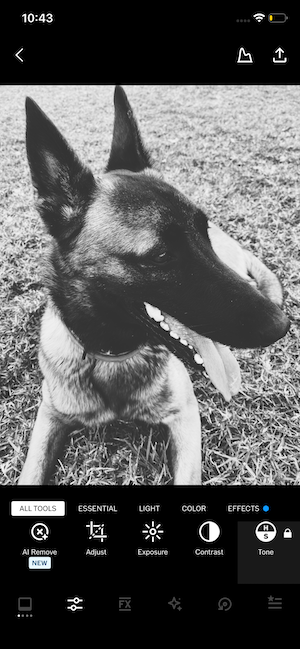
Image: Jessica Santero | WhistleOut
The grid preview is the real reason to download it
The grid preview lets you see how a new photo sits alongside the rest of your feed before you post it. It's a small feature, but it's the one that makes A Color Story feel purpose built for influencers and anyone who treats their profile like a portfolio.
VSCO and Lightroom focus on the edit itself, while A Color Story keeps going until the photo is ready to publish. That extra step saves you from the classic mistake of posting three nearly identical beach photos in a row.
Is A Color Story worth the subscription?
A Color Story is worth paying for if Instagram is where most of your photos end up. The free tier is very limited, so you'll hit a paywall quickly if you try to edit without subscribing.
Start with the free trial
The yearly plan includes a short free trial, and you can also go month to month if you'd rather not commit to a full year. I'd use the trial to edit a few days' worth of posts, then cancel before it renews if the grid preview doesn't change how you post.
If you rarely post to social media, VSCO gives you far more free editing tools without a trial clock ticking in the background. iPhone owners chasing a vintage film look will have more fun with Hipstamatic.
A Color Story shines brightest for the person who plans a feed down to the last square. For that person, the subscription costs less than the time you'd spend rearranging posts after they're already live.
 How I tested A Color Story
- Edited the same test photo used across the roundup with A Color Story's signature filters on an iPhone 11.
- Walked through the onboarding filters to see how closely they match Instagram's own look.
- Tested the grid preview to judge how useful it is for planning a feed before posting.
- Compared the free tier against the trial to measure how much the app offers before you pay.
Why you can trust WhistleOut
.svg)
15+
years of mobile industry experience

900+
published wireless guides

35+
firsthand carrier reviews
We've been around since the birth of the iPhone. Along the way, we've learned how to spot the best deals for your wallet (and your sanity). We spend our days researching informative guides and writing insightful reviews on every kind of wireless plan, distinguishing what matters from what doesn't. We played around with these plans before recommending them, ensuring they're worth your hard-earned money.
Want to know more? Check out how we review every cell phone plan we rank.
A Color Story: FAQ
Is A Color Story free?
A Color Story is free to download, but its free features are very limited. The yearly plan includes a free trial, and current pricing is listed on the App Store and Google Play pages.
Can you preview your Instagram grid in A Color Story?
Yes, A Color Story lets you preview how a new photo will look alongside the rest of your grid before you post it.
Is A Color Story available on Android?
Yes, A Color Story is available for both iPhone on the App Store and Android on Google Play.
What is the best app for editing Instagram photos?
A Color Story is my top pick for Instagram edits thanks to its grid preview and filters designed around Instagram aesthetics.
Jessica Santero
Staff Writer

Find a better phone plan
Thousands of cell phone plans unpacked. All the facts. No surprises.


.png?w=280&h=280&usm=20&usmrad=0.8&fit=crop "Best Cell Phone Deals for October 2026: Get the New iPhone 18 Pro for Free")


.png?w=280&h=280&usm=20&usmrad=0.8&fit=crop "Cell Coverage Near You: Who Has the Best 5G Network?")


