
Reminders used to be the app I opened first every morning, and Bear changed that within a week of testing it. Bear replaces plain, unformatted notes with markdown-style headers, tags, and dates you can add without ever touching a formatting menu.
You can compare it to the rest of our picks in the best iPhone-exclusive apps.

- Free on one device; paid subscriptions available
- Available for iPhone, iPad, and Mac only
Notes sync fastest with a strong data connection
Bear saves every note the moment you type it, and that sync depends on your phone actually having a signal to send it with. Check out the most popular unlimited data plans below:
|
Visible

$19 Visible Plan
$19.00/mo
Taxes & Fees included
|
|
Mint Mobile

Unlimited Data Plan
$15.00/mo
$45 for 3 months of service
|
|
Verizon

Simplicity Plan
$30.00/mo
+ Taxes & Fees. Price includes AutoPay & Bring a Number discount
|
How Bear turns typed shortcuts into notes you can skim
Bear is a notes app built around markdown-style formatting, but you never have to learn markdown to use it. Typing a pound sign before a line turns it into a header, tapping a contact's name links it directly into your writing, and dropping in a date or a linked note takes one tap from the toolbar above your keyboard. There is no account to create and no setup screen standing between you and typing.
I used Bear for quick notes during phone calls, jotting down takeaways from a podcast, and saving things I wanted to remember from Reddit threads before I scrolled past them. Opening the app and starting to type happens within a single tap every time, which sounds silly until you compare it to how many steps other note apps add before you can actually write anything.
Why headers make old notes easy to find again
Switching between header sizes takes one tap, and that single feature made the biggest difference in how I use the app. A note packed with headers is easy to skim weeks later, while the same note without any structure turns into a wall of text you have to read start to finish just to find one detail.
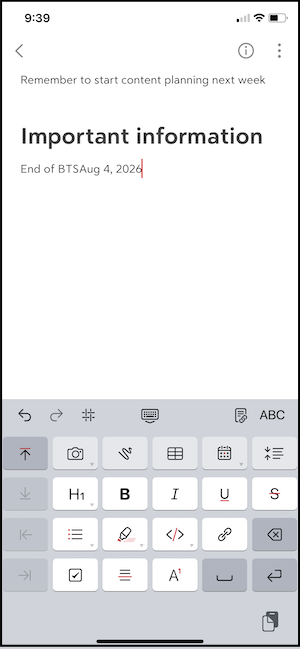
Image: Jessica Santero | WhistleOut
Bear feels less like a plain notes app and more like a cross between a Google Doc and Notes, simple on the surface but far more capable underneath once you start using the formatting tools regularly.
Not sure how to update your apps?
Keeping your apps up to date ensures you're always getting the latest features, bug fixes, and security improvements. Learn how to update the apps on your iPhone and your Android. It takes less time than you think.
Where Bear pulls ahead of the default Notes app
Apple's Notes app handles the basics, but Bear adds structure that Notes leaves out entirely. In-line tags let you pull up every note on a topic without scrolling through folders, linked notes connect related ideas to each other, and export options turn a finished note into a shareable document without copying and pasting the text somewhere else.
None of that comes at the cost of speed. Bear opens directly to a blank note or your most recent one, and the formatting tools stay out of the way until you actually need them.
Is Bear worth downloading?
Yes, especially if you take a lot of quick notes throughout the day and want them to stay organized without extra effort on the back end. The free tier limits you to one device, so notes taken on your iPhone will not sync to your iPad or Mac unless you upgrade to Bear Pro. For a single-device user, the free version covers every formatting feature without restriction.
If you have ever lost track of an idea because it was buried in a wall of unformatted text, Bear is built to fix exactly that.
Bear is the app I now open before Reminders, even after years of Reminders being my default. The headers alone made my notes easier to find later than any folder system I tried before.
Jessica Santero, WhistleOut Staff Writer
 How I tested Bear
- Used Bear as a daily notes app on iPhone during phone calls, podcast listening, and browsing sessions
- Tested header formatting, in-line tagging, date insertion, and note linking against Apple's default Notes app
- Timed how quickly I could open the app and start typing compared to other note-taking apps
- Tested export options to see how notes hold up outside the app
- Checked whether the free, single-device tier restricted any formatting features
Why you can trust WhistleOut
.svg)
15+
years of mobile industry experience

900+
published wireless guides

35+
firsthand carrier reviews
We've been around since the birth of the iPhone. Along the way, we've learned how to spot the best deals for your wallet (and your sanity). We spend our days researching informative guides and writing insightful reviews on every kind of wireless plan, distinguishing what matters from what doesn't. We played around with these plans before recommending them, ensuring they're worth your hard-earned money.
Want to know more? Check out how we review every cell phone plan we rank.
Bear: FAQ
Is Bear free to use?
Yes, Bear is free on a single device with full access to markdown formatting, tags, and links. Syncing notes across multiple Apple devices requires upgrading to Bear Pro.
Is Bear available on Android?
No, Bear is built exclusively for iPhone, iPad, and Mac, with no official Android release currently available.
Does Bear require an account to use?
No, you can open Bear and start typing notes immediately without creating an account or completing any setup screens.
Can I export notes from Bear?
Yes, Bear includes export options that let you turn a finished note into a shareable document without copying and pasting the text elsewhere.
Jessica Santero
Staff Writer

Find a better phone plan
Thousands of cell phone plans unpacked. All the facts. No surprises.





