Gas prices can change from one station to the next, even on the same stretch of road. A 10-cent difference doesn't sound like much, but on a 15-gallon tank, that's $1.50 every time you fill up. If you fill up once a week, that's close to $80 a year.
You don't need a dozen gas-saving apps to close that gap. You need three free ones, each used at a different point in your trip:
- GasBuddy finds the cheapest stop before you drive
- Waze shows prices while you're on the road
- Upside pays you back after you fill up.
WhistleOut staff writer and resident app expert Jessica Santero has tested all three on real road trips and everyday errands. I pulled together what she found, plus the current fine print on fees and savings, so you can pick the app that matches how you want to save.
Quick look at the best gas apps
| App | When to use it | How you save | Price |
|---|---|---|---|
| GasBuddy | Before you drive | Finds the cheapest station near you or along your route. The free GasBuddy card takes at least 3¢/gal off at the pump. | Free; optional Premium is $9.99/mo. |
| Waze | On the road | Shows driver-reported gas prices without leaving your navigation app. | Free; no paid tier. |
| Upside | After you fill up | Pays cash back on gas (we've seen up to 22¢/gal) on top of your credit card rewards. | Free; $1 fee to cash out under $10. |
What to look for in a gas app
Whether you're filling up for the daily commute or crossing three states, a good gas app needs to do at least one of these jobs well:
- Show prices you can trust. Most gas price apps rely on drivers to report prices, so the best ones tell you when each price was last updated.
- Save money without forcing a worse way to pay. Some apps make you use their own payment card, which means giving up your credit card's gas rewards.
- Pay out without eating your savings. Cash-back apps can have minimums or fees to withdraw your money, so check the fine print before you rely on them.
No single app nails all three, which is why the order you use them in matters more than which one is "best." Free price-finders get you to the cheapest station. A cash-back app then lowers what you actually paid.
Find the price first. Then get paid back.
The best gas apps, in the order you'll use them
Before you drive: GasBuddy finds the cheapest stop

Step 1: Before you drive
Free on iOS and Android
- Finding the cheapest station near you or along your whole route
- Road trips through areas where you don't know the stations
- Saving a few cents per gallon with a free payment card
GasBuddy is the app to open before you leave. It tells you where the cheapest gas is, so you're not pulling off at the first exit when your tank hits a quarter.
GasBuddy tracks live gas prices at stations across the U.S. and Canada, using reports from drivers and data from station owners. The basic search shows the cheapest stations near you, sorted by price and distance. The more useful feature is route search. You simply enter your destination, and GasBuddy shows the cheapest fuel along the way so you can plan your stop instead of guessing.
Because drivers report most of the prices, they can lag a few hours in quieter areas. On major highways, Jessica found the data current enough to rely on. GasBuddy also shows when each price was last reported, so you can decide for yourself whether a detour is worth it.
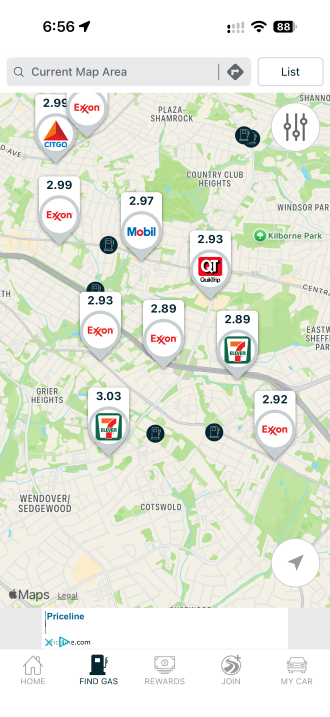
so you can spot the cheapest one at a glance.
Image: Max McCaskill | WhistleOut
How the GasBuddy card works
The Pay with GasBuddy+ card is how GasBuddy saves you money at the pump, too. It's free, doesn't require a credit check, and links to your checking account. GasBuddy says you'll save at least 3 cents per gallon anywhere Mastercard is accepted, and up to 33 cents per gallon if you activate a Flash Deal (formerly called Deal Alerts) in the app before you fill up.
That said, it works like a debit card, so you give up your credit card's gas rewards every time you use it. In most cases, the GasBuddy card's 3-cent baseline doesn't beat a card that rewards gas purchases. The card only wins when a Flash Deal pushes the discount higher than what your credit card already pays you.
However, GasBuddy isn't built as a navigation app. Mid-drive, you're better off with the app that's already on your screen.
On the road: Waze shows gas prices without switching apps

Step 2: On the road
Free on iOS and Android
- Checking gas prices without leaving your navigation app
- Drivers who already use Waze for directions
- Finding a stop when you didn't plan one ahead of time
Waze is the easiest way to check gas prices once you're already driving, mostly because it's probably already open.
Waze is a free navigation app that uses real-time reports from millions of drivers to flag accidents, police, road hazards, and closures before you reach them. It holds a 4.8 rating on the App Store across more than 3 million reviews, and there's no premium tier to upsell you. Jessica's testing also found that Waze uses less mobile data than both Google Maps and Apple Maps over the same routes, which matters when navigation runs for hours.
That same community reports gas prices, too. Pull up nearby gas stations in Waze, and you'll see what other drivers have reported, so you can pick a cheaper stop without leaving your route.
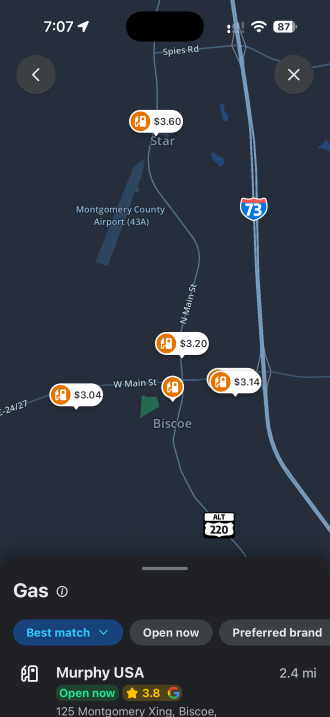
Image: Max McCaskill | WhistleOut
To be clear, Waze's gas prices are less reliable than GasBuddy's. Waze says its prices come from users and may not always match what the station is charging. Only drivers within 0.3 miles of a station who have driven at least 100 miles with Waze can update a price, and you can't edit prices from CarPlay or Android Auto. In busy areas, that's usually fine. On a quiet rural highway, treat the number as a ballpark.
Once you've picked your station and filled up, there's still one more chance to save.
Keep your gas apps connected on long drives
Every app on this list needs a connection. GasBuddy pulls live prices over cellular data, Waze runs for hours on a road trip, and Upside offers have to be claimed in the app, often right at the pump. A plan with plenty of data and strong coverage keeps those savings within reach.
These popular unlimited plans can keep you connected while traveling and even help you save on your phone bill too.


After you fill up: Upside pays you back

Step 3: After you fill up
Free on iOS and Android
- Getting cash back on gas with the card you already use
- Stacking savings on top of your credit card's gas rewards
- Drivers who also want cash back on food and convenience store runs
Upside is the best gas cash back app we've tested and the only app on this list that pays you after you buy gas, and it's the one Jessica liked most. She used it for three months, saved $56 on gas, and kept it on her phone.
Upside works differently from GasBuddy. You pay full price at the pump with your own credit or debit card, and Upside sends you cash back afterward. Using it takes three steps:
- Find an offer on Upside's map, either by sharing your location or entering a ZIP code.
- Pay with the card you linked to the app.
- Claim your cash back by tapping the offer or uploading a photo of your receipt.
The prices on Upside's map already include your cash back, so the number you see is what you'll effectively pay. Offers change by location, time of day, and season. Jessica has seen up to 22 cents per gallon on regular gas, and she's watched the savings at her local station double on holidays.
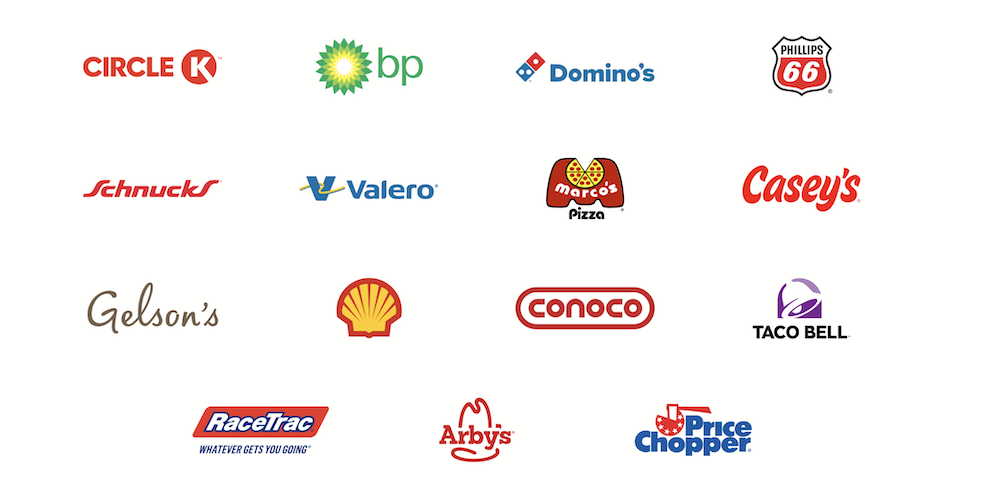
Image: Jessica Santero | WhistleOut
The biggest advantage is that Upside doesn't replace how you pay. Your credit card rewards still apply, so you earn both. Jessica pairs Upside with a credit card that earns 5% back on gas, which effectively doubles her rewards on every fill-up.
What gas stations use Upside?
Upside works with more than 50,000 gas stations, convenience stores, grocery stores, and restaurants across all 50 states and Washington, D.C. Gas station partners include BP, Casey's, Chevron, Circle K, Exxon, Gulf, Love's, Marathon, Mobil, Phillips 66, RaceTrac, Shell, Speedway, and Sunoco.
That said, don't assume your usual station is in the Upside gas app. Upside limits partnerships to about 30% of the gas stations in any given area, so check the map before you fill up. Two of the same brand on the same street might not both offer cash back.
The fine print
Upside charges a $1 fee if you cash out less than $10, so it's worth letting your balance build first. Jessica reaches $10 in about two trips to the gas station. You can cash out to your bank account, PayPal, or a gift card.
Upside also needs your card details to verify purchases. Jessica recommends linking a credit card rather than a debit card for the added fraud protection. And while Upside stacks with credit card rewards, it doesn't always stack cleanly with gas station loyalty programs. If you also use a station's rewards discount, Upside may reduce your cash back to account for it.
Gas station apps and Checkout 51 didn't make the cut
Brand apps from BP, Shell, Exxon, and other chains can save you a few cents per gallon, but only at that brand's stations, and some are regional. If you're loyal to one chain, its app is worth a download. Just know that combining a station discount with Upside may lower your Upside cash back.
Checkout 51 also pays cash back on gas, but it shares much of the same station list as Upside, makes you upload a receipt within 20 hours, and won't pay out until you hit $20. For most drivers, Upside does the same job with fewer hoops.
Planning a long drive? See our full list of the best road trip apps.
Which gas app should you download?
If you only download one cheap gas app, make it GasBuddy. Finding the cheapest station is still the biggest, easiest saving method, and GasBuddy does it better than anything else that's free.
If you already pay for gas with a rewards credit card, add Upside. It costs nothing, doesn't change how you pay, and puts real money back in your pocket on top of the rewards you're already earning.
If you'd rather not juggle apps at all, stick with Waze and check its gas prices when you need a stop. You'll give up some accuracy, but you won't have to pick up your phone to find a reasonable price.
How we tested the best gas apps
Jessica Santero tested GasBuddy across multiple road trips, used Waze on real road trips alongside Google Maps and Apple Maps, and used Upside for three months on her regular fill-ups. I then checked each app's current savings, fees, and partner details against its official help pages and announcements. We focused on:
- Price accuracy: Whether the gas prices each app showed were current enough to trust, and whether the app showed when they were last updated.
- Real savings: How much each app saved per gallon or per trip, and whether those savings stacked with credit card rewards.
- Costs and fine print: Paid tiers, cash-out minimums, withdrawal fees, and payment requirements.
- Ease of use: How many steps it took to find a price or claim a reward, especially on the road.
Why you can trust WhistleOut

15+
years of mobile industry experience

900+
published wireless guides

35+
firsthand carrier reviews
We've been around since the birth of the iPhone. Along the way, we've learned how to spot the best deals for your wallet (and your sanity). We spend our days researching informative guides and writing insightful reviews on every kind of wireless plan, distinguishing what matters from what doesn't. We played around with these plans before recommending them, ensuring they're worth your hard-earned money.
Want to know more? Check out how we review every cell phone plan we rank.
Best gas apps: FAQ
What is the best app for gas prices?
The best app for gas prices is GasBuddy. It shows live, driver-reported prices at stations across the U.S. and Canada, tells you when each price was last updated, and can find the cheapest gas along your entire route. Waze is a good backup if you're already using it for directions.
What is the best app to get cash back on gas purchases?
The best app to get cash back on gas is Upside. You pay with your own credit or debit card, claim an offer in the app, and get cash back afterward. Because you keep using your own card, Upside's cash back stacks with your credit card rewards.
Are gas apps worth it?
Yes, apps to save on gas are worth it as long as you stick to the free ones. GasBuddy and Waze cost nothing and steer you toward cheaper stations, and Upside saved our tester $56 on gas in three months without changing how she paid. Paid tiers like GasBuddy+ Premium are a harder sell, since they only pay for themselves if you pump around 50 gallons a month.
How does GasBuddy work?
GasBuddy works by collecting gas prices reported by drivers and station owners, then sorting nearby stations by price and distance. You can also enter a destination to see the cheapest gas along your route. The app is free, and an optional free payment card saves you a few extra cents per gallon at the pump.
What is the GasBuddy card?
The GasBuddy card (often searched as the Gas Buddy card), officially the Pay with GasBuddy+ card, is a free payment card that links to your checking account and takes at least 3 cents per gallon off at stations that accept Mastercard. Activating a Flash Deal in the app can raise that to as much as 33 cents per gallon. It doesn't require a credit check, but it also doesn't earn credit card rewards.
What gas stations use the Upside app?
Gas stations that use the Upside app include BP, Casey's, Chevron, Circle K, Exxon, Gulf, Love's, Marathon, Mobil, Phillips 66, RaceTrac, Shell, Speedway, and Sunoco. Upside only partners with about 30% of the stations in a given area, though, so check the map in the app to see which locations near you offer cash back.
Does Waze show gas prices?
Yes, Waze shows gas prices reported by other drivers when you look up nearby gas stations. Because the prices are crowdsourced, they may not always match the pump, so check GasBuddy if you need a more reliable number.
Max McCaskill
Sr. Staff Writer

Thousands of cell phone plans unpacked. All the facts. No surprises.

Related Articles


Related Topics
App RoundupsPopular Topics
Featured App Reviews iOS News Coverage Device Reviews Device Explainers T-Mobile App Roundups Carrier Explainers