

Thanksgiving is the one day a year when most home cooks juggle four dishes at once, cook for a crowd, and coordinate a grocery list with family. I've always considered old-fashioned recipe index cards the epitome of good cooking—but I have been missing out. Recipe apps offer endless recipes for any diet and allergy restriction; the pictures are mouthwatering, and the recipes are delicious. I put six of the best recipe apps to the test to see which one fit my cooking style.
The right app keeps your recipes, menu, and shopping list in one place, so the big day runs smoother. Recipe Keeper is my absolute favorite for Thanksgiving this year, and ReciMe is the best option for pulling those saved folders from TikTok into a real cookbook.
Quick glance at the best recipe apps
| App | Best for | Available on | Price |
|---|---|---|---|
| Recipe Keeper | Building your own cookbook from recipe websites | iPhone, Android, computer | Free for 20 imports; Pro costs $19.99 as a one-time purchase |
| ReciMe | Importing recipes from social media and planning the menu | iPhone, Android | Free for five recipes; upgrade to Premium for $4.99/month |
| Pepper | Finding seasonal recipe ideas | iPhone, Android | Free with ads; Pepper+ costs $4.99/month |
| Crouton | Meal prep and pantry tracking | iPhone, iPad, Mac, Apple Watch, Vision Pro | Free with a recipe limit; Crouton Plus costs $24.99 as a one-time purchase |
| Paprika | Importing recipes from popular cooking websites | iPhone, Android, Mac, Windows | $4.99 on mobile with a one-time purchase |
My top features in a recipe app
Whether you're having family in for the holidays or just hoping to put something delicious together on a Tuesday, a good recipe app needs to:
- Import recipes quickly,
- plan a full menu,
- and turn that menu into a grocery list.
Holiday cooking already creates more stress than it should, so an app that helps plan and execute is essential.
Plus, the recipe import feature brings the TikTok side dish you saved and the recipe from your favorite food blog into one place. Serving size adjustments save you from doing fraction math when a recipe for 6 has to feed 14. And the meal planner plus grocery list keep you from making extra trips to the store.
The best recipe apps (for both iPhone and Android devices)
Recipe Keeper: Collect your favorite links in one location
4.5 out of 5 overall
- Importing recipes from websites without the ads
- Building your own recipe book
- Editing recipes with your own tweaks
Recipe Keeper is free on iPhone and Android and includes 20 recipe imports. But if you want more, then you'll have to upgrade to a paid subscription.
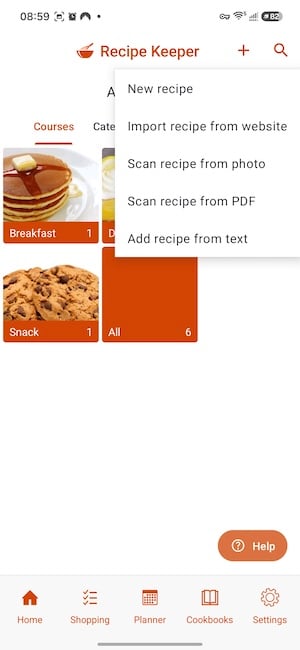
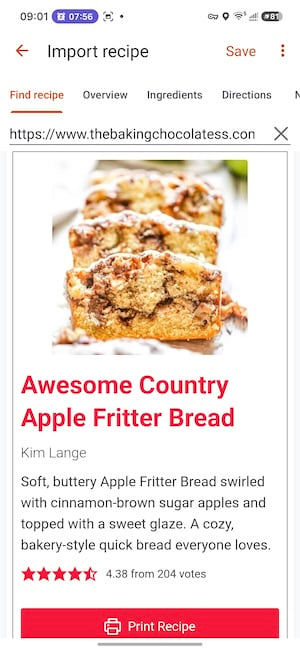
Recipe Keeper is a recipe organizer, shopping list, and meal planner that works on (and syncs to) your phone, tablet, and computer. Just paste a link from any recipe website, and the app imports the full recipe—without the ads. I always use Sally's Baking Addiction banana bread recipe (because it's the literal best), but I usually just look for it on Google. Recipe Keeper lets me save it in one location in an easy-to-read format so I can have it on hand for the cooler weather.
Images: Jessica Santero | WhistleOut
The app can also scan recipes from cookbooks, magazines, and handwritten cards. Plus, when you change the serving size in the app, Recipe Keeper recalculates the ingredients for you. That means you won't have to calculate ⅔ cup of oil times six anymore.
Recipe Keeper is the underdog among other recipe apps. It doesn't look like much when you open it, and the starter recipes are basic. I got spaghetti, pancakes, a lemon pie, and some cookies. But the best feature of this app, and arguably of any recipe app, is web import—and the imported recipes look stunning.
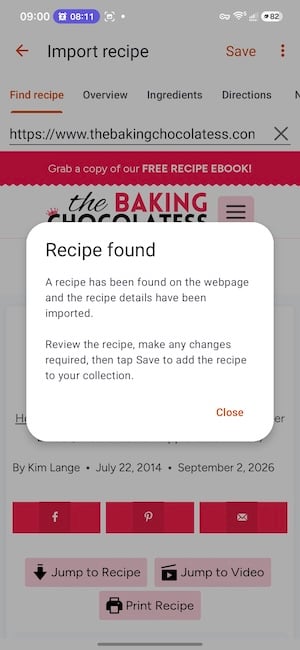
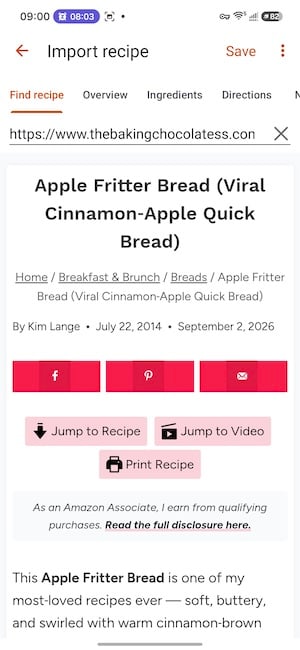
I've been hunting for a good recipe for the viral apple fritter loaves making the rounds online, so I found one I liked and imported it. All I had to do was copy the website link, and the app pulled in the entire recipe with no ads. The steps, ingredient list, picture, serving size, prep time, and cook time all fit in basically one scroll.
Images: Jessica Santero | WhistleOut
If you have beloved recipes you make often, and you're tired of Googling the same thing just to click the same purple link, this is the app for you. I'll be importing all the loaves I make plus my favorite dishes, because I'm tired of index cards that always get dirty and lost. You can also edit any recipe, so if I add extra nutmeg to my apple fritter loaf, I can write that in.
The catch is that you only get 20 free imports before you have to upgrade. So if you're serious about building your own recipe book, the upgrade is worth it. Recipe Keeper also works across all your devices, so if someone sends you a recipe while you're working, you can import it on your laptop.
Sharing is caring, and that includes your phone bill
Pepper's shared folders put everyone's dishes in one spot, and a family phone plan does the same for your monthly bill. Most carriers lower the price per line as you add people, so one plan for the whole household often costs less than separate plans.
Compare the most popular family plans with three lines for maximum savings.
|
Verizon

Simplicity Plan
$90.00/mo
+ Taxes & Fees. Price includes AutoPay & Bring a Number discount
|
|
Spectrum Mobile®

Unlimited Plus
$120.00/mo
+ $60 Upfront
|
|
T-Mobile

Essentials Saver 2.0
$100.00/mo
with Auto-Pay - Taxes & Fees NOT included
|
ReciMe: My personal favorite as a social media foodie

4.5 out of 5 overall
- Saving recipes from TikTok and Instagram
- Planning a full holiday menu
- Sending your grocery list to Instacart
ReciMe is free on iPhone (iOS 17 or later) and Android (Android 12 or later), but the free tier restricts you to five recipe imports.
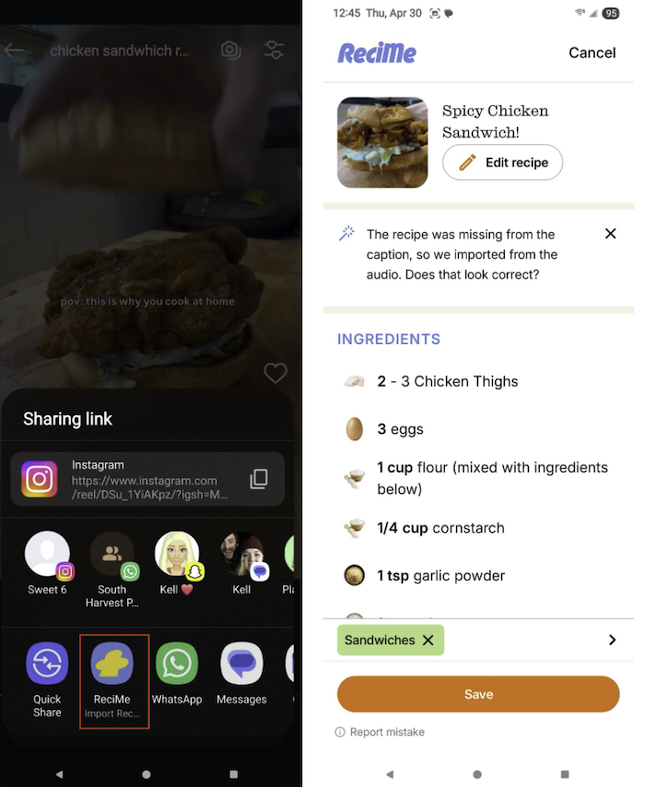
ReciMe is a recipe organizer and meal planner that imports recipes from social media posts, food blogs, and photos of printed recipes. You can share a recipe video from Instagram or TikTok to the app, and ReciMe generates the full list of ingredients and steps. You can also edit recipes (to give them your own personal touch), sort them into custom cookbooks, and print them or save them as PDFs.
Images: Scott Houghton | WhistleOut
The meal planner turns your weekly plan into a very detailed grocery list. It even sorts your list by aisle, with duplicate ingredients combined so you don't have to go back and grab more sugar after consulting different recipes. With one tap of a button, ReciMe sends that list to Instacart for pickup or delivery, and your shopping is done.
That way, this Thanksgiving you can easily whip up the viral side dish you saved last month on Instagram (the maple bacon biscuits in my case) and still whip up Grandma's hand-written divinity recipe all in one app.
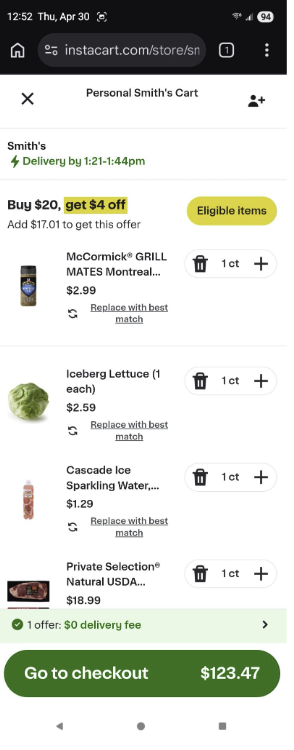
Image: Scott Houghton | WhistleOut
WhistleOut Android expert and culinary connoisseur, Scott Houghton, tested ReciMe for a month and found the social media import impressively accurate. He tried it on dozens of recipe videos, and it nailed the vast majority of them. Some reels or shorts are difficult to import in general since some creators show the recipe only in the video and leave it out of the caption. But in those cases, ReciMe gets you about 90% of the way there.
Scott recommends gathering your recipes in ReciMe and then printing them. There's nothing worse than trying to wake your phone with your nose when your hands are covered in raw chicken juice. He also suggests starting with the $4.99 monthly plan before committing to a full year, since the five-recipe free tier works more like a demo.
Cook from a phone that opens like a recipe book
A foldable phone opens up like a pocket-sized cookbook, which gives the recipes you import into Recipe Keeper a tablet-sized screen. Many foldables can also stand half-open on the counter, so your recipe stays in view while your hands are covered in pie dough.
Check out the latest foldable phone deals if you're ready to retire the stained index cards for good.
Pixel 11 Pro Fold 5G 256GB
- 8 inch display
- Rear Cameras: 48MP, 10.5MP, 10.8MP
- Front Cameras: 10MP, 10MP

Galaxy Z Fold8 5G 256GB
- 7.6 inch display
- Rear Cameras: 50MP, 50MP
- Front Cameras: 10MP, 10MP

Galaxy Z Fold7 5G 256GB
- 8 inch display
- Rear Cameras: 200MP, 10MP, 12MP
- Front Camera: 10MP


Pepper: Serves up seasonal recipe ideas in a social feed
3.5 out of 5 overall
- Finding seasonal holiday recipes
- Browsing recipes for free
- Following home cooks you love
Pepper is free with ads on iPhone and Android. Upgrading to Pepper+ includes unlimited save folders, daily rewards, and an ad-free experience.
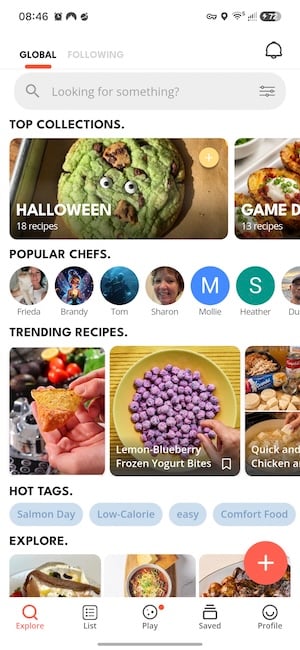
Pepper is a social recipe app where home cooks post recipes and follow each other, similar to Instagram. The home screen organizes recipes into category tiles, including seasonal collections. All timely recipes and holiday ideas show up right at the top. Each recipe lists its ingredients with small food emoji icons, and the steps sit in clear boxes underneath.
Plus, an Instacart button sends the ingredient list to your account so you can either pick up or get them delivered. And since Pepper is a social cooking app, you can also create shared recipe folders with friends and family, so everyone can see and contribute recipes live in one spot.

Images: Jessica Santero | WhistleOut
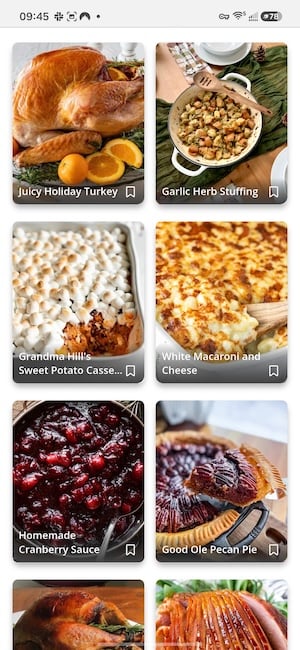
Setting up Pepper was a little annoying. The app constantly tries to upsell you on the subscription, and you have to hunt for small Xs and tiny lettering to skip through to the free version. Once I made it past those screens, I was shocked by how good the free version is. Halloween recipes filled the top of the screen when I tested it, plus the best game day snacks. They ranged from easy to complex and covered sweets, desserts, and snacks. The Thanksgiving folder had a really good mix of recipes too, including my favorite sweet potato casserole and an interesting white macaroni and cheese with a white cheddar sauce that looked really good. I'm a fan of canned jellied cranberry sauce, but the homemade cranberry sauce looked delicious too.
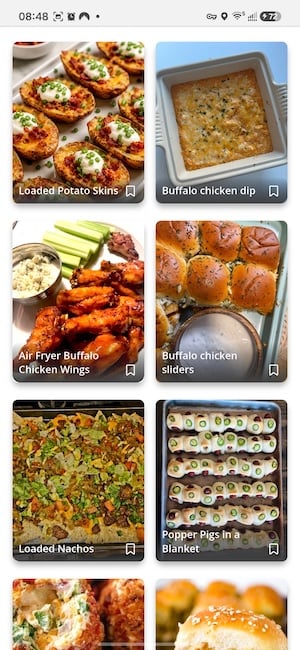
The game day category had twice-baked potatoes, buffalo dip, and loads of other dishes that looked absolutely mouthwatering. You can tap the category tiles to scroll, or search for a specific recipe if you're craving something in particular.
Images: Jessica Santero | WhistleOut
Pepper also highlights a recipe of the week. I put it to the test, and the Halloween pumpkin patch fudge uploaded by @wickedwonderland was fantastic. I can't resist anything topped with the mellowcreme pumpkins that come out around Halloween, so this one is definitely a repeat sweet treat.
Pepper works like a social profile for recipe sharing, which you may or may not like. You can follow certain creators or post your own recipes. The free version is easy to use, and the ads didn't bother me. If you're looking for support this Thanksgiving, Pepper is a great pick.
Samsung Food didn't make the cut
As an Android user with a Samsung Galaxy S24 FE, I had high hopes for Samsung Food. It's Samsung's free meal planner with shared grocery lists, and it would have been our top free pick—if I could have opened it. I was so sad this app didn't work. I kept tapping the option to sign in with my Samsung account, which I have, but the app wouldn't open. I exited, refreshed, uninstalled, and reinstalled, and it still didn't work. I'm disappointed, Samsung.
Crouton: Turn your weekly meals into a shared household calendar
3.5 out of 5 overall
- Weekly meal planning and meal prep
- Tracking pantry ingredients
- Apple-only households
Crouton is free on iPhone, iPad, Mac, Apple Watch, and Vision Pro, with a recipe limit. Crouton Plus removes the limit.
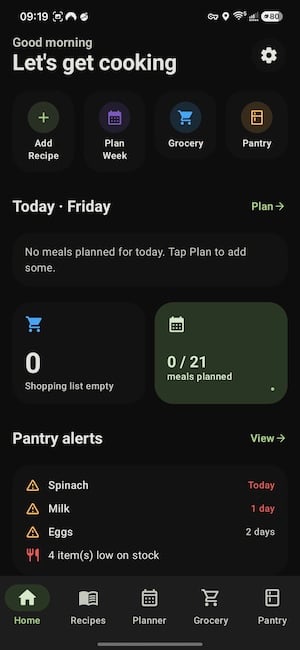
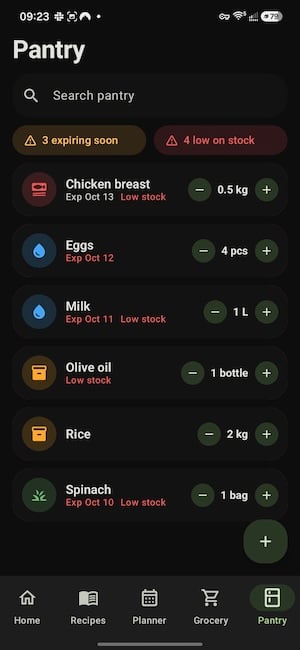
Crouton is a meal planner and pantry tracker for Apple devices that feels like a mix of the Notes and Calendar apps. Tap a day, choose breakfast, lunch, dinner, or snacks, and pick a recipe for each meal. Plus, the pantry alert section lets you mark ingredients as low or out, and the app keeps your shopping list ready to go. And if your household is like mine, you might want to share your meal plans with the other people you live with to coordinate. Crouton doesn't work on Android, Windows, or the web, so it fits best in households where everyone uses Apple devices.
Images: Jessica Santero | WhistleOut
As soon as I opened the app, I instantly saw why this app is a fan favorite. It isn't a collection of category tiles, and it isn't a super simple recipe book builder either. Instead, it feels like the Notes app, with simplified but dynamic sections. This app leans toward meal planning and meal prep. So it best suits those who shop for ingredients to keep their pantry stocked, rather than buying ingredients only for one saved recipe.
The catch (and I think it's a pretty big one) is that you have to input your own recipes. The app only comes with five or six preloaded recipes, and adding everything yourself seems time-consuming to me. Still, if you have a set rotation, the work pays off. Let's be honest, I only cook about 20 different dishes, so I could input those 20 recipes and have them on hand at all times. If you love trying new recipes, though, you won't find any suggestions here.
If you do have your rotation of dishes, the app makes it much easier to track your pantry and keep your shopping list ready. If you're willing to put in the work, this app can save you hours every week by replacing the lists and inventory checks that come with serious meal prep.
Get the whole household on iPhone
Crouton works only on Apple devices, so everyone who shares your meal plan needs an iPhone, iPad, or Mac. Crouton also runs on Apple Watch, which keeps your recipe steps on your wrist while you cook.
If anyone in your house is due for an upgrade, compare the latest iPhone deals before you buy.
iPhone 16 128GB
- 6.1 inch display
- Rear Cameras: 48MP, 12MP
- Front Camera: 12MP

iPhone 18 Pro 256GB
- 6.3 inch display
- Rear Cameras: 48MP, 48MP, 48MP
- Front Camera: 18MP

iPhone 18 Pro Max 256GB
- 6.9 inch display
- Rear Cameras: 48MP, 48MP, 48MP
- Front Camera: 18MP

Paprika: The most affordable recipe app with a one-time purchase
4 out of 5 overall
- Importing single recipes from big cooking sites
- Skipping the ads and life stories on recipe blogs
- A one-time purchase instead of a subscription
Paprika costs $4.99 on iPhone and Android as a one-time purchase, and includes cloud sync between devices for free.
Paprika is a recipe manager that pulls recipes from almost any website through its built-in browser. The app detects cook times in your directions and turns them into timers you tap to start, so "roast for 45 minutes" becomes a running countdown on your phone. You can have multiple timers at once and pin several active recipes to jump between the stuffing and the gravy.

Images: Jessica Santero | WhistleOut
The ingredient scaler adjusts serving sizes and converts measurements, too. And the grocery list combines ingredients across recipes and sorts them by aisle. Paprika also saves meal plans as reusable menus, so this year's Thanksgiving lineup is ready to go again next November.
What makes this app different from other recipe import apps is that its browser already has links programmed in for popular cooking websites. You open the link list and tap your favorite site. For example, I tapped Food & Wine, and the app took me directly to its pages. All you have to do is tap a recipe, download it, and the recipe goes straight into your recipe book so you can follow it from there.
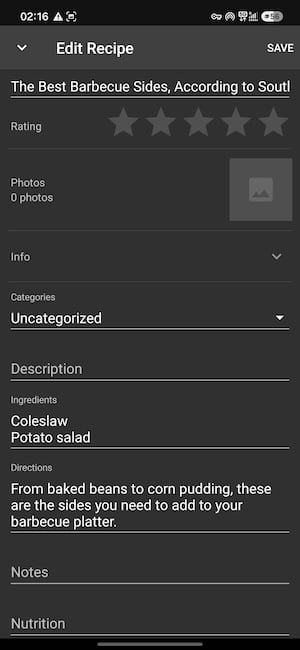
That said, I found quite a few errors while using this app. I tapped on an article with several recipes in it, titled "The Best Barbecue Sides, According to Southern Chefs." When I went to download it, the app couldn't tell that the article held multiple recipes. It gave me an ingredient list of only coleslaw and potato salad, while the directions read "from baked beans to corn pudding."
 How I tested the best recipe apps
I tested Pepper, Recipe Keeper, Crouton, Paprika, and Samsung Food on my Samsung Galaxy S24 FE and iPhone 11, including:
- Recipe import: How cleanly recipes came in from websites, built-in cooking site links, and roundup articles, tested in Recipe Keeper, Paprika, and ReciMe.
- Social media import: How accurately an app turned Instagram and TikTok recipe videos into full recipes, tested in ReciMe.
- Recipe discovery: How easy it was to browse seasonal folders, category tiles, and the recipe of the week, and to cook from a recipe, tested in Pepper.
- Meal planning and pantry tracking: How easy it was to add recipes to specific days and mark ingredients as low or out, tested in Crouton and ReciMe.
- Grocery lists: Whether the list sorted itself by aisle, combined duplicate ingredients, and sent it to Instacart, tested in ReciMe.
- Setup and free tiers: How easy it was to get past sign-in and upsell screens, and how far the free version went before hitting a paywall, tested in all six apps.
Best recipe apps: FAQ
What is the best recipe app for Thanksgiving?
The best recipe app for Thanksgiving is ReciMe for most home cooks. It imports recipes from social media, food blogs, and printed pages, then turns your menu into an aisle-sorted grocery list you can send to Instacart. Recipe Keeper is a strong choice if most of your recipes come from websites.
What is the best free recipe app?
The best free recipe app from our testing is Pepper. Its free version includes seasonal recipe collections, recipe search, and an Instacart button, with ads that don't get in the way. Recipe Keeper's free version allows 20 web imports, and ReciMe's free tier allows five recipes.
Can a recipe app import recipes from TikTok or Instagram?
Yes, a recipe app can import recipes from TikTok or Instagram. ReciMe generates the full ingredient list and steps when you share a recipe video to the app. Accuracy drops slightly when the creator shows the recipe only in the video and leaves it out of the caption.
Can a recipe app adjust a recipe for a large group?
Yes, a recipe app can adjust a recipe for a large group. Recipe Keeper and Paprika both recalculate ingredient amounts when you change the serving size.
Which recipe apps work on both iPhone and Android?
The recipe apps on this list that work on both iPhone and Android are ReciMe, Recipe Keeper, Pepper, and Paprika. Crouton works only on Apple devices.
Why you can trust WhistleOut
.svg)
15+
years of mobile industry experience

900+
published wireless guides

35+
firsthand carrier reviews
We've been around since the birth of the iPhone. Along the way, we've learned how to spot the best deals for your wallet (and your sanity). We spend our days researching informative guides and writing insightful reviews on every kind of wireless plan, distinguishing what matters from what doesn't. We played around with these plans before recommending them, ensuring they're worth your hard-earned money.
Want to know more? Check out how we review every cell phone plan we rank.
Jessica Santero
Staff Writer

Thousands of cell phone plans unpacked. All the facts. No surprises.


