
You don't need a tablet or a stylus to start drawing, just the right app on the phone you already have. ibisPaint X made my list of the best drawing apps for your phone with a 3.5 out of 5, and it's best for artists who want serious painting tools without switching to a tablet.
3.5 out of 5 overall
- Free, with ads. Subscriptions available.
- Available for iOS and Android
Bigger screen, smaller phone bill
A bigger screen gives you more room to draw. Carriers like T-Mobile, Verizon, and AT&T are offering trade-in deals on the latest foldable phones, so check out the best phone trade-in deals this month to see how much you can save.
Once you've got the phone, you don't have to pay T-Mobile prices to use T-Mobile's network. These popular T-Mobile MVNO plans run on the same coverage, often for half the price:
|
Mint Mobile

Unlimited Data Plan
$30.00/mo
$90.00 upfront payment for 3 months <br>(equals to $30.00/month). <br>Intro pricing for new customers only.
|
|
Tello

Unlimited Text, Talk, and Data Plan
$25.00/mo
|
|
US Mobile

Unlimited Premium Plan
$39.00/mo
|
ibisPaint X is a full painting studio that fits in your pocket
ibisPaint X is a free painting app for iPhone and Android, and it has the most painting tools of the drawing apps I tested. I will say it really is easy to use.
“I've never really dabbled in digital art and I've always stuck to physical media, but I was surprised at the amount of fun I had while trying this app.”
Jessica Santero, WhistleOut Writer
I've done many classes and courses in watercolor and oil painting, and with ibisPaint X, your finger doodles and masterpieces come to life.
Loads of brushes and fairly accurate pressure sensitivity
There are loads of brushes to choose from, and the pressure sensitivity is fairly accurate. The harder you press, the darker or thicker your line gets. If you press lighter, you get a thinner line or a softer color.
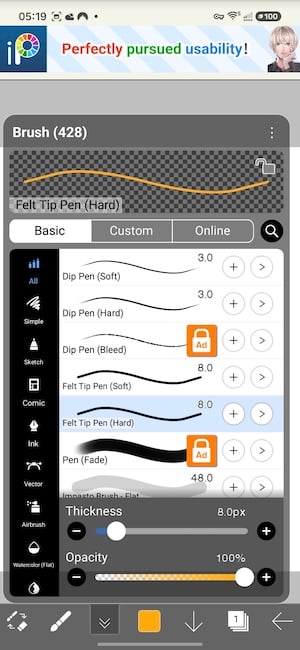
Image: Jessica Santero | WhistleOut
All the basic art tools, plus templates
You can use all the basic art tools on this app, including shapes, a bucket tool for filling in color, and blending. You can pick colors from a palette or jump into the color wheel to mix your own perfect hues and shades.
I also liked that you can start from a template if you want to work on something specific or need a different image size.
Not sure how to update your apps?
Keeping your apps up to date ensures you're always getting the latest features, bug fixes, and security improvements. Learn how to update the apps on your iPhone and your Android. It takes less time than you think.
It works on a small screen, but it would shine on something bigger
I painted on my Samsung Galaxy S24 FE, which is a pretty small screen for this kind of thing. It was fine, and I didn't feel crowded while using the app on a small screen. I just pinched to zoom in and out with two fingers whenever I needed to work on the smaller, finer details of my goldfish.
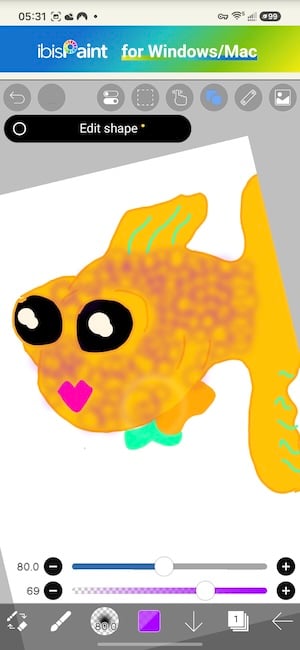
Image: Jessica Santero | WhistleOut
If finger drawing feels clumsy, a cheap capacitive stylus goes a long way, no tablet required. While I made it work on a small screen, this app would shine on something bigger, so a foldable phone makes for the best easel on the go.
Free gets beginners far, premium is for serious artists
I tested the free tier so you know exactly what you get before paying a cent. If you don't want to pay for premium, the ads aren't all that intrusive.
While ibisPaint X is a great app for beginners, serious digital artists will probably want more. If so, consider upgrading for extras like 20GB of cloud storage, a vector tool, and more fonts and filters. You might also want a full-blown art app for a more realistic digital art experience.
Is ibisPaint X worth downloading?
Want to paint with real depth on your phone? Go with ibisPaint X. Its ads barely get in the way, and you get loads of brushes, templates, and a color wheel without spending a cent.
Want more ways to draw on your phone? Check out the full list of the best drawing apps.
 How I evaluated ibisPaint X
I judged each app on how well it works on a phone screen, not a tablet. Here's what I looked for:
- Canvas space: How much of the screen is actually for drawing, and how much is taken up by menus?
- Free tier value: How much can you do without paying, and how often do ads interrupt you?
ibisPaint X FAQ
Is ibisPaint X free?
Yes, ibisPaint X is free to download on iPhone and Android. It has ads, but they aren't all that intrusive.
Is there a free drawing app like Procreate for Android?
Procreate isn't available on Android, but ibisPaint X is one of the closest free alternatives, with a similar range of brushes and layers.
What do you get with ibisPaint X premium?
Premium adds 20GB of cloud storage, a vector tool, and more fonts and filters.
Do I need a stylus to use ibisPaint X?
No, ibisPaint X works with your finger. A stylus gives you more control for fine detail, though.
Is ibisPaint X good for beginners?
Yes, it's easy to use and covers all the basic art tools, including shapes, a bucket tool, and blending.
Jessica Santero
Staff Writer

Find a better phone plan
Thousands of cell phone plans unpacked. All the facts. No surprises.


.png?w=280&h=280&usm=20&usmrad=0.8&fit=crop "Best Cell Phone Deals for October 2026: Get the New iPhone 18 Pro for Free")


.png?w=280&h=280&usm=20&usmrad=0.8&fit=crop "Cell Coverage Near You: Who Has the Best 5G Network?")


