
Invideo AI does something Apple Intelligence simply doesn't offer yet. Invideo AI generates a finished, watchable video from a single text prompt, optimized for whatever platform you tell it you're posting to.
You can compare it to the rest of my picks in the best Apple Intelligence apps.

- Free tier available with limits; paid upgrade removes them
- Available for iPhone and Android
What Invideo AI does that Apple Intelligence doesn't offer
Invideo AI turns a written prompt into a complete video, asking upfront whether it should be optimized for a vertical platform like TikTok or a landscape format like a webpage banner. Apple Intelligence's Image Playground and Genmoji can generate images, but Apple hasn't built a text-to-video tool into the iPhone at all. Invideo AI covers that gap directly, with no equivalent built into iOS to compete against.
I typed in a prompt asking for an ad for a new foldable iPhone, and Invideo AI returned a full, watchable ad in about two minutes. That turnaround alone makes it worth having installed for anyone who occasionally needs a quick promotional clip without hiring an editor.
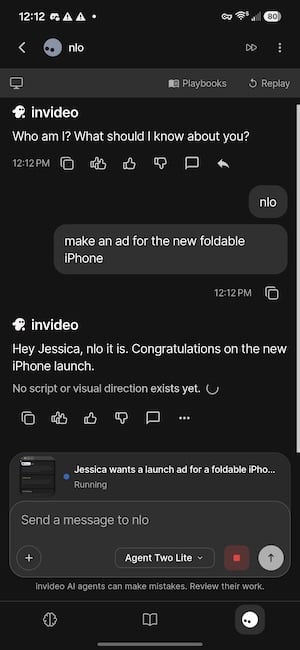
Image: Jessica Santero | WhistleOut
The free tier comes with real limits
The free version caps weekly generation time and exports, lowers the resolution ceiling, stamps a watermark on every export, and blocks access to premium stock footage, voice cloning, and the app's more advanced generation credits. None of that stopped the ad I generated from being usable for a quick social post, but the watermark rules it out for anything more polished.
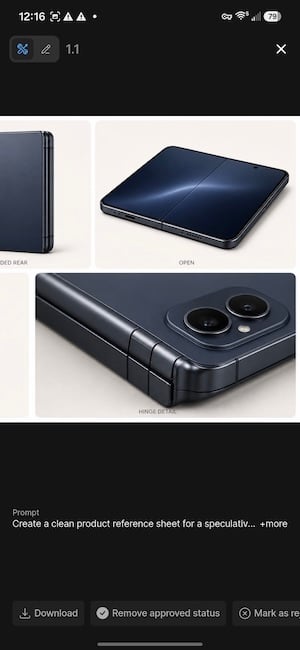
Image: Jessica Santero | WhistleOut
Not sure how to update your apps?
Keeping your apps up to date ensures you're always getting the latest features, bug fixes, and security improvements. Learn how to update the apps on your iPhone and your Android. It takes less time than you think.
Generating and exporting video eats data fast
Generating and exporting video from your phone uses far more data than a typical app. If you're planning to use Invideo AI regularly, a plan built for heavier data use keeps you from watching your allowance disappear mid-export.
|
Cricket

Supreme Unlimited Plan
$55.00/mo
with AutoPay; $60 for the first month.
+ $9.99 Upfront
|
|
US Mobile

Unlimited Premium Plan
$39.00/mo
|
|
H2O Wireless

$60 Unlimited + 20GB Hotspot Plan
$60.00/mo
$54/mo. with AutoPay. Taxes & fees not included.
+ $3 Upfront
|
Is Invideo AI worth downloading?
Yes, if you occasionally need a quick, polished video without hiring an editor or learning software, especially for social content or a one-off promo clip. Plan on upgrading if you need to lose the watermark or push past the free tier's resolution cap, since those two limits are the main thing standing between the free version and something you'd actually publish.
Invideo AI does something Apple Intelligence simply doesn't offer yet, and two minutes from prompt to finished ad is hard to argue with.
Jessica Santero, WhistleOut Staff Writer
 How I tested Invideo AI
- Generated a real video from a text prompt on the free tier
- Timed how long the app took to return a finished video
- Checked the free tier's resolution cap, watermark, and weekly export limits
- Compared the result against Apple Intelligence's image-only generation tools
Why you can trust WhistleOut
.svg)
15+
years of mobile industry experience

900+
published wireless guides

35+
firsthand carrier reviews
We've been around since the birth of the iPhone. Along the way, we've learned how to spot the best deals for your wallet (and your sanity). We spend our days researching informative guides and writing insightful reviews on every kind of wireless plan, distinguishing what matters from what doesn't. We played around with these plans before recommending them, ensuring they're worth your hard-earned money.
Want to know more? Check out how we review every cell phone plan we rank.
Invideo AI: FAQ
Is Invideo AI free to use?
Invideo AI offers a free tier with capped weekly generation time and exports, a lower resolution ceiling, and a watermark on every export, with a paid upgrade removing those limits.
Can Invideo AI's free version remove the watermark?
No, watermark removal on Invideo AI requires an upgrade, and the free version is capped at a lower resolution with limited weekly exports.
Does Apple Intelligence have a text-to-video tool?
No, Apple Intelligence's Image Playground and Genmoji generate images only, with no built-in text-to-video generator on the iPhone as of this testing.
How long does Invideo AI take to generate a video?
A single text prompt produced a full, watchable ad in about two minutes during testing, though generation time can vary based on video length and complexity.
Jessica Santero
Staff Writer

Find a better phone plan
Thousands of cell phone plans unpacked. All the facts. No surprises.


.png?w=280&h=280&usm=20&usmrad=0.8&fit=crop "Best Cell Phone Deals for October 2026: Get the New iPhone 18 Pro for Free")


