
MediBang Paint is the best free app for comics and manga, as long as you can put up with full-screen ads. It made my list of the best drawing apps for your phone with a 3 out of 5, and it's best for comic and manga artists, plus anyone who uses multiple devices.
3 out of 5 overall
- Free, with ads. Subscriptions available.
- Available for iOS and Android
Full-screen ads and cloud syncing eat into your data
Every full-screen ad and every drawing you sync to your MediBang account pulls from your monthly data. If you like to sketch away from Wi-Fi, an unlimited plan from a major carrier keeps a data cap from cutting your session short. Compare the best unlimited data plans right now:
|
Visible

$25 Visible Plan
$25.00/mo
Taxes & Fees included
|
|
Mint Mobile

Unlimited Data Plan
$30.00/mo
$90.00 upfront payment for 3 months <br>(equals to $30.00/month). <br>Intro pricing for new customers only.
|
|
T-Mobile

Essentials Saver 2.0
$50.00/mo
with Auto-Pay - Taxes & Fees NOT included
|
Here's the catch: MediBang has very annoying ads
I tested five drawing apps on both my iPhone 11 and Samsung Galaxy S24 FE to find the best options for budding and experienced artists alike. Out of the apps I tested, MediBang Paint is probably the one with the most annoying ads.
“It basically turns your whole screen into an ad with your drawing included, which means you have no option but to click on it.”
Jessica Santero, WhistleOut Writer
Tapping the ad sends you off to the App Store to look at another app.
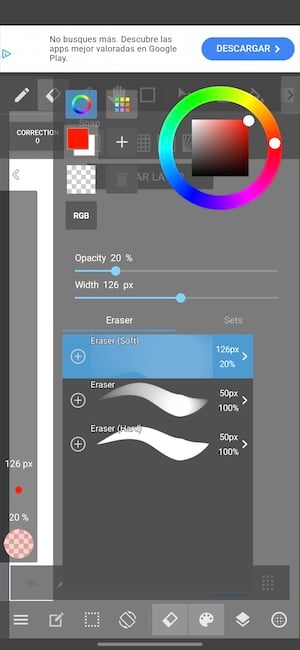
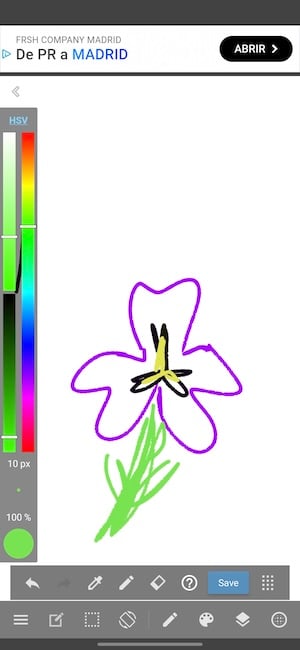
Images: Jessica Santero | WhistleOut
That said, it's a free app, so the ad experience is part of the charm. If the ads become too much, MediBang offers a premium plan that adds extra cloud storage and premium brushes without the ad breaks.
180 brushes and built-in tools for laying out comic panels
It's a completely free option if you want to get into digital drawing without spending a cent. You get the general features you'd expect for painting, drawing, erasing, changing colors, adding shapes, and switching between landscape and portrait.
It comes with 180 default brushes, plus built-in tools for laying out comic panels. You can also unlock more than 900 premium brushes temporarily by watching an ad (if they don't drive you nuts).
Not sure how to update your apps?
Keeping your apps up to date ensures you're always getting the latest features, bug fixes, and security improvements. Learn how to update the apps on your iPhone and your Android. It takes less time than you think.
How it handles a small screen
It all works just fine, although it isn't quite as intuitive as some of the other apps I tested. I tested it on my Samsung Galaxy S24 FE, and even on that small screen, I still managed to make a cute little sketch.
Turn your phone's brightness up and lock rotation so your canvas doesn't flip mid-stroke.
Save to the cloud and pick it back up on another device
You can save your work to the cloud with a free MediBang account and pick it back up on another device.
Is MediBang Paint worth downloading?
Drawing comics or switching between devices? MediBang Paint is built for panels and cloud saving. If you just want some drawing practice and don't want to spend any money on an app, it's a good starting point.
Looking for more free drawing apps? See the full list of the best drawing apps for your phone.
 How I evaluated MediBang Paint
I tested every app on my Samsung Galaxy S24 FE and iPhone 11 and stuck to the free versions. Here's what I looked for:
- Finger-friendliness: Can you draw well without a stylus?
- Tool depth: Brushes, layers, and extras like symmetry or comic panels.
MediBang Paint FAQ
Is MediBang Paint free?
Yes, MediBang Paint is free to download on iPhone and Android, with a premium plan available.
Is MediBang Paint good for comics and manga?
Yes, it's our pick for comics and manga, with built-in comic panel tools and 180 default brushes.
Can you use MediBang Paint on multiple devices?
Yes, a free MediBang account saves your drawings to the cloud so you can keep working on another device.
How do you get more brushes in MediBang Paint?
Watch an ad to temporarily unlock more than 900 premium brushes, or upgrade to the premium plan.
Does MediBang Paint have ads?
Yes, and they're the most annoying out of the apps I tested, since an ad can take over your whole screen. The premium plan removes the ad breaks.
Jessica Santero
Staff Writer

Find a better phone plan
Thousands of cell phone plans unpacked. All the facts. No surprises.


.png?w=280&h=280&usm=20&usmrad=0.8&fit=crop "Best Cell Phone Deals for October 2026: Get the New iPhone 18 Pro for Free")


.png?w=280&h=280&usm=20&usmrad=0.8&fit=crop "Cell Coverage Near You: Who Has the Best 5G Network?")


