
Apple Intelligence apps are supposed to make your iPhone smarter, but a few of Apple's own tools still miss the mark. I tested six apps and found the top four that step in exactly where Apple Intelligence stalls out, whether that's a photo edit that comes out warped, a calendar that can't parse a sentence, an AI video tool Apple doesn't offer at all, or a parental control with an easy workaround.
None of these apps replace Apple Intelligence outright. They cover the gaps, so pair them with what's already built into your iPhone instead of assuming Siri and Apple's on-device AI can do it all.
AI apps run better on a plan built for them
Editing photos, generating video, and syncing an AI calendar across devices all lean on your data connection more than a typical app. A plan with strong 5G coverage keeps every one of these apps responsive instead of stalling mid-edit.
Check out the most popular unlimited data plans below:
|
Visible

$19 Visible Plan
$19.00/mo
Taxes & Fees included
|
|
Mint Mobile

Unlimited Data Plan
$15.00/mo
$45 for 3 months of service
|
|
Verizon

Simplicity Plan
$30.00/mo
+ Taxes & Fees. Price includes AutoPay & Bring a Number discount
|
Best Apple Intelligence apps at a glance
| App | Available on | Fills this gap in Apple Intelligence |
|---|---|---|
| Snapseed | iPhone, Android | Photo edits that hold up better than Apple's Clean Up tool |
| Routine | iPhone, Android, Mac, Windows, Linux, web | Calendar scheduling that understands plain sentences |
| Invideo AI | iPhone, Android | AI video generation, which Apple Intelligence doesn't offer |
| Sage Haven | iPhone only (Android waitlisted) | Parental controls that go further than Screen Time alone |
1. Snapseed: The photo editor that fixes what Apple's Clean Up tool leaves behind
- Available for iPhone and Android
Snapseed is a better photo editor than I expected from a free app, and it's become my fallback for every edit Apple's own tools can't finish cleanly.
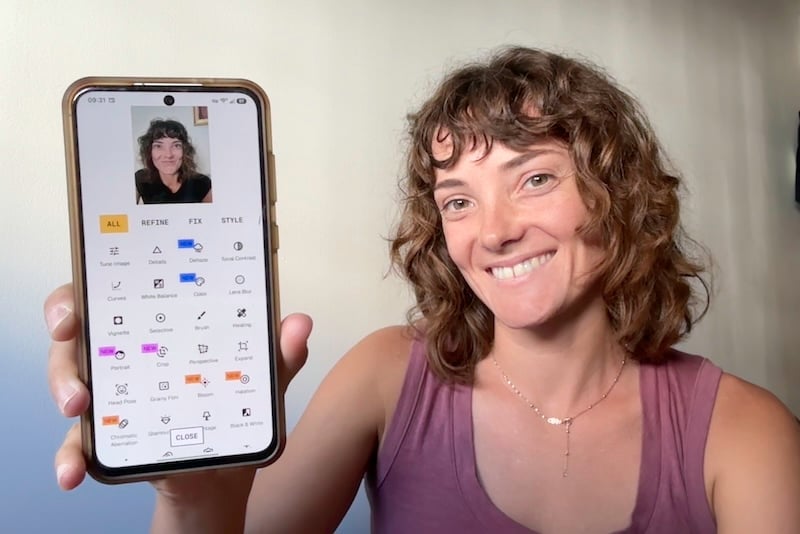
Snapseed is a photo editor with 31 effect categories covering everything from grain and perspective correction to generated backgrounds that blend in without a visible seam. Apple Intelligence's Clean Up tool in Photos handles small object removal, but it tends to smear or blur the area it's filling in, especially on busier backgrounds. Snapseed's healing and perspective tools pick up the slack with far more control over the result.
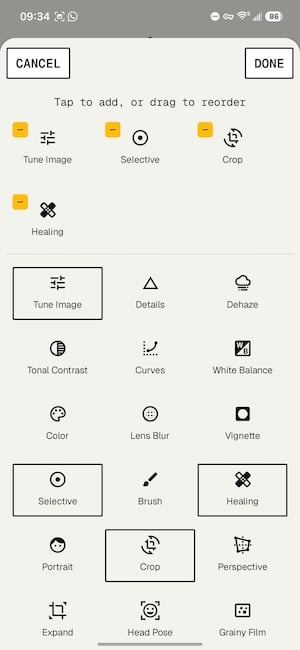
Image: Jessica Santero | WhistleOut
I ran a selfie through Snapseed to see what the filters could do, and I came away more impressed than I expected to be. Rotating and adjusting perspective let the app autogenerate the missing edges of the frame without any obvious warping, and the generated backgrounds held up under a closer look. It's built for people who want to edit a photo, not just slap a filter on it, so don't expect cat-ear overlays or one-tap presets here.
Snapseed makes the most sense for anyone who's tried Apple Intelligence's Clean Up tool and walked away unimpressed with the result. If you care how a photo turns out, not just whether the object got removed, this is the app to open instead.
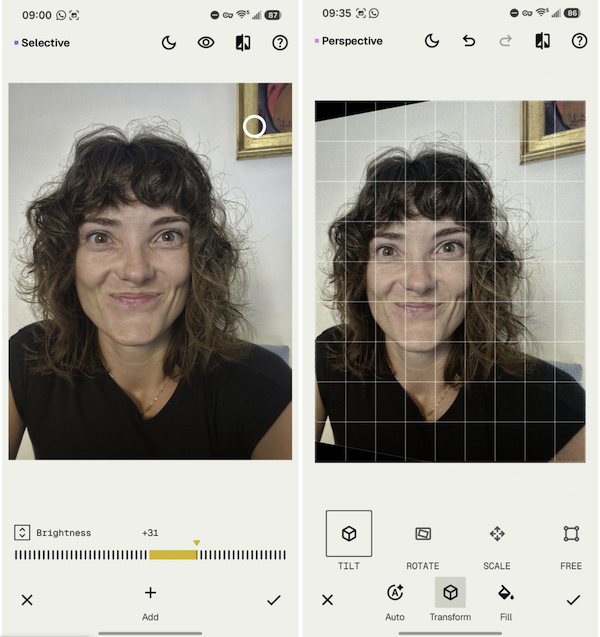
Image: Jessica Santero | WhistleOut
What Reddit says about Apple's Clean Up tool
A thread on r/ios put Apple's fill tool up against the competition, and the comparison wasn't kind. One commenter said Apple's version does "a poor job filling in the deleted area," adding that Google and Samsung have had this nailed down for years.
Editing photos on the go adds up fast
Snapseed itself doesn't need much data to run, but backing up a camera roll full of freshly edited, full-resolution photos does. A plan with unlimited data keeps your edits syncing without you watching a data meter.
Here are the most affordable data plans below to keep editing without worrying about running out:
|
Lyca Mobile

$33 High Data Plan
$7.50/mo
Pay $7.50/month for the first 6 months<br>Regular rate is $33/month
|
|
Boost Mobile

Unlimited Plan
$10.00/mo
with AutoPay
|
|
Twigby Mobile

Unlimited Talk, Text and 5GB Data
$10.00/mo
for the first 3 months then $20.00/month
|
2. Routine: The calendar that understands a sentence instead of a form

- Available for iPhone, Android, Mac, Windows, Linux, and web
Routine is the first calendar app that's made me stop defending Apple Calendar's plain interface.
Routine combines a calendar, task list, and journal into one app, with an AI assistant built in for scheduling by voice or by typing a sentence instead of filling out separate fields. Siri can add a basic event to Apple Calendar, but it doesn't gather context the way Routine does. Routine can pull a meeting request from Slack, create the event, and sync the correct video call link to your calendar without you touching either app directly.
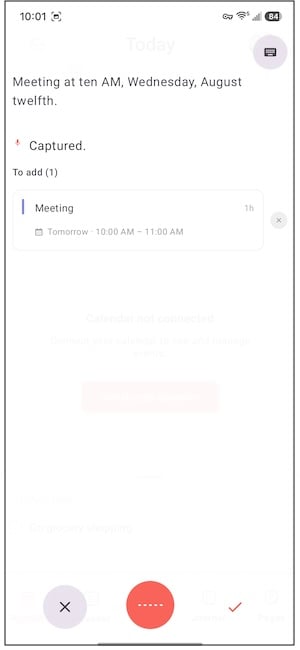
Image: Jessica Santero | WhistleOut
I set up a full week of events without typing a single word, just by dictating each one into Routine. The app also let me connect Slack so it could catch messages about meetings and turn them into calendar events automatically, and my personal calendar stayed separate from anything synced through work, which is exactly what I wanted. Syncing my existing calendars took about 10 minutes the first time, but every sync since has been instant.

Image: Jessica Santero | WhistleOut
Routine is built for anyone juggling a packed schedule who wants a calendar that keeps up with how people talk about their day. If Apple Calendar has ever made you type out an event field by field when you just wanted to say it out loud, Routine is the fix.
What Reddit says about Routine
r/adhdwomen has a thread full of praise for how Routine handles the small tasks that usually slip through the cracks. One person in the thread said the app helped them settle on "more realistic expectations" about how they actually spend their time.
A synced calendar needs a signal to match
Routine is only as useful as its last sync. If your plan drops out the moment you leave Wi-Fi, a dictated event from your car or the hallway between classes won't show up where you need it. Strong coverage keeps Routine current wherever you are.
Here are the best T-Mobile plans for the best nationwide coverage no matter what:
|
T-Mobile

Essentials Saver 2.0
$50.00/mo
with Auto-Pay - Taxes & Fees NOT included
|
|
T-Mobile
Experience Beyond 2.0
$100.00/mo
with Auto-Pay + Taxes and fees
|
|
T-Mobile
Go5G
$75.00/mo
with Auto-Pay - Taxes & Fees included
|
3. Invideo AI: The video generator Apple Intelligence doesn't have

- Available for iPhone and Android
Invideo AI does something Apple Intelligence simply doesn't offer yet, generating a finished video from a single prompt.
Invideo AI turns a written prompt into a complete video, asking upfront whether it should be optimized for a vertical platform like TikTok or a landscape format like a webpage banner. Apple Intelligence's Image Playground and Genmoji can generate images, but Apple hasn't built a text-to-video tool into the iPhone. Invideo AI covers that gap directly.
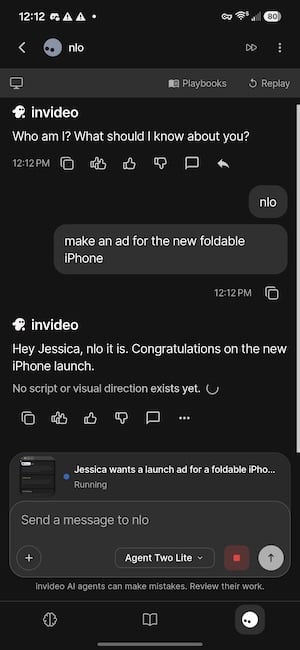
Image: Jessica Santero | WhistleOut
I typed in a prompt asking for an ad for a new foldable iPhone, and Invideo AI returned a full, watchable ad in about two minutes. The free version does come with real limits: capped weekly generation time and exports, a lower resolution ceiling, a watermark on every export, and no access to premium stock footage, voice cloning, or the app's more advanced generation credits.

Image: Jessica Santero | WhistleOut
Invideo AI is best for anyone who wants a quick, polished video without hiring an editor or learning software, especially for social content or a one-off promo clip. Just plan on upgrading if you need to lose the watermark or push past the free tier's resolution cap.
What Reddit says about Apple Intelligence's image tools
Reactions to Apple's own image generators are mixed over on r/iphone. One commenter likes Image Playground and Genmoji well enough but admitted it often creates "cursed images," and that a few generations back to back will heat up their phone.
Exporting AI video eats data fast
Generating and exporting video from your phone uses far more data than a typical app. If you're planning to use Invideo AI regularly, a plan with enough data keeps you from watching your data disappear mid-export.
An unlimited plan is your best bet, and you can snag one for under $50/month. Here are your options:
|
Visible
$19 Visible Plan
$19.00/mo
Taxes & Fees included
|
|
Mint Mobile
Unlimited Data Plan
$15.00/mo
$45 for 3 months of service
|
|
Tello

Unlimited Text, Talk, and Data Plan
$25.00/mo
|
4. Sage Haven: The parental control that closes the gap Screen Time leaves open

- Available for iPhone (Android on the waitlist)
Sage Haven is the app I'd hand my kid their first phone number through, not Screen Time alone.
Sage Haven is a COPPA-certified messaging and calling app built specifically for kids in their first few years online. Parents approve every contact before a kid can message them, and the app moderates messages with AI before they're ever sent or received. Apple's Screen Time is a solid start for limiting app usage, but it has known workarounds, and it doesn't moderate what's inside a message the way Sage Haven does.
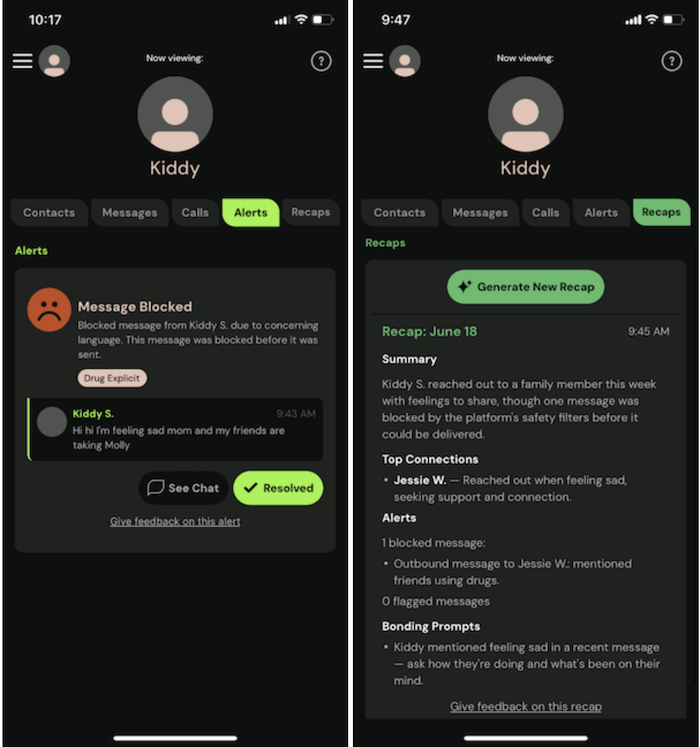
Image: Jessica Santero | WhistleOut
The feature that impressed me most in testing was the recap tool. When I sent a test message using a word tied to sadness, I got a parent alert almost immediately, along with context on what was said and a suggestion for how to bring it up. The kid's number also works inside iMessage and Google Messages, so the safety layer doesn't disappear just because the other person isn't using Sage Haven too.
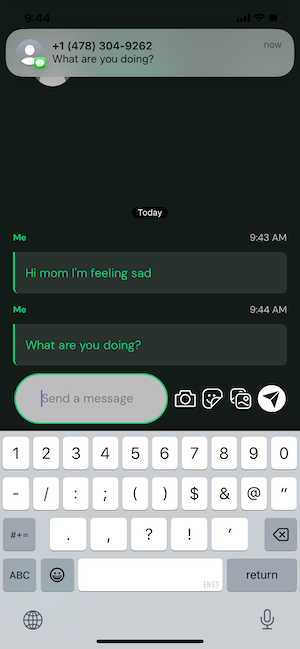
Image: Jessica Santero | WhistleOut
Sage Haven is built for parents giving a kid their first way to text or call independently, not for older teens who already have an unrestricted phone. If you're weighing when to hand over that first device, pairing it with Sage Haven from day one beats layering on restrictions after the fact.
What Reddit says about Screen Time's limits
A parent on r/applehelp ran into this exact problem. Their son found a way around both Screen Time's app limits and its Downtime feature, and the parent called the built-in options "useless" against a kid who knew his way around a phone.
Setting up a kid's first phone plan
If Sage Haven has you thinking about your kid's first device, the plan behind it matters just as much as the parental controls on it. Look for a family plan with enough data and an affordable price point to keep everyone happy.
These are the most popular family plans right now:
|
Verizon
Simplicity Plan
$120.00/mo
+ Taxes & Fees. Price includes AutoPay & Bring a Number discount
|
|
T-Mobile
Essentials Saver 2.0
$100.00/mo
with Auto-Pay - Taxes & Fees NOT included
|
|
US Mobile

Unlimited Starter Plan
$100.00/mo
|
 How I tested these apps
I downloaded and used each of these four apps directly on my own iPhone alongside Apple Intelligence's built-in tools, rather than comparing feature lists alone. That meant:
- Running the same photo through both Apple's Clean Up tool and Snapseed
- Dictating a full week of events into Routine
- Generating a real video prompt in Invideo AI
- Testing Sage Haven's moderation and alert system with real test messages
Why you can trust WhistleOut
.svg)
15+
years of mobile industry experience

900+
published wireless guides

35+
firsthand carrier reviews
We've been around since the birth of the iPhone. Along the way, we've learned how to spot the best deals for your wallet (and your sanity). We spend our days researching informative guides and writing insightful reviews on every kind of wireless plan, distinguishing what matters from what doesn't. We played around with these plans before recommending them, ensuring they're worth your hard-earned money.
Want to know more? Check out how we review every cell phone plan we rank.
Best Apple Intelligence apps: FAQ
Do I need an iPhone that supports Apple Intelligence to use these apps?
No, Snapseed, Routine, Invideo AI, and Sage Haven all work independently of Apple Intelligence, so they run on any compatible iPhone whether or not your device supports Apple's on-device AI features.
Which of these apps can I use offline?
Snapseed and Routine both include usable offline modes for editing photos or reviewing already-synced events, while Sage Haven and Invideo AI need an active connection to moderate messages or generate video.
Is Apple's Clean Up tool getting better?
Apple continues to update Apple Intelligence's photo tools with each iOS release, but as of this testing, Snapseed's healing and perspective tools still produce more reliable results on busier backgrounds.
Can Invideo AI's free version remove the watermark?
No, watermark removal on Invideo AI requires an upgrade, and the free version is capped at a lower resolution with limited weekly exports.
Does Sage Haven work if the other person isn't using the app?
Yes, a Sage Haven number works inside iMessage and Google Messages, so a kid still gets the app's moderation and parent alerts even when texting someone who doesn't have Sage Haven installed.
Jessica Santero
Staff Writer

Find a better phone plan
Thousands of cell phone plans unpacked. All the facts. No surprises.





