
Routine is the first calendar app that's made me stop defending Apple Calendar's plain interface. Routine combines a calendar, task list, and journal into one app, with an AI assistant that schedules events from a dictated sentence instead of a form.
You can compare it to the rest of my picks in the best Apple Intelligence apps.
- Free tier available
- Available for iPhone, Android, Mac, Windows, Linux, and web
What Routine does that Siri can't
Routine understands context the way Siri and Apple Calendar don't. Siri can add a basic event when you ask, but it won't gather details from other apps on its own. Routine can pull a meeting request straight out of Slack, create the calendar event, and attach the correct video call link, all without you opening either app directly.
I set up a full week of events without typing a single word, dictating each one straight into Routine instead. The app caught the day, time, and title correctly every time, which is more than I can say for the last calendar app I tried using entirely by voice.
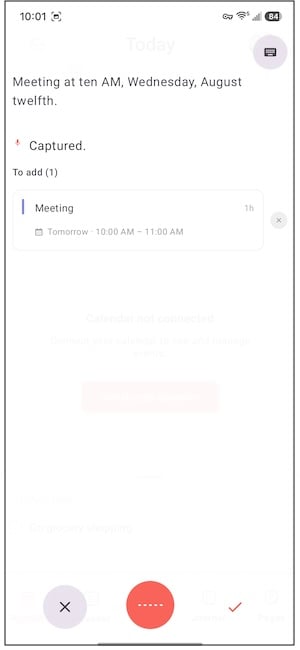
Image: Jessica Santero | WhistleOut
Slack integration keeps work meetings separate from your own calendar
Connecting Slack let Routine catch meeting messages and turn them into calendar events automatically, and my personal calendar stayed visually separate from anything synced in through work. That separation mattered to me, since the last thing I want is a work standup buried in the same list as a dentist appointment. Syncing my existing calendars into Routine took about 10 minutes the first time, but every sync since has been instant.
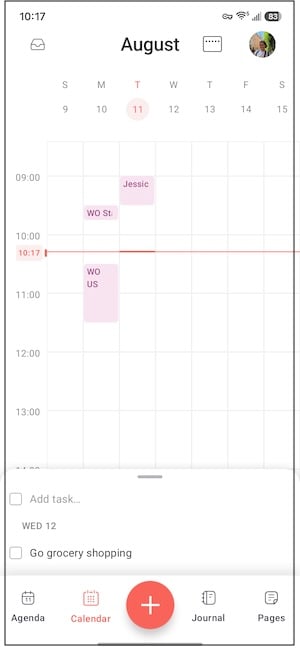
Image: Jessica Santero | WhistleOut
Not sure how to update your apps?
Keeping your apps up to date ensures you're always getting the latest features, bug fixes, and security improvements. Learn how to update the apps on your iPhone and your Android. It takes less time than you think.
A synced calendar needs a signal to match
Routine is only as useful as its last sync. A dictated event you add from your car or between meetings won't show up where you need it if your plan drops out the moment you leave Wi-Fi. Strong nationwide coverage keeps Routine current wherever you are.
|
Mint Mobile

Unlimited Data Plan
$30.00/mo
$90.00 upfront payment for 3 months <br>(equals to $30.00/month). <br>Intro pricing for new customers only.
|
|
Tello

Unlimited Text, Talk, and Data Plan
$25.00/mo
|
|
US Mobile

Unlimited Premium Plan
$39.00/mo
|
Is Routine worth downloading?
Yes, especially if Apple Calendar has ever made you type out an event field by field when you just wanted to say it out loud. Routine is built for anyone juggling a packed schedule who wants a calendar that keeps up with how people actually talk about their day, and the free tier already covers dictation, Slack integration, and multi-calendar syncing.
Routine is the first calendar app that's made me stop defending Apple Calendar's plain interface. Dictating a full week of events without typing a word changed how I plan my day.
Jessica Santero, WhistleOut Staff Writer
 How I tested Routine
- Dictated a full week of events into Routine without typing
- Connected Slack to test automatic meeting detection and event creation
- Synced multiple existing calendars and timed the process
- Compared Routine's scheduling accuracy against Siri and Apple Calendar's built-in event creation
Why you can trust WhistleOut
.svg)
15+
years of mobile industry experience

900+
published wireless guides

35+
firsthand carrier reviews
We've been around since the birth of the iPhone. Along the way, we've learned how to spot the best deals for your wallet (and your sanity). We spend our days researching informative guides and writing insightful reviews on every kind of wireless plan, distinguishing what matters from what doesn't. We played around with these plans before recommending them, ensuring they're worth your hard-earned money.
Want to know more? Check out how we review every cell phone plan we rank.
Routine: FAQ
Is Routine free to use?
Routine offers a free tier that includes dictation, Slack integration, and multi-calendar syncing, with a paid upgrade available for additional features.
Does Routine work on Android?
Yes, Routine is available on iPhone, Android, Mac, Windows, Linux, and web, making it easier to keep the same calendar synced across every device you use.
Can Routine schedule events by voice?
Yes, Routine's built-in AI assistant creates calendar events from a dictated sentence or typed text instead of requiring you to fill out separate date, time, and title fields.
Does Routine sync with Slack?
Yes, Routine can connect to Slack, catch meeting requests sent through it, and automatically create the matching calendar event with the correct video call link attached.
Jessica Santero
Staff Writer

Find a better phone plan
Thousands of cell phone plans unpacked. All the facts. No surprises.


.png?w=280&h=280&usm=20&usmrad=0.8&fit=crop "Best Cell Phone Deals for October 2026: Get the New iPhone 18 Pro for Free")


.png?w=280&h=280&usm=20&usmrad=0.8&fit=crop "Cell Coverage Near You: Who Has the Best 5G Network?")


