
I've stopped reaching for Apple Intelligence's Clean Up tool for anything with a busy background. Snapseed is a free photo editor with 31 effect categories that finishes edits Apple's own fill tool leaves smeared or blurry.
You can compare it to the rest of my picks in the best Apple Intelligence apps.
- Free, no premium tier
- Available for iPhone and Android
Backing up full-resolution edits chews through data
Snapseed itself barely touches your data plan, but syncing a camera roll full of freshly edited, full-resolution photos to the cloud does. An unlimited plan keeps every edit backing up without a data meter cutting you off mid-upload.
|
Visible

$19 Visible Plan
$19.00/mo
Taxes & Fees included
|
|
Mint Mobile

Unlimited Data Plan
$15.00/mo
$45 for 3 months of service
|
|
Verizon

Simplicity Plan
$30.00/mo
+ Taxes & Fees. Price includes AutoPay & Bring a Number discount
|
What Snapseed does that Apple's Clean Up tool can't
Snapseed handles object removal and background fills with far more control than Apple Intelligence's Clean Up tool in Photos. Apple's version tends to smear or blur whatever it fills in, especially against a busy background, and I've hit that limit more than once trying to remove a stray tourist from a vacation photo. Snapseed's healing and perspective tools pick up exactly where Apple's tool gives out.
The app covers 31 effect categories total, from grain and perspective correction to generated backgrounds that blend in without a visible seam. That range matters because Snapseed is built for someone who wants to finish an edit properly, not just remove an object and call it done.
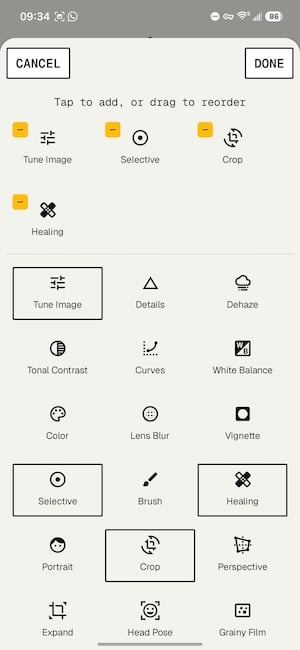
Image: Jessica Santero | WhistleOut
A selfie test showed no visible seams
I ran a selfie through Snapseed specifically to test the perspective and background tools, and the result held up under a close look. Rotating and adjusting the perspective let the app autogenerate the missing edges of the frame without any obvious warping, which is exactly the kind of edit that trips up Apple's Clean Up tool on a cluttered background.
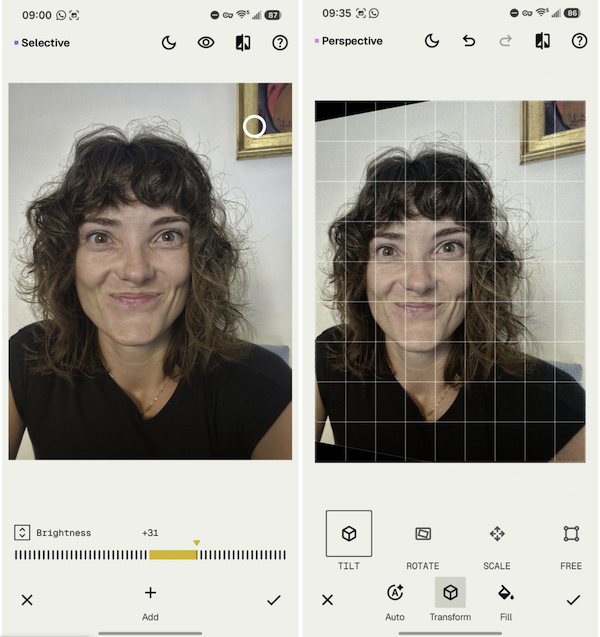
Image: Jessica Santero | WhistleOut
Not sure how to update your apps?
Keeping your apps up to date ensures you're always getting the latest features, bug fixes, and security improvements. Learn how to update the apps on your iPhone and your Android. It takes less time than you think.
Don't expect filters or one-tap presets
Snapseed skips cat-ear overlays and one-tap presets entirely, favoring granular tools over quick gimmicks. Anyone who wants to actually edit a photo rather than slap a filter on it will feel at home here. Anyone looking for an Instagram-style filter pack should look elsewhere.
Is Snapseed worth downloading?
Yes, especially if you've already tried Apple Intelligence's Clean Up tool and walked away unimpressed with a smeared result. The entire app is free with no premium tier blocking any of the 31 effect categories, so there's no reason not to keep it installed alongside Apple's own editing tools for the edits Apple can't finish cleanly.
Snapseed is a better photo editor than I expected from a free app, and it's become my fallback for every edit Apple's own tools can't finish cleanly.
Jessica Santero, WhistleOut Staff Writer
 How I tested Snapseed
- Ran the same photo through both Apple's Clean Up tool and Snapseed to compare results
- Tested perspective correction and background fill on a busy, cluttered background
- Edited a selfie using Snapseed's rotation and healing tools
- Checked the full list of 31 effect categories against Apple Intelligence's photo tools
Why you can trust WhistleOut
.svg)
15+
years of mobile industry experience

900+
published wireless guides

35+
firsthand carrier reviews
We've been around since the birth of the iPhone. Along the way, we've learned how to spot the best deals for your wallet (and your sanity). We spend our days researching informative guides and writing insightful reviews on every kind of wireless plan, distinguishing what matters from what doesn't. We played around with these plans before recommending them, ensuring they're worth your hard-earned money.
Want to know more? Check out how we review every cell phone plan we rank.
Snapseed: FAQ
Is Snapseed completely free?
Yes, Snapseed has no premium tier, no subscription, and no paywalled effect categories, making all 31 effect categories free to use.
Does Snapseed work on Android?
Yes, Snapseed is available for both iPhone and Android, unlike several other apps built specifically to pair with Apple Intelligence.
Is Snapseed better than Apple's Clean Up tool?
For busy or cluttered backgrounds, yes. Snapseed's healing and perspective tools produce cleaner fills than Apple Intelligence's Clean Up tool, which tends to smear or blur the area it's replacing.
Does Snapseed have filters like Instagram?
Snapseed skips one-tap presets and overlay filters in favor of granular editing tools, so it's built for detailed edits rather than quick filter effects.
Jessica Santero
Staff Writer

Find a better phone plan
Thousands of cell phone plans unpacked. All the facts. No surprises.





