
VSCO is a photo and video editing app that pairs manual tools with AI-suggested edits, and it's one of the easiest ways to polish a selfie straight from your camera roll. It landed as my top Android pick in the roundup of the best camera apps for iPhone and Android because it gives away more editing tools for free than most of its competitors.
I'm not a professional photographer, and I don't want to open a laptop every time a photo needs a little brightening. VSCO sits right between a basic filter app and full editing software, which is exactly where most casual photographers live.
Edit on the go without overpaying for T-Mobile's network
Loading VSCO's filters and uploading your finished edits away from Wi-Fi takes a steady stream of data. T-Mobile MVNOs run on the same network as T-Mobile itself, and they often charge far less for the same coverage.
Check out the most popular T-Mobile MVNO plans below:
|
Mint Mobile

Unlimited Data Plan
$15.00/mo
$45 for 3 months of service
|
|
US Mobile

Unlimited Premium Plan
$39.00/mo
|
|
Tello

Unlimited Text, Talk, and Data Plan
$25.00/mo
|

- Free, subscription for full features
- Available for iPhone and Android
What is VSCO?
VSCO is an editing app that lets you either shoot directly inside the app or upload photos you've already taken. I tested it on an iPhone 11 and a Samsung Galaxy S24 FE, and I stuck to the free tier on both phones to see how far you can get without paying. You don't need any photography knowledge to get started, since the suggested edits give you a finished look before you open a single manual control.
Not sure how to update your apps?
Keeping your apps up to date ensures you're always getting the latest features, bug fixes, and security improvements. Learn how to update the apps on your iPhone and your Android. It takes less time than you think.
Suggested edits show up the second you upload
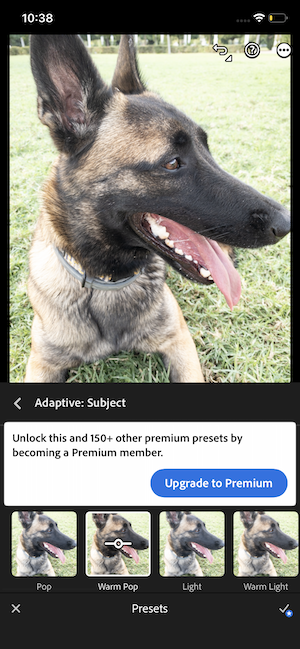
As soon as you upload a photo, VSCO suggests edits and filters tailored to that specific image. You can dial the intensity of any suggestion up or down, or skip it entirely and move into manual editing to fine-tune the look yourself.
The preset filters need a moment to load, but once they appear, you get a solid range to choose from without spending a cent. That instant starting point is what makes VSCO so fast for selfies, since most of the work is done before you touch a single slider.
Images: Jessica Santero | WhistleOut
The remove distractions tool has competition
VSCO includes an AI tool called "remove distractions" that erases stray people from the background of your shots. It works well, but most current iPhones, Samsungs and Pixels already include a similar eraser in their native photo apps.
That overlap means the tool isn't a reason to download VSCO on its own. It becomes a handy bonus if your phone is a few generations old and doesn't have an eraser built into the gallery. My iPhone 11 benefited the most, since it doesn't support Apple's newest AI editing features.
Who should download VSCO?
VSCO is the right pick if selfies and quick social posts make up most of what you shoot. The filters and editing tools go further than your default camera app, and the free tier covers more ground than most of the other apps I tested.
When to look elsewhere
If you want full technical control over every pixel, you'll probably end up on a laptop with dedicated editing software anyway. VSCO is built for editing on the go, and it doesn't pretend to be a professional studio.
iPhone owners chasing a nostalgic film look will have more fun with Hipstamatic, while anyone planning a curated Instagram grid will get more out of A Color Story. Lightroom offers deeper manual controls, but its free tier locks away most of the tools that make it worth using.
For everyone who just wants better selfies without a subscription, VSCO earns a permanent spot on your home screen. It's the first app I'd recommend to anyone who wants photos that look better than the default camera without learning a full editing program.
 How I tested VSCO
- Tested on two older phones, an iPhone 11 and a Samsung Galaxy S24 FE, to see how much the app could improve photos from past-generation hardware.
- Uploaded the same test photo used across the roundup and compared VSCO's suggested edits against manual adjustments.
- Tried the remove distractions tool and compared it with the eraser tools built into current phones.
- Stayed on the free tier to measure how many filters and tools you get without a subscription.
Why you can trust WhistleOut
.svg)
15+
years of mobile industry experience

900+
published wireless guides

35+
firsthand carrier reviews
We've been around since the birth of the iPhone. Along the way, we've learned how to spot the best deals for your wallet (and your sanity). We spend our days researching informative guides and writing insightful reviews on every kind of wireless plan, distinguishing what matters from what doesn't. We played around with these plans before recommending them, ensuring they're worth your hard-earned money.
Want to know more? Check out how we review every cell phone plan we rank.
VSCO: FAQ
Is VSCO free?
Yes, VSCO is free to download with preset filters and manual editing tools included. A subscription unlocks the full feature set.
Is VSCO good for editing selfies?
Yes, VSCO suggests edits the moment you upload a photo, which makes quick selfie fixes easy without paying for a subscription.
What is the best camera app for Android?
VSCO is my top pick for Android because it offers a strong set of free editing tools and suggests edits as soon as you upload a photo.
Can VSCO remove people from photos?
Yes, VSCO's AI remove distractions tool erases stray people from the background. Most current iPhones, Samsung phones, and Pixels offer a similar tool in their native photo apps.
Jessica Santero
Staff Writer

Find a better phone plan
Thousands of cell phone plans unpacked. All the facts. No surprises.





