
Apple Fitness+, Peloton, and Zwift are all premium workout apps designed to help you stick to your routine, but they get there through three different setups. Like other Apple apps we've compared to third-party rivals, the best experience depends on what equipment you have and how much you're willing to spend.
Apple Fitness+ is the easiest on-ramp if you already own an Apple Watch, since your real-time stats show up directly on the workout video. There's no separate app to manage and no equipment to buy beyond a mat and some free weights, so the barrier to starting your first workout is close to zero.
Peloton goes wider without asking for any hardware, and Zwift goes deepest for cyclists and runners willing to buy a smart trainer to get there. Peloton's class variety and leaderboard-driven community make it the pick for anyone who wants options without an equipment purchase. Zwift's structured training plans and virtual routes reward the people who are ready to treat it like a serious training tool rather than an occasional workout, but it does require an indoor cycling machine.
We recommend: match the app to your equipment, not the other way around
Choose Fitness+ if you want low-friction guided workouts that sync automatically with your Apple Watch. Choose Peloton if you want instructor-led classes, leaderboard motivation, and variety across cycling, running, and strength, without buying any equipment. Choose Zwift if you already have a smart trainer and want structured, power-based training with virtual routes and live racing.
Quick comparison:
Apple Fitness+
- $9.99/month or $79.99/year, no equipment beyond a mat and free weights
- Real-time heart rate and calorie stats appear directly on the workout video
- Sessions run in tidy 10, 20, or 30-minute blocks
- New workouts added weekly across HIIT, strength, yoga, kickboxing, Pilates, and core
- Requires an Apple Watch for the full experience
- iOS only, unavailable to Android users entirely
Peloton
- No Peloton bike or hardware required to access the full class library
- Three tiers starting at $9.99/month, up to $28.99/month for full access
- Syncs with Apple Watch, Android watches, and Fitbit
- Active community with leaderboards and challenges
- 30-day free trial to test before committing
- Full library access requires the most expensive tier
Zwift
- Thousands of virtual routes, group rides, and structured training plans
- Works for both indoor cycling and treadmill running
- Pairs with heart rate monitors and GPS watches for full data tracking
- 14-day free trial available
- $19.99/month or $199.99/year, the priciest of the three subscriptions
- Requires a smart trainer with entry prices starting around $500
Apple Fitness+ is best for Apple Watch owners
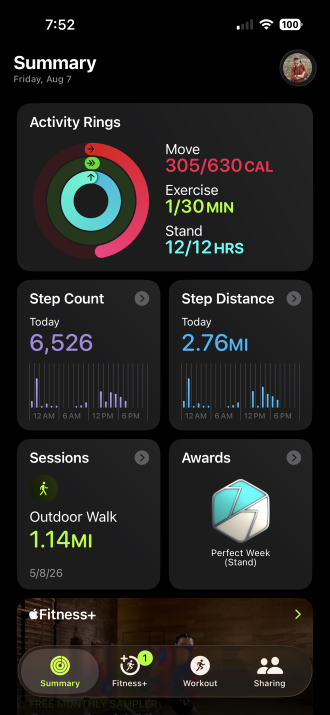
Image: Max McCaskill
Apple Fitness+ requires no extra equipment if you already own an Apple Watch. Your heart rate and calorie burn show up directly on the workout video, sessions run in tidy 10, 20, or 30-minute blocks, and there's no major learning curve to get started. It's a low-commitment way to stay consistent, which is the hardest part of any fitness routine. A mat and a set of free weights cover most of what the library asks for, and new sessions are added weekly so the catalog doesn't go stale.
That said, the Apple Watch requirement is the one real limitation. If you own an iPhone but not an Apple Watch, you're only getting the video library without the real-time stats that make Fitness+ worth its price. Unfortunately, those metrics are pulled directly from the watch, so there's no lesser version of the experience that works without one.
Fitness+ is generally the easiest on-ramp for paid workouts if you already own the hardware it's built around. It's a great option for people who are just getting into working out. Plus, at $9.99 a month, it's an affordable way for anyone who wants guided sessions without adding a second app or a second piece of equipment to the mix.
Streaming workout videos adds up on a cellular plan
Streaming a full workout catalog every day pulls more data than most people expect, especially if you're skipping Wi-Fi at the gym or on the road.
Check out our guide to the best MVNOs and compare plans below:
|
Visible

$25 Visible Plan
$25.00/mo
Taxes & Fees included
|
|
Mint Mobile

Unlimited Data Plan
$10.00/mo
$60 for 6 months of service
|
|
Spectrum Mobile®

Unlimited Plus
$40.00/mo
+ $20 Upfront
|
Peloton is best for guided classes without equipment
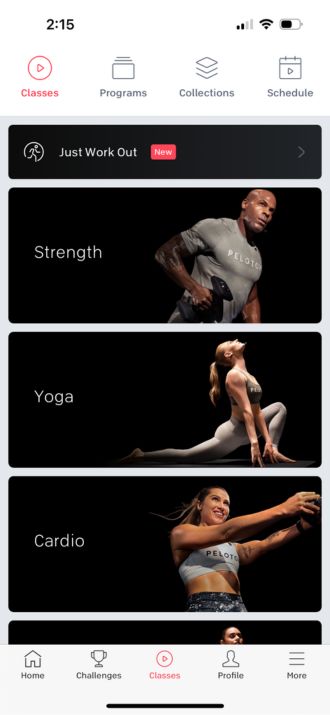
Image: Angelo Ilumba
The Peloton app is a premium exercise app with guided workouts. Even better, you don't even need a Peloton bike to use the Peloton app, which makes it great for anyone who is looking for an all-around option.
The app gives you access to instructor-led classes for cycling, strength training, yoga, running, stretching, and more, all streamable to your phone or cast to a TV. Tracking syncs with Apple Watch, Android watches, and Fitbit without needing Peloton's own hardware to get accurate data. There's also an active community layer, with leaderboards and challenges for anyone who's motivated by a bit of competition. In our Peloton app review, we found the class quality noticeably better than free alternatives, with instructors who stayed energetic without tipping into grating.
Peloton splits its library across three subscription tiers, so the price depends on how much of it you want access to.
- Strength+: $9.99/month, includes strength training, yoga, cardio, and meditation
- App One: $12.99/month, adds cycling, running, and outdoor classes
- App+: $28.99/month, unlocks everything, including scenic routes and full hardware integration
To be fair, getting the complete library means paying for the top tier. The 30-day free trial makes it easy to figure out which level of access is worth it before committing to a monthly cost.
Zwift is best for structured endurance training
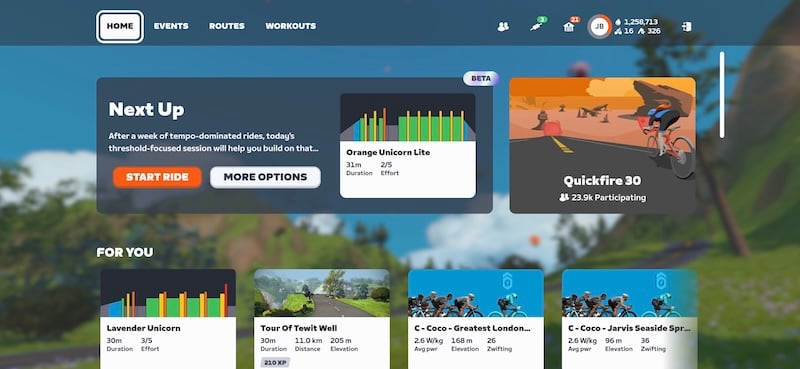
Image: Jessica Santero
Zwift goes further than either Fitness+ or Peloton for cyclists and runners who want real structured training, but it asks for a real investment to get there. The app requires a smart trainer, which generally starts around $500 and can get up to $1,500 for premium models, depending on if you want to mount it on your own bike or buy an all-in-one smart frame.
You can ride through thousands of virtual maps, including recreations of classic race routes, or join group rides with other cyclists chatting in real time. The pre-planned workout library covers every level from complete beginner to race-ready athlete, and monthly challenge programs add badges and milestones to work toward. Zwift also supports treadmill running for anyone who wants the same structured approach off the bike.
In our Zwift review, we found the visual detail extraordinary enough that a Sunday group ride became a genuine weekly highlight rather than a chore. We ranked Zwift ahead of Peloton in our best health and fitness apps guide for exactly that reason, since its immersive virtual worlds and daily-use habit-forming design go further than Peloton's class library alone.
Unfortunately, none of this works without a smart trainer, which is a real cost on top of the $19.99 monthly subscription. Even worse, that's before factoring in a bike if you don't already have one set up for indoor use. It pairs with heart rate monitors and GPS watches for a complete training session that accurately measures your effort, which matters if you're tracking progress toward a specific goal.
For someone using it as a full gym replacement, the cost evens out over enough sessions. For anyone who just wants an occasional guided workout, Zwift is a harder sell than Fitness+ or Peloton, both of which get you moving with far less upfront commitment or cost.
How to get each app running
Apple Fitness+ lives inside the built-in Fitness app on any iPhone, so there's no separate app to download. Subscribe from within Fitness, pair your Apple Watch, and you're ready to start a workout.
Peloton and Zwift are both straightforward downloads on either app store, with free trials to test before you subscribe.


 How we tested these fitness apps
We looked at all three apps across guided workouts, equipment requirements, and pricing, including:
- Comparing class variety and session length across Apple Fitness+ and Peloton
- Reviewing Peloton's three subscription tiers to see what each one unlocks
- Evaluating Zwift's structured training library and its smart trainer requirement
- Confirming which claims about pricing, equipment needs, and platform availability still hold up
- Testing Zwift and Peloton using guided workouts and sessions
Pricing, features, and availability may have changed since we wrote this, but we'll try our best to keep it updated.
Why you can trust WhistleOut
.svg)
15+
years of mobile industry experience

900+
published wireless guides

35+
firsthand carrier reviews
We've been around since the birth of the iPhone. Along the way, we've learned how to spot the best deals for your wallet (and your sanity). We spend our days researching informative guides and writing insightful reviews on every kind of wireless plan, distinguishing what matters from what doesn't. We played around with these plans before recommending them, ensuring they're worth your hard-earned money.
Want to know more? Check out how we review every cell phone plan we rank.
Apple Fitness+, Peloton, and Zwift: FAQ
Do I need an Apple Watch to use Apple Fitness+?
No, an Apple Watch is not required to use Apple Fitness+. However, we still recommend using one, since the real-time metrics integration from your smartwatch is the whole point of the platform. Your heart rate and activity data will not appear or be tracked without one.
Do I need a Peloton bike to use the Peloton app?
No, you don't need a Peloton bike to use the Peloton app. The subscription gives you access to the full class library on any device, including your phone and TV, with no Peloton equipment required.
Do I need special equipment to use Zwift?
Yes, Zwift requires a smart trainer to use for cycling or a treadmill for running. Without one, the app can't track your workout and won't function as intended.
Is Apple Fitness+, Peloton, or Zwift cheaper?
Apple Fitness+ and Peloton's entry-level tier are tied at $9.99 a month. Zwift is the most expensive of the three at $19.99 a month, on top of the smart trainer it requires.
Max McCaskill
Sr. Staff Writer

Find a better phone plan
Thousands of cell phone plans unpacked. All the facts. No surprises.


