

The wrapping paper is still on the floor, your new phone is charging on the counter, and the app store is waiting with millions of options. These 10 must-have apps cover the basics everyone needs. Plus, every pick works on both iPhone and Android—and most are completely free.
Whether your phone came from under the tree or you treated yourself to a holiday upgrade, the apps you download in the first few days set you up for the whole new year.
For the newest releases, check out our monthly roundup of the best new apps.
Still holding on to an old phone?
Carriers regularly give away flagship phones with a new line or trade-in. Make sure to check out the best cell phone deals to find the right upgrade.
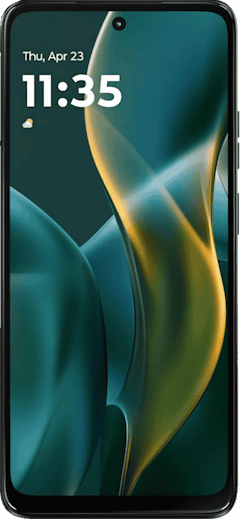
- 6.7 inch display
- Rear Cameras: 50MP, 2MP
- Front Camera: 16MP
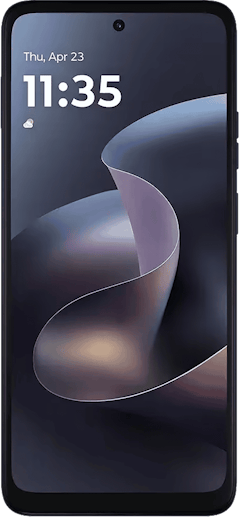
- 6.7 inch display
- Rear Cameras: 50MP, 2MP
- Front Camera: 32MP
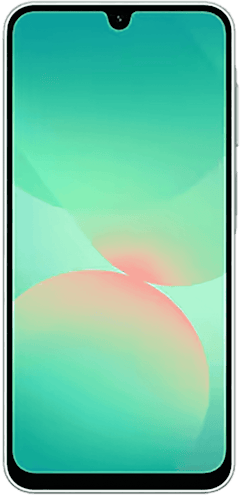
- 6.7 inch display
- Rear Cameras: 50MP, 8MP, 2MP
- Front Camera: 13MP

Quick look at the best apps for new phones
| App | Best for | Price |
|---|---|---|
| Bitwarden | Storing and filling passwords | Free; Premium subscription available |
| Google Photos | Backing up photos and videos | Free with 15GB of Google storage |
| Nextdoor | Local recommendations and neighborhood alerts | Free |
| Texts, calls, and group messaging | Free | |
| Brave | Browsing without ads and trackers | Free |
| Google Maps | Directions and offline maps | Free |
| Libby | Free ebooks and audiobooks | Free with a library card |
| FitOn | Free workout classes | Free; Premium subscription available |
| Todoist | To-do lists and reminders | Free; Premium subscription available |
| YNAB | Budgeting | Free trial; monthly and yearly subscriptions available |
Bitwarden: The app that remembers every password for you (so you never get locked out)
4 out of 5 overall
- Anyone who reuses or forgets passwords and wants a simpler login experience.
Bitwarden is a password manager, which means it stores all your logins in one encrypted vault that only opens with a single master password. It creates strong passwords for new accounts and fills them in automatically when you sign in to apps and websites. Bitwarden’s free plan covers unlimited passwords on unlimited devices, which is super rare for a password manager.
To the horror of most, a new phone means signing back in to dozens of apps.
With Bitwarden installed first, an afternoon of password reset emails turns into a few taps. Your saved passwords also sync to your laptop and tablet, so you set it up once and use it everywhere.
If you’re like me, you create passwords so safe that you can’t even remember them, or you have multiple variations of the same password with really creative punctuation. I honestly can’t function without my password manager because I log in to so many different platforms. Plus, Samsung Pass and Apple Passwords aren’t that great.
Bitwarden isn’t the only option either; check out our top picks for the best password managers.
Google Photos: This app lets you save every photo (without sacrificing storage)
5 out of 5 overall
- Anyone with loads of photos they just can’t delete, and families who share albums across iPhone and Android.
Google Photos backs up every picture and video on your phone to the cloud and organizes them for you. You can search your library for things like “dog” or “beach,” and the app sorts photos by the person and place. You get 15GB of storage for free, which is shared across Gmail, Google Drive, and Google Photos. If you take a lot of pictures, you might need to look into a Google One plan (eventually).
I’ve used Google Photos for years, and when I switched from iPhone to Android, bringing my photos with me was the easiest part.
I always back up my photos because I never know what’ll happen to my phone. Phones get wet in the rain, take one too many tumbles off the kitchen table, and get left in the back of the car (and sat on). Once Google Photos backs up your library, a broken phone stops being a lost-memories disaster.
It’s also the easiest way to collect photos from a family trip or a friend’s birthday party, since iPhone and Android users can add pictures to the same shared album.
Nextdoor: The neighborhood group chat for all the juicy gossip
5 out of 5 overall
- Anyone who wants to know what’s happening on their block.
Nextdoor is a social network for your neighborhood. When you sign up, you verify your address. That way, everyone in your feed lives near you, with verified addresses as well. Neighbors post recommendations, lost and found pets, items for sale or for free, and local events. I found out my neighbors plan a huge Memorial Day block party every year through Nextdoor. Plus, many cities and public agencies use Nextdoor to share safety alerts and service updates.
Nextdoor is the fastest way to find a trusted local babysitter, plumber, or dog walker, since you can see which businesses your neighbors recommend.
It’s also where you’ll find out why cell service is out or which internet provider is available in the area. The feed can occasionally turn into a debate about someone’s parking job, but you can mute topics and adjust your notifications to keep things useful.
WhatsApp: Free texts and calls to anyone, anywhere in the world.
4.5 out of 5 overall
- International travelers, friends and family overseas, and group chats that mix iPhone and Android users.
WhatsApp is a free messaging app for texts, voice calls, video calls, and group chats. It runs over Wi-Fi or mobile data instead of your carrier’s texting plan, so it works the same on iPhone and Android. Personal messages and calls are protected with end-to-end encryption, meaning only you and the people in the chat can read them. It also has Communities and Channels, which bring people together around shared interests, neighborhoods, and brands.
Get ready for a year of adventure and install WhatsApp—right away.
For any overseas travel, WhatsApp is the way to go. It’s the default messaging app in much of the world, so it’s how you’ll reach hotels, tour guides, and the friends you make along the way. Since everything runs over Wi-Fi or data, you can text and call home without paying international roaming charges.
WhatsApp can even help you meet new people. Its events feature lets you plan a meetup inside a group chat or Community, share the date, time, and location, and see who’s coming with built-in RSVPs.
Not a fan of WhatsApp? Make sure to check out our picks for the best messaging apps.
Brave: The web browser that blocks ads before they even load
4 out of 5 overall
- Anyone tired of pop-ups, autoplay videos, and ads that follow them from site to site.
Brave is a web browser with an ad and tracker blocker built in and turned on by default. You don’t need to install extensions or change any settings, and the app shows how many ads and trackers it has blocked on each site. Pages often load faster, too, since your phone isn’t downloading all those ads.
Brave is a browser that’s clutter-free.
Brave is one of the easiest privacy upgrades you can make on a new phone. You can set it as your default browser on both iPhone and Android, so links from texts and emails open in Brave automatically.
Brave makes online shopping much calmer, since product pages load without pop-ups and banner ads stacked on top of each other. Brave also includes optional extras, like crypto rewards and an AI assistant, but you can ignore or turn off anything you don’t want either.
Google Maps: The navigation app our whole team agrees on
5 out of 5 overall
- Drivers, commuters, travelers, and anyone who wants real-time traffic alerts.
Google Maps gives you turn-by-turn directions for driving, walking, biking, and public transit. It shows real-time traffic, accidents, and police alerts, and it reroutes you automatically when there’s a faster option. You can also download maps for offline use and share your live location with friends and family.
As a long-time iPhone user, I don’t trust Apple Maps. The number of times I’ve missed my exit is insane.
iPhones use Apple Maps by default, so Google Maps is a first-day download for iPhone owners. Android users already have it, but a new phone is a good time to set up the features most people skip. Downloading offline maps before a trip means your directions keep working when you lose signal, and location sharing lets your family see when you’re close to home.
When I polled the WhistleOut team about their primary navigation app, every single person picked Google Maps. I used to switch to Waze for speed trap alerts, but I dropped it once Google Maps added police alerts and incident reporting.
Read why nobody on our team has switched in our Google Maps guide.
Keep your apps running without data worries
Photo backups, audiobook streaming, and navigation all add up on a limited data plan. An affordable unlimited data plan lets you use your new phone freely without overage fees.



Libby: The entire library in your pocket (and my go-to for audiobooks and podcasts)
5 out of 5 overall
- Readers, commuters, and anyone paying for audiobooks they could borrow for free.
Libby connects to your local library card and lets you borrow ebooks, audiobooks, and digital magazines. You can download titles to read or listen offline, and books return themselves when the loan ends. Since nothing is ever late, you’ll never owe a late fee.
Why pay for a subscription if you have free books and audiobooks with Libby?
Libby is one of the best free apps you can download for long commutes, flights, and waiting rooms. Popular titles often have a waitlist, so place a hold on anything you want and Libby will notify you when it’s your turn.
I spend about 10 hours a week in Libby, mostly listening to audiobooks during long runs. It’s saved me hundreds of dollars I would have spent on Audible, and the app is clean and easy to use.
FitOn: Free workout classes with celebrity trainers—no gym membership required
4 out of 5 overall
- Beginners, home workouts, and anyone who wants a routine without paying for a fitness subscription.
FitOn is a workout app with a large library of free video classes, including strength, cardio, HIIT, yoga, Pilates, and dance. You can filter workouts by length, intensity, and the body area you want to target, and many sessions are led by celebrity trainers. The app also sets weekly goals and challenges to keep you coming back. PRO adds extras like meal plans, offline downloads, and casting workouts to your TV.
My favorite part is that you can download the videos.
The free version is generous enough that most people never need to upgrade. A 10-minute session fits into a lunch break, and plenty of workouts need little or no equipment, so your living room works as a gym.
You do have to put up with a 4-second ad almost every time you click on something, but FitOn gives you unlimited free workout videos, and they’re really good. There are so many fun and interesting programs, from beginner to intermediate, plus prenatal and postnatal workouts, so everyone is included. The videos are easy to follow and can get intense, depending on what you want. The trainers also show different modifications if you want a harder or easier workout.
If you’re going on vacation for a week and know you’ll be away from cell data, you can save a few workouts to your phone ahead of time and work out outside or wherever you end up.
We’ve tested loads of options. Check out our best health and fitness apps to see which suits your workout style.
Todoist: Say a task once, and it automatically adds to your calendar
5 out of 5 overall
- Busy people juggling work, family, and errands.
Todoist is a to-do list app that understands plain language. Type or dictate “call the dentist tomorrow at 2 p.m.,” and Todoist schedules the task with a reminder automatically. You can sort tasks into projects, set recurring reminders, and sync everything across your phone, tablet, and computer.
With Todoist’s dictation feature, I don’t have to type in tasks anymore.
Everyday life is full of small deadlines, like return windows, bill due dates, and birthday cards you swore you’d mail on time. Todoist keeps all of it in one list instead of scattered across sticky notes. You can also share a project with someone else, so a shared grocery list updates for both of you.
I’ve tried Reminders and TickTick over the years, but Todoist is the one that keeps me organized.
For more options, see our favorite organization apps.
YNAB (You Need A Budget): The app that tells you where you’re spending

5 out of 5 overall
- Anyone who wants to stop wondering where their paycheck went.
YNAB is a budgeting app built around one simple rule, which is to give every dollar a job before you spend it. You connect your bank accounts, assign your money to categories like rent, groceries, and fun, and YNAB tracks your spending against the plan. It also nudges you to save a little each month for big yearly bills, like car insurance or vacations.
YNAB has saved me about $250 a month, or $3,000 over a year, because it shows me exactly where my money goes.
The learning curve is steep, and it isn’t cheap, but it pays for itself.
A new phone is a good excuse for a fresh start with your money, too. YNAB is especially helpful if your paycheck always seems to disappear before the month ends, or if big yearly bills like car insurance keep catching you off guard. The free trial gives you a full month to see whether YNAB fits your routine before you pay anything.
 How I picked and tested these apps
All of these apps live on my phone, and that’s exactly why I’m recommending them.
- I used each app for at least one month during my normal routine.
- I checked that every pick works on both iPhone and Android.
- I compared free versions against paid tiers (just to see what you get without paying).
- I reviewed each app’s privacy details and permissions.
For more of our favorites, see the best iPhone and Android apps of the year and the apps I pay for every month.
Why you can trust WhistleOut

15+
years of mobile industry experience

900+
published wireless guides

35+
firsthand carrier reviews
We've been around since the birth of the iPhone. Along the way, we've learned how to spot the best deals for your wallet (and your sanity). We spend our days researching informative guides and writing insightful reviews on every kind of wireless plan, distinguishing what matters from what doesn't. We played around with these plans before recommending them, ensuring they're worth your hard-earned money.
Want to know more? Check out how we review every cell phone plan we rank.
Best apps for new phones: FAQ
What apps should I have on my phone?
The apps you should have on your phone are the ones that protect your accounts, back up your memories, and save you time. Start with a password manager like Bitwarden, and then a photo backup app like Google Photos.
How do I get my old apps onto my new phone?
You can get your old apps onto your new phone by restoring a backup during setup. iPhone users can use Quick Start or an iCloud backup, and Android users can restore from their Google account or use Samsung Smart Switch. For more setup tips, see our new iPhone first-day survival guide.
Can I delete preinstalled apps?
You can delete many preinstalled apps, but not all of them. iPhones let you remove most built-in apps, like Stocks and Weather, while Android phones often let you disable apps that won’t uninstall, which hides them and stops them from running.
Jessica Santero
Staff Writer

Thousands of cell phone plans unpacked. All the facts. No surprises.
Related Articles


Related Topics
App Roundups FeaturedPopular Topics
Featured App Reviews iOS News Coverage Device Reviews Device Explainers T-Mobile App Roundups Carrier Explainers


What about social media apps?
Honestly, you’ve probably already downloaded apps like Instagram and TikTok. The apps everyone already has are absolutely worth reinstalling if you use them. This list focuses on the apps you might not think of but will be glad you have.
Better yet, make this the year of real connections, away from a screen. Try out one of our top picks for the best apps to make new friends.