
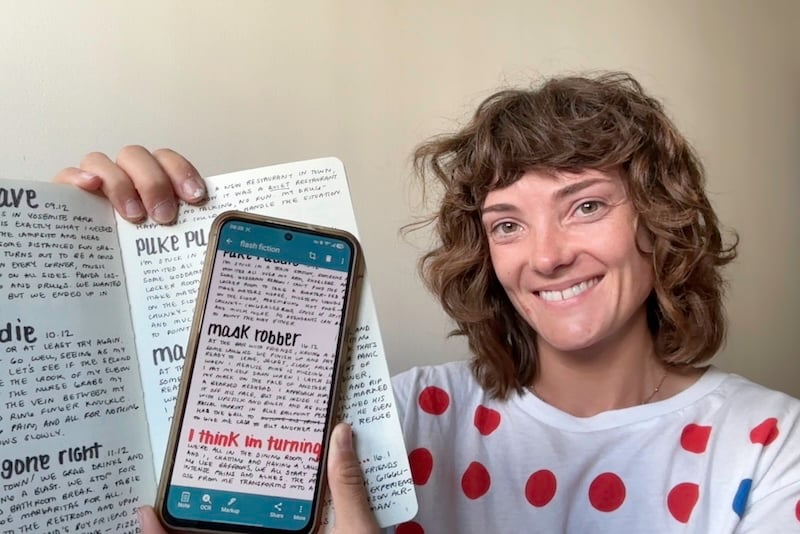
College hands you more to juggle than hours in the day—lectures, readings, group projects, and a social life on top of it all. Sure, you can turn on Focus Mode or download a productivity app, but blocking distractions isn't the same as mastering the art of studying. A handful of education apps can help you get there, turning the scraps of time between classes into real progress instead of another scroll session.
I tested 10 iOS and Android apps and picked the top 6 that help students make the most of their time and get better at the whole studying game.
Save on new gear for the new school year
Back-to-school season is the perfect time to upgrade your tech without breaking the bank. Check out the best cell phone deals to snag the latest iPhone at a discount, or opt for an iPad with Apple's Back to School deals. You can even save with one of the best phone plans for college students, too.
Don't forget to make sure you have enough data to support your favorite gadgets on the go. Check out the most popular phone plans to help you save even more:
|
Visible

$25 Visible Plan
$25.00/mo
Taxes & Fees included
|
|
Verizon

Simplicity Plan
$30.00/mo
+ Taxes & Fees. Price includes AutoPay & Bring a Number discount
|
|
Mint Mobile

Unlimited Data Plan
$10.00/mo
$60 for 6 months of service
|
Best apps for students compared
| App | Available on | Price | Best for |
|---|---|---|---|
| Quizlet | iPhone and Android | Free tier (flashcards and limited study games); Quizlet Plus $7.99/month, or $2.99/month annually | AI-powered flashcards, tests, and study games |
| Todoist | iPhone and Android | Free (premium $4.99/month) | Organizing deadlines and syncing calendars |
| Evernote | iPhone and Android | Free (premium from $10.83/month) | Scanning documents and transcribing lectures |
| Otter.ai | iPhone, Android, and desktop | Free (Basic plan); premium Pro from $8.33/month billed annually ($16.99/month billed monthly) | Recording and transcribing lectures, meetings, and study sessions |
| NoteBloc | iPhone and Android | Free, unlimited scans (optional one-time Pro purchase removes ads) | Scanning handwritten notes and textbook pages to read on the go |
| Libby | iPhone and Android | Free (participating library card required) | Free ebooks and audiobooks from your library |
How I evaluated the best apps for students
I judged each app on whether it actually simplifies a real part of student life, not just whether it looks polished in a screenshot. Here's what I looked for:
- Ease of use: Can you start using the app the moment you open it, without a manual?
- Price and value: Does the free version deliver real functionality, or is it just a trial designed to push you toward paying?
- Efficacy: Does the app deliver on what it promises, or is it all marketing?
- Practicality: Is this something you'd actually open during a busy semester, or a single-use app taking up storage?
1. Quizlet: Learn faster with this all-in-one study guide app

5 out of 5 overall
- Free tier includes flashcards and some limited study games
- Available for iOS and Android
Quizlet allows students to work collaboratively and master any course through flashcards, tests, games, and AI-powered tutoring. Among education apps for students, Quizlet is king. The brilliance of this study app lies in its database. Enter your institution and the course you're taking to find past students' flashcards. Rather than creating new materials, you'll spend it using pre-existing ones in various ways, by taking customized tests, playing a Connections-style match game, or interacting with Q-Chat, Quizlet's AI tutor.

Image: Kevin Kearney
For a test run, I revisited Introduction to Astronomy, a course from my undergraduate days that still haunts me. I found flashcards from the course's many modules and got to work, matching vocab terms and running through a few custom multiple-choice quizzes. Within a few minutes, I was more confident with the terms than I ever was as a student.

Image: Kevin Kearney
Quizlet Plus unlocks even more study-focused features, including exercises from widely used textbooks and detailed explanations for those textbooks' solutions. The free tier still gives you flashcards and a handful of study games, which covers a lot of what a typical student needs before ever touching Plus. Students on tight budgets can also check out Knowt, a free Quizlet clone.
Still, if you've got the room in your budget, we recommend the original app over its impersonator. Quizlet's in-depth features and seemingly endless well of knowledge make Plus a solid upgrade over the free clone. Better yet, you can use Quizlet across all of your devices. I can undoubtedly say that Quizlet is one of the best iPad apps for college students, making typing and testing easier than ever.

"Within a few minutes of using flashcards from my old astronomy course, I was more confident with the terms than I ever was as an actual student. Quizlet's in-depth features and endless well of user-generated content make Plus a solid upgrade if you've got the room in your budget."
Kevin Kearney, WhistleOut Staff Writer
Studying on a budget? You don't need unlimited data for this
Quizlet runs light on data, so there's no reason to pay for more than you need. If flashcards and the occasional AI chat cover most of your phone habits, a cheaper plan with a smaller data allowance can cover you just fine.
Check out the cheapest plans with limited data below:
|
TextNow

Free Flex Plan
$0.00/mo
+ $3.99 Upfront
|
|
MobileX

Build Your Own Plan
$1.98/mo
Platform fee
+ $9.88 Upfront
|
|
Twigby Mobile

Unlimited Talk, Text and 2GB Data
$5.00/mo
for the first 3 months then $15.00/month
|
2. Todoist: Prioritize your deadlines with this super-powered calendar

4.5 out of 5 overall
- Free, with a paid Pro tier for extra features
- Available for iOS and Android
Todoist is a sleek organizational app that allows you to order tasks, set reminders, and work towards goals. College is filled with due dates and responsibilities across multiple calendars—exam days on Canvas, hangouts on iCal, and extracurriculars on Google Calendar. Seasoned students know that putting it all in a single place is the way to go, allowing you to cut down on clutter and streamline your day-to-day. There's no shortage of apps for college students to stay organized out there, but one of the best is Todoist, perfect for students taking on a busy semester.

Image: Kevin Kearney
Todoist is more customizable than iCal or Google Calendar, making it the best calendar app for college students. It allows you to add detailed notes to tasks and organize long-term projects across a semester. Importantly, it also allows you to sync from those native calendars, turning Todoist into the universal guide to your many deadlines.

Image: Kevin Kearney
Todoist has a paid Pro tier, though. There are some nice features that come with that subscription—like additional reminders, the ability to set a time duration for an event, and location-based alerts—but the free version is more than suitable for a typical college student. After all, you're looking to have Todoist simplify your complicated life. Who needs more bells and whistles?
"Todoist is more customizable than iCal or Google Calendar, and syncing from those native calendars turns it into a universal guide to your deadlines. You're looking to simplify your complicated life, and the free version does exactly that without extra bells and whistles."
Kevin Kearney, WhistleOut Staff Writer
Cheap premium data for the whole family
Todoist works best when everyone's calendars stay in sync, and the same logic applies to your family's phone plan. T-Mobile's Experience plans let you add parents and siblings to one account without the bill spiraling.
Check out T-Mobile's family plans with Experience plans below:
|
T-Mobile

Experience More 2.0 | Family Plan
$170.00/mo
with Auto-Pay + Taxes and fees
|
|
T-Mobile
Experience Beyond 2.0 | Family Plan
$215.00/mo
with Auto-Pay + Taxes and fees
|
3. Evernote: Capture every lecture with the best note-taking app around

4.5 out of 5 overall
- Free, with paid premium tiers for more storage and AI tools
- Available for iOS and Android
Evernote is a turbo-charged notes app that allows you to scan docs and automatically transcribe voice recordings. I've always been a fan of my iPhone's Notes app, which I'd argue is the best iOS app around. Still, Notes has its limitations, especially for college students. If you need an app for note-taking, you'll need something far more sophisticated than Apple's native tool. Your best bet is Evernote, which offers students organizational tools designed for the lecture hall.

Image: Kevin Kearney
Open a Lecture Notes template and you'll be able to catalog that class's key information, with the ability to link to class materials and images. If you're feeling old school, you can even drop in some handwritten notes or scan your marked-up rough draft for inspection at a later date.
Most impressive, though, is the app's AI-powered transcription tool. Use your cell phone's mic to record the lecture (with your professor's permission, of course), and then watch as the app turns it into an accurate script. As someone who conducts a lot of interviews for a living, I've seen my fair share of audio transcription apps, and, unfortunately, most of them are quite poor. Evernote's, though, is strikingly clear and grammatically correct. It's a tool I'll definitely be using, and one I'm sure will be a game-changer for students when it comes time to cram for finals.

Image: Kevin Kearney
Additional AI tools, including the ability to summarize and tidy your notes, will require a premium subscription. The free version has limits on uploads and notes, but its data allowances are still more than enough to get you through the semester.
"I've seen my fair share of audio transcription apps, and most of them are quite poor. Evernote's is strikingly clear and grammatically correct. It's a tool I'll definitely keep using, and I think it'll be a game-changer for students cramming for finals."
Kevin Kearney, WhistleOut Staff Writer
Stay connected to your notes wherever you study
Scanning documents, transcribing lectures, and syncing across devices all rely on a solid connection, whether you're in the library, a lecture hall, or off campus entirely.
Check out the most popular unlimited data plans to keep everything backed up and accessible:
|
Visible
$25 Visible Plan
$25.00/mo
Taxes & Fees included
|
|
Verizon
Simplicity Plan
$30.00/mo
+ Taxes & Fees. Price includes AutoPay & Bring a Number discount
|
|
Mint Mobile
Unlimited Data Plan
$10.00/mo
$60 for 6 months of service
|
4. Otter.ai: Turn every lecture and meeting into a searchable transcript
4.5 out of 5 overall
- Free Basic plan, with paid Pro and Business tiers
- Available for iOS, Android, and desktop
Otter.ai listens to your meetings and lectures, then hands you back a full transcript and an AI-generated summary without you lifting a finger. The Google Calendar integration is what won me over. Turn it on, and Otter automatically joins and records any meeting already sitting on your calendar. Once it's done, you get a transcript alongside an AI summary, and you can use the built-in chat to ask Otter to pull specific details out of that transcript instead of scrolling through the whole thing yourself.
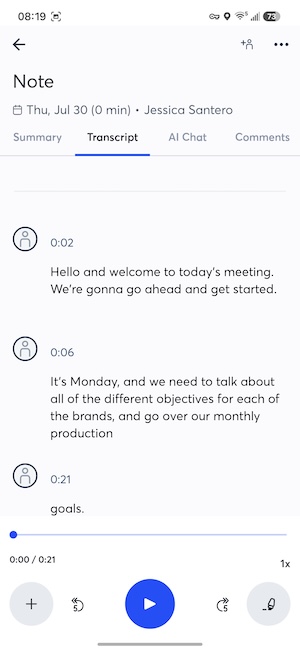
Image: Jessica Santero
You don't need a calendar invite to use it, either. Hit the record button during class (always with the speaker's permission, of course) to keep a transcript of the lecture. It's especially useful for group study sessions or group projects, where it's easy to miss a smaller detail someone mentions in passing.
Transcription is available in English, Spanish, and French, with German and Chinese still in beta testing. The free Basic plan caps you at 300 minutes a month, which is plenty for casual use, but heavier note-takers juggling back-to-back classes will burn through that allowance fast and may want to look at Pro.
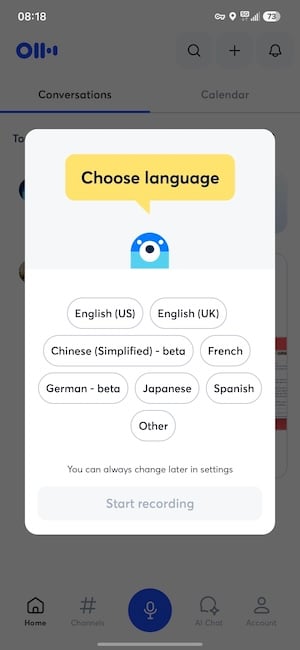
Image: Jessica Santero
"The Google Calendar integration is what won me over. Turn it on, open the meeting, and Otter handles the transcript and AI summary on its own. It's just as handy for a group study session where you're bound to forget a smaller detail someone mentioned."
Jessica Santero, WhistleOut Staff Writer
Recording eats data fast
Live transcription and constant syncing put real strain on your data, especially if you're recording back-to-back classes. A capped plan can leave you stuck mid-lecture, right when you need it most.
Check out the cheapest unlimited data plans below:
|
Visible
$25 Visible Plan
$25.00/mo
Taxes & Fees included
|
|
Verizon
Simplicity Plan
$30.00/mo
+ Taxes & Fees. Price includes AutoPay & Bring a Number discount
|
|
Mint Mobile
Unlimited Data Plan
$10.00/mo
$60 for 6 months of service
|
5. NoteBloc: Scan your notes so you're never stuck without them
4.5 out of 5 overall
- Free, unlimited scans (optional one-time Pro purchase removes ads)
- Available for iOS and Android
NoteBloc turns a quick snap of a notebook page into a clean, readable scan you can pull up anywhere. You get unlimited images, so there's no limit on how many pages you can capture and study on the go or cram through before a lecture.
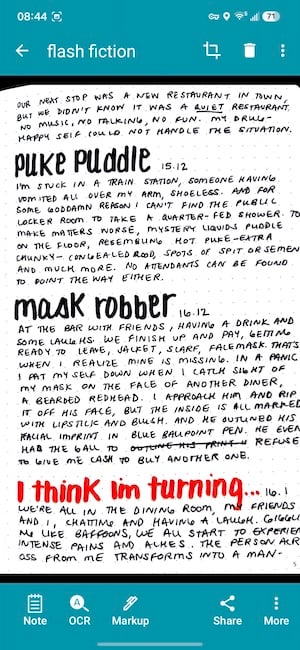
Image: Jessica Santero
Sometimes you don't have room to haul around every notebook or textbook. Having a clear, color scan you can pull up on your phone instead beats flipping through a stack of paper between classes.
"You don't always have room to bring every notebook or textbook with you. A clear, color image you can pull up on your phone instead is the better option, and NoteBloc doesn't cap how many pages you can scan."
Jessica Santero, WhistleOut Staff Writer
6. Libby: Save money with your library's digital collection

5 out of 5 overall
- Free (participating library card required)
- Available for iOS and Android
Libby lets students unlock their school's digital collections, giving them near-unlimited access to e-books and audiobooks they can download to a phone or Kindle. We already named this one of the best reading apps for students, so it only makes sense that it'd appear here, too. College students pay a small fortune purchasing textbooks; if you're a humanities student, you'll pay hundreds of dollars every semester to keep up with your courses' reading lists. Libby is the only free app that helps you save big by checking out digital versions of those books without paying a cent. All you need to gain access to these enormous collections is a library card, something you're granted once you start your first semester.

Image: Jessica Santero
One of the best parts of Libby is its audiobook library. Rather than paying for a subscription service like Audible or Spotify, Libby's audiobooks are completely free, just like everything else on the app. Dense historical treatises and complicated Shakespearean syntax will suddenly spring to life, allowing you to move through your assigned reading more quickly.

Image: Jessica Santero
As great as Libby is, it's not a perfect solution. Copyright law limits the number of digital copies that can be loaned out to users, so you'll want to ensure you place holds on titles well before your deadlines. Even better, you might want to use your local library branch, which likely has fewer students seeking out the same titles, rather than the library at your school.
What Reddit says about Libby
Readers elsewhere back this up. One user shared in r/books, "I read more with the Libby app. Nothing worse than needing to scroll or turn the page every paragraph."
"Libby is the only free app that helps you save big on textbooks and required reading—the audiobook library alone would cost you an Audible or Spotify subscription anywhere else. All you need is a library card to gain access to enormous collections at no cost."
Jessica Santero, WhistleOut Staff Writer
 How I evaluated these apps
Our mobile experts scour the app stores every month, looking for the best new apps for Android and iPhone. Before recommending an app, we use the app for at least one full workday, testing its basic functionality and evaluating whether or not it delivers on its promises. From there, we weigh the app's pros and cons and then determine whether or not it's a worthwhile download for the wider population of cell phone users.
- Easy to use: Great apps simplify your phone. We selected the tools that don't require a complicated instructional manual.
- Affordability: We leaned into inexpensive, quality apps. Extra points if they're free.
- Hands-on testing: We played around with these before recommending them, ensuring they're worth your download.
Why you can trust WhistleOut
.svg)
15+
years of mobile industry experience

900+
published wireless guides

35+
firsthand carrier reviews
We've been around since the birth of the iPhone. Along the way, we've learned how to spot the best deals for your wallet (and your sanity). We spend our days researching informative guides and writing insightful reviews on every kind of wireless plan, distinguishing what matters from what doesn't. We played around with these plans before recommending them, ensuring they're worth your hard-earned money.
Want to know more? Check out how we review every cell phone plan we rank.
Best apps for students: FAQ
What is the most useful app for students?
The most useful app for students is Quizlet. Not only can you create and share flashcards or mock-up study test questions, but you can learn even more with Quizlet's AI features. Consult Q-tutor, Quizlet's AI chatbot, if you have questions on any subject, or use write mode to scan notes and transform them into study cards.
What is the best free AI app for students?
The best free AI app for students on Apple and Android is DeepSeek. Unlike most AI apps or student apps with integrated AI features, DeepSeek is completely free. You won't have to pay for any premium features or even make an account to use this AI app.
What are the best free apps for students?
The best free apps for students are Libby, your personal library app, and Knowt, the best free alternative to Quizlet.
Jessica Santero
Staff Writer

Find a better phone plan
Thousands of cell phone plans unpacked. All the facts. No surprises.


