
The most reliable way to tell if a photo was edited by AI is to check it for Google's hidden SynthID watermark in the Gemini app, then run a reverse image search to find the original. Content Credentials and the AI labels on Pixel and Galaxy phones can also flag an edit, but they often disappear once a photo gets shared, and AI image detectors are too unreliable to trust on their own.
In my ranking of hidden AI phone features, generative photo editing scored a 3 out of 5 on the creep scale, mostly because of what other people can do with it. The good news is that Google and Samsung both mark AI edits. The bad news is that most of those marks disappear the moment someone takes a screenshot.
The methods that actually work
If you're staring at a photo and wondering, "Is this image AI?", here's how each method holds up once a photo starts getting shared around:
How each method holds up
| Method | What it catches | Does it work on a screenshot? |
|---|---|---|
| SynthID in the Gemini app | Images made or edited with Google's AI tools | Usually |
| Content Credentials | Photos from cameras and apps that sign them, including Pixel and Galaxy AI edits | No |
| Samsung's visible AI watermark | Galaxy AI Generative Edit | Yes, but you can crop it out |
| Google Photos AI edit label | Magic Editor edits | No |
| AI image detectors | Anything, in theory | Accuracy drops sharply |
| Reverse image search | Earlier or original versions of the photo | Yes |
My advice is to start with SynthID and a reverse image search, since both still work on screenshots, and treat everything else as a bonus rather than a final answer.
SynthID: Google's watermark that survives a screenshot
SynthID is Google's invisible watermark, and it's built into the pixels of every image made or edited with Google AI tools, including Gemini's image generator. Because SynthID lives in the image itself instead of in the file's metadata, a screenshot usually doesn't erase it.
To check an image, open the Gemini app, attach the photo, and ask "Is this AI-generated?" Gemini scans for the SynthID watermark and tells you whether Google's AI made or edited the image. If you're checking a screenshot, crop it tightly around the photo first, since Google says extra content around the image can throw off the result. The Gemini app is free, and it's one of the best AI apps to keep on your phone for exactly this kind of method.
The catch is that SynthID only catches Google's AI. An image from ChatGPT, Midjourney, or another non-Google tool won't carry the watermark, so a clean SynthID result doesn't prove a photo is real.
Content Credentials
Content Credentials are a digital record attached to a photo's file that shows where it came from and how it was edited, built on an industry standard called C2PA. Pixel phones from the Pixel 10 onward add Content Credentials to photos straight from the camera, and Galaxy phones from the Galaxy S25 onward add them when you use Galaxy AI tools like Generative Edit. You can read a photo's Content Credentials with the free Content Credentials Verify tool, and the Gemini app now checks for them too.
The problem is that Content Credentials live in the file's metadata, which is the image's most fragile part. Screenshots, resizing, and most social media uploads strip Content Credentials completely, so a photo that's been shared a few times usually arrives with no record at all. A missing credential tells you nothing, either way.
Samsung's visible AI watermark
Galaxy AI adds a small sparkle watermark to the corner of any photo edited with Generative Edit, so the quickest check on a Samsung photo is to look at its bottom corner. The watermark is part of the image itself, which means it survives a screenshot.
Where it gets tricky is that a quick crop removes it. A photo without the sparkle isn't proof of anything, since anyone can trim the corner off before sharing it.
Google Photos' AI edit label
Google Photos states in a photo's details when Magic Editor was used. To check, open the photo in Google Photos, swipe up, and look for the AI editing label in the details.
This also gets tricky because the label is in the file's metadata, so it only shows up on the original photo, not one shared through a Google Photos link or Quick Share. A screenshot erases it.
What about AI photos on iPhone?
Apple introduced Apple Reference Image at its September keynote, an opt-in camera mode on the iPhone 18 Pro and iPhone 18 Pro Max that signs a photo at the camera sensor the moment you take it. That signature proves a real iPhone camera captured the scene, and you can compare the reference image with an edited version to see what changed.
Apple is also adding Google's SynthID watermark to its own AI tools in a software update later this year. Once that update arrives, images created in Image Playground and most photos edited with Apple Intelligence tools like Clean Up will automatically carry the same kind of hidden watermark Google uses. If you use those tools, our list of the best Apple Intelligence apps covers where they're most useful.
AI image detectors
An AI image detector or AI image checker is a website or app that scans a photo and gives you a score, usually a percentage, for how likely it is to be AI-generated. Detectors learn by studying huge sets of real and AI-generated images, then look for the patterns AI tends to leave behind.
Detectors look like the obvious answer, since you just upload a photo and get a number. They also work on any image, not just ones from Google or Samsung, which makes them tempting when the other methods come up empty.
How accurate are AI image detectors?
AI image detectors are wrong far more often than their marketing suggests. A NewsGuard audit in May 2026 found that popular detectors flagged about 13% of real news photos as AI-generated, and one tool flagged 40%.
Detectors also struggle with the newest image generators and lose accuracy after a photo gets compressed, cropped, or screenshotted, which is exactly what happens to every image that gets shared.
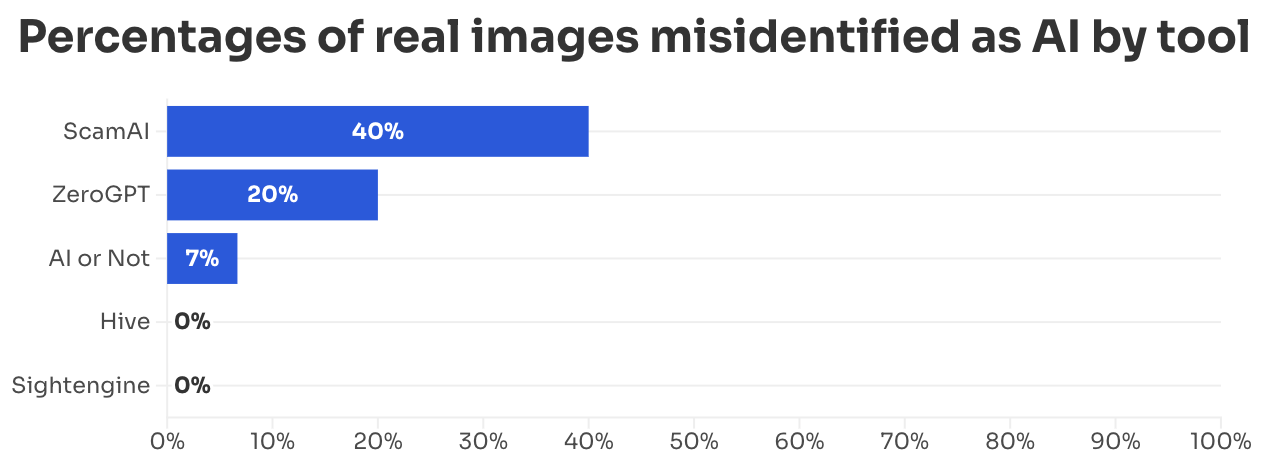
An AI image detector's score is a guess, not proof. I'd use one as a tiebreaker at most, never as the reason to call a photo fake.
How to spot an AI-generated image yourself
When the technical methods come up empty, your own eyes still help, though not as much as most people think. In our AI image survey, 72% of Americans couldn't tell AI-generated images apart from real photos. These are the tells worth checking first:
- Hands and fingers: Look for extra hands, missing fingers, or fingertips with no fingerprints, which still show up in a lot of AI images.
- Objects that don't line up: Table legs that bend at odd angles or plant stems with gaps in them point to an image that was generated rather than photographed.
- Mismatched textures: A single object with two different textures, or an animal with fur on its body but smooth, furless legs, is a common AI mistake.
- Hair and fine details: Bangs that fade into a forehead instead of connecting to the hairline, or whiskers that blur into double lines, are easy to miss at first glance.
- Warped text: Signs, shirts, and labels with garbled or misspelled lettering are one of the most reliable giveaways.
- Shadows and lighting: Shadows that fall in different directions, reflections that don't match the scene, or lighting that looks a little too perfect all deserve a second look.
Visual tells are getting less reliable as AI models improve, so I'd pair them with a reverse image search in Google Lens. If an earlier version of the photo exists without the sunset or the extra person, that comparison settles the question faster than any detector.
Looking for a phone with the latest AI features?
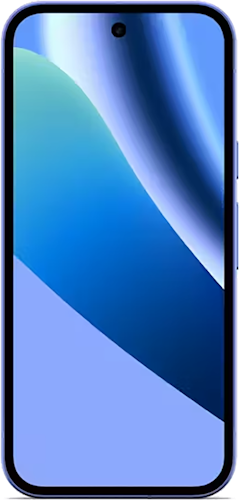
The newest Android flagships come with the most complete set of AI tools, including Gemini task automation and AI call screening, which older phones don't get. Here are some of the best AI-ready Android phones available right now.
Galaxy A27 5G 128GB
- 6.7 inch display
- Rear Cameras: 50MP, 5MP, 2MP
- Front Camera: 12MP
Galaxy A37 5G 128GB
- 6.7 inch display
- Rear Cameras: 50MP, 8MP, 5MP
- Front Camera: 12MP
Galaxy A57 5G 128GB
- 6.7 inch display
- Rear Cameras: 50MP, 12MP, 5MP
- Front Camera: 12MP
Pixel 10a 128GB
- 6.3 inch display
- Rear Cameras: 48MP, 13MP
- Front Camera: 13MP

AI-edited photos: FAQ
Are AI image detectors accurate?
AI image detectors aren't accurate enough to rely on, especially for photos shared online. A May 2026 NewsGuard audit found detectors flagged about 13% of real news photos as AI-generated on average, and accuracy drops further once a photo is compressed, cropped, or screenshotted.
What are the signs of an AI-generated image?
Common signs of an AI-generated image include warped or garbled text, unnatural hands and fingers, mismatched shadows and reflections, overly smooth skin, and backgrounds that blur into odd shapes. Newer AI models hide these tells better, so pair a visual check with a reverse image search or a SynthID check in the Gemini app.
Does SynthID survive a screenshot?
SynthID usually survives a screenshot because the watermark is built into the image's pixels, not its metadata. For the most accurate result, crop the screenshot tightly around the image before uploading it to the Gemini app, and keep in mind that SynthID only detects images made or edited with Google's AI tools.
What are Content Credentials?
Content Credentials are a digital record attached to a photo's file that shows where the photo came from and whether AI tools created or edited it. Pixel phones and Galaxy AI tools add Content Credentials automatically, but screenshots and most social media uploads strip them from the file.
Scott Houghton
Jr. Staff Writer

Thousands of cell phone plans unpacked. All the facts. No surprises.
Related Articles


.png?w=160&h=160&usm=20&usmrad=0.8&fit=crop "Cell Coverage Near You: Who Has the Best 5G Network?")
Related Topics
General Mobile ExplainersPopular Topics
Featured App Reviews iOS News Coverage Device Reviews Device Explainers Carrier Explainers App Roundups T-Mobile


Free iPhone 18 Pro, up to $1,200 off, with a trade-in in any condition or a line switch on Experience Beyond


.png?w=280&h=280&usm=20&usmrad=0.8&fit=crop "Best Cell Phone Deals for October 2026: Get the New iPhone 18 Pro for Free")




