
Image: Max McCaskill
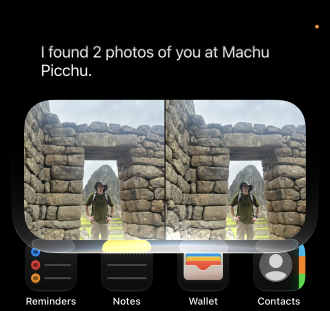
Siri can now dig through your texts, emails, and photos to find things for you. It's one of the most useful new Siri AI features in iOS 27, and it means you no longer have to scroll through three different apps to find the restaurant a friend recommended last month.
That said, "remembers everything" comes with some fine print. Here's what you can actually ask Siri to find, how to phrase it, and where it still comes up empty.
What Siri's personal context feature actually does
Apple calls this feature personal context. Instead of answering from the web, Siri AI searches the information already stored on your iPhone, including things like your messages, emails, and photos.
All of that searching happens on your device. Siri uses your iPhone's Spotlight index to find what you asked for, so none of your personal data is sent to an online server.
It's part of Apple's rebuilt Siri, powered by the newest Apple Intelligence capabilities. It's also separate from onscreen awareness, which answers questions about whatever is currently on your screen.
What you can ask Siri to find
The best uses are the small, annoying searches you'd otherwise do by hand. A few examples:
- A text: "What was the restaurant Mary Beth texted me about last month?"
- An email: "What's my flight confirmation number for my trip to Dallas?"
- A photo: "Show me photos from my trip to Peru last year."
Instead of opening Messages, Mail, or Photos and scrolling until you find it, you simply need to ask. Once Siri finds what you need, it can even put that information to work in other apps, like adding an appointment from a text to your calendar.
Limitations: Third-party apps and vague questions
Unfortunately, third-party apps are hit or miss. Siri can only search them if their developers have added support, and so far, not many have. During my testing, Siri AI couldn't search chats in Snapchat or pull travel details from popular apps like Flighty or Expedia.
Vague requests can also come back empty, even when you know the answer is sitting on your phone. If Siri doesn't find something on the first try, try rephrasing with a name, timeframe, or specific apps. Sometimes pointing Siri in the right direction is all it takes to get it to work.
How to word your request so Siri actually finds it
Siri AI does best with specific requests. The more you tell it about where to look, the better your odds. Try to include at least one of these:
- A contact's name
- A general timeline, like "last month"
- Which app to search
For example, "Check my Messages app for Mary Beth's mailing address that she sent last month" should get you a solid result. Just asking, "What is Mary Beth's address?" may get you nothing since Siri AI doesn't know where it should look.
Siri AI personal context: FAQs
What is personal context for Siri AI?
Personal context is a Siri AI feature that lets Apple Intelligence search the personal data on your iPhone to answer your questions. This can include texts, emails, photos, and more. For example, you can ask Siri for a flight confirmation number or photos from a specific trip instead of searching each app yourself for the relevant information.
Does Siri AI personal context send my data to Apple?
Not usually. Siri AI's personal context searches your iPhone's Spotlight index on your device. However, if you then ask Siri to complete a specific task with that information, it may need to go to an external server to be completed. However, Apple still maintains your data's security using a process called Private Cloud Compute.
Can Siri AI's personal context search third-party apps?
Yes, Siri AI's personal context features can search third-party apps whose developers have added support. However, since this is a new feature, the support rollout has been slow. In my testing, it couldn't search popular apps like Snapchat, Flighty, or Expedia.
Which iPhones support Siri AI personal context?
Siri AI personal context requires an iPhone 15 Pro or newer running iOS 27 with a supported language. That includes the iPhone 15 Pro and Pro Max, every iPhone 16 and iPhone 17 model, the iPhone Air, the iPhone 18 Pro and Pro Max, and the iPhone Duo.
Max McCaskill
Sr. Staff Writer

Thousands of cell phone plans unpacked. All the facts. No surprises.


