
An Android phone usually runs slow because of one of six problems: Storage that’s almost full, too many apps running in the background, a recent update that’s still settling in, a single misbehaving app, heat, or a worn-out battery. Every one of those causes is easy to check, and most take just a few minutes in your Settings app.
A slow Android phone has a sneaky way of convincing you to get an $800 upgrade, especially when your camera takes five full seconds to open and you miss your shot. In most cases, though, the real problem is something you can fix in about two minutes.
I’ll walk through how to spot each cause, the settings to check on Samsung Galaxy and Google Pixel phones, and how to fix a slow Android phone once you know what’s dragging it down.
Slow phone or slow connection?
A phone that opens apps quickly but takes forever to load web pages, videos, or social feeds has a connection problem, not a performance problem. Our guide to fixing slow internet on Android covers the network settings to check, and our breakdown of why your phone data is slow explains carrier-side causes like congestion and deprioritization.
If your plan is the bottleneck, switching to one with more premium data or a stronger network in your area can make a bigger difference than any setting:
|
Boost Mobile

Unlimited Plan
$10.00/mo
with AutoPay
|
|
Mint Mobile

Unlimited Data Plan
$10.00/mo
$60 for 6 months of service
|
|
Cricket

3-Month Unlimited Plan
$15.00/mo
$45 advance payment for 3 months (equals to $15/month)<br>regular rate for 3 months is $120 (equals to $40/month)
+ $9.99 Upfront
|
1. Your phone’s storage is almost full
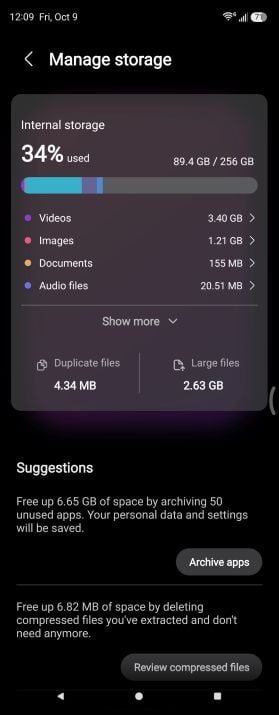
Image: Scott Houghton | WhistleOut
An Android phone slows down when its storage is nearly full because the system needs free space to install updates, save temporary files, and more to keep apps running smoothly. Problems usually start once less than 10% of your storage is free, and an Android phone that’s slow to open apps is often the first sign you’re running out of room.
Photos and videos usually take up the most space on a full phone, and offline downloads from apps like Spotify, Netflix, and Google Maps are close behind, especially the ones you saved for a trip and forgot about. Messaging apps add to the problem by quietly saving every meme and video your friends send, so a few busy group chats can eat up gigabytes without you noticing.
How to check the storage on your Pixel or Galaxy phone
To check your phone’s storage:
- Google Pixel: Go to Settings > Storage.
- Samsung Galaxy: Go to Settings > Device care > Storage.
Both screens break down your storage by category, so you can see right away whether photos, apps, or downloads take up the most space.
How to fix a slow Android phone with full storage
Backing up your photos to Google Photos and using its “Free up space” option clears the copies on your phone without deleting anything from the cloud. Uninstalling apps you haven’t opened in months helps too, and newer versions of Android let you archive an app instead, which removes most of its size while keeping your data in case you want to reinstall it later.
If you’re constantly bumping into your storage limit, our guide to how many GB of storage you need can help you pick the right size for your next phone.
My advice: Clear enough space to free at least 10% of your storage, and aim for closer to 20% so you aren’t back in the same spot a month from now.
2. Too many apps are running in the background
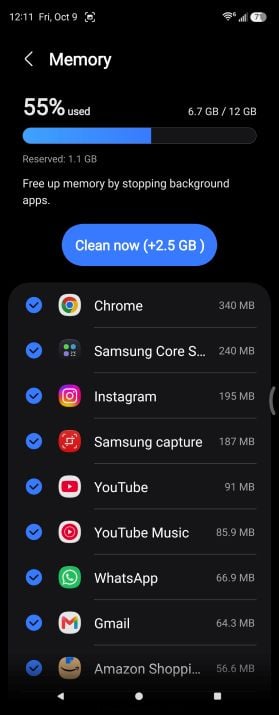
Image: Scott Houghton | WhistleOut
Background apps slow down an Android phone by using memory and processing power for things you aren't actively doing, like syncing accounts, tracking your location, and refreshing feeds. Social media apps, shopping apps that constantly check for deals, live wallpapers, and a home screen packed with widgets that refresh all day are common culprits.
How to see which apps are running in the background
The apps working hardest in the background usually show up in your battery and memory stats, so that's the best place to start looking:
- Google Pixel: Go to Settings > Battery > Battery usage.
- Samsung Galaxy: Go to Settings > Device care > Memory.
Apps near the top of the list that you haven't opened in a while are the ones worth reining in, since anything draining your battery in the background is also competing with the app you're actually using.
How to fix a slow Android phone with too many background apps
Swiping away every app in your recent apps screen feels productive, but it isn't the fix. Android relaunches a lot of those apps on its own, and reopening an app from scratch takes more work than picking it back up from memory.
Restricting the apps you rarely use works much better:
- Google Pixel: Go to Settings > Apps, pick an app, tap App battery usage, and choose Restricted.
- Samsung Galaxy: Go to Settings > Battery > Background usage limits and add apps to Sleeping apps or Deep sleeping apps.
Deleting widgets you never look at and switching from a live wallpaper to a static one further cut down on background activity.
3. A recent Android update is still settling in
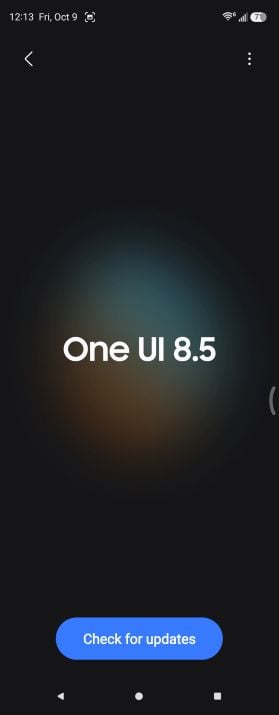
Image: Scott Houghton | WhistleOut
An Android phone often runs slower for a few days after a major software update because the system is re-optimizing your apps for the new version in the background. A wave of app updates usually lands at the same time as developers push versions built for the new software, so your phone ends up installing and optimizing a lot at once and can feel sluggish and a little warm until it finishes.
How to check if an update is slowing down your phone
The timing is the biggest clue, since a slowdown that started right after a big update is usually tied to it. You can see which version you're running and whether a newer patch is waiting:
- Google Pixel: Go to Settings > System > Software updates.
- Samsung Galaxy: Go to Settings > Software update.
If an Android update slowed your phone recently, there's a good chance it's One UI 9 or Android 17. Samsung started rolling out One UI 9, its Android 17 update, to the Galaxy S26 series in September, and it's reaching more Galaxy phones through the end of the year. Our guide to the latest Android version tracks which phones have it.
How to fix a slow Android phone after an update
Leaving your phone plugged in on Wi-Fi overnight for a couple of nights gives it time to finish optimizing in the background. After that, restart it and install any pending app updates from the Play Store.
A phone that's still slow a week or two after an update has a different problem. The update may have a bug, and manufacturers often release a follow-up patch to fix performance issues, so keep checking for software updates. Older phones can also struggle with their last major update, since newer versions of Android are built with newer hardware in mind.
4. A buggy app is making your phone slow down and freeze
A single buggy or malicious app can leave your Android phone running slow and freezing, especially if the slowdown started right after you installed something new. Malware is less common than people fear, but apps installed from outside the Play Store are the most likely source, and even legitimate apps can misbehave after a bad update.
How to find a problem app with Safe mode

Image: Scott Houghton | WhistleOut
Safe mode is the easiest way to find out, because it temporarily turns off every app you've downloaded while keeping the apps that came with your phone:
- Google Pixel (6 or newer): Press the power and volume up buttons together, then touch and hold Restart or Power off until you see the option to reboot to Safe mode.
- Samsung Galaxy: Open the power menu, then touch and hold Power off until the Safe mode button appears and tap it.
Use your phone normally in Safe mode for a few minutes. If the phone feels noticeably faster, one of your downloaded apps is the problem.
How to fix a slow Android phone caused by a bad app
Restart your phone normally, then uninstall the apps you installed most recently one at a time, restarting after each one so you can tell which app was to blame. If the problem app is one you need, check the Play Store for an update or clear its cache under Settings > Apps > [app name] > Storage.
Running a malware scan is worth doing too, especially if you've installed apps from outside the Play Store. Open the Play Store, tap your profile icon, then tap Play Protect and Scan. The scan only takes a few seconds, and if Play Protect finds a harmful app, it’ll give you the option to uninstall it.
5. Your phone is overheating
Android phones deliberately slow themselves down when they get too hot, which is called thermal throttling, to protect the processor and battery from heat damage. Gaming, navigating with your phone on a dashboard mount in direct sunlight, recording long videos, and charging while you do any of those things are the most common triggers, and a thick case makes everything worse by trapping heat against the back of the phone.
How to tell if heat is slowing down your phone
A phone that's throttling from heat usually feels warm to the touch, especially near the camera, and the lag tends to show up in the middle of something demanding like a game or a long navigation session. Your phone may also dim the screen on its own, pause charging, or show a warning that it needs to cool down before you can keep using certain features.
The easiest test is to let the phone cool off for 15 or 20 minutes. If it feels fast again once it's back to room temperature, heat was the cause.
How to fix a slow Android phone that's overheating
The slowdown is the phone protecting itself, so the fix is lowering the temperature instead of fighting the lag. Move it out of the sun, take the case off, unplug it, and close the camera and navigation apps you aren't using until it cools back down.
Avoiding the habits that heat it up in the first place keeps the slowdowns from coming back, so try not to charge while you game or stream, and keep the phone out of direct sunlight on your dashboard. Check out our guide to why your Android phone is overheating to learn more.
6. Your battery is worn out
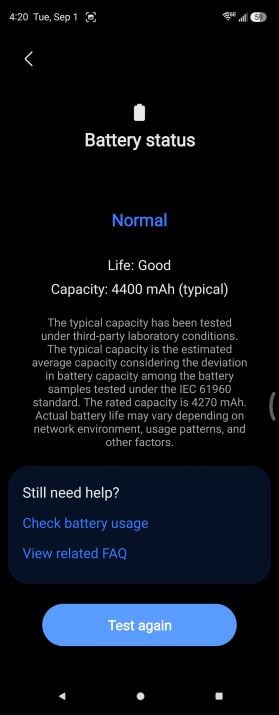
Image: Scott Houghton | WhistleOut
A worn-out battery makes an Android phone feel slower because it can't deliver steady power under heavy loads. Instead, the phone runs hotter, drains the battery faster, and spends more time in power-saving mode, which limits performance. Samsung has said publicly that it doesn't reduce processor speed through software updates as phones age, so a worn battery slows a Galaxy phone down through side effects like heat and constant power-saving mode rather than through a hidden throttle.
How to check battery health on a Pixel or Galaxy phone
Lithium-ion batteries wear out with every charge cycle, so a phone that's two or three years old often has noticeably less battery than it did out of the box. You can check how much wear yours has:
- Google Pixel (8a or newer): Go to Settings > Battery > Battery health.
- Samsung Galaxy: Open the Samsung Members app, go to the Support tab, tap Phone diagnostics, and run the Battery status test.
On my Galaxy Z Fold5, the battery test takes a few seconds and gives a quick rating of the battery's condition.
Newer Pixel owners might also notice Google's Battery health assistance feature in the same menu. Battery health assistance gradually lowers the battery's maximum voltage as it ages, starting at 200 charge cycles, which can slightly change charging speed and capacity but doesn't slow the phone down.
How to fix a slow Android phone with a worn battery
Replacing the battery through the manufacturer or an authorized repair shop usually costs far less than a new phone and can make an older phone feel quicker for another year or two.
My advice: If your phone still gets software updates and the rest of it works fine, a new battery is almost always the better deal than a new phone.
When it's time to replace a slow Android phone
An Android phone is worth replacing instead of fixing when it no longer gets security updates, still runs slow after a factory reset, or needs a repair that costs close to what a new phone does.
Software support is the easiest line to draw. Google's support for the Pixel 6 and Pixel 6 Pro ends in October 2026, and Samsung's Galaxy S22 series and older phones aren't getting One UI 9, so phones in that age range are running out of time no matter how well you take care of them.
Budget phones with 4GB of RAM and 64GB of storage also struggle with today's apps, even when everything else checks out. No amount of cleanup changes how much memory is physically inside the phone.
If you're ready to move on, our list of the best Android phones is a good place to start, and picking a model with plenty of storage and a long update window will keep you from reading this article again in two years.
Here are some of our favorite Android phones to upgrade to:
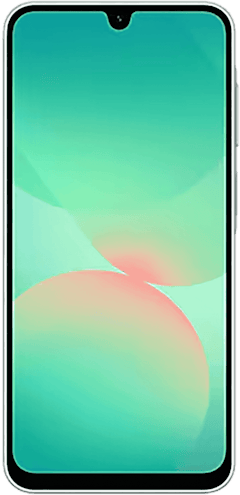
Galaxy A26 5G
- 6.7 inch display
- Rear Cameras: 50MP, 8MP, 2MP
- Front Camera: 13MP
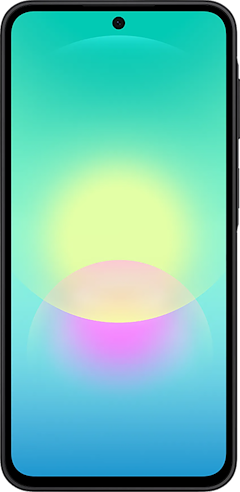
Galaxy A27 5G 128GB
- 6.7 inch display
- Rear Cameras: 50MP, 5MP, 2MP
- Front Camera: 12MP
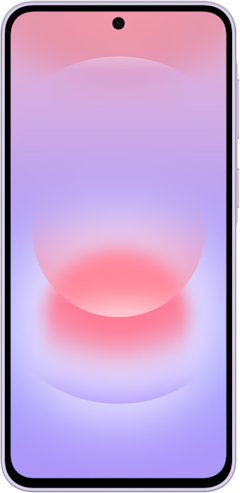
Galaxy A37 5G 128GB
- 6.7 inch display
- Rear Cameras: 50MP, 8MP, 5MP
- Front Camera: 12MP
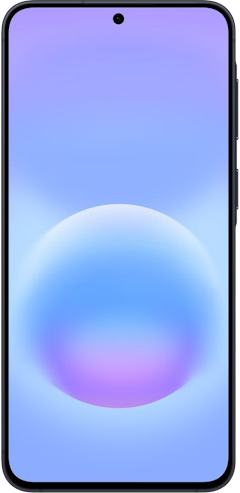
Galaxy A57 5G 128GB
- 6.7 inch display
- Rear Cameras: 50MP, 12MP, 5MP
- Front Camera: 12MP
Pixel 10a 128GB
- 6.3 inch display
- Rear Cameras: 48MP, 13MP
- Front Camera: 13MP


Slow Android phone: FAQ
Do Android updates slow down your phone?
Android updates can make a phone feel slower for a few days because the system re-optimizes your apps in the background after a major update. Performance usually returns to normal once that work finishes, and manufacturers often release follow-up patches when an update has a performance bug. Older phones can feel slower after their final major update, since newer Android versions focus on newer hardware.
Why do Android phones slow down over time?
Android phones slow down over time because storage fills up, apps get heavier with every update, and the battery wears out with every charge cycle. Each change is gradual, so the slowdown sneaks up on you instead of happening all at once. Freeing up storage and replacing a worn battery can fix most age-related slowdown on a phone that can still receive software updates.
Why is my new Android phone so slow?
A new Android phone usually runs slow for its first day or two because it's restoring apps and data from your old phone, downloading updates, and optimizing everything in the background. Leaving the phone plugged in on Wi-Fi overnight gives it time to finish that setup work. A brand-new phone that's still slow after a few days may be a budget model with limited RAM, or it may have a defect worth raising with the store or carrier while you're still in the return window.
How do I find out what is slowing down my Android phone?
The quickest way to find out what's slowing down an Android phone is to check your storage, your battery usage, and how the phone performs in Safe mode. Settings > Storage shows whether you're under 10% free, and Settings > Battery shows which apps are working hardest in the background. Safe mode turns off every downloaded app, so a phone that runs fast in Safe mode has a problem app, and a phone that's still slow points to storage, heat, or the battery.
Scott Houghton
Jr. Staff Writer

Thousands of cell phone plans unpacked. All the facts. No surprises.


