
Image: Max McCaskill
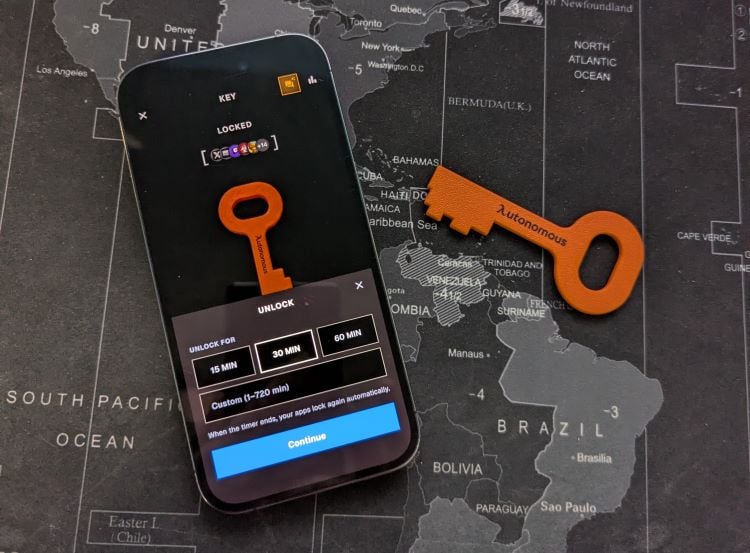
I used this NFC key for one month to see if it could help me escape my favorite apps.
Earlier this year, I realized something a bit embarrassing about myself: I'm a smartphone addict. At some point between testing new apps and having fun on social media, I became a major doomscroller, and it was taking a toll on my mental health.
After trying and failing to curb my doomscrolling habit with screen time apps and my iPhone's built-in features, I realized that I needed something that I couldn't simply tap through to ignore. That's when I found the Autonomous Key, which promised to fix the problem by locking my apps with a physical device I needed to tap.
The Autonomous Key is a $19 physical NFC key that locks apps on your smartphone. I used it for a month and was shocked to see it reduced my total smartphone screen time by over 80%. It works just as well and is cheaper than many of the other NFC doomscrolling devices that have gone viral on social media, like the Brick or Unpluq.
Here's how the Autonomous Key changed my relationship with my smartphone and why I'm keeping it forever.
What is the Autonomous Key?
The Autonomous Key is a physical NFC device with a corresponding Autonomous app that locks problematic apps on your smartphone. It's built for both Apple iOS and Android devices. Pricing starts at $19, and there's no required subscription plan to use the app.
The Autonomous app requires you to create an account and select the apps you want to lock. When you want to unlock them, you simply tap your phone against the key. There are three pre-built time allotments for your unlocked apps:
- 15 minutes
- 30 minutes
- 60 minutes
After the period ends, the apps are relocked, and you'll need to use your key to access them again.
Autonomous Key design and colors
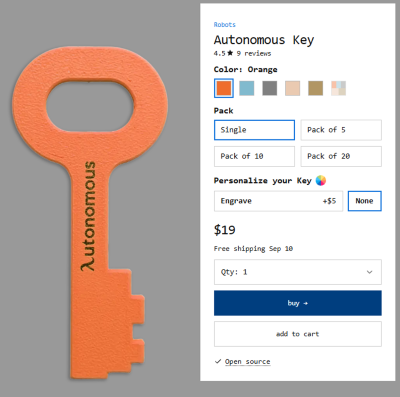
Image: Autonomous
The Autonomous Key is made of 3D-printed plastic. It's built out of two individual halves that are glued together, with the NFC chip sandwiched at the end of the key. There's also a hole at the top of the key in case you want to carry it with you on a keychain or hang it on a hook at home.
It comes in five colors:
- Orange
- Blue
- Gray
- Beige
- Brown
You can also customize the key by having it engraved for an extra $5.
I felt like the key's design and materials were worth the $19 price. There were no sharp plastic edges, and both halves lined up perfectly, despite everything being 3D printed. That said, I don't think I'd put it on a keychain and carry it with me everywhere. Since it's made of thin plastic, it does feel like it could bend or break in your pocket. However, I don't think that's really a problem, since it should be located away from you most of the time anyway to curb your doomscrolling.
How does the Autonomous Key work?
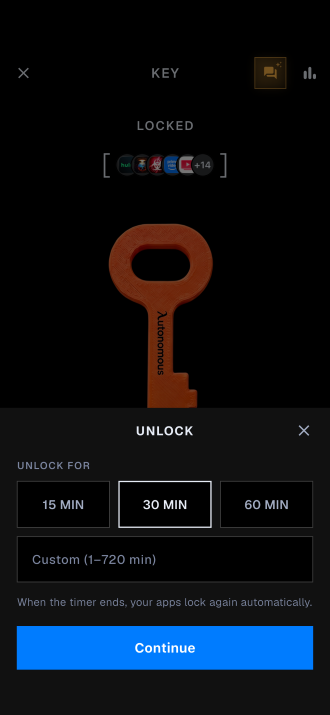
Image: Max McCaskill
The Autonomous Key was easy to use. You download the Autonomous app, create your account, and link the key by connecting it to the end of your phone.
From there, you'll need to give it access to your smartphone's screen time tracking features. That's one of the only privacy features the app needs, and it's a requirement you'll find with virtually all NFC locking devices. Essentially, these devices can see what apps you use, but they can't see any of the data inside those apps.
You'll then pick specific apps on your phone that you want to lock. This is where you'll need to be honest with yourself and think about how you use your phone. For example, I knew I needed to lock apps like X and Reddit, but I hadn't considered that apps like YouTube were also eating up my free time.
Common app categories that you may want to consider locking include:
- Social media
- Games
- Entertainment
- Short-form video
- Streaming
- Music
The Autonomous Key can also go further than just apps. Using your phone's screen time tracking, it can also block websites that it sees you visit often. On my device, while I blocked the Reddit app, Autonomous also suggested that I block Reddit's website in Safari. It saw that there were several times I'd looked up a topic online and visited Reddit's website first instead of going directly to the app.
Unlocking my device with the Autonomous App
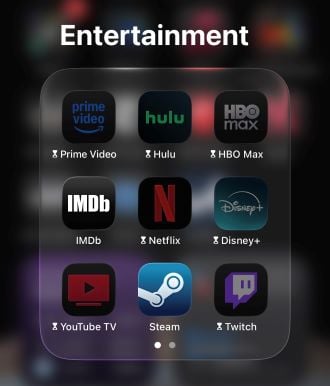
Image: Max McCaskill
When you want access to your apps, you'll open the Autonomous app, select the key, and pick how long you want to unlock the app. It will require you to connect the key to the end of your phone, and then it'll unlock them. Note that in my experience, the key and phone actually need to touch. Just being in the vicinity of each other was not enough.
After your time limit is up, the apps will automatically relock themselves.
Autonomous AI: Your key's AI assistant
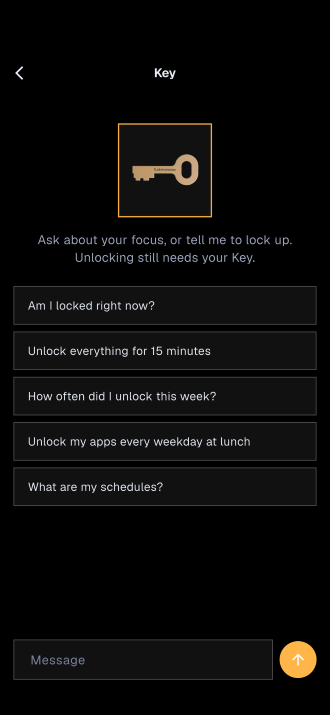
Image: Max McCaskill
The app also has a free AI assistant called Autonomous AI that can help manage your key. It can provide encouragement if it thinks you're using the key too much, help you schedule unlock times, and even answer questions about your usage statistics.
Truthfully, I did not get a lot out of Autonomous AI. Much of that was because I was trying to avoid using the key at all, so I didn't need the assistant. That said, it's hard to complain about a free feature, and it's probably helpful for people who want to set up specific free times for their apps or need a push to avoid unlocking.
Why did I like the Autonomous Key?
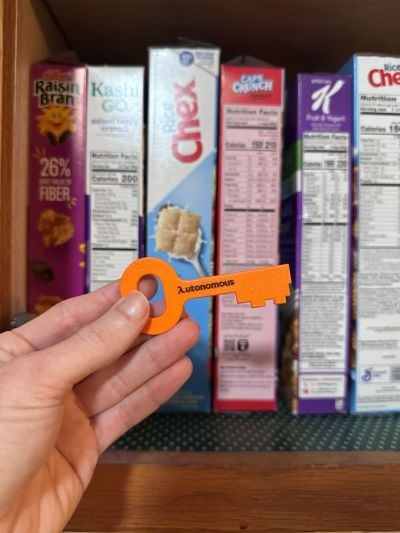
Image: Max McCaskill
I liked the Autonomous Key because over the course of a month it dropped my daily smartphone screen time from over seven hours to just one hour per day. And all I had to do was avoid using the key. I also loved that it was just $19, while most competing options are much more expensive or require long-term paid subscriptions. The Brick currently starts at $59, and the Unpluq starts at $26.50 for the physical tag with a $5.99/month subscription.
The first few days were extremely difficult because it was so easy to tap and unlock apps. I eventually realized that I needed to get the key away from my bedroom and workspace, so I threw it in a kitchen cabinet with all my cereal. Why did I pick that place? I honestly have no idea, but it was far enough out of my way to make unlocking my doomscrolling apps inconvenient.
Now that I've been using it for a month, I rarely notice that I'm not using my apps all the time, and I've even gone an entire week without unlocking them once. To be clear, I have not completely left social media. I still log on from my computer since I need access to information on platforms like X and Reddit for work. However, since I'm not also scrolling those platforms in bed or first thing in the morning, it's freed up time for other hobbies and helped my mental health overall.
What are signs of smartphone addiction?
Smartphone addiction can show up as both physical and mental issues.
Common signs of screen addiction can include:
- Doomscrolling social media or negative news stories
- Phubbing (snubbing people around you to use your phone)
- Anxiety when parted from your phone (also known as nomophobia)
- Poor sleep from using your phone before bed
- Bad posture and back pain from looking down at your phone
- Compulsive notification checking
- Using your phone during inappropriate times, like while driving, at a movie, or on a date
If you've done any of those things, it may be worth looking into a product like the Autonomous Key to help curb your smartphone use.
What didn't I like about the Autonomous Key?
While I was mostly pleased with the Autonomous Key, there were a couple of things I wasn't crazy about.
One is the Autonomous app. While the app works fine, it does feel a bit cluttered. Autonomous makes many products, from this key to smart desks, chairs, and even a $20,000 outdoor pod for remote workers. All of its products are set up through this same app, and you have to pick your key out of the list each time to use it. That's not a dealbreaker by any means, because in an ideal world, you shouldn't be using the app much anyway.
The other minor issue was that sometimes my apps did not automatically relock themselves when the time limit ran out. Reopening the Autonomous app instantly locked them, but if I wasn't paying attention, I could have wasted a ton of time on my blacklisted apps. Luckily, this seems like it was a launch issue that has since been patched since I haven't noticed it happening recently.
Autonomous Key pros and cons:
Pros:
- One of the cheapest NFC locking devices at $19
- Built for Apple and Android devices
- No subscription required
- Free AI assistant
- Easy setup
Cons:
- Somewhat cluttered app
- Thin plastic may bend or break in a pocket
- Requires self-control to avoid using the key
- Newer product, so there will be software hiccups
Autonomous Key vs. Brick
The Autonomous Key is the newest anti-doomscrolling product on the block, but it's going up against much more famous options like the Brick, which is beloved on social media and has been reviewed in publications like CNET and the New York Times. With the average American currently spending 6.9 hours of their day on their phone, it's no surprise that these kinds of products are becoming extremely popular.
Autonomous Key vs. Brick at a glance
| Autonomous Key | Brick | |
|---|---|---|
| Price | $19 | $59 |
| Subscription required | No | No |
| OS compatibility | iOS and Android | iOS and Android |
| Locking method | Timed unlock periods | Tap to lock and unlock |
| Design | Plastic portable key | Square plastic block with magnet |
| Personalization | Color selection and engraving | Color selection (when available) |
The Brick and Autonomous Key have similar functions. Both are physical NFC tools that lock specific apps on your smartphone to curb doomscrolling and smartphone addiction. These products also work on many of the same devices, especially newer smartphones running the most recent versions of iOS and Android.
The main difference between the Autonomous Key and Brick is the pricing. The Autonomous Key's $19 price is over 60% cheaper than the Brick's $59 price, despite doing similar jobs. Why pay more when the ideal outcome is never using either product to unlock my phone in the first place?
That said, there are some differences between how each system works. The Brick requires you to tap your smartphone to lock and unlock an app. Unlike the Autonomous Key, there is no timer, so the Brick keeps your apps unlocked until you tap again. For someone like me—who doesn't have much self-control around my phone—I could see that forcing myself to relock each time with Brick might be a problem. Having the key automatically kick me off my apps after 30 minutes was the better option for my needs.
As for the design, both have unique features that will be more appealing for some users. The Brick is built to be kept at home. It has a built-in magnet that makes it perfect for a fridge door. The Autonomous Key is better if you're going out and about. The hole at the top will work for a lanyard or keychain, and it's thin enough that I could stick it in my wallet's credit card slot in a pinch.
Recap: Would I recommend the Autonomous Key?
Yes, I would recommend the Autonomous Key to anyone who wants to reduce their screen time. After using it for a month, I now plan to leave my apps locked with it indefinitely. I hadn't realized how much time I was actually losing to my smartphone every night, or how depressing it was to scroll X right before bed.
I still have a lot of screen time with my remote job and video game hobby, and I haven't cut social media completely out of my life. However, not getting that extra screen time from my smartphone has made a surprising difference in my time and mental health.
The other thing that makes the Autonomous Key great is that it's much cheaper than other options. At a one-time payment of $19, the Autonomous Key easily beats the Brick's one-time $59 pricing, and it doesn't require the recurring $5.99/month subscription cost of products like the Unpluq.
Autonomous Key: FAQ
How does the Autonomous Key work?
The Autonomous Key uses an NFC tag and corresponding app to lock specific apps on your smartphone. It's designed to help you reduce your screen time and prevent doomscrolling.
Are my apps permanently locked if I lose the Autonomous Key?
No, if you lose the Autonomous Key, your apps aren't permanently locked. Your smartphone's operating system will never give an app that much power. Instead, you just need to delete the Autonomous app, and all your locked apps will instantly unlock.
Is the Autonomous Key safe?
Yes, the Autonomous Key is safe. It can't access your personal data inside apps or permanently lock you out of your phone.
What privacy access does the Autonomous Key need on my phone?
The Autonomous Key will use your screen time statistics to measure your app usage and manage app access. It can see what apps you use, certain websites you visit, and how long you use them, but it cannot see the contents of those apps or read the data inside of them.
Should I get an Autonomous Key or a Brick?
Picking between the Autonomous Key and Brick depends on your needs. People who want to reduce their doomscrolling at the lowest price should pick the Autonomous Key. However, if you need frequent access to locked apps, the Brick's tap-based unlocking system is more appealing than the Autonomous Key's timed unlocks.
Max McCaskill
Sr. Staff Writer

Thousands of cell phone plans unpacked. All the facts. No surprises.





.png?w=280&h=280&usm=20&usmrad=0.8&fit=crop "The Best Cheap Phone Plans for 2026: We Tested Them All to Help You Save")


