
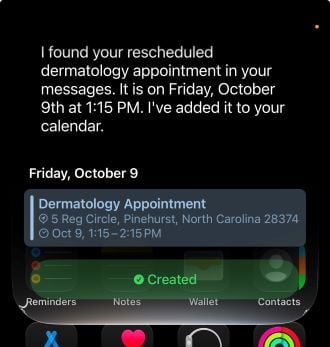
Messages and added it to Calendar.
Image: Max McCaskill
Siri can now pull information from one app and use it in another, all from a single request. It's one of the most practical new Siri AI features in iOS 27, and it's the closest Apple has come so far to turning Siri into a true AI agent.
Here's how Siri's cross-app compatibility works, a few real examples to try, and which apps support it so far.
How Siri works as an AI agent across apps
With the rebuilt Siri, Apple essentially turned its assistant into an AI agent. That means Siri can now take actions on your behalf across multiple apps with complicated processes instead of just answering questions.
You can ask Siri for information from one app, then have it use that information in other apps. For example, Siri can find an appointment in a text or email and add it to your calendar without you needing to open either app.
The impressive part is that Siri can generally handle all of this in one request. It decides which apps to use and searches for information on its own, without asking you to confirm each step along the way. It partially relies on Siri's new personal context feature, which allows the assistant to catalog data across your device so it can search or answer questions.
Real examples of Siri working across apps
The best uses for Siri's agent features are small, multistep tasks you'd normally handle by switching between apps yourself. Instead of copying an address from a text and pasting it into Maps, for example, you can just ask Siri to do it for you.
For example, I asked Siri to find an upcoming doctor's appointment reminder in my Messages and add it to the Calendar app so I wouldn't forget it. Siri found the details and added the appointment to Calendar in less than 10 seconds. That's the kind of small, tedious task where Siri AI saves the most time.
Here are a few other ways to put Siri to work across apps:
- Messages to Apple Maps: Ask Siri to find an address someone texted you and add it to the Maps app to get directions.
- Messages or Mail to Calendar: Have Siri search for an appointment or event and add it to your Calendar app.
- Safari to Reminders: If you like a recipe online, tell Siri to add the ingredients to your Reminders app for when you go shopping later.
- Messages or Mail to your contacts: Tell Siri to find information on your phone and compose a message about it in Messages or Mail.
Which apps work with Siri AI
Apple's own apps get the deepest support. Based on Apple's examples and my testing, Siri AI can take actions in apps like:
- Messages
- Contacts
- Calendar
- Reminders
- Notes
- Photos
- Apple Maps
- Music
- Podcasts
- Camera
- Phone
Apple also hasn't published a complete list, so this likely isn't everything.
Which apps don't work with Siri AI?
Third-party app support is still early, so the selection is very limited. It's up to individual developers and platforms to decide whether Siri can access their apps, and then they must decide how much access to give it. Until they add support, Siri can't search or take actions in those apps.
During my testing, Siri AI couldn't start chats in Snapchat or pull travel information from Flighty or Expedia. If an app you use every day doesn't work yet, it's likely the developer hasn't added support.
Siri AI agent: FAQs
Is Siri AI an AI agent?
Yes, Siri AI works like an AI agent. It can take actions on your behalf across multiple apps, like finding an appointment in Messages and adding it to Calendar, without needing constant instruction or multiple requests.
Which apps work with Siri AI?
Siri AI works best with Apple's own apps, including Messages, Mail, Calendar, Reminders, Notes, Photos, and Apple Maps. Third-party apps only work if their developers have added support, which is still limited.
Does Siri AI ask for confirmation before taking actions?
Siri AI generally completes multi-app tasks in Apple's apps without asking you to confirm each step. It may ask for permission before pulling information from a third-party app or when doing something sensitive like composing a message.
Which iPhones support Siri AI's agent features?
Siri AI's agent features require an iPhone 15 Pro or newer running iOS 27 with a supported language. That includes the iPhone 15 Pro and Pro Max, every iPhone 16 and iPhone 17 model, the iPhone Air, the iPhone 18 Pro and Pro Max, and the iPhone Duo.
Max McCaskill
Sr. Staff Writer

Thousands of cell phone plans unpacked. All the facts. No surprises.





.png?w=280&h=280&usm=20&usmrad=0.8&fit=crop "The Best Cheap Phone Plans for 2026: We Tested Them All to Help You Save")


