
Pepper is a social recipe app where home cooks post recipes and follow each other, similar to Instagram. It made our roundup of the best recipe apps for iPhone and Android as my pick for the best free recipe app, and its seasonal collections alone justify the download.
Pepper tackles the nightly question of what to cook by putting a feed of recipes from real home cooks on your phone, sorted into category tiles that change with the seasons. I expected a stripped-down free tier, and instead I found one of the most useful free recipe apps I've tested.
Scroll recipes all day without paying big-carrier prices
Pepper's feed loads photo after photo of mouthwatering dishes, so a reliable connection matters. AT&T MVNOs run on AT&T's network and often cost a fraction of what AT&T charges for its own plans, although your data may be deprioritized during busy times.
Compare the most popular AT&T MVNO plans and keep the savings for groceries:
|
Cricket

Supreme Unlimited Plan
$55.00/mo
with AutoPay; $60 for the first month.
+ $9.99 Upfront
|
|
Straight Talk

Platinum Unlimited Data Plan
$60.00/mo
+ $4.88 Upfront
|
|
US Mobile

Unlimited Premium Plan
$39.00/mo
|
- Free with ads
- Pepper+ removes ads and adds unlimited save folders for $4.99/month
- Available for iPhone and Android
What is Pepper?
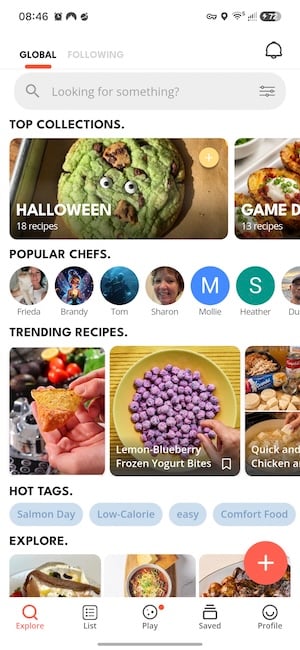
Pepper's home screen organizes recipes into category tiles, with timely collections and holiday ideas pinned at the top. Each recipe lists its ingredients with small food emoji icons and lays out the steps in clear boxes underneath, which keeps recipes easy to follow at the stove.
Not sure how to update your apps?
Keeping your apps up to date ensures you're always getting the latest features, bug fixes, and security improvements. Learn how to update the apps on your iPhone and your Android. It takes less time than you think.
Setup is pushy, but the free version rewards your patience
Pepper's setup tested my patience, because the app pushes the Pepper+ subscription repeatedly and hides the skip option behind tiny Xs and small print. Once I made it past those screens, the free version impressed me.
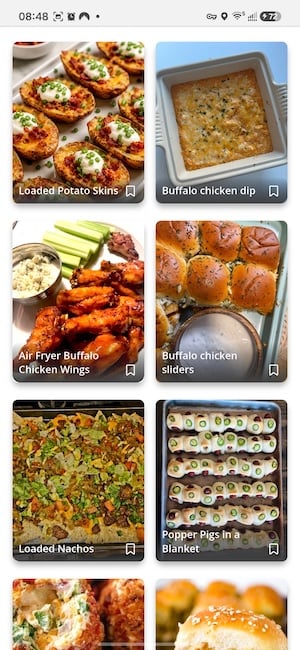
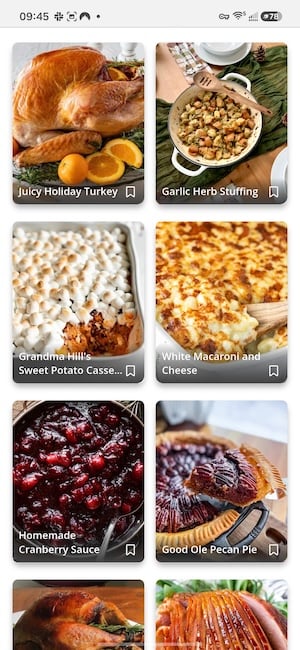
When I tested, Halloween treats and game day snacks filled the top of the feed, with recipes ranging from easy to complex across sweets, desserts, and party food. The Thanksgiving folder mixed classics like sweet potato casserole with a white macaroni and cheese in a white cheddar sauce, and the game day tiles served up twice-baked potatoes and buffalo dip. The collections rotate with the calendar, so the feed stays relevant whenever you open it. I'm loyal to canned jellied cranberry sauce, but the homemade cranberry sauce recipe in that folder looked good enough to tempt me.
Images: Jessica Santero | WhistleOut
You can tap through the category tiles to browse or search for a specific dish when you already know what you're craving.
The recipe of the week earned a repeat spot in my kitchen
Pepper highlights a recipe of the week on the home screen, and I put it to the test with a pumpkin patch fudge uploaded by @wickedwonderland. The fudge was fantastic, and it's now a repeat treat whenever mellowcreme pumpkins hit store shelves. The weekly pick is a low-effort way to try something new without scrolling through hundreds of options.

Images: Jessica Santero | WhistleOut
Shared folders and Instacart make Pepper practical
Pepper lets you create shared recipe folders with friends and family, so everyone can add and see recipes live in one spot instead of digging through a group chat for last month's casserole link. An Instacart button sends any recipe's ingredient list to your account for pickup or delivery. Shared folders work especially well for potlucks and family dinners, where everyone needs to see what's already on the menu.
You can follow creators whose cooking style you like or post your own recipes, which turns your account into a recipe-focused social profile. If you'd rather keep your cooking private, that social layer may feel unnecessary.
Is Pepper worth downloading?
Pepper is the app to download if you love trying new recipes and want fresh ideas without paying for them. If you mainly want to organize recipes you already own, an import-focused app like Recipe Keeper will serve you better.
Free or Pepper+?
The free version shows ads, but they never interrupted my browsing or cooking. Pepper+ removes the ads and adds unlimited save folders and daily rewards, and current pricing is listed on the App Store and Google Play pages. Most home cooks can stick with the free version unless they plan to organize a large recipe collection into many folders.
 How I tested Pepper
- Tracked the setup process on Android to see how easy it was to get past the sign-in and upsell screens to the free version.
- Browsed seasonal folders, category tiles, and search to see how quickly I could find something worth cooking.
- Made the recipe of the week to see whether a user-uploaded recipe holds up in a real kitchen.
Pepper: FAQ
Is the Pepper recipe app free?
Yes, Pepper is free with ads on iPhone and Android. Pepper+ removes the ads and adds unlimited save folders and daily rewards.
What is the best free recipe app?
Pepper is the best free recipe app from my testing, thanks to its seasonal collections, recipe search, and Instacart button with ads that stay out of the way.
Can you share recipes with family in Pepper?
Yes, Pepper lets you create shared recipe folders where friends and family can add and view recipes in real time.
Does Pepper work with Instacart?
Yes, Pepper has an Instacart button that sends a recipe's ingredient list to your account for pickup or delivery.
Is Pepper like Instagram for recipes?
Yes, Pepper works like a social network for home cooks, where you can follow creators, post your own recipes, and browse a feed of dishes.
Why you can trust WhistleOut
.svg)
15+
years of mobile industry experience

900+
published wireless guides

35+
firsthand carrier reviews
We've been around since the birth of the iPhone. Along the way, we've learned how to spot the best deals for your wallet (and your sanity). We spend our days researching informative guides and writing insightful reviews on every kind of wireless plan, distinguishing what matters from what doesn't. We played around with these plans before recommending them, ensuring they're worth your hard-earned money.
Want to know more? Check out how we review every cell phone plan we rank.
Jessica Santero
Staff Writer

Thousands of cell phone plans unpacked. All the facts. No surprises.


