
GoodNotes is a note-taking app for iPhone, iPad, Mac, and Android that keeps notebooks, planners, flashcards, and calendars in one library. It tops our roundup of the best note-taking apps for iPad, and I retested it on my iPad after almost a decade of daily use to see if it still deserves the crown.
I downloaded GoodNotes the week I got my iPad in 2018, and it carried me through two master's degrees, a massage therapy certification course, and years of high school lesson plans. After a week of testing six challengers, only CollaNote came close to tempting me away.
- Free, with paid plans available
- Handwriting, typing, templates, and AI tools in one app
- Available for iPhone, iPad, Mac, and Android
What is GoodNotes?
GoodNotes is built for handwritten notes. You can scan images, draw, and convert handwriting to typed font, or typed font back to handwriting, whenever a page needs a cleaner look. Notebooks, collections, flashcards, calendars, and planners all live in the same app, so you never have to juggle a second one.
Get Verizon coverage for your notes without the Verizon bill
Goodnotes syncs your notebooks across iPhone, iPad, and Mac, so a reliable connection keeps every page current wherever you study. Verizon MVNOs run on the same Verizon network as the major carrier, often for about half the price, and switching is one of the fastest ways to cut your monthly bill.
Check out the most popular Verizon MVNO plans right now:


One app for lesson plans and two master's degrees
As a full-time teacher, I needed my iPad to work as a notebook, a lesson planner, and a portable laptop once I paired it with a keyboard. GoodNotes tracked lesson plans during the school day and homework for both master's programs at night.
The templates make structured notes easy to start. I use a Cornell-style template for lectures, and you can add cute designs if you'd rather your notebooks look less like a spreadsheet.
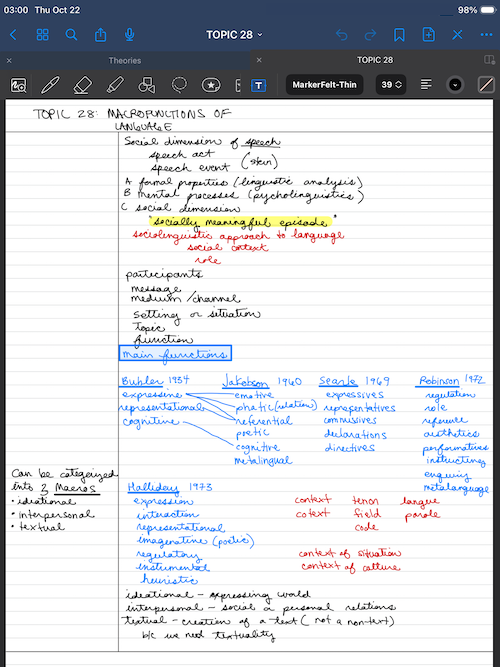
Image: Jessica Santero | WhistleOut
Images drop right onto the page
Adding images is just as simple, so pictures, scans, and handwriting from a single class can all live on the same page.
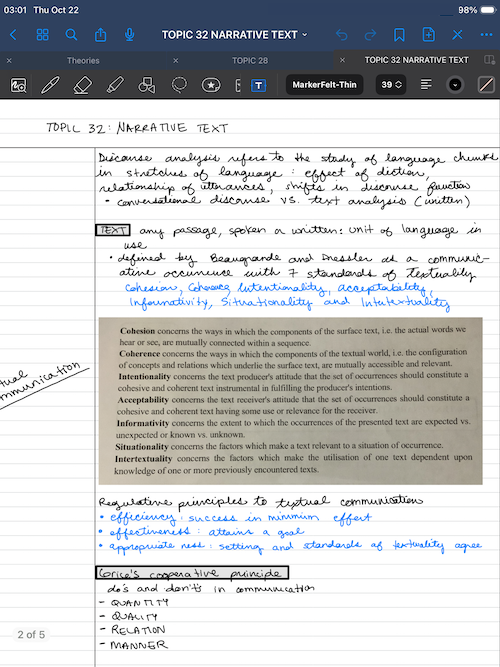
Image: Jessica Santero | WhistleOut
AI tools showed up without any extra work
My existing notebooks updated automatically when GoodNotes rolled out its AI features and integrations. You can ask AI to summarize or clarify a page, or have it create a base graphic that you then draw on top of. Writing with a stylus still feels completely natural, which matters more than any AI trick when you're taking notes for hours.
Not sure how to update your apps?
Keeping your apps up to date ensures you're always getting the latest features, bug fixes, and security improvements. Learn how to update the apps on your iPhone and your Android. It takes less time than you think.
Is GoodNotes worth paying for?
GoodNotes is worth paying for if you want one app to manage notebooks, planners, and flashcards for years. If you only need quick notes for a single project, Apple's free Freeform app might be enough until you're ready to upgrade.
GoodNotes still beats the specialists
Notability makes switching paper styles quicker, CollaNote adds a calculator and translation, and LiquidText handles research PDFs better. None of them match GoodNotes for keeping every notebook, planner, and flashcard deck in one library across iPhone, iPad, Mac, and Android.
The switch to a subscription stings
I bought GoodNotes as a one-time purchase in 2018, but the app has since moved to a subscription model. That's a tough change for an app this good, especially as one-time purchases get harder to find among note-taking apps. The free version lets you test the app before you commit, and the paid plans unlock the full feature set.
 How I tested GoodNotes
- Used GoodNotes daily since 2018 for lesson plans, a certification course, and two master's programs.
- Retested it alongside six other note-taking apps during a week of statistical research for a marketing course.
- Compared the free version with the paid plans to see what moved behind the subscription.
GoodNotes: FAQ
Is GoodNotes free?
GoodNotes has a free version you can use to test the app, and paid plans unlock the full feature set. Current pricing is listed on the App Store and Google Play pages.
Is GoodNotes the best note-taking app for iPad?
Yes, GoodNotes is our top pick for the best note-taking app for iPad. It keeps notebooks, planners, and flashcards in one app, and CollaNote is a close second.
Does GoodNotes work on Android?
Yes, GoodNotes is available on Android as well as iPhone, iPad, and Mac.
Can GoodNotes convert handwriting to text?
Yes, GoodNotes converts handwriting to typed font and can switch typed font back to handwriting.
Does GoodNotes have AI features?
Yes, GoodNotes can use AI to summarize or clarify your notes and create base graphics you can draw on.
Why you can trust WhistleOut
.svg)
15+
years of mobile industry experience

900+
published wireless guides

35+
firsthand carrier reviews
We've been around since the birth of the iPhone. Along the way, we've learned how to spot the best deals for your wallet (and your sanity). We spend our days researching informative guides and writing insightful reviews on every kind of wireless plan, distinguishing what matters from what doesn't. We played around with these plans before recommending them, ensuring they're worth your hard-earned money.
Want to know more? Check out how we review every cell phone plan we rank.
Jessica Santero
Staff Writer

Thousands of cell phone plans unpacked. All the facts. No surprises.

Related Articles


Related Topics
App Reviews FeaturedPopular Topics
Featured App Reviews iOS News Coverage Device Reviews Device Explainers Carrier Explainers App Roundups T-Mobile


