
LiquidText is a PDF and document app for iPhone and iPad that lets you drag text out of files, compare pages side by side, and write directly on your documents. It's our pick for PDFs and research in the roundup of the best note-taking apps for iPad, and I tested it on long PDFs and marketing reports on my iPad.
Where was LiquidText when I was writing papers for two master's degrees? Of all seven apps I tested, this one changed how I read long documents the most.
- Free, with a one-time purchase or subscription available
- Text extraction, pinch and compare, and team collaboration
- Available for iPhone and iPad
What is LiquidText?
LiquidText is built for research rather than everyday notebooks. It works for reviewing academic sources and for comparing market projections at work, and writing directly on your files is included in the free version. The free version covers the basics, so you can try text extraction before deciding on an upgrade.
Pay less for AT&T coverage while you research on the go
Downloading reports and syncing shared files takes a dependable connection, but it doesn't have to take a major carrier price tag. AT&T MVNOs run on AT&T's network, often for about half the price of the carrier's own plans, so you can switch and keep the coverage you already know.
Check out the most popular AT&T MVNO plans right now:


Drag the important parts right out of the document
Select any text in a PDF or doc and drag it into the LiquidText workspace, and it becomes its own excerpt you can move, compare, or paste into another file. Highlighting works fine until you have to flip back through 40 pages to find that one statistic again. Each excerpt stays linked to its original spot, so you can jump back to the source whenever you need context.
Students writing a thesis or literature review can collect quotes from several sources in one workspace instead of juggling open tabs, and analysts get the same benefit when numbers are scattered across a long file.
Pinch and compare puts page 3 next to page 30
To use pinch and compare, hold your thumb on one page and pinch down with your index finger while you scroll to another page. Excerpts from distant pages line up right next to each other for a literal side-by-side comparison within a single document. It's especially handy when a report puts its projections and its results 30 pages apart.
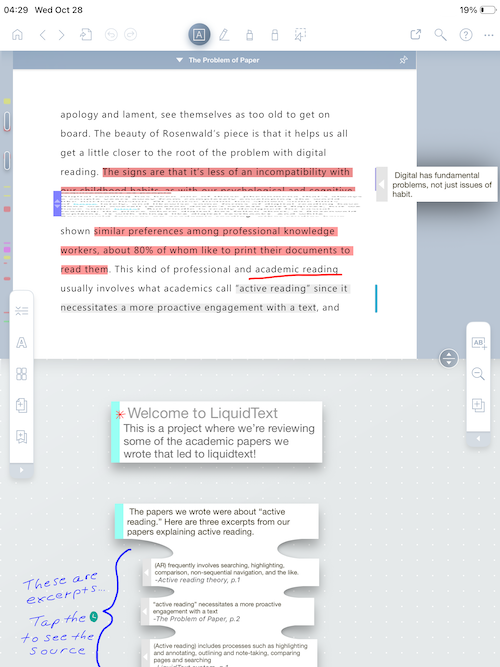
Image: Jessica Santero | WhistleOut
Not sure how to update your apps?
Keeping your apps up to date ensures you're always getting the latest features, bug fixes, and security improvements. Learn how to update the apps on your iPhone and your Android. It takes less time than you think.
Is LiquidText worth upgrading?
LiquidText isn't strictly a note-taking app, but it's an excellent research assistant for students, academics, and analysts who live in PDFs. If you mostly write class notes by hand, Goodnotes or CollaNote will serve you better, and LiquidText makes a great companion app for the heavy reading.
One-time purchase or subscription?
The one-time purchase unlocks about half of the premium features, while the annual subscription unlocks the best extras, including ChatGPT integration and team collaboration. The ChatGPT integration was still in beta when I tested it, so expect a few rough edges.
Collaboration is the reason to subscribe
If you're building next year's strategy from several reports, your coworkers can add their comments straight into the same file you're reading. If you work alone, the one-time purchase is the better value, since collaboration is the subscription's biggest selling point.
 How I tested LiquidText
- Dragged excerpts out of long PDFs to test how well text extraction works for research.
- Used pinch and compare on multi-page reports to line up sections that sat far apart.
- Compared the one-time purchase with the subscription to see which premium features each one unlocks.
LiquidText: FAQ
What is the best iPad app for annotating PDFs?
LiquidText is the best iPad app I tested for PDFs and research because you can drag text out of documents and compare pages side by side.
Is LiquidText free?
LiquidText has a free version that covers the basics, and you can upgrade with a one-time purchase or a subscription. Current pricing is listed on the App Store page.
What does the LiquidText subscription include?
The subscription unlocks the full set of premium features, including ChatGPT integration and team collaboration, while the one-time purchase covers about half of them.
Is LiquidText good for note-taking?
LiquidText is better for research and reviewing documents than for everyday class notes. Pair it with a notebook app like Goodnotes if you take a lot of handwritten notes.
Is LiquidText available on Android?
No, LiquidText is only available on iPhone and iPad.
Why you can trust WhistleOut
.svg)
15+
years of mobile industry experience

900+
published wireless guides

35+
firsthand carrier reviews
We've been around since the birth of the iPhone. Along the way, we've learned how to spot the best deals for your wallet (and your sanity). We spend our days researching informative guides and writing insightful reviews on every kind of wireless plan, distinguishing what matters from what doesn't. We played around with these plans before recommending them, ensuring they're worth your hard-earned money.
Want to know more? Check out how we review every cell phone plan we rank.
Jessica Santero
Staff Writer

Thousands of cell phone plans unpacked. All the facts. No surprises.

Related Articles


Related Topics
App Reviews FeaturedPopular Topics
Featured App Reviews iOS News Coverage Device Reviews Device Explainers Carrier Explainers App Roundups T-Mobile


